 TutorialKart.com
Salesforce Developer Tutorials – Visualforce pages and Apex programming
Salesforce Developer Tutorials help you learn how to build custom applications on the Salesforce platform using declarative tools, Apex programming, Visualforce pages, Salesforce data model concepts, and deployment practices. If your goal is to become a Salesforce developer, start with Salesforce administration basics first. A developer should understand objects, fields, relationships, page layouts, record types, profiles, permission sets, validation rules, flows, and approval processes before writing Apex code.
In this Salesforce developer tutorial, we focus on two important development topics: Visualforce pages for custom user interfaces and Apex programming language for server-side business logic. Visualforce is still useful for many existing Salesforce implementations, while modern Salesforce development may also use Lightning Web Components for newer user interface work. Apex remains important for triggers, controllers, integrations, asynchronous processing, and custom business rules that cannot be handled cleanly with point-and-click tools alone.
With Salesforce Platform, developers can customize applications declaratively or programmatically. Both approaches can be used to build the user interface, business logic, and data model. A good Salesforce developer knows when configuration is enough and when code is required.
Salesforce developer learning path for Apex and Visualforce
A beginner should not start with triggers or custom controllers immediately. The better learning path is to understand the platform layer first, then move into Apex and Visualforce step by step.
- Learn Salesforce CRM basics, users, profiles, permission sets, roles, objects, fields, and relationships.
- Practice declarative customization using page layouts, record types, validation rules, flows, approval processes, and reports.
- Learn Salesforce data access concepts such as SOQL, SOSL, DML operations, sharing, and record-level security.
- Start Apex programming with classes, methods, collections, exception handling, and test classes.
- Learn Apex database operations using SOQL queries, DML statements, and the Database class.
- Study Apex triggers carefully, including trigger context variables, bulk-safe logic, and recursion control.
- Build Visualforce pages using standard controllers first, then controller extensions and custom controllers.
- Practice deployment using sandboxes, change sets, metadata tools, and version control concepts.
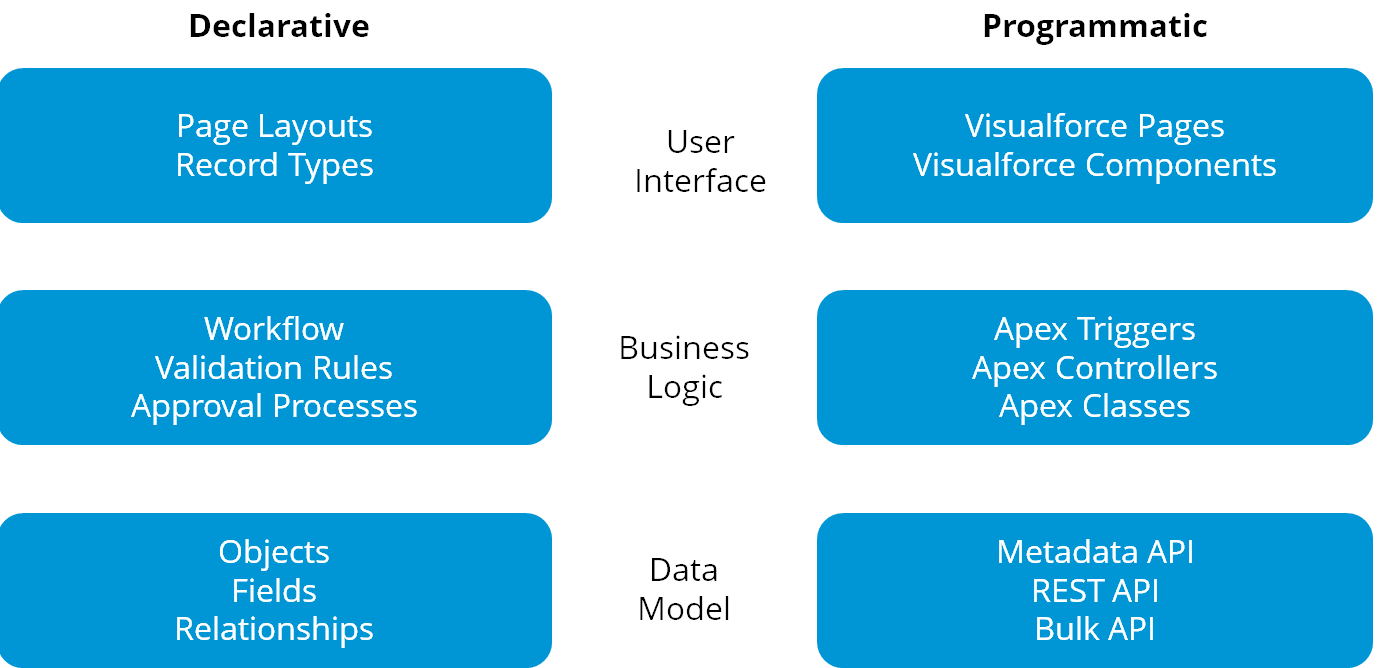
Declarative customization in Salesforce development
Declarative customization means building Salesforce functionality through setup screens and configuration instead of writing code. This approach is usually easier to maintain and should be considered first when the requirement can be met with standard Salesforce features.
- Declarative Customizations can be made point and click in a browser.
- Declarative customizations require an understanding of Force.com concepts, without coding Knowledge.
- Applications, Tabs, Page layouts, Record Types are used to develop user interface in declarative approach.
- Workflows, Validation Rules and Approval Processes are used to develop Business logic in declarative approach.
- Objects, Fields and Relationships are used to develop Data models in declarative approach.
For many business requirements, Salesforce Flow, validation rules, formula fields, approval processes, and record-triggered automation may reduce the need for custom code. However, code is still needed when requirements involve complex logic, integrations, custom transactions, advanced user interfaces, or reusable server-side services.
Programmatic customization with Apex classes, triggers and Visualforce pages
Programmatic customization means using code to extend Salesforce beyond standard configuration. A Salesforce developer should write code only after confirming that the requirement cannot be handled more safely and maintainably through declarative tools.
- Programmatic approach require coding skills.
- Visualforce pages and Visualforce Components are used to develop User interface in programmatic approach.
- Apex Triggers, Apex Controllers and Apex classes are used to develop Business logic in programmatic approach.
- Metadata API, REST API, Bulk API are used to develop data model in programmatic approach.
As a Salesforce Developer, it is required to develop user interface, Business logic and Data model to build an application on the Salesforce platform. It is required to learn Visualforce page to develop user interface for an application and Apex for adding business logic to the app.
Declarative customization versus programmatic customization in Salesforce
The choice between declarative and programmatic development affects maintenance, testing, deployment, and long-term support. Use configuration where it is sufficient, and use Apex or Visualforce where the requirement genuinely needs custom logic or a custom user interface.
| Area | Declarative Customisation | Programmatic Customisations |
|---|---|---|
| User interface | Apps, tabs, page layouts, record pages, quick actions, record types, and standard Lightning pages. | Visualforce pages, Visualforce components, custom controllers, controller extensions, and custom UI logic. |
| Business logic | Validation rules, flows, approval processes, assignment rules, and formulas. | Apex classes, Apex triggers, asynchronous Apex, callouts, and reusable service classes. |
| Data model | Objects, fields, relationships, field-level security, and sharing settings. | Metadata API, REST API, Bulk API, custom integrations, and automated metadata operations. |
| Maintenance | Usually easier for admins to review and update through setup. | Requires code review, test classes, deployment discipline, and developer maintenance. |
| Best use | Standard business automation and configuration-first requirements. | Complex logic, integration, custom transactions, advanced UI, and reusable application services. |
Apex programming language topics for Salesforce developers
In Apex tutorials, we learn different concepts like Enabling developing mode in Salesforce, about developer console, How to install Eclipse, Installing ant and Maven in the eclipse, we learn oops concepts, What is SOQL, different SOQL classes, DML operations, Database DML operations, SOQL governor limits, Batch Apex, about email services like outbound email services, Inbound email services, single email message, sending email template, Schedule apex, Triggers, deleting triggers, undeleting triggers, Schema programming, extensions and Custom settings.
Apex is a strongly typed, object-oriented programming language used on the Salesforce platform. It is commonly used for server-side logic, database operations, trigger automation, custom controllers, web service callouts, scheduled jobs, batch jobs, and integration processing. Apex code runs in a multi-tenant environment, so Salesforce governor limits and bulk-safe coding patterns are important from the beginning.
Simple Apex class example for querying Salesforce records
The following Apex example shows a small controller-style class that queries Account records. It uses a SOQL query and returns a list of records. In real projects, add proper sharing rules, error handling, test coverage, and field-level security checks based on the requirement.
public with sharing class AccountListController {
    public List<Account> getAccounts() {
        return [
            SELECT Id, Name, Industry
            FROM Account
            ORDER BY Name
            LIMIT 10
        ];
    }
}
Visualforce page development topics for Salesforce developers
In Visualforce Tutorials, we learn about different concepts like How to create first visualforce page using URL, Using developer console, Using eclipse and using standard navigation, about Visualforce input components, Visualforce Output components, creating custom object edit and detail page using visualforce, CSS in Visualforce pages, JavaScript in Visualforce pages, jQuery in Visualforce pages, Ajax in Visualforce pages, List views in Visualforce and many more.
Visualforce uses a tag-based markup language and can work with standard controllers, custom controllers, and controller extensions. It is useful when a Salesforce page needs custom layout, custom actions, printable output, PDF rendering, or integration with existing Visualforce-based applications.
Basic Visualforce page using a standard controller
This simple Visualforce page uses the standard Account controller and displays the current Account name. A standard controller is a good starting point because Salesforce provides standard record behavior without requiring a custom Apex controller.
<apex:page standardController="Account">
    <apex:pageBlock title="Account Details">
        <apex:outputField value="{!Account.Name}" />
        <apex:outputField value="{!Account.Industry}" />
    </apex:pageBlock>
</apex:page>
SOQL and DML skills required for Apex programming
SOQL is used to query Salesforce records, and DML is used to insert, update, upsert, delete, undelete, or merge records. Apex developers must understand both because most business logic reads data, validates conditions, and then writes changes back to Salesforce.
| Apex data topic | What a beginner should learn |
|---|---|
| SOQL | SELECT fields, WHERE filters, ORDER BY, LIMIT, relationship queries, and query selectivity. |
| DML | Insert, update, delete, upsert, undelete, merge, partial success, and error handling. |
| Governor limits | Limits on queries, DML statements, CPU time, heap size, and asynchronous processing. |
| Bulk processing | Writing code that works for one record, many records, imports, integrations, and batch operations. |
| Security | Sharing, CRUD, field-level security, user mode operations, and controlled data exposure. |
Apex triggers and Salesforce automation design
Apex triggers run before or after record changes such as insert, update, delete, and undelete. They are powerful, but they should be used carefully. A trigger should be bulk-safe, avoid SOQL and DML inside loops, handle recursion, and delegate business logic to Apex classes wherever possible.
Before writing a trigger, check whether the same requirement can be handled through Flow or a standard Salesforce automation feature. When Apex is required, keep trigger logic small and move reusable logic into handler or service classes. This makes the code easier to test, maintain, and deploy.
Salesforce deployments, sandboxes and developer tools
At the end of this Salesforce developer tutorials you will learn Apex programming language, Visualforce pages, Salesforce deployments, Sandboxes, Outbound Change Sets, Inbound Change sets, Deployment Settings and many more.
Salesforce development work should be tested in a sandbox before being moved to production. A developer should understand how metadata is deployed, how Apex tests are run, why test coverage matters, and how changes are moved safely between environments. In modern teams, Salesforce development may also include source control, Salesforce CLI, scratch orgs, and continuous integration, depending on the project setup.
When to learn Visualforce and when to learn Lightning Web Components
Visualforce is important for maintaining existing Salesforce pages and for use cases that still depend on Visualforce features. However, many new Salesforce user interface requirements are now built with Lightning Web Components. A practical Salesforce developer should understand Visualforce for legacy and platform coverage, and then learn Lightning Web Components for modern Lightning Experience development.
Apex connects with both Visualforce and Lightning Web Components. This is why Apex, SOQL, DML, testing, security, and integration concepts remain useful even when the user interface technology changes.
Common mistakes while learning Salesforce Apex and Visualforce
- Writing Apex before understanding Salesforce objects, relationships, sharing, and permissions.
- Using triggers for every requirement without checking whether Flow or configuration is enough.
- Writing SOQL queries or DML statements inside loops, which can cause governor limit errors.
- Building Visualforce pages without understanding standard controllers and controller extensions.
- Ignoring test classes until deployment time instead of writing tests along with the code.
- Testing only with one record instead of testing bulk record updates and realistic data volumes.
- Forgetting that user access, sharing rules, CRUD, and field-level security affect real application behavior.
Salesforce developer tutorial QA checklist
- Does the tutorial explain whether the requirement should be solved declaratively, with Apex, with Visualforce, or with another Salesforce development option?
- Are Salesforce data model concepts such as objects, fields, relationships, and record access explained before code examples?
- Do Apex examples avoid SOQL and DML inside loops and follow bulk-safe patterns?
- Does the Visualforce explanation mention standard controllers, custom controllers, and controller extensions where relevant?
- Are deployment, sandbox testing, Apex test classes, and governor limits included before production use?
Salesforce Developer Tutorials FAQ
What should I learn first for Salesforce development?
Start with Salesforce administration basics, especially objects, fields, relationships, page layouts, profiles, permission sets, record types, validation rules, flows, and approval processes. After that, learn SOQL, Apex classes, triggers, test classes, Visualforce, and deployment concepts.
Is Apex required to become a Salesforce developer?
Yes, Apex is an important skill for Salesforce developers. Many requirements can be handled declaratively, but Apex is needed for complex business logic, triggers, integrations, asynchronous jobs, custom controllers, and reusable server-side services.
Is Visualforce still useful for Salesforce developers?
Visualforce is useful for maintaining existing Salesforce implementations and for specific custom UI requirements. For many new Lightning Experience user interfaces, Salesforce developers also learn Lightning Web Components.
What is the difference between declarative and programmatic customization in Salesforce?
Declarative customization uses setup tools such as objects, fields, flows, validation rules, and page layouts. Programmatic customization uses code such as Apex classes, Apex triggers, Visualforce pages, APIs, and custom integrations.
Why are governor limits important in Apex programming?
Salesforce runs Apex in a shared multi-tenant environment, so limits are applied to protect platform resources. Developers must write efficient, bulk-safe code and avoid patterns such as SOQL or DML inside loops.
Continue with the linked Salesforce Apex and Visualforce lessons to build a stronger foundation in Salesforce development, custom user interfaces, business logic, database operations, and deployment practices.