 TutorialKart.com
SAP SD Tutorial – Sales and Distribution Module Training Guide
SAP SD Tutorial – Free SAP Sales & Distribution module training tutorials and materials for beginners, consultants, and professional learners. This guide explains how SAP SD supports the order-to-cash business process, how its enterprise structure is configured, and how SD integrates with finance, materials management, production planning, shipping, pricing, credit management, and billing.
SAP SD stands for Sales and Distribution. It is one of the core logistics modules in SAP ERP and SAP S/4HANA sales processing. The module handles the business process from receiving a customer enquiry or sales order to delivering goods or services, creating billing documents, and posting the relevant accounting entries. SAP SD is closely integrated with SAP Financial Accounting, Controlling, SAP Material Management, Production Planning (PP) and other SAP logistics functions.
What SAP SD Sales and Distribution Covers in a Business
SAP SD covers the sales, shipping, pricing, billing, and customer-facing distribution activities of an organization. In a typical order-to-cash process, the SD user or consultant works with sales documents, customer master data, material master data, pricing conditions, delivery documents, picking, goods issue, billing, and customer accounting integration.
- Pre-sales activities: customer enquiries, quotations, sales information, and customer follow-up.
- Sales order processing: order creation, document type control, item category determination, schedule lines, delivery relevance, pricing, taxes, and availability checks.
- Shipping and delivery: shipping point determination, delivery creation, picking, packing, transportation planning, and goods issue.
- Billing and accounts posting: invoice creation, billing document control, revenue account determination, and transfer of accounting values to finance.
- Customer and partner handling: sold-to party, ship-to party, bill-to party, payer, sales employee, forwarding agent, and other partner functions.
How to Learn SAP SD Module Step by Step
A beginner should not start SAP SD only by memorising transaction codes. Learn the module in the same sequence in which a real sales process works. First understand the organizational structure, then master data, then sales documents, then pricing, delivery, billing, and finally integration with FI and MM.
- Understand the order-to-cash process: enquiry, quotation, sales order, delivery, post goods issue, billing, and accounting entry.
- Learn SD enterprise structure: company code, sales organization, distribution channel, division, plant, shipping point, sales office, sales group, and sales area.
- Practise master data: customer master, material master, customer-material information record, condition master records, output records, and partner functions.
- Configure sales documents: sales document types, item categories, schedule line categories, copy control, incompletion procedures, and document flow.
- Study pricing in SAP SD: condition tables, access sequences, condition types, pricing procedures, pricing determination, discounts, freight, tax, and surcharges.
- Complete shipping and billing: delivery processing, picking, goods issue, billing types, invoice cancellation, and account determination.
- Review integration scenarios: SD-FI revenue posting, SD-MM stock movement, SD-PP make-to-order requirements, and credit management controls.
SAP SD is usually easier to learn when the learner understands the business flow behind the configuration. The difficulty depends on how much exposure the learner has to sales operations, inventory, accounting, and SAP navigation. For a complete beginner, the best approach is to work through one complete sales cycle repeatedly before moving into advanced configuration.
SAP SD Enterprise Structure for Sales Processing
An enterprise structure in SAP represents how a company is organized for business processing and reporting. In SAP SD, the organizational units define who sells, through which channel, for which product division, from which plant, and under which sales area. The important organizational units of the SAP SD module are:
- Sales Organization
- Distribution Channel
- Division
- Sales Group
- Sales Office
- Sales Area
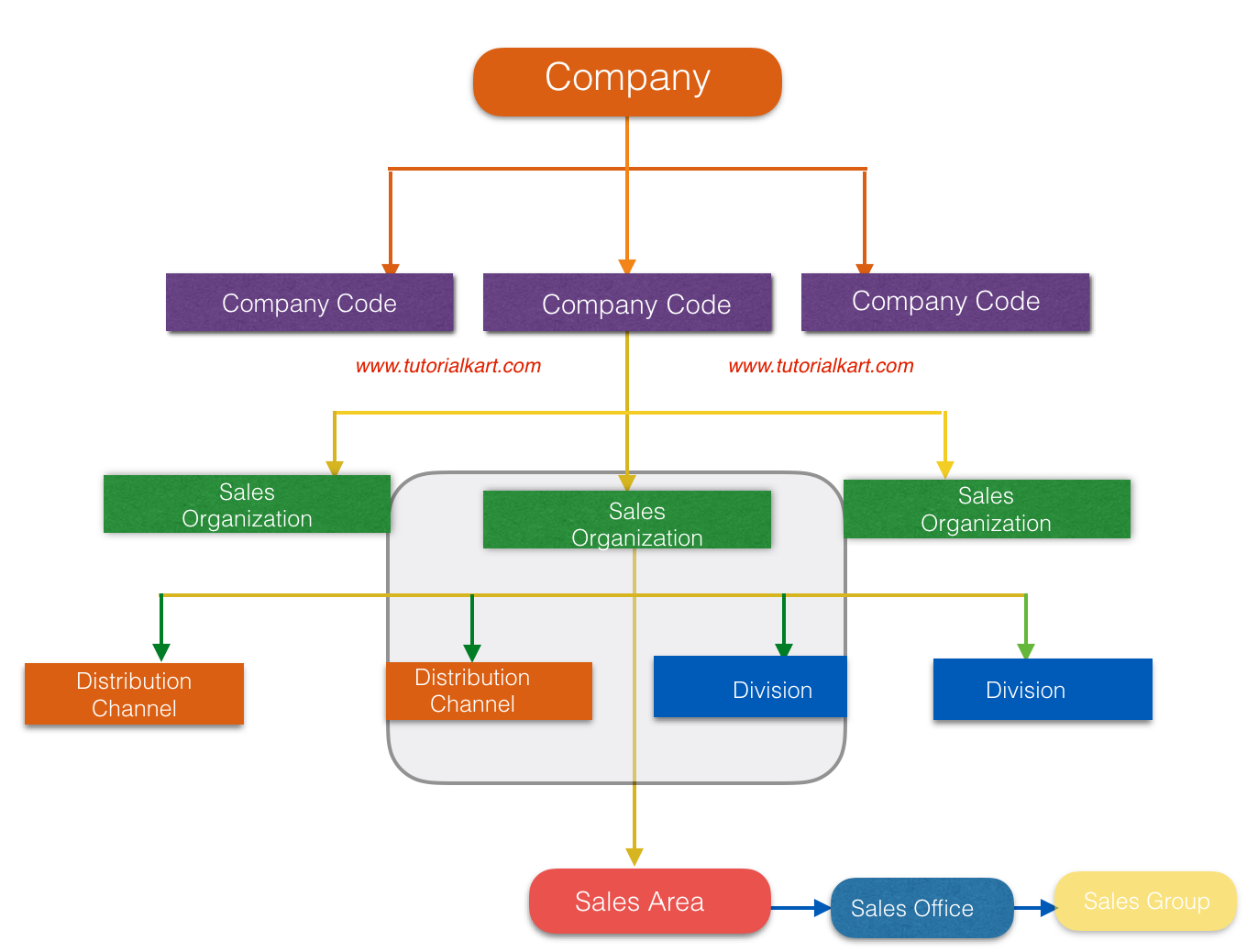
Sales Organization: – Sales Organization is the highest level organizational unit in the Sales and Distribution module. It is responsible for sales activities, distribution of goods and services, sales reporting, and customer-related sales processing.
Distribution channel: – The process of selling or distributing goods and services to customers is represented by the distribution channel. Examples include wholesale, retail, direct sales, online sales, or dealer sales, depending on how the business defines its channels.
Division: – Division represents a product line or product group. It helps the business separate sales reporting and responsibility by product range.
Sales Office: – Sales Office is a location or regional sales unit where a group of people perform sales activities.
Sales Group: – Sales Group is a group of sales employees working within a sales office for specific sales activities, customers, regions, or product lines.
Sales Area: – Sales area plays an important role in SAP SD because most sales transactions are processed through a specific sales area. It is a combination of Sales Organization + Distribution Channel + Division.
SAP SD Master Data Used in Sales and Distribution
Master data is the foundation for SAP SD transactions. If the master data is incomplete or incorrectly maintained, sales orders, deliveries, pricing, billing, and account postings may fail or produce incorrect results.
- Customer master: stores customer details for sales, shipping, billing, and accounting.
- Material master: stores product details such as sales unit, delivering plant, item category group, availability check, and tax classification.
- Customer-material information record: stores customer-specific material numbers, descriptions, and delivery preferences.
- Condition master: stores pricing values such as base price, discount, freight, tax, and surcharge.
- Output master: controls sales order confirmations, delivery notes, invoices, and other business communications.
Features of SAP SD Module in Order-to-Cash
The important features of the SAP SD module are listed below. These functions are normally configured together because each step in sales processing affects the next step in the document flow.
Price and Taxation: – Pricing evaluates the price of goods and services using condition types such as base price, discount, freight, rebate, surcharge, and tax.
Availability Check: – Availability check verifies whether the requested product quantity can be confirmed from available stock, planned receipts, or replenishment rules.
Credit Management: – Credit management controls customer credit exposure and can be configured through simple credit checks or automatic credit checks, depending on business requirements.
Billing & Invoice: – Billing creates invoices, credit memos, debit memos, cancellations, and other billing documents after the relevant sales or delivery process is completed.
Material Determination: – Material determination helps the system automatically replace or suggest a material based on configured conditions, such as product substitution.
Account Determination: – Account determination helps the system post revenue, discounts, tax, freight, and other values to the correct general ledger accounts during billing.
SAP SD Integration with FI, MM, PP and Other SAP Modules
SAP SD does not work as an isolated module in real implementation projects. A sales order may depend on stock availability from MM, production planning from PP, credit exposure from finance, and revenue posting in FI. This is why SD consultants must understand basic integration points even when their main responsibility is sales and distribution.
| SAP SD integration area | How it affects sales processing |
|---|---|
| SD and FI | Billing transfers accounting values such as revenue, tax, discount, and receivables to financial accounting. |
| SD and MM | Sales orders and deliveries depend on material master data, plant, storage location, stock availability, and goods issue. |
| SD and PP | Make-to-order and availability requirements may create demand for production planning. |
| SD and CO | Sales values, costs, profitability, and internal reporting can be analysed through controlling and profitability structures. |
| SD and WM/EWM | Warehouse processes may support picking, packing, staging, and goods movement during delivery. |
What You Learn in This SAP SD Training Tutorial
- Basic concepts of SAP Sales & Distribution module.
- Implementation of SD module and integration with other SAP modules.
- SAP SD enterprise structure and organizational assignments.
- Customer master, partner functions, and sales area data.
- Sales document configuration, pricing, credit management, shipping, and billing.
- SD interview questions for job preparation.
- SD certification guide and topic revision support.
- Real time SAP SD project issues and scenarios with examples.
SAP SD Course Syllabus for Beginners and Consultants
Refer to the SAP SD tutorials below as per syllabus and learn the SD module step by step with screenshots, examples, and business scenarios. The order below is suitable for beginners because it starts with enterprise structure and moves gradually into sales documents, pricing, and credit management.
SAP SD Enterprise Structure Configuration
- Define Company Code
- Assign company code to company
- Define sales organization
- Assign sales organization to company code
- Define division
- Define Plant in SAP
- Assign division to sales organization
- Define distribution channel
- Assign distribution channel to sales organization
- Define sales office in SD
- Assign sales office to sales area
- Define sales group
- Assign sales group to sales office
- Define shipping point in SD
- Maintain Storage Location in SAP
- Assign shipping point to plant.
- Maintain Loading Point
- Maintain Transportation planning point
SAP SD Customer Master Data Configuration
- How to define customer account groups in SAP
- Define number ranges for customer account groups
- Assign number ranges to customer account groups
- Define tolerance group for customers
- Define sundry debtor account
- Setup partner determination procedure
- Create customer master record in SAP.
SAP SD Sales Document Configuration
- Define sales order reasons
- Define purchase order types
- Define item categories in SAP
- Assign item categories
- Define item category groups
- Define schedule line categories
- Assign schedule line categories
- Define sales document type
SAP SD Pricing Procedure Configuration
- An overview of pricing procedure
- Define condition tables
- Define access sequences
- Create condition types
- Define pricing procedure
- Define pricing procedure determination
SAP SD Credit Management Configuration
- Define credit control area
- Assign company code to credit control area
- Assign sales area to credit control area
- Define risk categories
- Define credit groups
- Credit limit check for order types/ delivery types
- Maintain credit limits for customers.
SAP SD Transaction Practice for Beginners
After reading the configuration topics, practise the transaction flow in a training client. The aim is to understand how each configuration decision appears in the sales document, delivery, and invoice. A useful practice sequence is:
- Create or extend customer master data for the required sales area.
- Check material master sales views, plant data, tax classification, and item category group.
- Create a sales order and verify pricing, partner functions, schedule lines, and incompletion log.
- Create outbound delivery and check shipping point, picking relevance, route, and delivery quantity.
- Post goods issue and verify stock and accounting impact.
- Create billing document and review revenue account determination and document flow.
Common SAP SD Learning Mistakes to Avoid
- Learning only transaction codes: transaction codes are useful, but configuration logic is more important for consulting work.
- Ignoring master data: many SD errors are caused by missing customer, material, partner, tax, or pricing data.
- Skipping document flow: the document flow explains how sales order, delivery, goods issue, billing, and accounting documents are connected.
- Studying pricing without condition technique: pricing is easier when condition table, access sequence, condition type, and pricing procedure are learned together.
- Not reviewing FI and MM integration: SD consultants often need to discuss stock movement, revenue posting, tax, and receivables with other teams.
SAP SD Tutorial FAQs
What is SAP SD sales and distribution?
SAP SD is the Sales and Distribution module used to manage sales orders, deliveries, pricing, shipping, billing, and customer-related distribution processes. It supports the order-to-cash cycle from customer order entry to invoice and accounting posting.
How can I learn SAP SD module as a beginner?
Start with the order-to-cash business process, then learn enterprise structure, customer master, material master, sales document types, item categories, schedule lines, pricing, shipping, billing, and integration with FI and MM. Practising one complete sales cycle repeatedly is more useful than only reading configuration steps.
Is SAP SD hard or easy to learn?
SAP SD is manageable for beginners when learned in a structured sequence. It becomes difficult when the learner skips business process basics and starts directly with advanced configuration. Knowledge of sales, inventory, taxes, accounting basics, and SAP navigation makes the module easier.
Which SAP modules are most closely connected with SAP SD?
SAP SD is closely connected with SAP FI for billing and accounting, SAP MM for stock and material movement, SAP PP for production requirements, SAP CO for profitability and controlling, and warehouse functions for picking and delivery processing.
What should I practise after completing SAP SD basics?
Practise creating a customer, extending a material to sales views, creating a sales order, checking pricing, creating delivery, posting goods issue, creating billing, and reviewing document flow. Then practise error scenarios such as missing pricing, blocked credit, unavailable stock, and incomplete partner data.
SAP SD Tutorial Editorial QA Checklist
- Does the page explain SAP SD as Sales and Distribution and connect it clearly to order-to-cash?
- Are enterprise structure terms such as sales organization, distribution channel, division, sales office, sales group, and sales area explained accurately?
- Are existing SAP SD tutorial links preserved and grouped into a useful learning sequence?
- Does the tutorial include practical learning guidance for beginners, not only a list of configuration links?
- Are FAQs specific to SAP SD learning, SAP SD difficulty, SAP SD module meaning, and SD integration?
Continue to read and download SAP SD tutorial for free.