 TutorialKart.com
SAP ABAP Tutorial for Beginners
SAP ABAP is the programming language used to build, enhance, and support business applications in SAP systems. This SAP ABAP tutorial introduces the ABAP language, ABAP Dictionary, reports, internal tables, Workbench tools, and the basic development path a beginner should follow before moving to real project work.
ABAP stands for Advanced Business Application Programming. Earlier SAP training materials often used the term ABAP/4, where “4” referred to fourth-generation language. In practical SAP development, ABAP is used for reports, forms, interfaces, enhancements, data processing, and custom business logic in SAP applications.
SAP ABAP module is used to develop the new application, enhance the existing application and implement the SAP based on the requirements of an organization. Using ABAP/4 programming language, solutions can be developed for business applications such as SAP MM, SAP SD, SAP FICO, SAP PP, etc
What You Learn in This SAP ABAP Programming Tutorial
This tutorial is arranged for beginners who want to understand how ABAP development works inside SAP. You will learn the language basics first, then move to dictionary objects, reports, internal tables, and development tools.
- Real time ABAP project scenarios.
- Fundamentals of ABAP module
- How to design and customize interfaces
- How to code in SAP system.
- How to customize and generate ABAP reports
SAP ABAP Development Areas Beginners Should Know
In SAP projects, ABAP work is not limited to writing one program. A developer usually works with dictionary objects, reports, forms, classes, function modules, enhancements, and debugging tools. The following SAP ABAP concepts form the base for most development tasks.
Data Dictionary : – Data dictionary is the central source of database management system. The main functionality of data dictionary is to create and modify table.
Reports : – ABAP reports are used to extract the data from the multiple database tables or database views, process the extracted data and display the processed data in a required format.
Scripts & Smart Forms : – SAP Scripts and smart forms maintain communication with business partners.
Internal Tables : – Internal tables are temporary table-like data objects used inside an ABAP program. They are commonly used to store selected records, loop through business data, sort values, filter rows, and prepare report output.
Modularization : – ABAP programs can be organized using includes, subroutines, function modules, methods, and classes. Modular code is easier to test, reuse, and maintain in a large SAP system.
Debugging : – ABAP debugging helps developers check variable values, loop behavior, database selections, and program flow. It is one of the most important skills for solving errors in reports, enhancements, forms, and interfaces.
ABAP Workbench Tools Used in SAP Development
Workbench : – ABAP workbench is a set of tools which can be used to develop applications and modify the existing applications. The important tools of workbench are
- ABAP Dictionary – It is used to create tables in SAP system.
- ABAP Editor – It is used to create programs in ABAP language.
- Class Builder – It is used to design object oriented programs
- Function Builder – It is used to create functions in ABAP
- Screen Painter – It is used to design applications in SAP
- Object Navigator – It is used to save the ABAP objects.
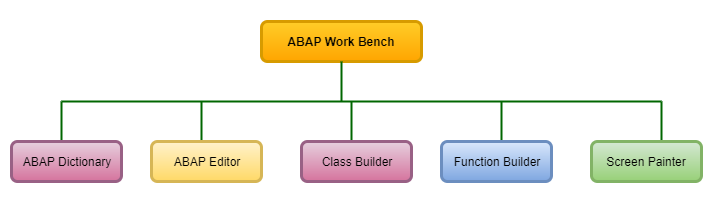
For beginners, the most frequently used tools are the ABAP Editor for programs, ABAP Dictionary for tables and data definitions, Function Builder for reusable function modules, Class Builder for object-oriented ABAP, and Object Navigator for browsing development objects in one place.
Basic SAP ABAP Program Structure
An ABAP report generally starts with a report statement, followed by data declarations, selection-screen parameters, database reads, processing logic, and output statements. The exact structure depends on the type of program, but beginners should first understand a simple executable report.
REPORT z_demo_first_report.

DATA lv_message TYPE string.

lv_message = 'Welcome to SAP ABAP'.

WRITE lv_message.
The above example declares a string variable, assigns text to it, and prints the value using the WRITE statement. In real projects, the same basic flow is extended with selection screens, database tables, internal tables, validation logic, and formatted output.
Welcome to SAP ABAPSAP ABAP Training Tutorials Syllabus
Refer below SAP ABAP tutorial step by step as per syllabus wise for better learning and experience.
SAP ABAP Basics for New Developers
- An Overview SAP ABAP/4 Programming Language.
- ABAP Operators
- ABAP Keywords
- ABAP Program Structure
- ABAP Syntax
SAP ABAP Dictionary, Tables, and Data Types
- An Overview ABAP data dictionary
- ABAP Views
- ABAP Data Types
- ABAP database tables
- Create domain
- Create data elements
- Create indexes
SAP ABAP Internal Tables and Data Processing
- An overview internal tables
- Internal table commands
- Create an Internal table
How to Learn SAP ABAP Step by Step
A beginner should learn SAP ABAP in a practical order. Start with the language syntax, then understand how SAP stores business data, then write simple reports, and finally move to modularization, forms, object-oriented ABAP, and enhancements.
- Understand SAP navigation: Learn how to open transactions, find tables, and use basic Workbench tools.
- Learn ABAP syntax: Practice declarations, operators, conditions, loops, and simple output statements.
- Study ABAP Dictionary: Understand domains, data elements, transparent tables, views, and indexes.
- Practice reports: Build simple classical reports using selection screens and internal tables.
- Use debugging: Step through code, check variable values, and understand runtime behavior.
- Move to reusable code: Learn function modules, classes, methods, and exception handling.
- Understand project objects: Study forms, enhancements, BAPIs, BADIs, and interfaces after the basics are clear.
SAP ABAP Example with Internal Table
The following simple ABAP example creates an internal table, appends records, and displays them using a loop. This is a common pattern in reports where data is collected first and displayed later.
REPORT z_demo_internal_table.

TYPES: BEGIN OF ty_student,
         id   TYPE i,
         name TYPE string,
       END OF ty_student.

DATA lt_students TYPE STANDARD TABLE OF ty_student.
DATA ls_student  TYPE ty_student.

ls_student-id = 1.
ls_student-name = 'Ravi'.
APPEND ls_student TO lt_students.

ls_student-id = 2.
ls_student-name = 'Meena'.
APPEND ls_student TO lt_students.

LOOP AT lt_students INTO ls_student.
  WRITE: / ls_student-id, ls_student-name.
ENDLOOP.
1 Ravi
2 MeenaSAP ABAP Skills Needed for Real Project Work
After learning the basic syntax, focus on the skills that are repeatedly used in SAP implementation and support projects. These skills help you read existing code, correct issues, and build small enhancements safely.
- Reading standard SAP tables: Know how to identify table fields, keys, and relationships before writing SELECT queries.
- Writing efficient database logic: Select only required fields, avoid unnecessary database calls inside loops, and test with realistic data volume.
- Using internal tables properly: Choose standard, sorted, or hashed tables based on access requirements.
- Debugging existing programs: Trace how data moves from selection screen input to final output.
- Understanding transport process: Know how development objects move from development to quality and production systems.
- Documenting changes: Add meaningful technical notes for future maintenance.
Common Mistakes While Learning SAP ABAP
Many beginners try to memorize statements without understanding how SAP data is structured. ABAP becomes easier when you connect every program to the business table, field, and process it supports.
- Writing ABAP code without checking table keys and field meanings in the ABAP Dictionary.
- Using
SELECT *when only a few fields are required. - Placing database SELECT statements inside loops without understanding the performance impact.
- Ignoring authorization checks and assuming every user can access every record.
- Changing standard objects without understanding enhancement options and transport impact.
- Skipping debugging practice and depending only on syntax examples.
SAP ABAP Tutorial Editorial QA Checklist
Use this checklist when reviewing SAP ABAP learning notes, examples, or tutorial pages before publishing or practicing from them.
- Does the tutorial clearly explain what SAP ABAP is before using advanced SAP terms?
- Are ABAP Dictionary objects such as domains, data elements, tables, and views explained separately?
- Do code examples use realistic ABAP statements and readable variable names?
- Is report development explained with selection, processing, and output flow?
- Are internal tables explained as temporary program-level data storage?
- Does the tutorial warn beginners about database access inside loops and unnecessary
SELECT *usage? - Are beginner topics separated from advanced topics such as BADIs, BAPIs, forms, and interfaces?
SAP ABAP Tutorial FAQs
What is SAP ABAP used for?
SAP ABAP is used to develop and enhance business applications in SAP systems. Common uses include reports, forms, interfaces, data processing programs, enhancements, and custom logic for SAP modules such as MM, SD, FICO, and PP.
Is SAP ABAP difficult for beginners?
SAP ABAP is manageable for beginners when learned step by step. The main challenge is not only the syntax, but also understanding SAP tables, business processes, development tools, and debugging.
What should I learn first in SAP ABAP?
Start with ABAP syntax, data types, operators, conditions, loops, and simple report programs. After that, learn ABAP Dictionary, database tables, internal tables, selection screens, and debugging.
What is the difference between ABAP Dictionary and internal tables?
ABAP Dictionary stores global data definitions such as domains, data elements, tables, and views in the SAP system. Internal tables are temporary data objects used inside an ABAP program while the program is running.
Do SAP ABAP developers need to know SAP functional modules?
ABAP developers do not need to become functional consultants, but they should understand the business process related to the object they are developing. For example, an ABAP report for purchasing is easier to build when the developer understands basic SAP MM data flow.
Stay connected with us for SAP ABAP training tutorial updates, interview questions and real time scenarios.