 TutorialKart.com
Build FastText Library from Github
fastText is an open-source library from Facebook Research for text classification and word representation learning. This tutorial explains how to build the fastText command-line library from GitHub source on Linux or macOS, verify the compiled binary, and understand the next steps after a successful build.
Building fastText from source is useful when you want the latest source code from the repository, need the native command-line tool, or want to inspect and compile the C++ implementation directly. If you only need to use fastText from Python, you may also consider installing the Python module, but this page focuses on compiling the source code from GitHub.
Requirements to build fastText from GitHub source
Following are the requirements to build FastText successfully :
- OS : Linux Distribution(like Ubuntu, CentOS, etc.) or MacOS
- Compiler with C++11 support
latest gcc or clang
You should also have git and make available in your terminal. Git is used to clone the source repository, and make is used to compile the fastText source code into the fasttext executable.
Check if GCC is installed in your Linux Distribution
Run the command “gcc –version” to check if gcc is installed. If not, install gcc and proceed with the building of FastText.
$ gcc --versionroot@arjun-VPCEH26EN:/home/arjun/workspace/fasttext/fastText# gcc --version
gcc (Ubuntu 5.4.0-6ubuntu1~16.04.4) 5.4.0 20160609
Copyright (C) 2015 Free Software Foundation, Inc.
This is free software; see the source for copying conditions. There is NO
warranty; not even for MERCHANTABILITY or FITNESS FOR A PARTICULAR PURPOSE.
If the command is not found on Ubuntu or Debian-based systems, install the build tools first.
sudo apt update
sudo apt install build-essential git
On macOS, you can install the command-line developer tools if the compiler is not already available.
xcode-select --installBuild FastText
Open a terminal and run the following commands :
Clone fastText.git project to your local machine using git command.
$ git clone https://github.com/facebookresearch/fastText.git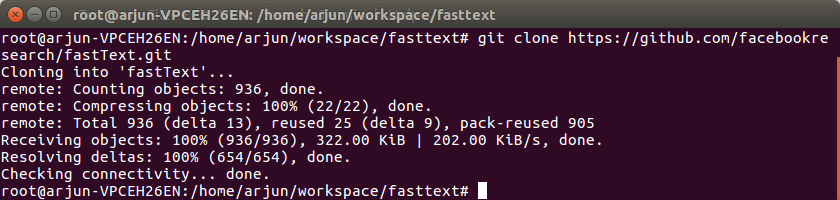
Open fastText and make the build.
$ cd fastText
$ make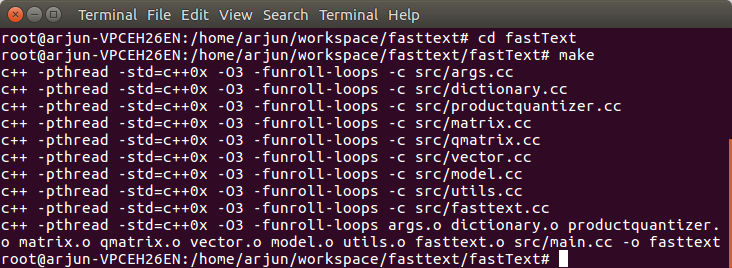
The make command compiles the C++ source files and creates the fasttext executable in the project directory. If the compilation finishes without errors, the binary can be run from the same directory using ./fasttext.
Verify the fastText build from the terminal
To verify if the build is successful and working, run the following command.
$ ./fasttext“./fasttext” should output the following usage description
root@arjun-VPCEH26EN:/home/arjun/workspace/fasttext/fastText# ./fasttext
usage: fasttext <command></command>

The commands supported by fasttext are:

  supervised              train a supervised classifier
  quantize                quantize a model to reduce the memory usage
  test                    evaluate a supervised classifier
  predict                 predict most likely labels
  predict-prob            predict most likely labels with probabilities
  skipgram                train a skipgram model
  cbow                    train a cbow model
  print-word-vectors      print word vectors given a trained model
  print-sentence-vectors  print sentence vectors given a trained model
  nn                      query for nearest neighbors
  analogies               query for analogies

root@arjun-VPCEH26EN:/home/arjun/workspace/fasttext/fastText#
We have successfully built FastText.
What each fastText command is used for after build
After the build is complete, the fasttext executable supports commands for supervised text classification, unsupervised word representation learning, prediction, evaluation, model compression, and vector lookup.
| fastText command | Purpose |
|---|---|
supervised | Train a supervised text classifier using labeled training data. |
test | Evaluate a supervised model on test data. |
predict | Predict the most likely label for input text. |
predict-prob | Predict labels with probability scores. |
skipgram | Train word vectors using the skip-gram model. |
cbow | Train word vectors using the continuous bag-of-words model. |
quantize | Compress a trained model to reduce memory usage. |
print-word-vectors | Print word vectors from a trained model. |
nn | Find nearest neighbors for a word in the vector space. |
analogies | Query word analogies using trained vectors. |
Create a small labeled text file to test fastText quickly
To check that the compiled binary can train and test a small classifier, create a simple training file. In fastText supervised training, labels are commonly written with the __label__ prefix followed by the text.
cat > cooking.train << 'EOF'
__label__recipe add salt and cook the rice
__label__recipe chop onions and fry in oil
__label__sports the team won the football match
__label__sports the player scored a goal
EOF
Now train a very small supervised model. This example is only for confirming that the build works; real models require much larger and cleaner datasets.
./fasttext supervised -input cooking.train -output cooking_modelTest a prediction by passing a short sentence to the model.
echo "cook rice with salt" | ./fasttext predict cooking_model.bin -The output should be a predicted label similar to the following.
__label__recipeSave and reuse a fastText model after training
When you train a fastText model from the command line, the model is saved using the output name provided with the -output option. For example, the command above creates a file named cooking_model.bin. You can reuse this file later for prediction, testing, quantization, or vector lookup depending on the model type.
./fasttext predict cooking_model.bin test.txtIn Python, the fastText model object can be saved with save_model(). That is a Python API step and is separate from building the command-line C++ tool shown in this tutorial.
model.save_model("model_filename.bin")Common fastText build errors and checks
If fastText does not compile, check the build environment before changing the source code. Most beginner build issues are caused by a missing compiler, missing make utility, or running commands from the wrong directory.
| Build issue | Likely cause | What to check |
|---|---|---|
gcc: command not found | Compiler is not installed. | Install build tools such as build-essential on Ubuntu/Debian. |
make: command not found | The make utility is not installed. | Install make or the operating system build tools package. |
No such file or directory | Command is being run from the wrong folder. | Run cd fastText before running make or ./fasttext. |
| Compilation errors related to C++ support | Compiler version may not support the required C++ standard. | Use a compiler with C++11 support such as a suitable GCC or Clang version. |
Permission denied while running binary | The executable bit may not be set or the filesystem may restrict execution. | Check permissions with ls -l fasttext and run from a normal local directory. |
fastText source build versus Python module install
There are two common ways beginners encounter fastText: the command-line source build and the Python module. They are related, but the setup and usage are different.
| Approach | Best suited for | Typical command |
|---|---|---|
| Build from GitHub source | Using the native command-line tool, compiling the C++ implementation, or following source-level tutorials. | git clone, cd fastText, make |
| Install Python module | Using fastText from Python scripts and notebooks. | pip install fasttext |
If your tutorial or project uses commands such as ./fasttext supervised, build the source as shown above. If your code uses import fasttext in Python, install the Python module in the appropriate Python environment.
Windows note for building fastText from source
The steps shown above are intended for Linux and macOS terminals. On Windows, beginners commonly use Windows Subsystem for Linux (WSL) to follow the same Linux-style commands. Native Windows builds may require additional compiler and build setup, so WSL is usually simpler for learning the command-line workflow.
QA checklist for this fastText GitHub build tutorial
- Does the tutorial clearly distinguish building the fastText command-line source from installing the Python module?
- Are Git, make, and a C++11-capable compiler listed before the build steps?
- Do the commands clone the official GitHub source, enter the correct directory, and run the build command in order?
- Is the build verified by running
./fasttextand checking the available commands? - Does the tutorial explain how a trained fastText model file can be saved and reused?
fastText build from GitHub FAQ
Is fastText open source?
Yes. fastText is available as an open-source project from Facebook Research. The source code can be cloned from the GitHub repository and built locally.
How do I build fastText from GitHub source?
Install Git, make, and a C++11-capable compiler. Then clone the repository with git clone https://github.com/facebookresearch/fastText.git, move into the fastText directory, and run make.
How do I verify that fastText was built successfully?
Run ./fasttext from inside the compiled fastText directory. If the build is successful, the terminal displays usage information and the supported commands such as supervised, skipgram, cbow, test, and predict.
How do you save a fastText model?
From the command line, the model is saved using the name passed to the -output option during training. For example, -output cooking_model creates cooking_model.bin. In the Python API, a model can be saved using model.save_model("filename.bin").
Do I need to build fastText from source for Python projects?
Not always. If your project uses Python code with import fasttext, installing the Python module may be enough. Build from GitHub source when you need the command-line executable or want to compile the C++ source directly.
After building fastText from GitHub source
In this FastText Tutorial, we have learnt to build fastText from github. In our next tutorial, we shall Train and Test Supervised Text Classifier.