 TutorialKart.com
Bash If Else Statement
Bash If Else statement is used for conditional branching in a Bash shell script. It lets a script run one set of commands when a condition is true and another set of commands when the condition is false.
An expression is associated with the if statement. If the expression evaluates to true, statements of the if block are executed. If the expression evaluates to false, statements of the else block are executed.
In this tutorial, we will go through the syntax and usage of if-else statement with examples. We will also cover string comparisons, numeric comparisons, file checks such as -f, -d, and -n, one-line Bash if else statements, nested if else blocks, and common mistakes.
Bash If Else is kind of an extension to Bash If statement.
Syntax of Bash If Else Statement
Syntax of If Else statement in Bash Shell Scripting is as given below :
if <expression>; then
	<commands>
else
	<other_commands>
fi
where
| Code | Description |
|---|---|
| <expression> | Set of one or more conditions joined using conditional operators. |
| <commands> | Set of commands to be run when the <condition> is true. |
| <other_commands> | Set of commands to be run when the <condition> is false. |
Observe that if, then, else and fi are keywords. The semi-colon (;) after the conditional expression is required when then is written on the same line as the condition. If then is placed on the next line, the semi-colon can be omitted.
if [ condition ]
then
    commands
else
    other_commands
fi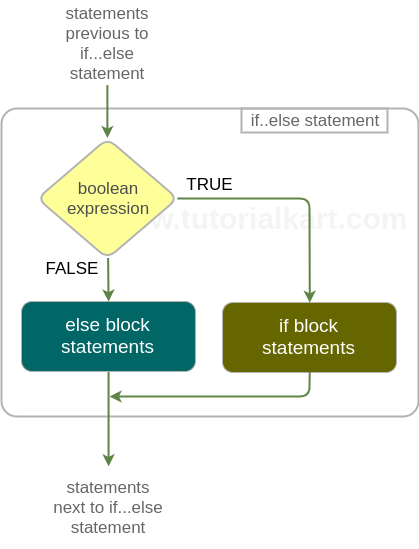
How Bash Tests Conditions in If Else Blocks
In Bash, the condition in an if else block is usually written with [ ] or [[ ]]. The single bracket form [ condition ] is the traditional test command syntax. The double bracket form [[ condition ]] is a Bash keyword with safer string handling and better support for pattern matching and compound conditions.
| Bash test | Use | Example |
|---|---|---|
[ "$name" = "John" ] | String comparison using test syntax | Checks whether name is John |
[[ "$name" == "J"* ]] | String pattern comparison in Bash | Checks whether name starts with J |
[ "$age" -ge 18 ] | Numeric comparison | Checks whether age is 18 or more |
[ -f "$file" ] | File test | Checks whether the path is a regular file |
Use spaces inside the brackets. For example, write [ "$x" -eq 10 ], not [$x -eq 10]. Also quote variables in most tests to avoid errors when the value is empty or contains spaces.
Example 1 : Bash If Else Statement
In this example, we shall look into two scenarios where in first if-else statement, expression evaluates to true and in the second if-else statement, expression evaluates to false.
Bash Shell Script
#!/bin/bash

# if condition is true
if [ "hello" == "hello" ];
then
	echo hello == hello : is true condition
else
	echo hello == hello : is false condition
fi

# if condition is false
if [ "hello" == "bye" ];
then
	echo hello == bye : is true condition
else
	echo hello == bye : is false condition
fi
Output
~$ ./bash-if-else-example
hello == hello : is true condition
hello == bye : is false condition
In the first if-else expression, condition is true and hence the statements in the if block are executed. Whereas in the second if-else expression, condition is false and hence the statements in the else block are executed.
Bash If Else with String Variables
A common use of Bash if else is comparing string variables. Use = or == for equality and != for inequality. In Bash scripts, quote the variables so that an empty value does not break the test.
Bash Shell Script
#!/bin/bash

username="admin"

if [ "$username" = "admin" ]; then
    echo "Administrator login"
else
    echo "Regular user login"
fi
Output
Administrator loginHere, $username is compared with the string admin. Since both values are equal, the commands inside the if block are executed.
Bash If Else with Numeric Comparisons
For numbers, Bash uses operators such as -eq, -ne, -gt, -lt, -ge, and -le. Do not use the string operator = when you want a numeric comparison.
| Operator | Meaning | Example |
|---|---|---|
-eq | Equal to | [ "$a" -eq "$b" ] |
-ne | Not equal to | [ "$a" -ne "$b" ] |
-gt | Greater than | [ "$a" -gt "$b" ] |
-lt | Less than | [ "$a" -lt "$b" ] |
-ge | Greater than or equal to | [ "$a" -ge "$b" ] |
-le | Less than or equal to | [ "$a" -le "$b" ] |
Bash Shell Script
#!/bin/bash

marks=72

if [ "$marks" -ge 35 ]; then
    echo "Pass"
else
    echo "Fail"
fi
Output
PassBash If Else with File Tests: -f, -d, -n and -z
Bash if else is often used to check files, directories, and empty values before running commands. The options -f, -d, -n, and -z are common in shell scripts.
| Test option | Meaning | Example |
|---|---|---|
-f | True if the path exists and is a regular file | [ -f "$file" ] |
-d | True if the path exists and is a directory | [ -d "$dir" ] |
-n | True if the string length is not zero | [ -n "$name" ] |
-z | True if the string length is zero | [ -z "$name" ] |
Bash Shell Script
#!/bin/bash

config_file="app.conf"

if [ -f "$config_file" ]; then
    echo "Configuration file found"
else
    echo "Configuration file missing"
fi
This script checks whether app.conf exists as a regular file before using it. The same pattern can be used before reading input files, checking log files, or validating paths passed as script arguments.
Example 2 : Bash If Else – Multiple Conditions
In this example, we shall look into a scenario where if expression has multiple conditions. Multiple conditions in an expression are joined together using bash logical operators.
Bash Shell Script
#!/bin/bash

# FALSE && TRUE || FALSE || TRUE evaluates to TRUE
if [[ 8 -eq 11 && "hello" == "hello" || 1 -eq 3 ]];
then
	echo "True condition"
else
	echo "False condition"
fi
Output
~$ ./bash-if-else-multiple-conditions-example
False condition
The expression after if keyword evaluated to false. Therefore program execution skipped if block statements and executed else block statements.
When combining conditions, prefer [[ ]] in Bash. It makes compound expressions with && and || easier to read than separate test commands.
if [[ condition1 && condition2 ]]; then
    commands
else
    other_commands
fi
Bash If Elif Else for More Than Two Branches
Use elif when a Bash script has more than two possible paths. Bash checks the if condition first. If it is false, Bash checks each elif condition in order. If none of them is true, the else block runs.
Bash Shell Script
#!/bin/bash

score=82

if [ "$score" -ge 90 ]; then
    echo "Grade A"
elif [ "$score" -ge 75 ]; then
    echo "Grade B"
elif [ "$score" -ge 60 ]; then
    echo "Grade C"
else
    echo "Needs improvement"
fi
Output
Grade BIn this script, the first condition is false because 82 is not greater than or equal to 90. The next condition is true, so Bash prints Grade B and skips the remaining branches.
Bash If Else Statement in One Line
If Else statement along with commands in if and else blocks could be written in a single line.
To write complete if else statement in a single line, follow the syntax that is already mentioned with the below mentioned edits :
- End the statements in if and else blocks with a semi-colon (;).
- Append all the statements with a space as delimiter.
In the following example, we will write an if else statement in a single line.
Bash Shell Script
#!/bin/bash

if [ "hello" == "hello" ]; then echo "statement 1"; echo "statement 2"; else echo "statement 3";  echo "statement 4"; fi

if [ "hello" == "hi" ]; then echo "statement 5"; echo "statement 6"; else echo "statement 7";  echo "statement 8"; fi
Output
~$ ./bash-if-else-single-line
statement 1
statement 2
statement 7
statement 8
A one-line Bash if else statement is useful for short checks, but for scripts that need to be maintained, the multi-line form is usually easier to read and debug.
Bash Nested If Else
If Else can be nested in another if else. Following is an example for the same.
Bash Shell Script
#!/bin/bash

if [ "hello" == "hello" ]; then
	if [ "hello" == "hi" ]; then
		echo "statement 1";
	else
		echo "statement 2";
	fi
else
	echo "statement 3";
fi
According to the expressions, statement 2 should be echoed to the console. Let us see the output.
Output
statement 2if, if-else and else-if statements could be nested in each other.
Use nested if else when the second decision depends on the first decision. If the conditions are independent, separate if blocks or an elif chain may be easier to understand.
Common Bash If Else Syntax Mistakes
Many Bash if else errors are caused by missing spaces, missing fi, unquoted variables, or using the wrong comparison operator.
| Mistake | Problem | Correct form |
|---|---|---|
if[$x -eq 1] | No spaces around brackets | if [ "$x" -eq 1 ] |
Missing fi | Bash cannot find the end of the if block | End every if block with fi |
[ $name = admin ] | May fail when $name is empty or contains spaces | [ "$name" = "admin" ] |
[ "$count" > 10 ] | String comparison, not numeric comparison | [ "$count" -gt 10 ] |
When a Bash if else statement behaves unexpectedly, print the variable values before the condition and test the script with both true and false inputs.
Bash If Else Editorial QA Checklist
- Confirm that every Bash if else example ends with
fi. - Check that variables inside test expressions are quoted unless pattern matching intentionally requires a different form.
- Use numeric operators such as
-eqand-gtfor numbers, and string operators such as=or!=for strings. - Use
[[ ]]for Bash-specific compound conditions with&&and||. - Run each script with inputs that make the
ifbranch execute and inputs that make theelsebranch execute.
FAQs on Bash If Else Statement
What is the correct syntax for an if else statement in Bash?
The basic syntax is if [ condition ]; then commands; else other_commands; fi. In multi-line scripts, place commands on separate lines for readability and always end the block with fi.
How do I compare two string variables in a Bash if statement?
Use [ "$a" = "$b" ] or [[ "$a" == "$b" ]]. Quote the variables so the condition still works when a value is empty or contains spaces.
What do -f, -d, -n and -z mean in Bash if else conditions?
-f checks whether a path is a regular file, -d checks whether a path is a directory, -n checks whether a string is not empty, and -z checks whether a string is empty.
When should I use elif instead of nested if else in Bash?
Use elif when you are checking several alternatives at the same decision level. Use nested if else when the second condition should be checked only after the first condition is true or false.
Can a Bash if else statement be written in one line?
Yes. A one-line Bash if else statement can be written as if [ condition ]; then command1; else command2; fi. It is suitable for short checks, while multi-line formatting is better for longer scripts.
Bash If Else Summary
In this Bash Tutorial, we have learnt about the syntax and usage of bash if else statement with example bash scripts. Bash if else is used to choose between two command paths, while elif is used for multiple branches. Use string, numeric, and file test operators carefully, quote variables in conditions, and close each if else block with fi.