 TutorialKart.com
Bash IF Statement Syntax with Examples
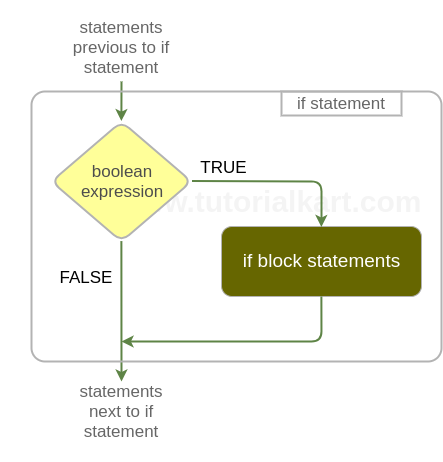
Bash IF statement is used for conditional branching in shell scripts. It runs a block of commands only when a condition is true, such as a string match, a number comparison, or a file check.
We shall learn about the syntax of if statement and get a thorough understanding of it with the help of examples. This updated guide also covers if else, elif, AND and OR conditions, one-line if usage, and common Bash test options.
- Syntax of if statement
- A simple If statement comparing strings
- if statement comparing numbers
- If expression with AND Condition
- If expression with OR Condition
- If expression with Multiple Conditions
Bash IF Conditions Used in Shell Script Decisions
A Bash if condition is useful when a script must decide what to do next. For example, a script can check whether a file exists before reading it, whether a command argument is empty, or whether a number is within an expected range. Bash treats a condition as true when the command or test expression returns an exit status of zero.
Options for IF statement in Bash Scripting
If statement can accept options to perform a specific task. These options are used for file operations, string operations, etc. In this topic, we shall provide examples for some mostly used options.
- Example – if -z (to check if string has zero length)
- Example – if -s (to check if file size is greater than zero)
- Example – if -n (to check if string length is not zero)
- Example – if -f (to check if file exists and is a regular file)
| Test | Use in Bash IF |
-z "$value" | True when a string is empty. |
-n "$value" | True when a string is not empty. |
-f file | True when the path is a regular file. |
-s file | True when the file exists and is not empty. |
-eq, -gt, -lt | Used for integer comparisons. |
Syntax of Bash If
Bash If statement syntax is
if [ expression ];
# ^ ^          ^      please note these spaces
then
    statement(s)
fi
Note : Observe the mandatory spaces required, in the first line, marked using arrows. Also the semicolon at the end of first line. And if conditional statement ends with fi
Bash IF ELSE syntax
if [ expression ];
then
    statement(s)
else
    statement(s)
fi
Bash ELIF syntax
if [ expression_1 ];
then
    statement(s)
elif [ expression_2 ];
then
    statement(s)
else
    statement(s)
fi
The syntax to include multiple conditions with AND operator is
if [ expression ] && [ expression_2 ];
then
    statement(s)
fi
The syntax to include multiple conditions with OR operator is
if [ expression ] || [ expression_2 ];
then
statement(s)
fi
For compound expressions, following if syntax is allowed. Please observe that the condition has double square brackets.
if [[ expression_1 && expression_2 || expression_3 ]];
then
    statement(s)
fi
Use [ ... ] for simple tests and [[ ... ]] for clearer Bash-specific compound conditions. In both forms, keep spaces around brackets and quote variables in string checks, such as [ -z "$name" ].
Example 1 – Bash IF
In the following example, we demonstrate the usage of if statement with a simple scenario of comparing two strings.
Bash Script File
#!/bin/bash

# if condition is true
if [ "hello" == "hello" ];
then
	echo "hello equals hello"
fi

# if condition is false
if [ "hello" == "bye" ];
then
	echo "hello equals bye"
fi
Note : In bash, respect each token/literal. Observe the spaces provided after if [ string literal “hello” and ==
When you run the above bash if example script file in a shell program like Terminal, the result would be
Output
~$ ./bash-if-example
hello equals hello
Example 2 – Bash IF – Compare Numbers
In the following example, we will compare numbers using if statement.
Bash Shell Script
#!/bin/bash

# if condition (greater than) is true
if [ 8 -gt 7 ];
then
	echo "is 8 greater than 7 : true "
fi

# if condition (greater than) is false
if [ 7 -gt 8 ];
then
	echo "is 7 greater than 8 : false "
fi

# if condition (less than) is true
if [ 7 -lt 8 ];
then
	echo "is 7 lesser than 8 : true "
fi

# if condition (lesser than) is false
if [ 8 -lt 7 ];
then
	echo "is 8 lesser than 7 : false "
fi

# if condition (equal to) is true
if [ 8 -eq 8 ];
then
	echo "is 8 equals 8 : true "
fi

# if condition (equal to) is false
if [ 7 -eq 8 ];
then
	echo "is 7 equals 8 : false "
fi
When you run the above bash script file in shell program like Terminal, the result would be
Output
~$ ./bash-if-example-2
is 8 greater than 7 : true
is 7 lesser than 8 : true
is 8 equals 8 : true
Bash IF ELSE Example for False Conditions
Use else when the script must run another command if the condition is false.
#!/bin/bash

number=9

if [ $((number % 2)) -eq 0 ];
then
    echo "$number is even"
else
    echo "$number is odd"
fi
9 is oddBash ELIF Example for More Than Two Results
Use elif when conditions should be checked in order and only the first matching block should run.
#!/bin/bash

marks=72

if [ "$marks" -ge 90 ];
then
    echo "Grade A"
elif [ "$marks" -ge 75 ];
then
    echo "Grade B"
elif [ "$marks" -ge 50 ];
then
    echo "Grade C"
else
    echo "Needs improvement"
fi
Grade CExample 3 – Using AND in IF Expression
In this example, we shall learn to use AND operator && to combine multiple conditions and form an expression (compound condition).
Bash Script File
#!/bin/bash

# TRUE && TRUE
if [ "hello" == "hello" ] && [ 1 -eq 1 ];
then
	echo "if 1"
fi

# TRUE && FALSE
if [ "hello" == "hello" ] && [ 1 -gt 2 ];
then
	echo "if 2"
fi
Output
~$ ./bash-if-example-3
if 1
Example 4 – Using OR in IF Expression
In this example, we shall learn to use OR operator || to combine multiple conditions and form an expression (compound condition).
Bash Script File
#!/bin/bash

# TRUE || FALSE
if [ "hello" == "hello" ] || [ 1 -eq 3 ];
then
	echo "if 1"
fi

# FALSE || FALSE
if [ "hello" == "hi" ] || [ 1 -gt 2 ];
then
	echo "if 2"
fi
Output
~$ ./bash-if-example-4
if 1
Example 5 – Bash IF with Multiple Conditions
In this example, we shall learn to include multiple conditions combined with AND and OR forming a single expression.
Bash Script File
#!/bin/bash

# FALSE && TRUE || FALSE || TRUE evaluates to TRUE
if [[ 8 -eq 11 && "hello" == "hello" || 1 -eq 3 || 1 -eq 1 ]];
then
	echo "if 1"
fi

# FALSE && TRUE || FALSE evaluates to FALSE
if [[ 8 -eq 11 && "hello" == "hello" || 1 -eq 3 ]];
then
	echo "if 2"
fi
Output
~$ ./bash-if-example-5
if 1
Bash One-Line IF Statement
#!/bin/bash

file="/tmp/report.txt"

if [ -f "$file" ]; then echo "Report file exists"; fi
Report file existsExample 6 – Bash IF -z
If statement when used with option z , returns true if the length of the string is zero. Following example proves the same.
Bash Script File
#!/bin/bash

if [ -z "" ];
then
	echo "zero length string"
fi

if [ -z "hello" ];
then
	echo "hello is zero length string"
else
	echo "hello is not zero length string"
fi
Example 7 – Bash IF -s
Bash If statement when used with option s , returns true if size of the file is greater than zero.
Bash Script File
if [ -s /home/tutorialkart/sample.txt ];
then
    echo "Size of sample.txt is greater than zero"
else
    echo "Size of sample.txt is zero"
fi
Example 8 – Bash IF -n
Bash If statement when used with option n , returns true if the length of the string is greater than zero.
Bash Script File
#!/bin/bash

if [ -n "learn" ];
then
	echo "learn is non-zero length string"
fi

if [ -n "hello" ];
then
	echo "hello is non-zero length string"
else
	echo "hello is zero length string"
fi
Example 9 – Bash IF -f
Bash If statement when used with option f , returns true if the given path exists and is a regular file.
Bash Script File
#!/bin/bash

if [ -f /home/tutorialkart/sample.txt ];
then
    echo "sample.txt - File exists."
else
    echo "sample.txt - File does not exist."
fi
Common Bash IF Syntax Errors
- Write spaces around
[and], as in[ "$name" == "Tom" ]. - Use
-eq,-gt, and-ltfor integer comparison inside single brackets. - Quote variables in string tests, such as
[ -z "$value" ]. - Close every
ifstatement withfi. - Use a semicolon before
thenwhenthenis written on the same line.
Editorial QA Checklist for Bash IF Examples
- Confirm every Bash
ifblock has matchingthenandfi. - Check that new shell examples use
language-bash. - Check that output-only examples use the
outputclass. - Verify that examples cover
if,else,elif, AND, OR, string tests, numeric tests, and file tests.
FAQs on Bash IF Statements
How do I write an if statement in Bash?
Use if [ condition ]; then commands; fi for a short form, or place then and the commands on separate lines for better readability.
What is the difference between Bash if else and elif?
else runs when the main condition is false. elif checks another condition before the final else block.
How do I use AND and OR in a Bash if statement?
Use && for AND and || for OR. You can combine separate single-bracket tests or use double brackets for compound Bash conditions.
Why does my Bash if statement show a syntax error?
Common causes are missing spaces around brackets, missing fi, an unquoted variable, or a missing semicolon before then in one-line syntax.
Key Takeaways for Bash IF Conditions
In this Bash Tutorial, we learned conditional branching in the sequential flow of execution of statements with bash if statement. We learned the syntax and usage of Bash IF with example shell scripts.