 TutorialKart.com
MySQL – Delete Database Using DROP DATABASE
To delete a database in MySQL, use the DROP DATABASE statement followed by the database name. This operation permanently removes the database and its objects, so confirm the database name and take a backup before running the query on a development, staging, or production server.
Following are some of the possible scenarios during which we might need to delete a database in MySQL :
- Database cleanup
- Testing the recovery scenario if a database is deleted unexpectedly.
Now we shall learn how to delete a database in MySQL.
Checks Before You Delete a MySQL Database
Before dropping a database, it is good practice to verify these points.
- Confirm that you are connected to the correct MySQL server.
- List available databases and check the exact database name.
- Make sure no application is actively using the database.
- Take a backup if the data may be needed later.
- Use a MySQL user account that has the required
DROPprivilege.
Following is the syntax of SQL query to delete a DATABASE.
DROP DATABASE <database_name>;Here, <database_name> is the name of the MySQL database that has to be removed. For example, if the database name is students, the statement becomes DROP DATABASE students;.
In our previous tutorial of creating a database, we have created “students” database. Now we shall delete that database using the following SQL query.
DROP DATABASE students;Example 1 – Delete DATABASE in MySQL
In this example, we delete or drop database named students.
mysql> show databases;
+--------------------+
| Database           |
+--------------------+
| information_schema |
| mysql              |
| performance_schema |
| students           |
| sys                |
+--------------------+
5 rows in set (0.03 sec)

mysql> DROP DATABASE students;
Query OK, 0 rows affected (0.03 sec)

mysql> show databases;
+--------------------+
| Database           |
+--------------------+
| information_schema |
| mysql              |
| performance_schema |
| sys                |
+--------------------+
4 rows in set (0.00 sec)
In the first show databases; result, the students database is present. After running DROP DATABASE students;, the next show databases; result does not include students. This confirms that the database has been deleted.
Deleting a database also deletes all the data(tables, views, etc.)
Note : Make sure you have the necessary permissions to delete the table. By default root user has permissions to delete the table. If you are logged in as root, you may delete the database without any hassle.
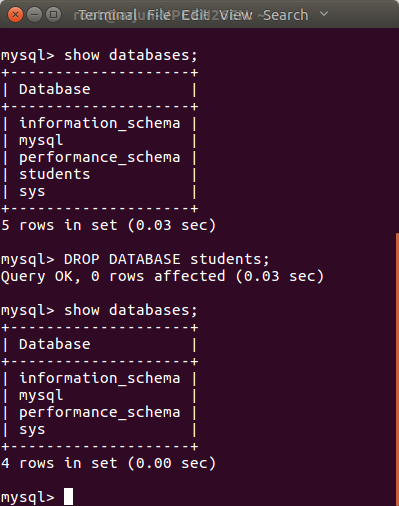
Delete a MySQL Database from the Command Line
You can also delete a MySQL database by logging in to the MySQL client from a terminal or command prompt. The basic flow is to connect to MySQL, list databases, run the DROP DATABASE statement, and list databases again for confirmation.
mysql -u root -pAfter entering the MySQL password, run the SQL statements inside the MySQL prompt.
SHOW DATABASES;
DROP DATABASE students;
SHOW DATABASES;
Use DROP DATABASE IF EXISTS to Avoid an Error
If you are not sure whether a database exists, use IF EXISTS. This prevents an error when the database name is not found.
DROP DATABASE IF EXISTS database_name;For example, the following statement deletes the students database only if it exists.
DROP DATABASE IF EXISTS students;This is useful in setup scripts, test cleanup scripts, and examples where the database may or may not already be present.
Delete a MySQL Database in MySQL Workbench
In MySQL Workbench, you can delete a database from the Schemas panel or by running the same SQL statement in a query tab.
- Open MySQL Workbench and connect to the MySQL server.
- In the Schemas panel, locate the database that has to be deleted.
- Right-click the database name and choose the drop/delete schema option.
- Review the confirmation carefully before applying the change.
- Refresh the Schemas panel to confirm that the database is removed.
You may also open a SQL editor tab and run DROP DATABASE database_name;. The SQL method is often clearer because the exact command is visible before execution.
What DROP DATABASE Removes in MySQL
DROP DATABASE removes the selected database and the objects stored inside it, such as tables and views. Once dropped, the database will no longer appear in the output of SHOW DATABASES;.
| Item | Effect of DROP DATABASE |
|---|---|
| Database name | Removed from the MySQL server |
| Tables in the database | Deleted with the database |
| Views and stored objects | Removed if they belong to the dropped database |
| Data rows | Permanently deleted unless restored from backup |
Common Errors While Dropping a MySQL Database
If the delete database command fails, check the error message and verify the database name, privileges, and connection.
| Problem | Likely reason | What to check |
|---|---|---|
| Unknown database | The database name does not exist or is misspelled. | Run SHOW DATABASES; and copy the exact name. |
| Access denied | The MySQL user does not have the required privilege. | Use an account with the DROP privilege or ask the administrator. |
| Wrong database deleted | The command was run on the wrong server or with the wrong name. | Check the host, environment, and database name before executing. |
Deleting Multiple MySQL Databases
For deleting multiple databases at a time, there is no straight forward SQL query. Of course there are workarounds, but deleting databases one at a time is recommended as one might avoid deleting a database that is not intended to delete.
If you need to clean up more than one database, list the databases first and run a separate DROP DATABASE statement for each database. This makes the deletion easier to review.
DROP DATABASE IF EXISTS test_db_1;
DROP DATABASE IF EXISTS test_db_2;
DROP DATABASE IF EXISTS test_db_3;
MySQL Delete Database FAQs
How do I delete an existing database in MySQL?
Use DROP DATABASE database_name;. For example, DROP DATABASE students; deletes the database named students.
How do I delete a MySQL database using a command?
Log in to the MySQL client using a command such as mysql -u root -p, then run DROP DATABASE database_name; at the MySQL prompt.
What is the difference between DROP DATABASE and DELETE in MySQL?
DROP DATABASE removes an entire database. DELETE removes rows from a table. Use DELETE when you want to keep the table and database structure.
Can I restore a MySQL database after dropping it?
You can restore it only if you have a valid backup or another recovery mechanism. The DROP DATABASE statement itself does not move the database to a recycle bin.
How do I avoid an error when the database does not exist?
Use DROP DATABASE IF EXISTS database_name;. This statement attempts to drop the database only when the database exists.
Editorial QA Checklist for MySQL DROP DATABASE Tutorial
- Does the tutorial clearly warn that
DROP DATABASEpermanently removes the database and its objects? - Does every SQL example use the correct
DROP DATABASEsyntax? - Is the
studentsexample consistent before and after deletion? - Does the page explain the safer
DROP DATABASE IF EXISTSform? - Does the tutorial distinguish database deletion from deleting rows in a table?