 TutorialKart.com
Docker Architecture
Docker architecture is based on a client-server model. The Docker client sends commands to the Docker daemon, and the daemon builds images, pulls images from registries, creates containers, attaches networks, mounts volumes, and controls the container lifecycle on the Docker host.
Following diagram of Docker Architecture provides details about the major components in a docker platform, and how user commands docker daemon through client, etc. which we shall see in detail.
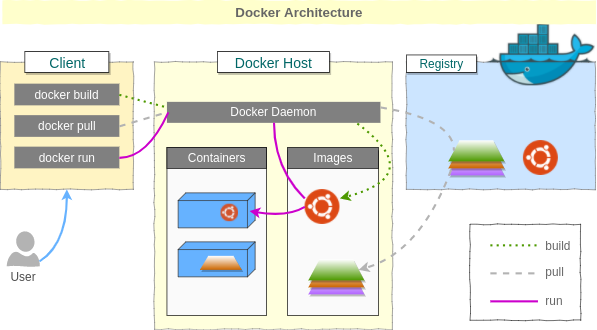
Docker uses server-client architecture. Where client is Docker Client(Command Line interface) and server process is Docker Daemon that is running on host. Both server and client can be on same computer.
In practice, the command flow is usually simple: you type a command such as docker run, the Docker client sends an API request to the daemon, and the daemon coordinates the work required to start a container from an image. On Linux, this uses operating system features such as namespaces and cgroups. On Docker Desktop for Windows and macOS, Docker Engine runs inside a Linux environment managed by Docker Desktop.
Main Docker Architecture Components
Following are the different components in a Docker Platform.
Docker Image [Build Component of Docker]
Docker Image is the build component of Docker. It is a read-only template. A docker image could contain an Operating System, a Web Server, a Web Application, etc.
More precisely, a Docker image contains the application, its dependencies, configuration files, and user-space operating system files required by the application. It does not contain a separate kernel like a full virtual machine. Images are built in layers, and unchanged layers can be reused across builds and containers.
Docker Container [Run Component of Docker]
Docker Container is the process that uses the template (Docker Image) and runs. A docker container, like a process, could be run, started, moved, stopped and deleted. Each container is isolated from others and is a secure application platform.
A container adds a writable layer on top of the read-only image layers. When the container stops or is removed, changes in that container layer are lost unless the data is stored in a Docker volume, bind mount, or another persistent storage option.
Docker Client
Docker command line interface is the Docker Client. A user like you or me can access the Docker client to give commands to Docker Daemon.
The client may be the docker CLI, Docker Desktop, or another tool that talks to the Docker Engine API. The client does not run containers by itself; it sends requests to the daemon.
docker versionThe output normally shows both client and server details. This is a useful quick check that the Docker client can communicate with the Docker daemon.
Client:
 Version:    ...

Server:
 Docker Engine:
  Version:   ...
Docker Daemon
Docker Daemon does all the heavy lifting. Docker Daemon does build docker images, pull images from registry, run containers with images. You can access Docker Daemon via Docker Client.
The daemon process is commonly called dockerd. It listens for Docker API requests and manages Docker objects such as images, containers, networks, and volumes. In modern Docker Engine, the daemon works with lower-level container components such as containerd and an OCI runtime to create and run containers.
Docker Host
The Docker host is the machine where the Docker daemon runs. It stores local images, runs containers, keeps container logs, manages Docker networks, and holds Docker volumes. The Docker client and Docker host can be on the same machine, or the client can connect to a remote Docker host when configured securely.
Docker Registries
Docker Images could be stored in Docker registries. Docker officially provides public access to Docker Hub, and organizations can also use private registries. Registries contain pre-built Docker images. You may pull those Docker Images and run with containers in your Docker Host.
A registry is not the same as a local image cache. When you run docker pull nginx, Docker downloads the image layers from a registry to the Docker host. After that, containers can be started from the local copy of the image.
Docker Architecture Flow for Pull, Build and Run Commands
The Docker architecture becomes easier to understand when you follow what happens for common Docker commands.
docker pull: the client asks the daemon to download an image from a registry. The daemon stores the image layers on the Docker host.docker build: the client sends the build context to the daemon. The daemon reads the Dockerfile instructions, creates image layers, and stores the final image locally.docker run: the client asks the daemon to create and start a container from an image. If the image is not available locally, the daemon can pull it from a registry first.docker ps: the client asks the daemon for the list of running containers, and the daemon returns the current container state.
docker pull nginx
docker run --name tk-nginx -p 8080:80 nginx
docker ps
In the above flow, the client only sends requests. The Docker daemon performs the registry download, container creation, port mapping, and status reporting.
User Building Docker Image File
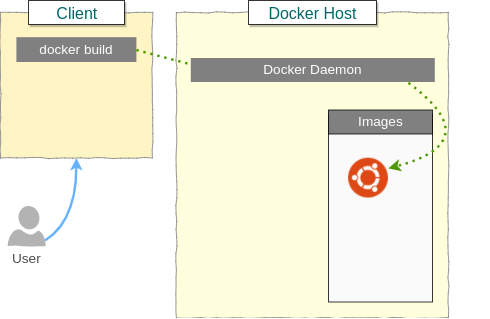
User provides build command via Docker Client (Command Line Interface)
$ docker build -t <image_name> .Docker sends build context to Docker Daemon that is running,
root@arjun-VPCEH26EN:~# ps -aef|grep docker
root      1220     1  0 Sep17 ?        00:06:57 /usr/bin/dockerd -H fd://
Docker daemon builds an image file, that is read only.
During a build, Docker sends the files in the current build context to the daemon. If the directory contains large files that are not needed for the image, the build can become slow. A .dockerignore file helps exclude unnecessary files from the build context.
Docker Image Layers and Container Writable Layer
Docker images are made of layers. Each instruction in a Dockerfile can create a new layer. These layers are read-only after the image is built. When Docker starts a container from the image, it adds a thin writable layer for that container.
- Image layer: reusable, read-only, and shared by containers created from the same image.
- Container writable layer: unique to a running or stopped container and used for changes made while the container exists.
- Volume: persistent storage managed by Docker and commonly used for application data that must survive container removal.
This layered design is one reason containers can start quickly and use storage efficiently when several containers are based on the same image.
Docker Networking and Volumes in the Architecture
Docker architecture is not limited to images and containers. The daemon also manages networking and storage for containers.
- Docker networks allow containers to communicate with each other and with external systems. The default bridge network is commonly used on a single host.
- Port publishing maps a host port to a container port, for example
-p 8080:80. - Docker volumes store data outside the container writable layer, so data can remain available after a container is deleted.
- Bind mounts connect a path from the host machine into the container and are often used during development.
Docker Architecture vs Virtual Machine Architecture
A Docker container is different from a virtual machine. A virtual machine includes a guest operating system with its own kernel. A Docker container uses the host kernel and packages the application with its dependencies in isolated user space.
| Architecture point | Docker container | Virtual machine |
|---|---|---|
| Operating system kernel | Uses the host kernel | Runs a guest operating system kernel |
| Startup behavior | Usually starts quickly because it is process-based | Usually takes longer because a full guest OS must boot |
| Packaging | Application plus dependencies and user-space files | Application plus full guest operating system |
| Isolation | Process-level isolation using OS features | Hardware-level virtualization through a hypervisor |
Docker Architecture FAQ
What is the main idea of Docker architecture?
The main idea of Docker architecture is that a Docker client sends commands to a Docker daemon, and the daemon manages images, containers, networks, volumes, and registry communication on the Docker host.
Is Docker daemon the same as Docker client?
No. The Docker client is the tool used to send commands, such as the docker CLI. The Docker daemon is the background service that receives those commands and performs the actual Docker operations.
Where are Docker images stored in Docker architecture?
Docker images can be stored in remote registries such as Docker Hub or private registries. When an image is pulled, Docker stores a local copy of the image layers on the Docker host.
What happens when docker run is executed?
When docker run is executed, the client sends a request to the daemon. The daemon checks for the image, pulls it if needed, creates a container from the image, applies the requested configuration, and starts the container process.
Why does Docker use images and containers separately?
Docker separates images and containers because an image is a reusable read-only template, while a container is a running or stopped instance created from that image. This allows the same image to be used to create many containers.
Docker Architecture Editorial QA Checklist
- Confirm that the tutorial explains the Docker client, Docker daemon, Docker host, images, containers, and registries as separate architecture components.
- Check that build, pull, and run command flows clearly show the client-to-daemon request path.
- Make sure Docker images are described as read-only layered templates and containers as writable runtime instances.
- Verify that Docker Hub or registry references do not imply that every image is official or safe by default.
- Confirm that the container vs virtual machine comparison does not claim that containers provide the same isolation model as full virtual machines.
Docker Architecture Summary
In this Docker Tutorial, we have learnt about the Docker Architecture, the components of the docker and how the commands flow from one component to other. The key point to remember is that the Docker client sends commands, the Docker daemon performs the work, images provide read-only templates, containers run from those images, and registries store images for sharing and reuse.