 TutorialKart.com
In this Java tutorial, you will learn what encapsulation in Java means, why private variables are accessed through methods, and how to implement encapsulation using getters, setters, validation, and read-only computed values.
What Encapsulation in Java Means
Encapsulation in Java is the object-oriented programming technique of keeping the data of a class inside that class and controlling access to it through methods. In simple words, a class hides its fields from direct access and exposes only the operations that other classes are allowed to perform.
In Java, encapsulation is commonly implemented by declaring instance variables as private and providing public getter and setter methods where needed. This binds data and behavior together, prevents accidental changes, and gives the class a single place to validate or compute values.
The below diagram gives an idea about Encapsulation in Java
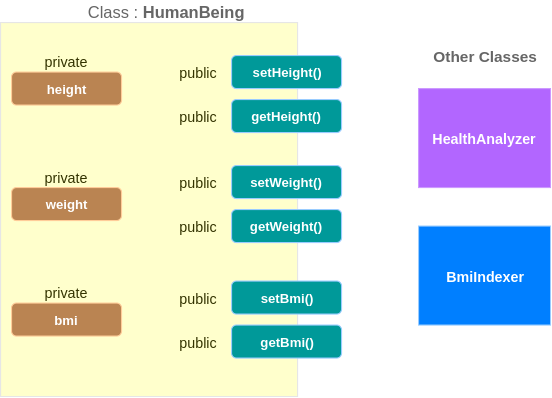
How Private Fields and Public Methods Provide Java Encapsulation
Points to be made from the above diagram are
- Variables (in the example:
height,weight,bmi) are declared private, and hence not visible to other classes. - For each variable, there is a setter method and getter method, which sets a value to the variable and gets the value of the variable respectively. Example : For variable
height, setter method issetHeight(), getter method isgetHeight(). - Setter and Getter methods are public, hence visible to other classes.
Encapsulation does not mean that every field must always have both a getter and a setter. The methods you expose should match what the object is allowed to do. For example, a value can be read-only, write-only, read-write, or completely hidden from other classes.
Getter and Setter Choices in Java Encapsulation
Based on the presence of getter and setter for a variable, the read and write permissions to the class variable could be set. Following table elaborates this idea.
| Setter | Getter | Permission to the variable is |
|---|---|---|
| Present | Not Present | write-only |
| Not Present | Present | read-only |
| Present | Present | write and read |
Read-only and write-only fields in an encapsulated Java class
- If setter is present and getter is not present, the variable is write-only, which means, other classes could only modify the value of the variable, but cannot read its value.
- If setter is not present and getter is present, the variable is read-only, which means, other classes can only read value of the variable, but cannot modify its value.
- If both setter and getter are present, the variable could be read or modified by the other classes
A well-designed encapsulated Java class usually avoids unnecessary setters. If a value is derived from other fields, it is often better to compute it in a method instead of storing it separately and allowing outside code to set it.
Basic Encapsulation in Java Example Using a Human Class
In the following example, Human.java class has variables height, weight and bmi which are private. For each variable, there is a setter and getter.
package com.tutorialkart.java;
/**
 * @author tutorialkart
 */
class Human{
	private float weight;
	private float height;
	private float bmi;
	public float getWeight() {
		return weight;
	}
	public void setWeight(float weight) {
		this.weight = weight;
	}
	public float getHeight() {
		return height;
	}
	public void setHeight(float height) {
		this.height = height;
	}
	public float getBmi() {
		return bmi;
	}
	public void setBmi(float bmi) {
		this.bmi = bmi;
	}
}

public class EncapsulationExample {
	public static void main(String[] args) {
		Human h1 = new Human();
		// using setters of Human
		h1.setHeight(1.65f);
		h1.setWeight(68);
		h1.setBmi(calculateBmi(h1));

		// using getters of Human
		System.out.println("Person has "+h1.getWeight()+" kgs and is "+h1.getHeight()+" meters in height, which results in BMI of "+h1.getBmi());
	}

	public static float calculateBmi(Human h1){
		return h1.getWeight()/(h1.getHeight()*h1.getHeight());
	}
}
Output
Person has 68.0 kgs and is 1.65 meters in height, which results in BMI of 24.977045
In this program, another class cannot directly access weight, height, or bmi because all three fields are private. The object can be updated only through setter methods and read only through getter methods.
Improved Java Encapsulation Example with Validation and Computed BMI
The previous example shows the basic syntax of encapsulation. In real Java programs, setters are also used to protect the object from invalid values. A BMI value is also better treated as a computed value, because it depends on height and weight.
class HumanProfile {
    private float weightKg;
    private float heightMeters;

    public float getWeightKg() {
        return weightKg;
    }

    public void setWeightKg(float weightKg) {
        if (weightKg <= 0) {
            throw new IllegalArgumentException("Weight must be positive.");
        }
        this.weightKg = weightKg;
    }

    public float getHeightMeters() {
        return heightMeters;
    }

    public void setHeightMeters(float heightMeters) {
        if (heightMeters <= 0) {
            throw new IllegalArgumentException("Height must be positive.");
        }
        this.heightMeters = heightMeters;
    }

    public float getBmi() {
        return weightKg / (heightMeters * heightMeters);
    }
}

public class EncapsulationValidationExample {
    public static void main(String[] args) {
        HumanProfile profile = new HumanProfile();

        profile.setHeightMeters(1.65f);
        profile.setWeightKg(68.0f);

        System.out.println("BMI: " + profile.getBmi());
    }
}
Output
BMI: 24.977045
In this version, weightKg and heightMeters cannot be set to zero or negative values. The bmi field is not stored at all. Instead, getBmi() calculates the value from the current height and weight, making the object state easier to keep correct.
Why Java Encapsulation Is More Than Getters and Setters
Encapsulation is often introduced as private fields plus getters and setters, but the purpose is not to mechanically generate methods for every field. The purpose is to protect the internal state of an object and expose a controlled interface.
- Validation: A setter can reject invalid data before it reaches the field.
- Consistency: Related fields can be updated in a controlled way so that the object does not enter an invalid state.
- Flexibility: The internal implementation can change without forcing other classes to change, as long as the public methods stay the same.
- Read-only behavior: A class can provide a getter without providing a setter when outside code should only read a value.
- Computed values: A class can return calculated values through methods instead of exposing extra mutable fields.
Encapsulation and Abstraction in Java OOP
Encapsulation and abstraction are related, but they are not the same idea. Encapsulation focuses on hiding the internal data of a class and controlling access to it. Abstraction focuses on showing only the essential operations and hiding unnecessary implementation details.
For example, an ATM can be used as a simple analogy. The user can withdraw cash, check balance, or change a PIN through visible operations. The internal verification, account update, and transaction logging are hidden. Encapsulation protects the internal data; abstraction keeps the external usage simple.
Common Java Encapsulation Mistakes to Avoid
- Making fields public: Public fields can be changed directly from anywhere, which bypasses validation and weakens encapsulation.
- Adding setters for everything: Not every field should be writable from outside the class.
- Returning mutable internal objects directly: If a field stores a mutable object, returning it directly can allow outside code to change internal state.
- Duplicating derived state: Storing values like BMI separately can create inconsistency if height or weight changes later.
- Skipping validation in setters: A setter that blindly assigns values is only a thin wrapper and does not fully use the benefit of encapsulation.
Java Encapsulation Checklist for Editorial and Code Review
- Check that important instance variables are not exposed as
publicfields. - Check that setters validate values where invalid input is possible.
- Check that read-only values do not have unnecessary setters.
- Check that computed values are calculated from source fields instead of being stored without need.
- Check that method names clearly describe the allowed operation, such as
setHeightMeters()orgetBmi().
Encapsulation in Java FAQs
What is encapsulation in Java with an example?
Encapsulation in Java is the practice of keeping fields private and allowing access through methods. For example, a HumanProfile class can keep heightMeters and weightKg private, update them through validated setters, and return BMI through a getter method.
Why are private variables used in Java encapsulation?
Private variables prevent other classes from changing object data directly. This lets the class validate values, control read and write access, and keep its internal state consistent.
Does every private field need a getter and setter in Java?
No. A private field should have only the methods that are actually needed. Some fields may be read-only, some may be write-only, and some may remain completely internal to the class.
What are the three access patterns in Java encapsulation?
A field can commonly be read-only, write-only, or read-write depending on whether a getter, setter, or both are provided. This is different from Java access modifiers such as private, protected, and public.
What are the four OOP concepts in Java?
The four main object-oriented programming concepts in Java are encapsulation, abstraction, inheritance, and polymorphism. Encapsulation specifically deals with protecting object data and exposing controlled methods.
Key Takeaways for Encapsulation in Java
In this Java Tutorial – Encapsulation in Java, we have learned how to encapsulate data inside a class using private fields and public methods. Getters and setters can be used to control read and write access, but good encapsulation also includes validation, computed values, and careful decisions about which operations should be exposed to other classes.