 TutorialKart.com
Method Overloading in Java
Method overloading in Java means defining multiple methods with the same method name in the same class, but with different parameter lists. The compiler decides which overloaded method to call by checking the method arguments used in the method call.
In this tutorial, we shall learn about Overloading in Java. Overloading is the ability to use same name for different methods with different set of parameters. We shall go through some Java Example Programs in detail to understand overloading in Java.
Overloading is a way to realize Polymorphism in Java. More specifically, method overloading is an example of compile-time polymorphism because the target method is selected during compilation based on the method signature.
If a method can expect different types of inputs for the same functionality it implements, implementing different methods with different names for each scenario may complicate the readability of code.
For example, we need a functionality to add two numbers. Now these two numbers could be integer values, float values, long values or double values. If we implement methods like addTwoInts(int a, int b), addTwoFloats(float a, float b), addIntFloat(int a, float b), etc., it becomes difficult to use these methods in other classes because the caller has to remember many method names. Java provides the ability to overload a method based on the type, number, or order of arguments passed in the method call, provided the methods have the same name.
Java Method Overloading Rules
Following are the rules to implement Overloading of methods.
- All the methods that take part in Overloading should have the same name.
- No two methods should have the same set of parameters. They should differ either in
- the number of parameters they have in their definition or
- the type of parameters they have in their definition
A practical way to remember the rule is this: Java overloads methods by their method signature. The method signature includes the method name and parameter list. It does not include the return type alone.
// Valid overloading: different number of parameters
void print(int a) {}
void print(int a, int b) {}

// Valid overloading: different parameter types
void print(int a) {}
void print(String a) {}

// Valid overloading: different parameter order
void print(int a, String b) {}
void print(String a, int b) {}
If a method is not found for a set of arguments, the compiler does Type Promotion and checks for a suitable method definition. We shall learn in detail about Type Promotion with an example in due course of this tutorial.
Note : Also, please note that, different return types do not make two methods different with respect to Overloading.
// Invalid: return type alone cannot overload a method
int total(int a, int b) {
    return a + b;
}

double total(int a, int b) {
    return a + b;
}
Method Overloading by Number, Type, and Order of Parameters
Java method overloading can be implemented in three common ways. All three keep the method name the same, but change the parameter list.
| Overloading form | Example signatures | Why Java treats them as different |
|---|---|---|
| Different number of parameters | area(int side)area(int length, int breadth) | The argument count is different. |
| Different parameter types | display(int value)display(String value) | The argument data types are different. |
| Different order of parameters | show(int id, String name)show(String name, int id) | The same types appear in a different order. |
Area Method Overloading Example in Java
A common beginner example is an overloaded area() method. The same method name can calculate the area of a square, rectangle, or circle depending on the arguments passed by the caller.
public class AreaCalculator {
    int area(int side) {
        return side * side;
    }

    int area(int length, int breadth) {
        return length * breadth;
    }

    double area(double radius) {
        return Math.PI * radius * radius;
    }

    public static void main(String[] args) {
        AreaCalculator calc = new AreaCalculator();

        System.out.println(calc.area(5));
        System.out.println(calc.area(5, 8));
        System.out.println(calc.area(2.5));
    }
}
25
40
19.634954084936208Here, area(5) calls the square-area method, area(5, 8) calls the rectangle-area method, and area(2.5) calls the circle-area method. The method name stays meaningful because each overload still represents the same operation: calculating area.
Example 1 – Method Overloading in Java Using add()
We shall use the same example of addition to demonstrate Overloading in Java.
Calculation.java
/**
 * Example program to demonstrate Overloading in Java
 */
public class Calculation {

	public static void main(String[] args) {
		Calculation calc = new Calculation();
		System.out.println(calc.add(4, 8));	// add(int a, int b) is loaded
		System.out.println(calc.add(4, 8.5));	// add(int a, float b)  is loaded
		System.out.println(calc.add("25", "85"));	// add(String a, String b) is loaded
		System.out.println(calc.add(25, 88888888888888888888888.0));	// add(int a, double b) is loaded
		System.out.println(calc.add(25));	// add(int a) is loaded
	}

	public int add(int a, int b){
		System.out.println("add(int a, int b) is called");
		return a+b;
	}

	public int add(String a, String b){
		System.out.println("add(String a, String b) is called");
		return Integer.parseInt(a)+Integer.parseInt(b);
	}

	public float add(int a, float b){
		System.out.println("add(int a, float b) is called");
		return a+b;
	}

	public double add(int a, double b){
		System.out.println("add(int a, double b) is called");
		return a+b;
	}

	public int add(int a){
		System.out.println("add(int a) is called");
		return a+1;
	}
}
Run the above program, and you shall get the following output in console.
Output
add(int a, int b) is called
12
add(int a, double b) is called
12.5
add(String a, String b) is called
110
add(int a, double b) is called
8.888888888888889E22
add(int a) is called
26
Now we shall cross verify the rules that we already stated with the above program.
- All the five methods that take part in overloading have same method name “add”.
- No two definitions of add function have same set of arguments. One add method have (int, int), another has (int, float), etc.
Notice the second call: calc.add(4, 8.5). The decimal literal 8.5 is a double by default in Java, so the compiler chooses add(int a, double b), not add(int a, float b). If the call used 8.5f, then add(int a, float b) would be the exact match.
How Java Chooses an Overloaded Method
When the compiler sees an overloaded method call, it follows a selection process. The exact rules in the Java Language Specification are detailed, but for most beginner programs this order explains the behavior clearly.
- First, Java looks for an exact match for the method name and argument types.
- If an exact match is not available, Java checks whether primitive widening conversion can make a matching method possible.
- If more than one method is still suitable, Java chooses the most specific applicable method.
- If Java cannot choose one method clearly, compilation fails with an ambiguous method call error.
This is why overloads should be easy to read. Too many similar overloads can make code harder to understand, even when the compiler accepts it.
Type Promotion during Method Overloading in Java
If a method is not found for a set of arguments, the compiler does Type Promotion and checks for a suitable method definition. Following diagram shows different type promotions that are possible.
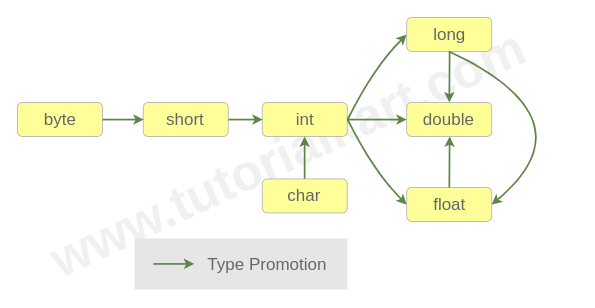
If there is forward path between two data types, then the starting datatype in the path can be type promoted to the datatype at end of the path.
- byte can be type promoted to short.
- short can be type promoted to int.
- Implication can be applied in type promotion. i.e., if byte can be promoted to short and short can be promoted to int, then byte can be promoted to int. Also byte can be promoted to long, double or float.
For primitive numeric values, this is called widening. A smaller numeric type can be widened to a larger compatible numeric type, such as int to long, float, or double. Java does not automatically narrow a larger type to a smaller type for method overloading because that could lose information.
Example 2 – Type Promotion in Java Method Overloading
We shall use the same Calculation class, but remove the definition add(int, int). As we have add(int, float), even we make a call add(int, int), as int can be promoted to float, double or long, we have add(int, float) and add(int, double) which are potential overloadable methods.
Calculation.java
/**
 * Example program to demonstrate Overloading in Java with Type Promotion
 */
public class Calculation {

	public static void main(String[] args) {
		Calculation calc = new Calculation();
		System.out.println(calc.add(4, 8));
		System.out.println(calc.add(4, 8.5));
		System.out.println(calc.add("25", "85"));
		System.out.println(calc.add(25, 88888888888888888888888.0));
		System.out.println(calc.add(25));
	}

	public int add(String a, String b){
		System.out.println("add(String a, String b) is called");
		return Integer.parseInt(a)+Integer.parseInt(b);
	}

	public float add(int a, float b){
		System.out.println("add(int a, float b) is called");
		return a+b;
	}

	public double add(int a, double b){
		System.out.println("add(int a, double b) is called");
		return a+b;
	}

	public int add(int a){
		System.out.println("add(int a) is called");
		return a+1;
	}
}
Run the above program and you shall get the following output in console.
Output
add(int a, float b) is called
12.0
add(int a, double b) is called
12.5
add(String a, String b) is called
110
add(int a, double b) is called
8.888888888888889E22
add(int a) is called
26
int has been promoted to float.
Now, we shall remove add(int, float) and see the result.
Calculation.java
/**
 * Example program to demonstrate Overloading in Java
 */
public class Calculation {

	public static void main(String[] args) {
		Calculation calc = new Calculation();
		System.out.println(calc.add(4, 8));
		System.out.println(calc.add(4, 8.5));
		System.out.println(calc.add("25", "85"));
		System.out.println(calc.add(25, 88888888888888888888888.0));
		System.out.println(calc.add(25));
	}

	public int add(String a, String b){
		System.out.println("add(String a, String b) is called");
		return Integer.parseInt(a)+Integer.parseInt(b);
	}

	public double add(int a, double b){
		System.out.println("add(int a, double b) is called");
		return a+b;
	}

	public int add(int a){
		System.out.println("add(int a) is called");
		return a+1;
	}
}
Run the above program.
add(int a, double b) is called
12.0
add(int a, double b) is called
12.5
add(String a, String b) is called
110
add(int a, double b) is called
8.888888888888889E22
add(int a) is called
26
For both add(int, int) and add(int, float); add(int, double) has been called i.e., int and float are promoted to double.
You may experiment with other type promotions and verify the results with the type promotions presented in the picture.
Ambiguous Method Overloading in Java
Sometimes two overloaded methods are both possible matches and neither method is more specific than the other. In that case, Java does not guess. The program fails to compile with an ambiguity error.
public class AmbiguousOverloading {
    void print(int a, double b) {
        System.out.println("int, double");
    }

    void print(double a, int b) {
        System.out.println("double, int");
    }

    public static void main(String[] args) {
        AmbiguousOverloading obj = new AmbiguousOverloading();
        obj.print(10, 20);
    }
}
The call obj.print(10, 20) can match both methods after type promotion. The first method can promote the second int to double, and the second method can promote the first int to double. Since neither method is clearly better, the call is ambiguous.
reference to print is ambiguousMethod Overloading and Type Conversion with null
The value null can match reference types such as String, Object, and arrays. If one overloaded method is more specific, Java chooses the more specific method. If the choices are unrelated reference types, the method call becomes ambiguous.
public class NullOverloading {
    void show(Object value) {
        System.out.println("Object");
    }

    void show(String value) {
        System.out.println("String");
    }

    public static void main(String[] args) {
        NullOverloading obj = new NullOverloading();
        obj.show(null);
    }
}
In this example, String is more specific than Object, so Java calls show(String value).
StringMethod Overloading vs Method Overriding in Java
Method overloading and method overriding are both related to polymorphism, but they solve different problems. Overloading happens when methods have the same name but different parameter lists. Overriding happens when a subclass provides its own implementation of an inherited method with the same signature.
| Difference | Method overloading | Method overriding |
|---|---|---|
| Where it happens | Usually in the same class, though inherited methods can also be overloaded | Between a superclass and subclass |
| Method name | Same method name | Same method name |
| Parameter list | Must be different | Must be the same |
| Return type | Can be different only when parameter list is different | Must be compatible with the overridden method return type |
| Polymorphism type | Compile-time polymorphism | Runtime polymorphism |
In our next tutorial, we shall learn about Overriding in Java.
Constructor Overloading in Java
Constructors can also be overloaded in Java. Constructor overloading means a class has more than one constructor, and each constructor has a different parameter list. This lets an object be created with different initial data.
public class Student {
    String name;
    int age;

    Student() {
        name = "Unknown";
        age = 0;
    }

    Student(String name) {
        this.name = name;
        age = 0;
    }

    Student(String name, int age) {
        this.name = name;
        this.age = age;
    }
}
The idea is the same as method overloading: the constructor name is the same as the class name, but the parameter list changes.
When Method Overloading Is Appropriate in Java
Use method overloading when several operations represent the same idea but accept different input forms. Good examples include print(), valueOf(), sort(), area(), and add(). The overloaded methods should feel like one operation to the caller.
- Use the same method name only when the operation has the same meaning.
- Avoid overloads that behave very differently from each other.
- Avoid too many overloads with similar numeric types because type promotion can make calls harder to read.
- Prefer clear parameter names and small method bodies so each overload remains easy to maintain.
Java Method Overloading Reference Notes
The Java language treats a method declaration by its name and parameter list. For exact details on method declarations, parameters, and signatures, refer to the official Oracle Java tutorial on defining methods in Java. Use official language references when reviewing edge cases such as overload selection, widening conversions, and ambiguous calls.
FAQs on Method Overloading in Java
What is method overloading in Java?
Method overloading in Java is the process of creating multiple methods with the same name but different parameter lists. The methods may differ by number of parameters, type of parameters, or order of parameters.
Can we overload a method only by changing the return type in Java?
No. Java does not allow method overloading by return type alone. If two methods have the same name and the same parameter list, changing only the return type causes a compile-time error.
What is the difference between method overloading and overriding?
Method overloading uses the same method name with different parameter lists and is resolved at compile time. Method overriding uses the same method signature in a subclass and is resolved at runtime.
What is type promotion in method overloading?
Type promotion is the widening of a primitive value to a compatible larger type when an exact overloaded method is not found. For example, an int argument can be promoted to long, float, or double if a matching overload is available.
Can Java constructors be overloaded?
Yes. Constructors can be overloaded by defining more than one constructor in a class with different parameter lists. This allows objects to be created with different initial values.
Method Overloading QA Checklist for Java Tutorials
- Check that each overloaded method has the same method name but a different parameter list.
- Do not claim that return type alone is enough for method overloading.
- Verify output carefully when decimal literals are used, because Java treats decimal literals as
doubleunless marked withforF. - Test examples that involve primitive widening so the selected overload is explained correctly.
- Explain ambiguous overloads when two promoted matches are equally suitable.
Conclusion: Method Overloading in Java
In this Java Tutorial, we learned about Overloading in Java with an Example program of adding two numbers for different set of input parameters. Also, we learned type promotions that are possible with different data types in Java for overloading methods.
Method overloading is best used when the same operation needs to accept different input forms. The compiler chooses the overloaded method by checking the method signature and, when needed, applying valid type promotion. For the next related concept, continue with Overriding in Java.