 TutorialKart.com
In this Java tutorial, you will learn how to get the list of files and sub-directories in a given folder. The examples cover normal directory listing, filtering files by extension, and recursively reading files from sub folders.
Java list files and sub-directories in a directory
You can get the list of files and sub-directories in a given folder using Java. We can also filter the list based on extension or a specific condition. For simple programs, the java.io.File API is enough. For newer Java applications, the java.nio.file.Files and Path APIs are often preferred because they work well with streams and recursive walking.
In this Java Tutorial, we shall learn how to perform the following tasks.
- Extract list of files and directories in a folder using java
- Extract list of files belonging to specific file type
- Extract list of files belonging to specific file type, present in the folder and its sub folders/directories
- Use a safer null check when
listFiles()cannot read a directory - Use Java 8+
Files.walk()to list files recursively
When to use File.listFiles and Files.walk in Java
| Java approach | Best used for | Important note |
|---|---|---|
File.listFiles() | Listing files and folders directly inside one directory | Returns only immediate children unless you add recursion |
File.isFile() and File.isDirectory() | Separating files from sub-directories | Works with the classic java.io.File API |
String.endsWith() | Filtering file names by extension | Use lower-case comparison if extension matching should be case-insensitive |
Files.walk() | Listing files from a folder and all nested sub folders | Close the stream with try-with-resources |
Extract list of files and sub-directories in a directory
Follow these steps to extract the names of files and sub directories in a given directory. This first example lists only the items that are directly present in the selected folder. It does not go inside nested folders.
Step 1 : Specify the folder. In this example, “sample” is the folder name placed at the root to the project.
File folder = new File("sample");Step 2 : Get the list of all items in the folder.
File[] listOfFiles = folder.listFiles();Step 3 : Check if an item in the folder is a file.
listOfFiles[i].isFile()Step 4 : Check if an item in the folder is a directory.
listOfFiles[i].isDirectory()Complete program that lists the files and directories in a folder is given below.
ListOfFilesExample.java
import java.io.File;
import java.util.ArrayList;
import java.util.List;
/**
* Program that gives list of files or directories in a folder using Java
*/
public class ListOfFilesExample {
	public static void main(String[] args) {
		List files = new ArrayList<>();
		List directories = new ArrayList<>();

		File folder = new File("sample");
		File[] listOfFiles = folder.listFiles();

		for (int i = 0; i < listOfFiles.length; i++) {
			if (listOfFiles[i].isFile()) {
				files.add(listOfFiles[i].getName());
			} else if (listOfFiles[i].isDirectory()) {
				directories.add(listOfFiles[i].getName());
			}
		}

		System.out.println("List of files :\n---------------");
		for(String fName: files)	System.out.println(fName);

		System.out.println("\nList of directories :\n---------------------");
		for(String dName: directories)	System.out.println(dName);
	}
}
The sample folder and its contents are as shown in the below picture :
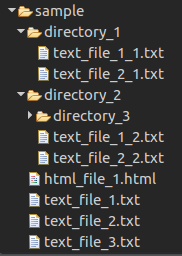
When the program is run, output to the console would be as shown below.
Output
List of files :
---------------
html_file_1.html
text_file_1.txt
text_file_3.txt
text_file_2.txt
List of directories :
---------------------
directory_1
directory_2
Handle null result from listFiles while reading a Java directory
The listFiles() method can return null when the path does not denote a directory, when the application does not have permission to read the directory, or when an I/O problem occurs. For practical programs, add a null check before using the returned array.
import java.io.File;

public class SafeDirectoryListExample {
    public static void main(String[] args) {
        File folder = new File("sample");
        File[] entries = folder.listFiles();

        if (entries == null) {
            System.out.println("Directory cannot be read or does not exist.");
            return;
        }

        for (File entry : entries) {
            if (entry.isFile()) {
                System.out.println("File: " + entry.getName());
            } else if (entry.isDirectory()) {
                System.out.println("Directory: " + entry.getName());
            }
        }
    }
}
This check avoids a NullPointerException when the directory path is wrong or inaccessible.
Get list of files of specific extension from the directory
Follow these steps to filter only the files that belong to a specific extension, such as .txt. This example checks files in the selected folder only. It does not include files from nested sub-directories.
Step 1 : Specify the folder.
File folder = new File("sample");Step 2 : Get the list of all items in the folder.
File[] listOfFiles = folder.listFiles();Step 3 : Check if an item in the folder is a file.
listOfFiles[i].isFile()Step 4 : Check if the file belong to specified file-type.
Check the extension of the filename with String.endsWith(suffix)
listOfFiles[i].getName().endsWith(fileExtension)Complete program to get the list of files, that belong to a specified extension type is shown below.
ListOfFilesExample.java
import java.io.File;
import java.util.ArrayList;
import java.util.List;
public class ListOfFilesExample {
	public static void main(String[] args) {
		List files = new ArrayList<>();
		List directories = new ArrayList<>();
		String fileExtension = ".txt";

		File folder = new File("sample");
		File[] listOfFiles = folder.listFiles();

		for (int i = 0; i < listOfFiles.length; i++) {
			if (listOfFiles[i].isFile()) {
				if(listOfFiles[i].getName().endsWith(fileExtension)){
					files.add(listOfFiles[i].getName());
				}
			}
		}

		System.out.println("List of .txt files :\n--------------------");
		for(String fName: files)	System.out.println(fName);
	}
}
When the program is run, Output to the console would be as shown below.
Output
List of .txt files :
--------------------
text_file_1.txt
text_file_3.txt
text_file_2.txt
Case-insensitive Java file extension filter
The earlier example works when the file extension case exactly matches the value in fileExtension. If your folder can contain names such as REPORT.TXT or notes.Txt, convert both the file name and extension to lower case before comparing.
import java.io.File;
import java.util.Locale;

public class CaseInsensitiveExtensionExample {
    public static void main(String[] args) {
        File folder = new File("sample");
        String extension = ".txt";

        File[] files = folder.listFiles();
        if (files == null) {
            System.out.println("Directory cannot be read.");
            return;
        }

        for (File file : files) {
            String fileName = file.getName().toLowerCase(Locale.ROOT);
            if (file.isFile() && fileName.endsWith(extension.toLowerCase(Locale.ROOT))) {
                System.out.println(file.getName());
            }
        }
    }
}
Get list of files with specific extension from the directory and its sub-directories
Follow these steps to collect files from the selected directory and all its sub-directories. This is a recursive approach: when the program finds a directory, it calls the same method again for that directory.
Step 1 : Specify the folder.
File folder = new File("D:"+File.separator+"Arjun"+File.separator+"sample");Step 2 : Get the list of all items in the folder.
File[] listOfFiles = folder.listFiles();Step 3 : Check if an item in the folder is a file.
listOfFiles[i].isFile()Step 4 : Check if the file belong to specified file-type.
Check the extension of the filename with String.endsWith(suffix)
listOfFiles[i].getName().endsWith(fileExtension)Step 5 : Check if an item in the folder is a directory.
listOfFiles[i].isDirectory()Step 6 : Get the list of files (beloging to specific file-type) recursively from all the sub-directories.
The complete program is given below.
FileListExtractor.java
import java.io.File;
import java.util.ArrayList;
import java.util.List;
public class FileListExtractor {

	List allTextFiles = new ArrayList();
	String fileExtension = ".txt";
	public static void main(String[] args) {
		FileListExtractor folderCrawler = new FileListExtractor();
		folderCrawler.crawlFold("sample");
		System.out.println("All text files in the folder \"sample\" and its sub directories are :\n---------------------------------------------------------------");
		for(String textFileName:folderCrawler.allTextFiles){
			System.out.println(textFileName);
		}
	}

	public void crawlFold(String path){
		File folder = new File(path);
		File[] listOfFiles = folder.listFiles();
		for (int i = 0; i < listOfFiles.length; i++) {
			if (listOfFiles[i].isFile()) {
				if(listOfFiles[i].getName().endsWith(fileExtension)){
					allTextFiles.add(listOfFiles[i].getName());
				}
			} else if (listOfFiles[i].isDirectory()) {
				// if a directory is found, crawl the directory to get text files
				crawlFold(path+File.separator+listOfFiles[i].getName());
			}
		}
	}
}
When the program is run, output to the console is
Output
All text files in the folder "sample" and its sub directories are :
---------------------------------------------------------------
text_file_2_1.txt
text_file_1_1.txt
text_file_2_1.txt
text_file_1_1.txt
text_file_2_2.txt
text_file_1_2.txt
text_file_1.txt
text_file_3.txt
text_file_2.txt
In recursive examples, printing only getName() shows the file name without its folder path. If two sub-directories contain files with the same name, the output may appear to contain duplicates. Print the full path when you need to identify the exact location of each file.
Java recursive file listing with full file paths
The following version prints the full path of each matching file. It also checks whether listFiles() returned null before looping through the directory entries.
import java.io.File;

public class RecursiveFilePathExample {
    public static void main(String[] args) {
        printFiles(new File("sample"), ".txt");
    }

    private static void printFiles(File folder, String extension) {
        File[] entries = folder.listFiles();

        if (entries == null) {
            return;
        }

        for (File entry : entries) {
            if (entry.isFile() && entry.getName().endsWith(extension)) {
                System.out.println(entry.getPath());
            } else if (entry.isDirectory()) {
                printFiles(entry, extension);
            }
        }
    }
}
Use getPath() or getAbsolutePath() when the directory structure matters. Use getName() only when the file name alone is enough.
Java 8 Files.walk example to list all files in folder and subfolders
Java 8 introduced stream-based APIs that make recursive directory traversal shorter. The Files.walk() method starts from a root path and visits the root, sub-directories, and files under it. The stream should be closed, so use try-with-resources.
import java.io.IOException;
import java.nio.file.Files;
import java.nio.file.Path;
import java.nio.file.Paths;
import java.util.stream.Stream;

public class FilesWalkExample {
    public static void main(String[] args) {
        Path root = Paths.get("sample");

        try (Stream<Path> paths = Files.walk(root)) {
            paths.filter(Files::isRegularFile)
                 .forEach(System.out::println);
        } catch (IOException e) {
            System.out.println("Error while reading directory: " + e.getMessage());
        }
    }
}
This program prints all regular files under the sample folder, including files inside nested sub-directories.
Java 8 Files.walk filter files by extension recursively
To list only files with a specific extension from a folder and its subfolders, add a filter on the file name.
import java.io.IOException;
import java.nio.file.Files;
import java.nio.file.Path;
import java.nio.file.Paths;
import java.util.Locale;
import java.util.stream.Stream;

public class FilesWalkExtensionExample {
    public static void main(String[] args) {
        Path root = Paths.get("sample");
        String extension = ".txt";

        try (Stream<Path> paths = Files.walk(root)) {
            paths.filter(Files::isRegularFile)
                 .filter(path -> path.getFileName()
                                     .toString()
                                     .toLowerCase(Locale.ROOT)
                                     .endsWith(extension))
                 .forEach(System.out::println);
        } catch (IOException e) {
            System.out.println("Error while reading directory: " + e.getMessage());
        }
    }
}
This approach is compact and useful when you are already using Java 8 or later. For very large directory trees, be careful with recursive traversal because it may visit many files and can take time depending on disk speed and permissions.
Common mistakes in Java directory listing programs
| Mistake | Why it causes a problem | Better approach |
|---|---|---|
Assuming listFiles() is never null | Wrong paths and unreadable directories can return null | Check the returned array before looping |
Using only getName() in recursive output | Files in different folders can have the same name | Print getPath() or getAbsolutePath() |
| Using case-sensitive extension checks unintentionally | .TXT and .txt are treated differently | Convert the file name to lower case before comparing |
Forgetting to close a Files.walk() stream | The stream can keep directory resources open | Use try-with-resources |
| Expecting non-recursive code to read sub folders | listFiles() lists only immediate entries | Use recursion or Files.walk() |
FAQs on listing files and sub-directories in Java
How do I list all files in a directory in Java?
Use File.listFiles() to get the entries inside a directory. Then check each entry with isFile() to print only files. This lists files directly inside the directory, not files inside nested folders.
How do I list files in subdirectories recursively in Java?
You can write a recursive method that calls itself when it finds a directory. In Java 8 or later, you can also use Files.walk() to traverse the folder tree and filter regular files.
How do I filter only .txt files in a Java folder?
Check whether the file name ends with .txt using endsWith(".txt"). For case-insensitive matching, convert the file name to lower case before comparing.
Why does listFiles return null in Java?
listFiles() can return null if the path is not a directory, the program has no read permission, or an I/O error occurs. Always check for null before using the returned array.
Should I use File or Path to list files in Java?
Use File for simple legacy examples and small programs. Use Path with Files.walk() for modern Java code, especially when you need recursive traversal and stream filtering.
Editorial QA checklist for Java directory listing tutorial
- Confirm that non-recursive examples are described as listing only immediate files and folders.
- Check that recursive examples clearly mention sub-directories and nested folders.
- Verify that new Java code examples use valid imports and correct PrismJS language classes.
- Ensure extension filtering examples explain case-sensitive and case-insensitive matching.
- Review all examples that call
listFiles()and explain the null result risk for real programs.
Conclusion
In this Java Tutorial, we learned how to list all the files and sub-directories in a given folder. We also learned how to filter files by extension, how to read files recursively from sub-directories, and how to use Java 8 Files.walk() for modern recursive directory traversal.