 TutorialKart.com
SAP ABAP Database Tables
SAP ABAP database tables are tables defined in the ABAP Dictionary and created in the underlying database of an SAP system. A database table stores data in rows and columns. Each row is a record, and each column is a field with a defined technical type, length, description, and key behavior.
In ABAP development, database tables are not just physical storage objects. They are dictionary objects that carry metadata used by ABAP programs, screens, search helps, validations, foreign key checks, and database access through Open SQL. For most application development, transparent tables are the main table type used to store master data and transaction data.
To define tables in ABAP dictionary, you need to define fields first, so to define a field, you need to specify data type, length and description.
Field = Data Element + Domain

Domain = Data type + Length

Data Element = Description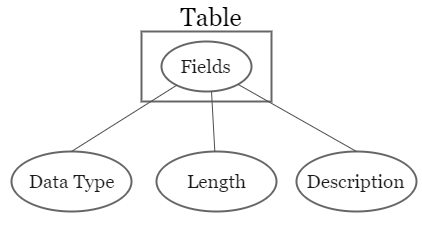
How SAP ABAP Database Tables Are Defined in the ABAP Dictionary
An ABAP database table definition usually contains the table name, delivery class, data class, size category, table fields, key fields, technical settings, and optional relationships such as foreign keys. The ABAP Dictionary stores this metadata and activates the table definition so that the database table can be generated or adjusted in the database.
A table field can refer to a data element. The data element provides the semantic meaning, field labels, and documentation. The data element normally refers to a domain, and the domain defines technical properties such as data type, length, fixed values, and value range. This reuse keeps table definitions consistent across SAP objects.
Important Components of an ABAP Database Table
| Component | Purpose in an ABAP table |
|---|---|
| Table fields | Columns that store individual values such as customer number, material number, date, amount, or status. |
| Key fields | Fields that uniquely identify a record or participate in the primary key. |
| Data element | Gives a field its business meaning, labels, and documentation. |
| Domain | Defines the technical type, length, and allowed value range. |
| Foreign key | Defines a relationship between a field and a check table, mainly for consistency and input help. |
| Technical settings | Control database-related settings such as buffering and expected table size in classical SAP GUI development. |
Types of ABAP Database Tables
Types of ABAP database tables
- Transparent tables
- Pool Tables
- Cluster tables
These three categories are important for understanding classical ABAP Dictionary concepts. In current SAP development, especially in SAP HANA and ABAP Cloud-based development, transparent database tables are the standard choice. Pool tables and cluster tables are mainly legacy concepts and should not be chosen for new application tables.
Transparent Tables in SAP ABAP
Transparent tables
Transparent tables are used to stare the application’s master data and transaction data.It is a one to one relationship with the tables in database (SAP database, SQL, Oracle, etc) i.e. the name of table, field names and the number of fields are similar in both DDIC and database (DB). In real time, an organization mostly works with transparent tables.
In a transparent table, the table definition in the ABAP Dictionary corresponds directly to a database table. The table name, field names, and technical structure are visible at database level. Examples of commonly discussed SAP tables include customer, material, accounting, and document-related transparent tables, depending on the SAP product and release.
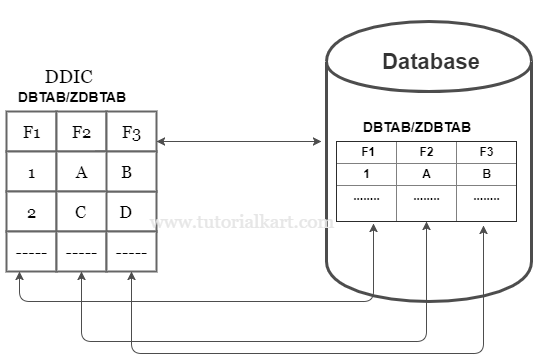
Use transparent tables when you need a normal persistent database table for business data. ABAP programs usually read and write transparent tables with Open SQL statements such as SELECT, INSERT, UPDATE, MODIFY, and DELETE.
Pool Tables in Classical SAP ABAP Systems
Pool tables
Pools tables are one to many relationship with the database tables. The system follows binary search while accessing the pool tables. These pool tables are used to store the internal controlling information.
A pooled table is a logical table that is stored with other pooled tables inside a table pool at database level. This design was used in older SAP systems to store many small tables together. For new development, use transparent tables instead of pooled tables.
Cluster Tables in Classical SAP ABAP Systems
Cluster tables
Cluster tables are many to on relationship with the database tables. The system follows linear search while accessing the cluster tables.
A cluster table is a logical table stored together with related cluster tables inside a table cluster. Several logical records can be stored in a compressed or encoded form in one physical database object. This was useful in older system designs but is not the recommended model for new ABAP database table development.
Transparent Table vs Pool Table vs Cluster Table in SAP ABAP
| Table type | Relationship with database table | Typical use | Use in new development |
|---|---|---|---|
| Transparent table | One ABAP Dictionary table maps to one database table. | Application master data and transaction data. | Recommended for normal persistent database tables. |
| Pool table | Many logical pooled tables are stored in one table pool. | Small internal or customizing-type data in older systems. | Legacy concept; avoid for new application design. |
| Cluster table | Several logical cluster tables are stored in one table cluster. | Related data stored together in older SAP designs. | Legacy concept; avoid for new application design. |
How to Create a Database Table in SAP ABAP
You can create database tables in SAP ABAP using transaction code SE11.
In classical SAP GUI development, the usual transaction for creating and maintaining ABAP Dictionary tables is SE11. In ABAP Development Tools, database tables can also be created as repository objects in an ABAP project. The exact tool depends on the SAP system, release, and development model used by your project.
- Open transaction SE11.
- Choose Database table and enter a table name, usually beginning with Z or Y for a custom table.
- Enter a short description for the table.
- Maintain delivery class and technical settings as required by the table purpose.
- Add table fields and mark the required key fields.
- Assign data elements or enter built-in types where appropriate.
- Maintain foreign keys and search helps when needed.
- Save, check, and activate the table.
Before creating a custom SAP ABAP database table, decide whether the data really needs a custom persistent table. In many cases, a standard SAP table, CDS view, customizing object, or extension mechanism may already exist.
How ABAP Programs Access Database Tables
ABAP programs normally access database tables through Open SQL. Open SQL is database-independent from the ABAP developer’s point of view, so the same ABAP statement can run on the supported database platform of the SAP system. In modern SAP landscapes, SAP HANA is common, but ABAP development should still follow the supported data access rules for the target system.
SELECT *
  FROM mara
  INTO TABLE @DATA(materials)
  UP TO 10 ROWS.
The example above reads records from a database table into an internal table. In real programs, avoid selecting all columns unless needed. Prefer selecting only the required fields and always consider keys, indexes, authorizations, and performance.
How to Find a List of Tables in SAP ABAP
To find SAP ABAP database tables, developers commonly use the ABAP Dictionary and repository search tools. The available options can vary by system authorization and development environment.
- Use SE11 to display a known table or search by table name pattern.
- Use SE16 or SE16N to display table contents when authorization is available.
- Use dictionary metadata tables such as DD02L for table definitions and DD03L for table fields.
- Use ABAP Development Tools search when working in Eclipse-based ABAP projects.
For example, a developer looking for custom tables may search for names beginning with Z or Y. A developer looking for a field across tables may search the field metadata rather than opening each table manually.
Binary Search and Linear Search in the Context of ABAP Tables
What is binary search and linear search?
Binary search : – The system divides total records into two equal parts, then the system starts searching in second half, if the record in not found in second half the system starts searching in first half.
Linear search : – The system starts searching the record from 1st record until the required record in found. Once the system finds the record, it stops the search.
In ABAP learning material, binary search and linear search are often discussed along with internal tables and older explanations of pooled or cluster storage. For practical ABAP programming, the most important point is to choose the correct data model and access pattern. Database reads should use suitable keys and where conditions; internal table reads should use the right internal table category and key.
SAP ABAP Database Table Design Checklist
- Use a transparent table for new persistent application data unless your project architecture says otherwise.
- Define clear key fields and avoid making the primary key wider than necessary.
- Reuse existing data elements and domains where they correctly match the business meaning.
- Add field labels and documentation so the table is understandable in tools and screens.
- Maintain foreign keys when the field should be checked against a related table.
- Avoid storing derived values that can be calculated reliably from existing data.
- Check whether a standard SAP table, CDS view, or extension option already exists before creating a custom table.
- Review table buffering carefully; incorrect buffering can cause stale data or unnecessary memory usage.
Common Mistakes with SAP ABAP Database Tables
- Creating a custom table without checking whether a standard object already exists.
- Using technical field names that do not clearly describe the stored data.
- Skipping data elements and domains even when reusable dictionary objects are available.
- Marking too many fields as key fields, which makes table access and maintenance harder.
- Reading all columns and all rows in ABAP when only a few fields are required.
- Ignoring authorization checks when displaying or changing table data through custom programs.
SAP ABAP Database Tables FAQ
What are the types of database tables in SAP ABAP?
The classical SAP ABAP database table types are transparent tables, pool tables, and cluster tables. Transparent tables are the normal table type used for application data. Pool and cluster tables are legacy concepts from older SAP designs.
How do you create a database table in SAP ABAP?
In classical SAP GUI, use transaction SE11, choose Database table, enter the table name, define fields and key fields, maintain technical settings, save the object, and activate it. In newer development environments, ABAP Development Tools may also be used depending on the system.
What database is used in SAP ABAP?
ABAP runs on the database platform supported by the SAP system. Many modern SAP systems use SAP HANA, but ABAP programs usually access data through Open SQL so that the data access remains aligned with the ABAP platform rules.
How can I get a list of all tables in SAP?
You can search tables in SE11, display table contents through SE16 or SE16N when authorized, or inspect dictionary metadata tables such as DD02L for table definitions and DD03L for field information.
Are pool tables and cluster tables still used for new ABAP development?
Pool tables and cluster tables are mainly relevant for understanding older SAP systems. For new ABAP application development, transparent database tables and modern data models such as CDS-based views are generally the appropriate direction.