 TutorialKart.com
SAP ABAP Operators
SAP ABAP operators are symbols or keywords used in expressions to perform calculations, compare values, combine conditions, or work with character strings. In an ABAP statement, operators work with operands such as variables, constants, literals, fields, and expressions.
The source code of SAP ABAP consists of statements and comments. A statement is usually made from ABAP keywords, operands, operators, and variables, and it ends with a period.
- Operand: A value or object on which an operator performs an operation. Examples include variables, constants, fields, and literals.
- Variable: A named memory location used to store a value during program execution.
- Expression: A combination of operands and operators that returns a value or a truth result.
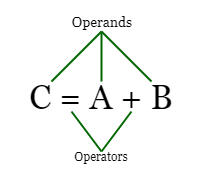
SAP ABAP operators are commonly grouped into the following categories.
- Arithmetic operators
- Comparison operators
- Logical operators
- Character and string operators
- Assignment operator
Spacing Rules for SAP ABAP Operators
In ABAP, operators and operands should be separated by spaces. This is especially important for assignment and arithmetic expressions because the ABAP parser reads the statement as separate tokens.
There should be at least one space between any type of operator. for e.g.
 	A= B :- Invalid
 	A =B :- Invalid
 	A = B :- Valid
A valid ABAP assignment statement also ends with a period.
DATA result TYPE i.

result = 10 + 5.
Arithmetic Operators in SAP ABAP
Arithmetic operators in SAP ABAP are used to perform mathematical calculations such as addition, subtraction, multiplication, division, exponentiation, and remainder calculation. In simple arithmetic statements, ABAP can use the implied COMPUTE operation, but modern code usually writes the expression directly.
| Operator | Description | Example |
| + | Adds two numeric values | 5 + 3 = 8 |
| – | Subtracts the second value from the first value | 5 – 3 = 2 |
| * | Multiplies two numeric values | 5 * 3 = 15 |
| / | Divides one numeric value by another numeric value | 5 / 2 = 2.5 |
| DIV | Performs integer division | 5 DIV 2 = 2 |
| MOD | Returns the remainder after integer division | 5 MOD 2 = 1 |
| ** | Calculates the power of a value | 5 ** 3 = 125 |
The following ABAP example shows arithmetic operators used with integer variables.
DATA: a      TYPE i VALUE 10,
      b      TYPE i VALUE 3,
      result TYPE i.

result = a + b.
WRITE: / 'Addition:', result.

result = a - b.
WRITE: / 'Subtraction:', result.

result = a * b.
WRITE: / 'Multiplication:', result.

result = a DIV b.
WRITE: / 'Integer division:', result.

result = a MOD b.
WRITE: / 'Remainder:', result.
Comparison Operators in SAP ABAP
Comparison operators in SAP ABAP compare two operands and return a logical result. They are used mainly in control statements such as IF, ELSEIF, WHILE, and CHECK.
| Operator | Keyword Form | Description | Example |
| < | LT | Less than | A < B or A LT B |
| <= | LE | Less than or equal to | A <= B or A LE B |
| > | GT | Greater than | A > B or A GT B |
| >= | GE | Greater than or equal to | A >= B or A GE B |
| = | EQ | Equal to | A = B or A EQ B |
| <> | NE | Not equal to | A <> B or A NE B |
Both symbolic and keyword forms are commonly seen in ABAP programs. Use one style consistently within the same program or team standard.
DATA: marks TYPE i VALUE 72.

IF marks GE 40.
  WRITE: / 'Passed'.
ELSE.
  WRITE: / 'Failed'.
ENDIF.
Logical Operators in SAP ABAP
Logical operators in SAP ABAP are used to combine or reverse conditions. They are useful when a decision depends on more than one comparison.
| Operator | Description | Example Use |
| AND | Returns true only when all conditions are true | IF A > B AND A > C. |
| OR | Returns true when at least one condition is true | IF A < B OR A < C. |
| NOT | Reverses a logical condition | IF NOT A = B. |
The following example uses AND to check two conditions before printing a message.
DATA: a TYPE i VALUE 20,
      b TYPE i VALUE 10,
      c TYPE i VALUE 15.

IF a GT b AND a GT c.
  WRITE: / 'A is the biggest value'.
ENDIF.
The NOT operator should be used carefully because it can make long conditions harder to read. When possible, write the condition in a direct form.
Character and String Operators in SAP ABAP
ABAP also provides operators for character-like data. These operators are useful when checking whether a string contains characters, follows a pattern, or matches part of another string.
| Operator | Meaning | Example |
| CO | Contains only | text CO ‘ABC’ |
| CN | Contains not only | text CN ‘ABC’ |
| CA | Contains any | text CA ‘0123456789’ |
| NA | Contains not any | text NA ‘0123456789’ |
| CS | Contains string | text CS ‘SAP’ |
| NS | Contains no string | text NS ‘SAP’ |
| CP | Covers pattern | text CP ‘A*’ |
| NP | Does not cover pattern | text NP ‘A*’ |
For string concatenation in newer ABAP syntax, the && operator joins character-like values into one string.
DATA first_name TYPE string VALUE 'SAP'.
DATA last_name  TYPE string VALUE 'ABAP'.
DATA full_text  TYPE string.

full_text = first_name && ' ' && last_name.

IF full_text CS 'ABAP'.
  WRITE: / full_text.
ENDIF.
Assignment Operator in SAP ABAP
The assignment operator = assigns the value of the expression on the right side to the variable on the left side. Although the same symbol is also used for equality comparison in conditions, the meaning depends on the statement context.
DATA total TYPE i.

" Assignment
total = 100.

" Comparison
IF total = 100.
  WRITE: / 'Total is 100'.
ENDIF.
Common Mistakes with SAP ABAP Operators
- Missing spaces around operators: Write
a = b, nota=b. - Forgetting the period at the end of a statement: ABAP statements must end with a period.
- Using symbolic and keyword comparison styles inconsistently: For example, mixing
>=andGEeverywhere can reduce readability. - Expecting normal division from DIV:
DIVreturns integer division, while/performs normal division depending on data type. - Confusing assignment with comparison:
=assigns a value in an assignment statement and compares values inside a condition.
SAP ABAP Operators Quick Reference
| Operator Category | Common Operators | Used For |
| Arithmetic operators | +, -, *, /, DIV, MOD, ** | Numeric calculations |
| Comparison operators | =, <>, <, <=, >, >=, EQ, NE, LT, LE, GT, GE | Comparing values |
| Logical operators | AND, OR, NOT | Combining or reversing conditions |
| Character operators | CO, CN, CA, NA, CS, NS, CP, NP | Checking character-like values |
| String concatenation | && | Joining string values |
| Assignment | = | Assigning a value to a variable |
Frequently Asked Questions on SAP ABAP Operators
What is an operator in SAP ABAP?
An operator in SAP ABAP is a symbol or keyword used to perform an operation on operands. For example, + adds numbers, EQ compares values, and AND combines conditions.
What are the main types of operators in SAP ABAP?
The main types of SAP ABAP operators are arithmetic operators, comparison operators, logical operators, character or string operators, and assignment operators.
What is the difference between = and EQ in SAP ABAP?
In a comparison condition, = and EQ both check whether two values are equal. In an assignment statement, = assigns the value on the right side to the variable on the left side.
What is the difference between DIV and / in SAP ABAP?
DIV performs integer division and returns the whole-number result. The / operator performs division and can produce a decimal result depending on the data type used.
Why are spaces required around ABAP operators?
ABAP statements are parsed as tokens. Spaces help separate operands, operators, and keywords correctly. For example, a = b. is valid, while compact forms such as a=b. should be avoided.
Editorial QA Checklist for SAP ABAP Operators
- Confirm that arithmetic examples show correct results, especially subtraction, division,
DIV, andMOD. - Check that all new ABAP code examples end statements with periods.
- Verify that comparison operators include both symbolic and keyword forms.
- Ensure the tutorial explains the difference between assignment
=and comparison=. - Keep code block classes PrismJS-compatible when adding future examples.