 TutorialKart.com
Structure of ABAP Program
An ABAP program has a defined structure so that declarations, processing logic, and reusable blocks are easy to read and maintain. A typical ABAP report program begins with an introductory statement such as REPORT, followed by global declarations, selection screen definitions if required, event blocks, and reusable procedures such as subroutines, methods, or function module calls.
ABAP program structure is important because SAP systems store and execute repository objects in an organized way. A clear layout also makes the program easier to debug, enhance, transport, and review in real projects.
Main Sections in the Structure of an ABAP Program
ABAP program consists the following structure
- Header
- Global Declarations
- Processing Logic
- Definition of Reusable Blocks
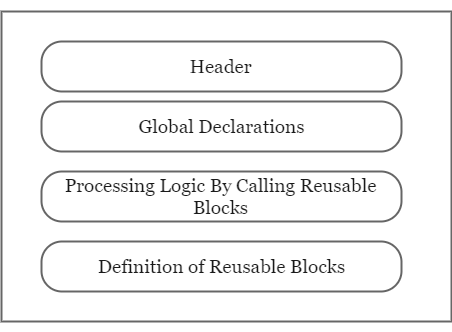
In a simple executable report, these sections usually appear in this order. In other ABAP program types, such as module pools or class pools, the same idea of separating declaration and processing logic is followed, but the exact event blocks and processing flow differ.
Header Section in an ABAP Program
Header
Header section provides the detailed information about the development and which is the standard template for all custom ABAP developments. The first statement of ABAP program starts with a word PROGRAM or REPORT. It is not mandatory to mention the program name, but for documentation purpose correct name of ABAP program should be used.
When the user creates a program, by default system inserts the first ABAP statement
- For module pools – PROGRAM <name of program>
- For executable pools – REPORT <name of report>
For executable report programs, REPORT is commonly used. For module pool programs, PROGRAM is used. Other repository object types may use other introductory statements, but the key point is that the first statement identifies the program category and starts the source code.
REPORT z_demo_sales_report.

* Program title: Demo sales report
* Purpose      : Display sample sales data
* Author       : Development team
Global Declaration Section in ABAP Program Layout
Global Declaration
Global declaration declares all the global variables
The global declaration section normally contains data objects, constants, types, tables, internal tables, work areas, field symbols, and selection-screen parameters that are needed by more than one processing block. In modern ABAP, keep global declarations limited to what is genuinely required across the program.
TYPES: BEGIN OF ty_employee,
         emp_id   TYPE i,
         emp_name TYPE string,
         city     TYPE string,
       END OF ty_employee.

DATA: gt_employee TYPE STANDARD TABLE OF ty_employee,
      gs_employee TYPE ty_employee.

PARAMETERS p_city TYPE string.
In this example, TYPES defines a reusable local structure, DATA declares internal table and work area variables, and PARAMETERS creates an input field on the report selection screen.
Processing Logic Section in ABAP Reports
Processing Logic
Processing logic block is used to implement the business logic and it is written for declaration.
In an executable ABAP report, the processing logic is commonly written inside event blocks. These event blocks are triggered by the ABAP runtime at specific stages of report execution. Common report events include INITIALIZATION, AT SELECTION-SCREEN, START-OF-SELECTION, and END-OF-SELECTION.
| ABAP report event | Purpose in program structure |
|---|---|
INITIALIZATION | Sets default values before the selection screen is displayed. |
AT SELECTION-SCREEN | Validates user input entered on the selection screen. |
START-OF-SELECTION | Contains the main report processing logic. |
END-OF-SELECTION | Runs after main data selection and can be used for final output preparation. |
INITIALIZATION.
  p_city = 'Chennai'.

AT SELECTION-SCREEN.
  IF p_city IS INITIAL.
    MESSAGE 'Enter a city' TYPE 'E'.
  ENDIF.

START-OF-SELECTION.
  PERFORM get_employee_data.
  PERFORM display_employee_data.
Reusable Blocks in ABAP Program Structure
Definition of Reusable Blocks
You can define reusable components once and you can call components wherever they are need for business logic.
Reusable blocks help avoid repeated code. In procedural ABAP, a common reusable block is a subroutine created using FORM and called using PERFORM. In object-oriented ABAP, reusable logic is usually placed in methods of local or global classes. Function modules and includes are also used in many SAP systems, depending on the design.
FORM get_employee_data.
  CLEAR gt_employee.

  gs_employee-emp_id = 1.
  gs_employee-emp_name = 'Anil'.
  gs_employee-city = p_city.
  APPEND gs_employee TO gt_employee.
ENDFORM.

FORM display_employee_data.
  LOOP AT gt_employee INTO gs_employee.
    WRITE: / gs_employee-emp_id, gs_employee-emp_name, gs_employee-city.
  ENDLOOP.
ENDFORM.
For new development, many projects prefer ABAP Objects and class methods for reusable logic. Still, understanding FORM routines is useful because many existing SAP systems contain procedural ABAP programs.
Typical ABAP Report Program Skeleton
The following skeleton shows how the main sections of an ABAP report can be arranged in a readable order.
REPORT z_demo_program_structure.

*---------------------------------------------------------------------*
* Global declarations
*---------------------------------------------------------------------*
TYPES: BEGIN OF ty_result,
         id   TYPE i,
         text TYPE string,
       END OF ty_result.

DATA gt_result TYPE STANDARD TABLE OF ty_result.

PARAMETERS p_limit TYPE i DEFAULT 10.

*---------------------------------------------------------------------*
* Processing logic
*---------------------------------------------------------------------*
INITIALIZATION.
  p_limit = 5.

AT SELECTION-SCREEN.
  IF p_limit LE 0.
    MESSAGE 'Limit must be greater than zero' TYPE 'E'.
  ENDIF.

START-OF-SELECTION.
  PERFORM build_result.
  PERFORM display_result.

*---------------------------------------------------------------------*
* Reusable blocks
*---------------------------------------------------------------------*
FORM build_result.
  "Build internal table data here
ENDFORM.

FORM display_result.
  "Display output here
ENDFORM.
Pre-requisites to Create an ABAP Program
Pre-requisites to create an ABAP programs
- Every SAP ABAP program should have a name and should begin with a letter Y or Z. The letters from A to X is reserved for SAP programs.
- Title : – Description of the program
- Type : – Types of ABAP program are
- Executable program,
- Include program and
- module pool program.
- Package : – Package a place where the program has to be created and stored. In real time package is created for each module/sub-module but not individuals.
In customer development, program names usually begin with Z or Y because SAP reserves the standard namespace for SAP-delivered objects. A package groups related repository objects and connects them to the transport system. For quick local practice, a temporary object may be used if transport is not required.
Types of ABAP Programs and Their Structure
Different ABAP program types have different purposes. The structure of a report program is not the same as the structure of a module pool or class pool.
| ABAP program type | Typical introductory statement | Purpose |
|---|---|---|
| Executable report program | REPORT | Runs directly and commonly uses report events and selection screens. |
| Module pool program | PROGRAM | Used for dialog programming with screens, PBO modules, and PAI modules. |
| Include program | No independent execution | Stores reusable source code included in another program. |
| Function group | FUNCTION-POOL | Contains function modules that can be called from other ABAP programs. |
| Class pool | CLASS-POOL | Contains a global ABAP class. |
For beginners, an executable report is usually the easiest type to understand because it has a direct execution flow and can display output immediately.
Characteristics of ABAP Program Syntax
Characteristics of ABAP program
- ABAP programming language is not a case sensitive. But it is a space sensitive, it should have space between the programming words.
- ABAP is only case sensitive during camparison
- Every ABAP statement should end with a period (full stop).
- The program name should not contain a special characters such as ” , – ( ) “, spaces, etc.
- The program name should be unique and description length upto 30 characters long.
ABAP keywords are generally not case-sensitive, so REPORT and report are treated as the same keyword. However, character data comparison can be affected by the actual values stored in variables. Every ABAP statement must end with a period, and missing periods are a common beginner error.
DATA lv_message TYPE string.

lv_message = 'Hello ABAP'.
WRITE lv_message.
In the example above, each complete statement ends with a period. ABAP also allows chained statements using a colon and commas, but beginners should first become comfortable with simple statement layout.
An Example of SAP ABAP Program
An Example of SAP ABAP Program
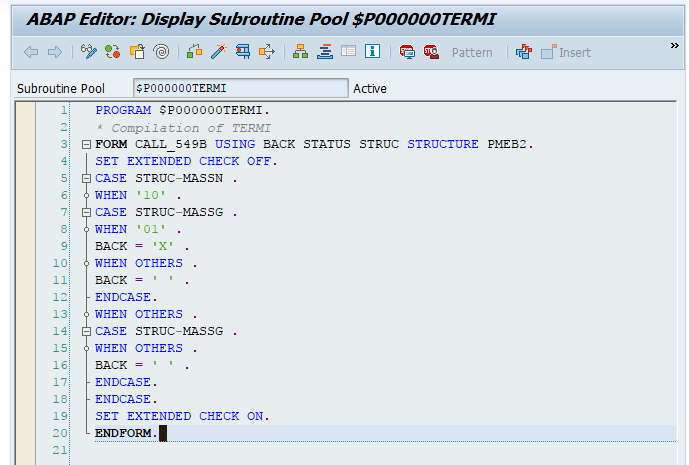
The example program follows the same basic layout: introductory statement, declarations, processing logic, and output logic. When reading any ABAP program, first identify the program type, then locate the global declarations, and then follow the event blocks or called routines in execution order.
Where ABAP Programs Are Stored in SAP
Where ABAP programs are stored?
ABAP Repository is a special memory in the database of SAP R/3 system and ABAP programs are stored in this memory.
ABAP programs are repository objects. They are stored in the SAP system database and managed through ABAP development tools such as the ABAP Workbench or ABAP Development Tools in Eclipse, depending on the system and development setup. Repository objects are usually assigned to packages and moved between systems using transports.
Common Mistakes in ABAP Program Structure
- Placing executable statements before required declarations in a way that makes the program hard to read.
- Forgetting the period at the end of an ABAP statement.
- Using too many global variables instead of passing data through parameters or methods.
- Putting all logic inside
START-OF-SELECTIONwithout reusable routines or methods. - Creating custom objects outside the
ZorYnamespace in customer systems. - Using an include program as though it can be executed independently.
Reference Links for ABAP Program Layout
For further reading, refer to the SAP ABAP program layout documentation, the SAP Learning ABAP syntax introduction, and the SAP ABAP cheat sheet on structures.
Structure of ABAP Program FAQs
What is the typical structure of an ABAP program?
A typical ABAP report program contains an introductory statement such as REPORT, global declarations, optional selection-screen definitions, event blocks for processing logic, and reusable blocks such as subroutines or methods.
What is a structure in SAP ABAP?
In ABAP, a structure is a complex data type made of multiple fields grouped under one name. A program can use structures to represent one record, such as an employee, material, customer, or sales document line.
What is the first statement in an ABAP report program?
For an executable report program, the first statement is commonly REPORT program_name.. For a module pool, the first statement is commonly PROGRAM program_name..
What are the different types of ABAP programs?
Common ABAP program types include executable report programs, module pool programs, include programs, function groups, class pools, interface pools, and type pools. Each type has a different purpose and source code structure.
Why do custom ABAP program names usually start with Z or Y?
In customer systems, Z and Y are commonly used for custom development names because the standard SAP namespace is reserved for SAP-delivered objects.
Editorial QA Checklist for ABAP Program Structure Tutorial
- Check that the tutorial clearly separates ABAP report header, global declarations, processing logic, and reusable blocks.
- Verify that ABAP statements in new examples end with periods.
- Confirm that ABAP code examples use the
language-abapPrismJS class withsyntaxfor syntax demonstrations. - Ensure references to
REPORT,PROGRAM,FUNCTION-POOL, andCLASS-POOLmatch their program type context. - Keep the existing ABAP program images and the existing SAP modules link unchanged.
- Avoid unsupported claims about SAP releases, transactions, or system behavior that can vary by installation.