 TutorialKart.com
Define Period Work Schedules in SAP HR Time Management
In SAP HR Time Management, a period work schedule defines the repeating sequence of daily work schedules for a specific period. It tells the system which daily work schedule applies on each day of the pattern, such as Monday to Friday working days and Saturday/Sunday weekly offs, or a rotating shift pattern spread across several weeks.
A period work schedule is an important part of work schedule configuration. It works together with daily work schedules, day types, public holiday calendars, and work schedule rules when SAP generates employee work schedules.
Where Period Work Schedules Fit in SAP HR Work Schedule Configuration
Period work schedules should be understood as the bridge between individual daily work schedule keys and the final work schedule rule assigned to employees. The daily work schedule defines one day. The period work schedule arranges those daily schedules into a repeating weekly or multi-week pattern. The work schedule rule then uses that pattern for actual work schedule generation.
| Configuration object | Purpose in SAP HR Time Management |
|---|---|
| Daily work schedule | Defines planned working time for one day, such as start time, end time, break, and planned hours. |
| Period work schedule | Defines the order of daily work schedules across a repeating period, usually one or more weeks. |
| Day type and holiday class | Controls how normal days, weekly offs, public holidays, and special days are treated. |
| Work schedule rule | Combines the period work schedule with holiday calendar, day type rules, and other settings to generate employee schedules. |
Weekly and Multi-Week Period Work Schedules in SAP HR
In SAP HR, period work schedules are commonly represented in weekly blocks. A simple period work schedule may contain one week, while rotating shift patterns may contain two or more weeks. Each day in the period is filled with the required daily work schedule key.
For example, a normal five-day work week can use a working daily work schedule from Monday to Friday and an off-day daily work schedule for Saturday and Sunday. A rotating shift pattern can use different daily work schedule keys across week 001, week 002, week 003, and so on.
Period work schedule can be represented as a week or month based on the requirements of client. In standard SAP system you can define only number of weeks but not monthly schedules. For monthly schedules, ABAP developers can customize the program as per the requirements.
Before You Define a Period Work Schedule in SAP HR
Before maintaining the period work schedule, confirm the basic Time Management configuration that the period work schedule depends on. This avoids incorrect work schedule generation later.
- Daily work schedule keys are already created for working days, weekly offs, and shift days.
- Personnel subarea grouping for work schedules is known and matches the relevant employee population.
- Holiday calendar and day type rules are already reviewed for public holidays and weekly offs.
- The required work pattern is documented clearly, including week 001, week 002, and any rotation sequence.
- Payroll and time evaluation teams have confirmed how the planned working time should be interpreted.
Navigation
| SAP R/3 Role Menu | Period work schedules |
| Transaction | SPRO |
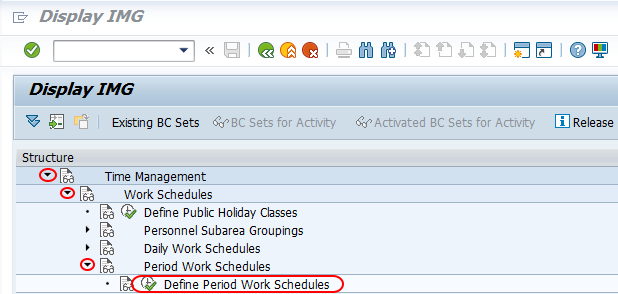
| SAP Menu Path | SPRO > Time Management > Work Schedules > Period Work Schedules > Define period work schedules. |
Configuration Steps to Define Period Work Schedules in SAP HR
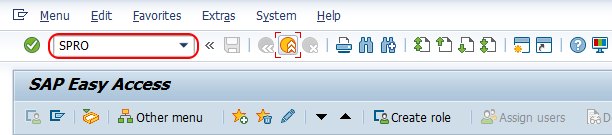
Step 1 : – Execute tcode “SPRO” from SAP command field.
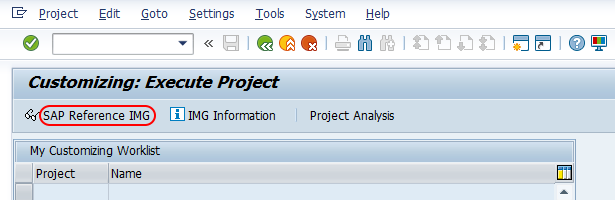
Step 2 : – Choose “SAP Reference IMG”
Step 3 : – Follow the navigation Time Management (TM) – Work schedules – Period work schedules and choose IMG activity “Define period work schedule”.
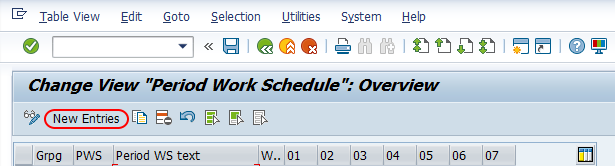
Step 4 : – From change view “Period work schedule” overview screen, click on new entries button to create new period work schedules in SAP as per the requirements of an organization.
Step 5 : – On new entries period work schedule screen, enter the following details.
- Grpg : – Enter the personnel subarea groups for DWS key i.e. 50.
- PWS : – Enter the four digit key that defines as period work schedule in SAP system.
- Period WS text : – Update the descriptive text of period work schedule.
- Week : – It specifies the shifts for the week. Enter the sequential number i.e. 001. You can define number of weeks but not monthly schedules in standard SAP.
- 01 – 07 : – 01 to 07 denotes as 7 days in a week that starts from Monday on wards. Here you need to update the daily work schedule key to working days.
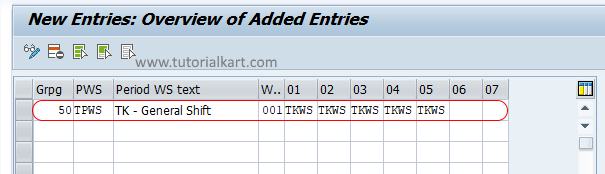
After maintaining period work schedule for week, choose save icon and the configured details of period work schedule in SAP system.
Example Period Work Schedule Pattern for a Five-Day Work Week
The exact daily work schedule keys depend on the client configuration. The following example shows the idea of how the seven days in a period work schedule are filled. Use the actual DWS keys from your SAP system instead of copying these sample values.
| Day position in PWS | Calendar day | Sample DWS key | Meaning |
|---|---|---|---|
| 01 | Monday | NORM | Normal working day |
| 02 | Tuesday | NORM | Normal working day |
| 03 | Wednesday | NORM | Normal working day |
| 04 | Thursday | NORM | Normal working day |
| 05 | Friday | NORM | Normal working day |
| 06 | Saturday | OFF | Weekly off |
| 07 | Sunday | OFF | Weekly off |
For rotating shifts, maintain additional week numbers and enter the DWS sequence for each week. The rotation should match the shift agreement or business requirement exactly.
Period Work Schedule and Work Schedule Rule Relationship in SAP HR
After defining the period work schedule, it is normally used in a work schedule rule. The work schedule rule contains the additional control information needed to generate employee work schedules, such as the public holiday calendar, day type selection rule, and period work schedule assignment.
If the work schedule rule is not maintained correctly, the period work schedule alone will not produce the expected planned working time for employees. Always check the final generated work schedule for the relevant personnel area, personnel subarea, employee subgroup grouping, and holiday calendar.
Period Work Schedule Testing After SAP HR Configuration
Once the period work schedule is saved and assigned through the work schedule rule, generate or display the work schedule for test employees. Check the planned hours, off days, public holidays, and rotation sequence across the full pattern.
- Check whether the correct daily work schedule appears for every day in week 001.
- For rotating patterns, check week 002 and later weeks, not only the first week.
- Verify that public holidays override or interact with the schedule as expected.
- Confirm that weekly offs are shown on the correct dates.
- Review whether time evaluation and payroll receive the intended planned working time.
Common SAP HR Period Work Schedule Configuration Mistakes
- Using the wrong personnel subarea grouping: The PWS may not be available where it is needed if the grouping does not match the employee population.
- Maintaining only one week for a rotating pattern: Shift patterns that rotate across multiple weeks need each week to be entered in sequence.
- Confusing PWS with daily work schedule: A daily work schedule defines one day, while a period work schedule arranges daily schedules across the period.
- Not checking holidays: A PWS pattern should be tested with public holidays and day type rules before production use.
- Skipping work schedule generation testing: The configuration should be checked in the generated work schedule, not only in the Customizing screen.
Editorial QA Checklist for SAP HR Period Work Schedules
- Does the tutorial explain period work schedule as a sequence of daily work schedules rather than a single day setup?
- Are the SPRO navigation path and existing SAP screenshots preserved exactly?
- Does the article explain how PWS connects to daily work schedules and work schedule rules?
- Are multi-week and rotating shift patterns explained without assuming one fixed client policy?
- Do the FAQ answers clearly separate period work schedules from period parameter, IT0001, and work schedule rule concepts?
FAQs on Period Work Schedules in SAP HR
What is a period work schedule in SAP HR?
A period work schedule in SAP HR is a repeating sequence of daily work schedules. It defines which daily work schedule applies to each day in a week or multi-week pattern.
What is the difference between a daily work schedule and a period work schedule?
A daily work schedule defines planned working time for one day. A period work schedule arranges daily work schedule keys across several days or weeks to form a repeating work pattern.
What is a work schedule rule in SAP HR?
A work schedule rule combines the period work schedule with other settings such as holiday calendar, day type rules, and work schedule generation controls. It is used to generate planned working time for employees.
What is a period parameter in SAP HR?
A period parameter is a separate SAP HR concept that is commonly used in payroll period setup to define the period frequency, such as monthly or weekly. It is not the same as a period work schedule in Time Management.
What is a 4-3-3-4 work schedule in SAP HR?
A 4-3-3-4 work schedule usually refers to a rotating pattern with blocks of working days and off days, but the exact meaning depends on the client policy. In SAP HR, it should be configured by entering the correct DWS sequence across the required period work schedule weeks.
Successfully we have defined period work schedules in SAP HR.