 TutorialKart.com
Define Group Personnel Subareas for Attendances and Absences in SAP HR
In this SAP HR Tutorial, you will learn how to define group personnel subareas for attendances and absences step by step. This configuration assigns a personnel subarea grouping for attendance and absence types so that SAP Time Management can apply the right rules for each employee location or personnel subarea.
A personnel subarea in SAP HR is a subdivision of a personnel area. It is commonly used to represent a plant, branch, office, work location, or similar HR grouping. For Time Management, personnel subareas can be grouped so that multiple locations share the same absence and attendance type rules when their policies are identical.
Based on the absence types, personnel subareas grouping is given. If two locations have same leave type, grouping number is assigned or different number is assigned.
Why Personnel Subarea Grouping Is Required for Attendance and Absence Types
The personnel subarea grouping for attendances and absences controls which attendance and absence type catalog applies to employees in a personnel subarea. For example, two branches may use the same sick leave, casual leave, and overtime attendance types. In that case, both personnel subareas can use the same grouping. If another branch has different leave rules, it can be assigned a different grouping.
This grouping is used later while defining absence types, attendance types, absence quotas, attendance quotas, counting rules, and related Time Management settings. It helps avoid duplicate configuration when the same rule applies to several personnel subareas.
Important SAP Time Management Configurations Before PS Grouping
Before maintaining this grouping, review the related Time Management settings. These settings work together when an employee’s attendance, absence, or quota is processed.
- Define daily work schedules in SAP
- Define period work schedules in SAP
- Define day types in SAP
- Define absences types
- Define groupings for absence types
SAP HR Navigation for Group Personnel Subareas for Attendances and Absences
| SAP R/3 Role Menu | Group Personnel Subareas for Attendances and Absences |
| Transaction code | SPRO |
| SAP Path | Time Management > Time data recording and administration > Absences > Absences catalog > Group PS for attendances and absences. |
The activity is maintained through the SAP Implementation Guide. The menu text can vary slightly by SAP release, but the purpose remains the same: assign the correct attendance and absence grouping to each personnel area and personnel subarea combination.
Steps to Define Group Personnel Subareas for Attendances and Absences in SAP
Step 1: Execute SPRO for SAP Reference IMG
Step 1 : – Execute tcode “SPRO” from SAP command field.
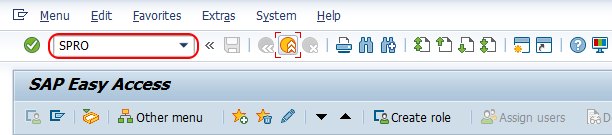
Step 2: Open Display SAP Reference IMG
Step 2 : – Choose “Display SAP Reference IMG” or press function key F5 from your keyboard.
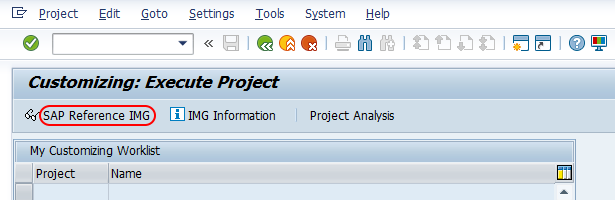
Step 3: Open Group PS for Attendances and Absences in SAP IMG
Step 3 : – From display SAP IMG screen, follow the navigation menu Time management – Time data recording and administration – Absences – Absences catalog and choose img activity of group personnel subareas for attendances and absences.
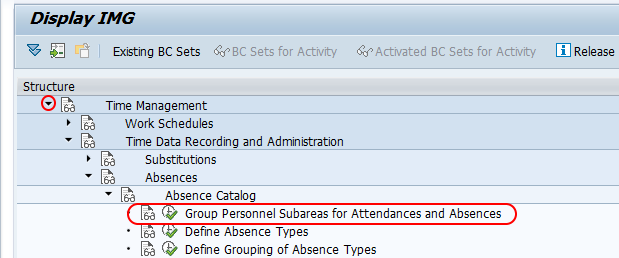
Step 4: Use Position to Find the Personnel Area and Personnel Subarea
Step 4 : – From change view personnel subarea groupings for absence/attendance type screen, choose position button and enter. Now your personnel area key (TK16) displays on top of the scree, so you can easily assigned PS group to your personnel areas.
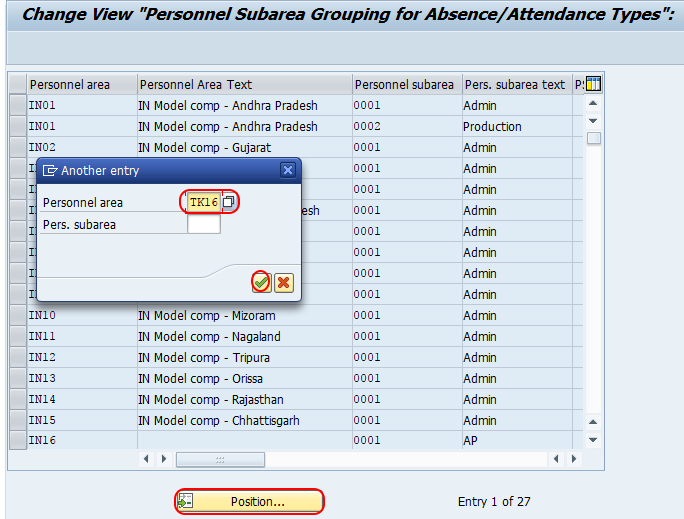
The Position function is useful when the system contains many personnel areas and personnel subareas. Enter the required personnel area and personnel subarea so that you can maintain the grouping for the correct assignment line.
Step 5: Assign the Personnel Subarea Grouping Code for Absence and Attendance Types
Step 5 : – Now assign personnel subarea code groupings in the given field for respective personnel areas.
Note : – You can any number from 01-99 for PS grouping and it is not required to match with PS grouping for work schedule.
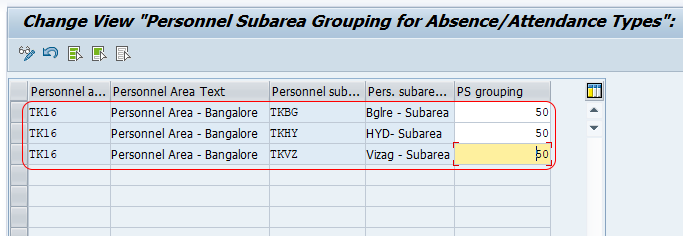
Choose save icon and save the configured PS grouping assignment details in SAP system.
If the system asks for a customizing request, select the correct transport request according to your project procedure. The grouping assignment should be transported together with the related absence and attendance configuration so that the rules remain consistent in the target system.
How to Decide Same or Different PS Grouping for Attendances and Absences
Use the same personnel subarea grouping when the attendance and absence policies are the same. Use different groupings when rules are different for leave types, attendance types, quota rules, holiday handling, or time entry checks.
| Business situation | Recommended grouping decision |
|---|---|
| Two locations use the same annual leave, sick leave, and casual leave rules | Assign the same PS grouping for attendances and absences. |
| One location has additional leave types not used by another location | Use a different PS grouping for the location with different rules. |
| Factory employees and office employees have different absence quota rules | Use separate groupings if the rule difference is maintained through attendance or absence configuration. |
| Only the work schedule is different, but absence and attendance type rules are identical | The same attendance and absence PS grouping may still be used. |
| A country-specific legal leave type applies only to selected personnel subareas | Use a separate grouping for the affected personnel subareas. |
Example of Personnel Subarea Grouping for Absence and Attendance Rules
Assume a company has three personnel subareas: Hyderabad Office, Chennai Office, and Factory Unit. Hyderabad and Chennai follow the same leave policy, while Factory Unit has different attendance and absence rules.
| Personnel subarea | Attendance and absence policy | PS grouping |
|---|---|---|
| Hyderabad Office | Office leave policy | 01 |
| Chennai Office | Office leave policy | 01 |
| Factory Unit | Factory attendance and absence policy | 02 |
With this setup, absence types and attendance types can be configured once for grouping 01 and reused for both office personnel subareas. Grouping 02 can have separate absence and attendance rules for factory employees.
Relationship Between PS Grouping, Absence Types, Attendance Types, and Quotas
The personnel subarea grouping for attendances and absences is not a leave type by itself. It is a grouping key used by SAP Time Management configuration. After assigning the grouping, you still need the relevant absence type, attendance type, and quota configuration based on the business requirement.
- Absence types use the grouping to control which leave categories are available for a personnel subarea.
- Attendance types use the grouping to control which attendance categories are available for time entry.
- Absence quotas may use related groupings and counting rules to determine entitlement and deduction.
- Time evaluation and payroll can be affected indirectly when absence or attendance records are processed.
For this reason, a grouping change should be tested with actual employee time records before it is moved to production.
Testing Personnel Subarea Grouping for Attendances and Absences
After saving the grouping, test whether the correct absence and attendance types are available for employees in the assigned personnel subarea. Testing should include at least one employee from each affected personnel subarea.
- Open the employee master data and confirm the personnel area and personnel subarea assignment.
- Try to record an absence for the employee and check whether the expected absence types are available.
- Try to record an attendance and check whether the expected attendance types are available.
- Check whether the correct absence quota is deducted, if the absence type is quota relevant.
- Test an employee from another personnel subarea to confirm that different rules apply where required.
- Confirm that the grouping does not conflict with work schedule, holiday calendar, or day type settings.
Common Mistakes in Group Personnel Subareas for Attendances and Absences
| Mistake | What to check |
|---|---|
| Using one grouping for personnel subareas with different leave policies | Create separate groupings where absence or attendance rules differ. |
| Confusing this grouping with work schedule grouping | Remember that the attendance and absence PS grouping does not need to match the work schedule grouping. |
| Changing grouping without checking absence type configuration | Review absence types, attendance types, and quota configuration that depend on the grouping. |
| Maintaining the grouping for the wrong personnel subarea | Use the Position function and verify the personnel area and personnel subarea before saving. |
| Testing only one location after a grouping change | Test each affected personnel subarea because the same grouping may be shared by multiple locations. |
Editorial QA Checklist for SAP HR PS Grouping Tutorial
- Confirm that the tutorial explains the purpose of grouping personnel subareas for attendances and absences.
- Check that the SAP IMG path and SPRO transaction are shown clearly.
- Verify that the relationship with absence types, attendance types, and quotas is explained without treating the grouping as a leave type.
- Ensure the note about grouping values 01-99 and their independence from work schedule grouping is retained.
- Confirm that all screenshots and existing internal SAP HR links remain unchanged.
FAQs on Group Personnel Subareas for Attendances and Absences in SAP HR
What is personnel subarea grouping for attendances and absences in SAP HR?
It is a grouping key assigned to personnel subareas so that SAP Time Management can determine which attendance and absence type rules apply to employees in those personnel subareas.
What is the personnel subarea in SAP HR?
A personnel subarea is a subdivision of a personnel area. It can represent a branch, plant, office, or other HR location and is used in several SAP HR configuration areas, including Time Management.
Can two personnel subareas use the same attendance and absence grouping?
Yes. If two personnel subareas follow the same attendance and absence rules, they can be assigned the same grouping. If the rules differ, maintain different grouping values.
Does attendance and absence PS grouping have to match work schedule grouping?
No. The grouping for attendances and absences does not have to match the personnel subarea grouping used for work schedules. Use each grouping according to the specific configuration requirement.
Is time and attendance part of SAP HR?
Yes. Time and attendance processing is part of SAP HR Time Management. It includes attendance recording, absence recording, work schedules, quotas, and related time data checks.
Successfully we have configured personnel subarea groups for absences and attendances in SAP HR.