 TutorialKart.com
Define Authorization Key for WBS in SAP PS
In SAP Project System, an authorization key for WBS is used with a WBS user status profile to restrict who can set or delete specific user statuses on a Work Breakdown Structure element. When a user tries to set or delete a protected user status, the SAP system performs an authorization check based on the authorization key assigned to that status.
This configuration is maintained using transaction code BS52. The key created here can later be assigned in the user status profile so that only users with the required authorization can perform the controlled status change for WBS elements.
Where the WBS Authorization Key Is Used in SAP PS
The authorization key is not used by itself. It becomes meaningful when it is linked to a user status in a status profile for WBS elements. For example, a project team may allow most users to view or update a WBS element, but restrict actions such as approving, locking, technically closing, or deleting a specific user status to selected roles only.
- WBS element: The project structure object on which the user status is applied.
- User status profile: The profile that defines allowed user statuses and status transitions.
- Authorization key: The key that protects selected status actions from unauthorized users.
- User authorization role: The SAP role that gives a user permission to use the protected authorization key.
Before creating the key, decide which WBS user status needs control and which project users should be allowed to perform that action. This avoids creating unused or unclear authorization keys in the system.
Navigation to Define Authorization Key for WBS
| SAP R/3 Role Menu | Define Authorization key forWBS |
| Transaction code | BS52 |
| SAP IMG Path | SPRO > Project System > Structures > Operative structures > Work breakdown structures > WBS user status profile > Define authorization key for work breakdown structure. |
Prerequisites Before Maintaining Authorization Key for WBS
Check the following points before you maintain the authorization key in transaction BS52.
- You should have configuration authorization for Project System customizing.
- The business requirement for WBS user status control should be clear.
- The naming convention for authorization keys should be agreed with the SAP security or basis team.
- The related user status profile should be reviewed so the key can be assigned to the correct status action later.
- If the configuration is done in a development system, a customizing transport request should be available for saving the change.
Configuration Steps to Define Authorization Key for WBS Using BS52
Learn how to configure authorization key for WBS step by step using transaction code BS52.
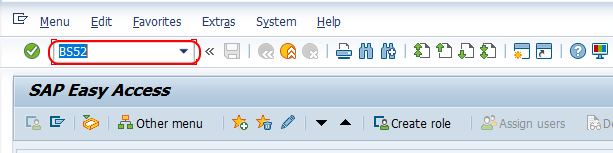
Step 1 : – Execute tcode “BS52” from SAP command field.
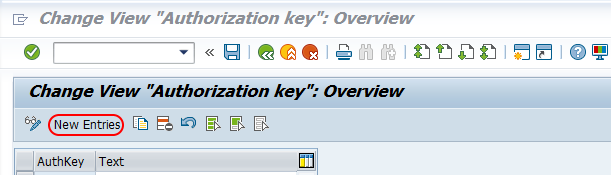
Step 2 : – On change view authorization key overview screen, choose new entries button for maintaining new authorization key WBS in SAP system.
Step 3 : – On new entries authorization key screen, update the following details.
- AuthKey : – Enter the key that defines as authorization key for WBS in SAP system.
- Text : – Update the descriptive text of authorization text in the given field.
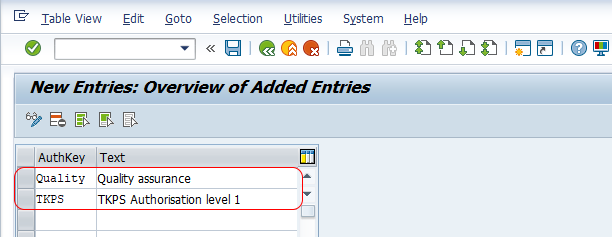
Choose save icon and save the configured authorization key in SAP.
Field Notes for WBS Authorization Key Maintenance
| Field | What to enter | Editorial note for SAP PS configuration |
|---|---|---|
| AuthKey | Enter a short key such as an internal project approval or control key. | Use a naming convention that can be understood by both SAP PS consultants and the security team. |
| Text | Enter a meaningful description for the authorization key. | The text should explain the purpose of the key, such as controlling approval, closure, or restricted WBS status changes. |
After saving the entry, the authorization key is available for assignment in the relevant WBS user status profile. The next configuration step is usually to maintain or review the user status profile and assign the key to the status where the authorization check is required.
Example Scenario for Authorization Key in WBS User Status
Assume a company uses a WBS user status called APPD – Approved. The project manager should be allowed to set this status, but project team members should not be able to approve the WBS element. In this case, an authorization key can be created in BS52 and assigned to the approved user status in the WBS status profile.
When a user tries to set or delete that protected user status, the system checks the user authorization. If the user does not have the required authorization, the status change is not allowed. This helps keep important WBS status changes controlled through SAP roles instead of relying only on manual process discipline.
Common Issues While Using Authorization Key for WBS
- Key created but no restriction happens: The key may not yet be assigned to the relevant user status in the WBS status profile.
- User cannot change the WBS status: The user role may not contain the required authorization for the key assigned to that status.
- Wrong users can still change the status: Review both the status profile configuration and the role authorization values maintained by the security team.
- Authorization check works in one system but not another: Check whether the customizing transport and role changes were moved correctly to the target system.
- Too many unclear keys exist: Clean naming and descriptive text help avoid duplicate keys for the same WBS control requirement.
Difference Between Authorization Key and Authorization Object in SAP
An authorization key is a configuration value used in application customizing, such as WBS user status control in SAP PS. An authorization object is part of the SAP security concept and is maintained in roles to control what a user can do. In practice, the SAP PS consultant normally defines and assigns the authorization key, while the SAP security consultant ensures that the required authorizations are included in the correct user roles.
If a user receives an authorization error while changing a protected WBS user status, check both sides: the WBS status profile assignment and the authorization values in the user role.
QA Checklist for SAP PS WBS Authorization Key Configuration
- Confirm that the authorization key created in BS52 has a clear business purpose.
- Confirm that the key is assigned only to the WBS user status actions that need restriction.
- Test the status change with an authorized project user.
- Test the same status change with an unauthorized user and verify that the system blocks the action.
- Confirm that the SAP security role includes the required authorization values before moving the change to production.
FAQs on Defining Authorization Key for WBS in SAP PS
What is an authorization key for WBS in SAP PS?
An authorization key for WBS is a configuration key used to control whether a user is allowed to set or delete a protected user status on a WBS element. It is mainly used with WBS user status profiles.
Which transaction code is used to define authorization key for WBS?
Transaction code BS52 is used to define authorization key for WBS in SAP Project System customizing.
Why does the WBS authorization key not restrict users after saving it?
Creating the key in BS52 only makes it available for use. To enforce a restriction, assign the key to the relevant user status in the WBS status profile and ensure the user roles are maintained correctly.
Can the same authorization key be used for multiple WBS user statuses?
Yes, the same authorization key can be reused if the same group of users should be allowed to perform those protected status actions. Use separate keys when the authorization requirement is different.
Who usually maintains the authorization key and user role access?
The SAP PS consultant usually maintains the WBS authorization key and status profile configuration. The SAP security or basis team usually maintains the role authorizations required for users to pass the authorization check.
Successfully we have learned how to define authorization key for WBS in this SAP PS tutorial.