 TutorialKart.com
How to define special characters for Projects in SAP PS
In SAP PS, special characters for projects are maintained as part of the project coding mask settings. These characters control how project definitions and WBS element numbers are entered, separated, and checked in the Project System module.
In this SAP PS tutorial, you will learn how to define special characters for project coding, what each field in transaction OPSK means, and what to check before saving the configuration.
SAP PS special characters for project coding mask – navigation
Navigation
| SAP R/3 Role Menu | Project coding mask |
| Transaction Code | OPSK |
| SAP Menu | SPRO > Project system > Structures > Operative structures > Work breakdown structures > Project coding mask > Define special characters for project |
You can use this activity when your organization wants project numbers to follow a fixed structure, such as a project key followed by separators and WBS levels. The configuration helps users enter project and WBS numbers consistently.
What special characters mean in SAP PS project numbers
In SAP Project System, a project definition represents the overall project, while WBS elements break the project into structured levels. The project coding mask defines how these IDs are formatted. Special characters are used mainly as separators or entry aids in these IDs.
For example, a project number may be entered with a separator between logical parts of the number. The exact format depends on the coding mask configured for your SAP system. The special character setting should be consistent with the project coding masks used by the business.
Important: Do not confuse SAP PS project special characters with special characters allowed in SAP passwords or other SAP key fields. Password rules and key-field rules belong to different configuration areas. This tutorial is only about special characters used for SAP PS project coding masks.
Configuration steps to define special characters for Projects in SAP
In this activity, you specify how a project is coded for editing. You can maintain the parameters for editing the project number by using the following configuration steps.
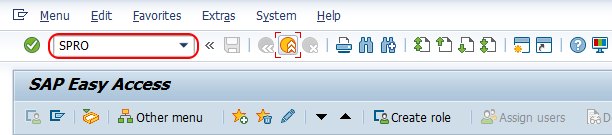
Step 1: Execute transaction code SPRO from the SAP command field.
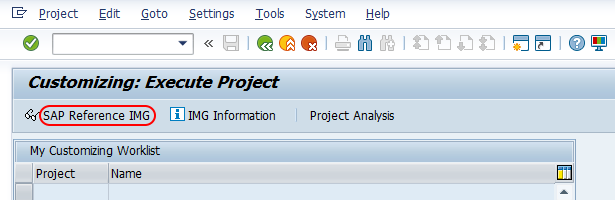
Step 2: Choose SAP Reference IMG.
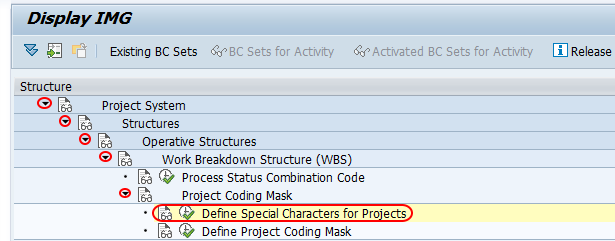
Step 3: Follow the navigation path Project system > Structures > Operative structures > Work breakdown structures > Project coding mask and choose the IMG activity Define special characters for project.
Step 4: In the next screen, under Change View Special Characters in Project Number: Overview, maintain the required project coding parameters.
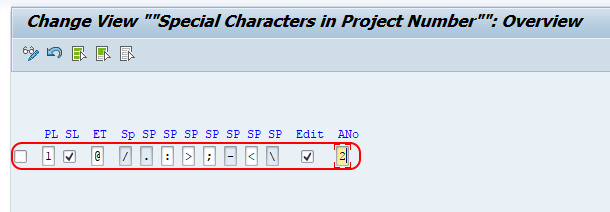
Field values in SAP OPSK special characters for Projects screen
Maintain the following details according to the project coding design used in your SAP PS implementation.
- PL: Project length specifies the length for project coding for both the project definition and WBS element. You can assign up to 5 places.
- SL: Structure length check specifies whether the project structure length should be equal to the number of characters maintained in project length.
- ET: Entry tool is a special character used to enter WBS elements faster.
- SP: Special character separates WBS element numbers in the project coding structure. Avoid the special characters
;,+,?, and%. - Edit: If you select this indicator, only coded project numbers are used within the Project System.
- Ano: Automatic number assignment specifies whether numbers are assigned automatically to WBS elements.
After maintaining the required details, choose the save icon and save the configured details.
Checks before saving SAP PS project special character settings
Before saving the configuration, review the project coding mask design with the project structure used by your organization. A small mismatch in length or separator settings can make project and WBS number entry difficult for users.
- Check whether the project length matches the intended project definition format.
- Confirm that the separator character is easy to read and does not conflict with restricted or reserved characters.
- Check whether the structure length indicator is required for your project numbering approach.
- Confirm whether automatic WBS number assignment is needed for the project coding process.
- Test the coding mask and special character settings in a non-production client before using them in production.
Common issues while defining special characters for Projects in SAP PS
| Issue | Likely reason | What to check |
|---|---|---|
| Project or WBS number is not accepted | The entered number does not match the coding mask | Check project length, separator, and structure length settings |
| Separator does not behave as expected | Special character is not maintained correctly | Check the SP and ET values |
| Users cannot enter uncoded project numbers | Edit indicator is selected | Review whether only coded project numbers should be allowed |
| Automatic numbering is not working as expected | Automatic number assignment is not aligned with the coding setup | Check the Ano indicator and related project coding settings |
FAQs on SAP PS special characters for Projects
What special characters are allowed in SAP PS project coding?
Allowed special characters depend on the project coding mask configuration in SAP PS. In the special character field for WBS separation, avoid ;, +, ?, and %. Always test the selected separator with your project coding mask before using it in production.
What is the transaction code to define special characters for Projects in SAP?
The transaction code is OPSK. You can also reach the same activity through SPRO under Project System > Structures > Operative structures > Work breakdown structures > Project coding mask.
What is the project definition in SAP PS?
A project definition is the top-level object that identifies and controls a project in SAP Project System. WBS elements are created under the project definition to represent the structure and work packages of the project.
Is the SAP password special character list used for SAP PS project numbers?
No. SAP password special character rules and SAP PS project coding mask rules are separate. For project numbers, follow the project coding mask and special character settings maintained for SAP Project System.
Can I change SAP PS project special characters after projects are created?
Changes should be handled carefully because existing project and WBS numbers may already follow the earlier coding pattern. Review the impact, test in a non-production system, and follow your SAP change process before changing settings used by active projects.
QA checklist for SAP PS project special character tutorial
- Confirm the transaction code
OPSKand SPRO navigation are shown correctly. - Confirm the tutorial explains project special characters in relation to project coding masks and WBS element numbering.
- Confirm the field explanations for PL, SL, ET, SP, Edit, and Ano are clear.
- Confirm the restricted separator examples
;,+,?, and%are not recommended for the SP field. - Confirm the article does not mix SAP PS project-number rules with unrelated SAP password special-character rules.
SAP PS project special characters configuration summary
Successfully we have defined special characters for project in SAP PS. The key point is to maintain the project length, separator, structure length check, entry tool, and numbering indicators according to the project coding mask used by your business.