 TutorialKart.com
There is a difference between the field label and the field API name in Salesforce. The label is the name users see on page layouts, record pages, reports, and forms. The API name is the technical name used by Apex, SOQL, formulas, validation rules, integrations, and metadata tools.
For standard fields, the API name often looks like the field name, for example Name, Phone, or CreatedDate. For custom fields, Salesforce appends __c, for example GST_Number__c. Custom objects also use __c, for example Hospital__c. When writing SOQL, always use the API name, not the display label.
How to know API Name of Fields
In Lightning Experience, the usual path is Setup | Object Manager | Object Name | Fields & Relationships. In Salesforce Classic, the older setup path for standard objects appears as Setup | Customize | Object | Fields. The screenshots below show the older navigation, but the same idea applies: open the object, then check the field list for the field API name.
To know API name for a standard object navigate to Setup | Customize | Object | Fields.
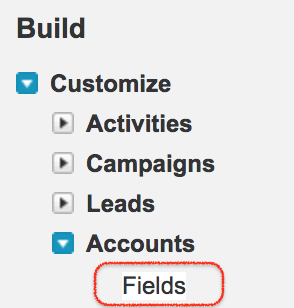
Here we are getting to know API name for Standard Object Accounts. Click on Fields as shown above.
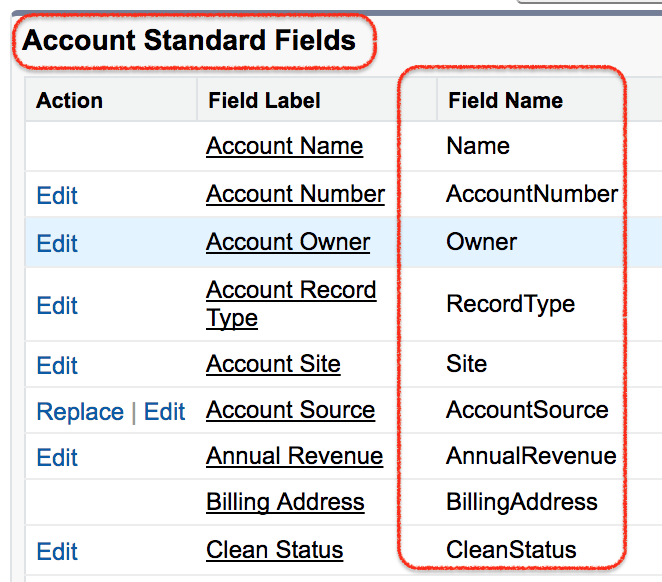
Now go to Standard fields section and we get some list of Standard fields as shown above. For standard fields, the field name shown in setup is commonly the API name used in SOQL. Examples include Id, Name, OwnerId, CreatedDate, and LastModifiedDate.
Field label vs field API name in Salesforce SOQL
A field label can contain spaces and can be changed for business users. A field API name is the stable developer-facing name. If a field label is Customer GST Number, its API name may be Customer_GST_Number__c. SOQL requires the API name.
| Salesforce item | Example label | Example API name | Where it is used |
|---|---|---|---|
| Standard object | Account | Account | SOQL FROM clause, Apex, integrations |
| Custom object | Hospital | Hospital__c | SOQL FROM clause, Apex, integrations |
| Standard field | Account Name | Name | SOQL SELECT and WHERE clauses |
| Custom field | Hospital Code | Hospital_Code__c | SOQL SELECT and WHERE clauses |
| Custom relationship | Hospital | Hospital__r | Relationship fields in SOQL |
Do not copy a page layout label directly into a SOQL query unless you have confirmed that it is also the API name. A label such as Account Name will not work in SOQL if the actual API name is Name.
API name for Account Custom Fields
To know API name for Account custom fields navigate to Accounts custom field & relationships.
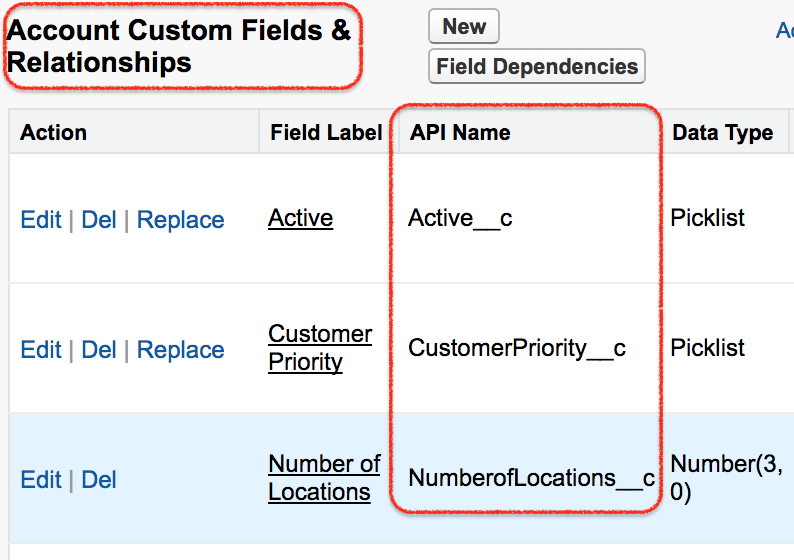
Here we find API name for Account custom fields are added with __c at the end. For Custom object, custom field the API name is appended at the end.
For example, if the Account object has a custom field with the label Customer Type, its API name may be Customer_Type__c. A SOQL query must use Customer_Type__c.
SELECT Id, Name, Customer_Type__c
FROM Account
WHERE Customer_Type__c = 'Direct'
API name for Custom Objects and Custom fields in Salesforce
Navigate to Build | Create | Object .
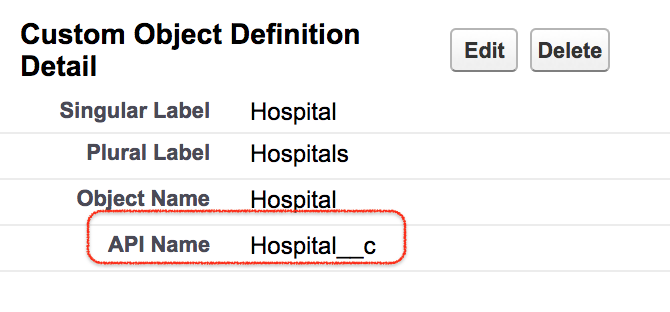
Now select any custom object. The API name for custom object is present in the object definition page. Open object definition page as show above. The API name for custom object Hospital is Hospital__c.
To know API name for Custom fields navigate to Build | Create | Object | Custom fields & Relationships.
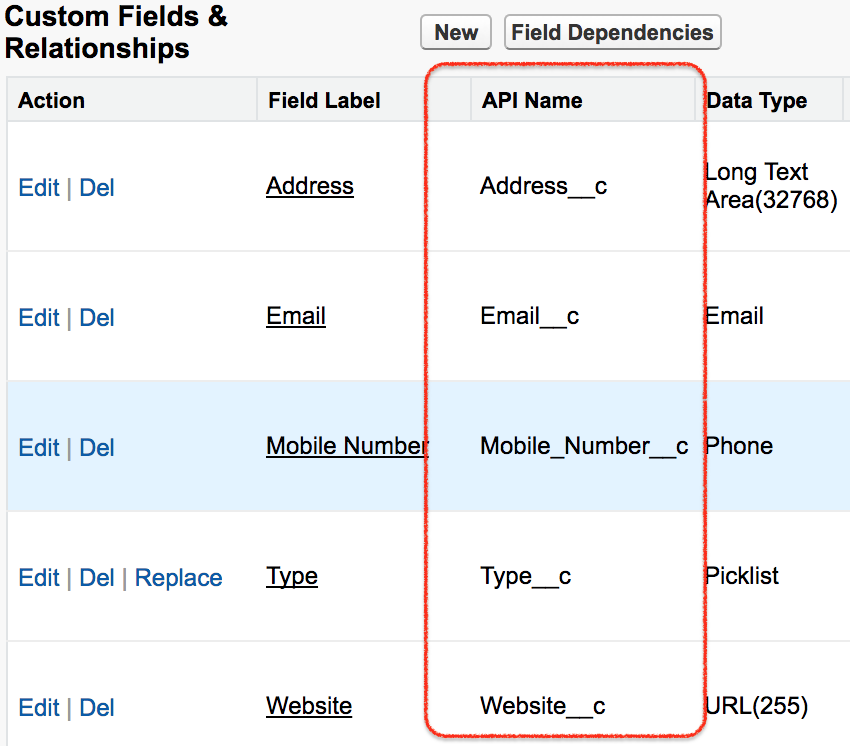
The API name column in the Custom fields and Relationships section denotes the API names of the custom fields in Salesforce.
How to find a Salesforce field API name in Lightning Experience
For most Salesforce orgs using Lightning Experience, use Object Manager to find a field API name.
- Click the Setup gear icon.
- Open Object Manager.
- Search for and open the object, for example Account, Contact, or a custom object.
- Click Fields & Relationships.
- Find the field label in the list.
- Read the value in the Field Name or API Name column.
If you cannot find the field in Object Manager, check whether the field belongs to another object, whether the object is part of a managed package, or whether your user profile has enough setup access to view the metadata.
How to use Salesforce field API names in SOQL
After you identify the API name, place it in the SELECT, WHERE, ORDER BY, or relationship part of the SOQL query as required.
SELECT Id, Name, Email
FROM Contact
WHERE Email != null
In Apex, the same SOQL query is normally written inside square brackets.
List<Contact> contactsWithEmail = [
    SELECT Id, Name, Email
    FROM Contact
    WHERE Email != null
];
For a custom object and custom field, include the __c suffix exactly as shown in setup.
SELECT Id, Name, Hospital_Code__c
FROM Hospital__c
WHERE Hospital_Code__c != null
How to get a field API name in Apex using schema describe
When code needs to inspect object metadata, Apex can use schema describe methods. This is useful for dynamic logic, admin tools, validation utilities, and situations where you need to map a field label to a field API name.
Map<String, Schema.SObjectField> fieldMap = Account.SObjectType.getDescribe().fields.getMap();

for (String apiName : fieldMap.keySet()) {
    Schema.DescribeFieldResult fieldDescribe = fieldMap.get(apiName).getDescribe();
    System.debug('API Name: ' + apiName + ', Label: ' + fieldDescribe.getLabel());
}
The map key gives the field API name. The describe result gives details such as the field label, data type, relationship name, accessibility, and whether the field can be created or updated by the running user.
How to find a field API name from a field label in Apex
If you know the label but not the API name, loop through the object’s describe fields and compare labels. Labels are not guaranteed to be unique, so code should handle more than one possible match.
String labelToFind = 'Account Name';
List<String> matchingApiNames = new List<String>();

Map<String, Schema.SObjectField> fieldMap = Account.SObjectType.getDescribe().fields.getMap();

for (String apiName : fieldMap.keySet()) {
    Schema.DescribeFieldResult describeResult = fieldMap.get(apiName).getDescribe();

    if (describeResult.getLabel() == labelToFind) {
        matchingApiNames.add(apiName);
    }
}

System.debug('Matching field API names: ' + matchingApiNames);
This technique is useful for debugging and metadata utilities. For normal Apex business logic, it is usually clearer to use the known API name directly.
How to get all field API names of an object for SOQL review
Developers often need a list of all field API names before writing a SOQL query. You can get them from Object Manager, Schema Builder, Workbench, Salesforce Inspector-style tools, or Apex describe code. In Apex, the following example prints all Account field API names.
Map<String, Schema.SObjectField> fieldsByApiName = Account.SObjectType.getDescribe().fields.getMap();

List<String> apiNames = new List<String>();
apiNames.addAll(fieldsByApiName.keySet());
apiNames.sort();

System.debug(apiNames);
Use this list to choose only the fields your query needs. Avoid selecting unnecessary fields in Apex because larger query results make code slower and harder to maintain.
FIELDS() syntax for selecting standard or custom fields in SOQL
Salesforce SOQL also supports the FIELDS() function in supported API versions. It can be useful while exploring fields, but it should be used carefully in production code because it can return many columns.
SELECT FIELDS(STANDARD)
FROM Account
LIMIT 10SELECT FIELDS(CUSTOM)
FROM Account
LIMIT 10For application code, prefer explicit field API names such as SELECT Id, Name, Phone FROM Account. Explicit fields make permissions review, testing, and future maintenance easier.
Picklist API values and labels in Apex SOQL
For picklist fields, SOQL normally returns the stored value. In many orgs, the stored value and the user-facing label are the same, but translations or renamed labels can make them different. When you need the display label in a query result, use toLabel().
SELECT Id, Name, toLabel(Industry)
FROM Account
In Apex logic, be clear whether you are comparing stored picklist API values or display labels. For filters and automation logic, using the stored value is usually safer.
List view API names are different from field API names
A list view also has a developer-facing name, but it is not a field API name. A field API name identifies a column on an object. A list view API name identifies a saved list view definition. Do not use a list view API name in a SOQL SELECT clause.
For example, My_Open_Opportunities might be a list view name, while StageName, Amount, and CloseDate are field API names used in SOQL.
Common mistakes while using Salesforce field API names
- Using the label instead of API name:
Account Nameis a label;Nameis the Account field API name. - Forgetting the custom suffix: Custom fields and custom objects usually end with
__c. - Using a relationship field incorrectly: A lookup field may be
Hospital__c, while relationship traversal may useHospital__r.Name. - Assuming labels are unique: Two fields can have similar or identical labels in some metadata designs.
- Copying a report column name into Apex: Report headings can differ from the field API name.
- Ignoring managed package namespaces: Packaged custom fields can include a namespace prefix before the field name.
QA checklist for Salesforce field API name tutorials
- Confirm that each SOQL example uses field API names, not field labels.
- Check that custom object and custom field examples include the correct
__csuffix. - Verify that relationship examples distinguish
__clookup fields from__rrelationship traversal. - Use Lightning Experience navigation where possible, while noting older Classic navigation when screenshots show it.
- Make sure Apex describe examples use
Schema.SObjectFieldandDescribeFieldResultcorrectly. - Do not recommend selecting every field in production SOQL when only a few fields are needed.
References for Salesforce field API names and SOQL fields
For additional reference, see the Salesforce Developer documentation on SOQL SELECT fields and Salesforce Help for setup and field metadata concepts.
Salesforce field API name FAQs
What is the API name of a field in Salesforce?
The API name is the technical name used by SOQL, Apex, formulas, integrations, and metadata tools. For example, a custom field labelled Customer Type may have the API name Customer_Type__c.
How do I get a field API name in Salesforce Apex?
Use schema describe methods such as Account.SObjectType.getDescribe().fields.getMap(). The map keys are field API names, and each value can provide metadata such as label, type, and access information.
Why do custom field API names end with __c?
Salesforce appends __c to custom objects and custom fields to distinguish them from standard metadata. A custom object may be Hospital__c, and a custom field may be Hospital_Code__c.
How do I get a picklist label instead of the API value in SOQL?
Use toLabel() in the SOQL query, for example SELECT Id, toLabel(Industry) FROM Account. Use this when you need the display label rather than the stored picklist value.
Is a list view API name the same as a field API name?
No. A field API name identifies a field on an object, such as CloseDate. A list view API name identifies a saved list view definition. They are used in different contexts.
Conclusion
In this Apex Tutorial, we learned how to get API Name of Fields, with the help of examples. The main rule is simple: use the label for user-facing screens, but use the field API name in Apex, SOQL, formulas, automation, and integrations.