 TutorialKart.com
In this Salesforce Object Query Language SOQL tutorial, we are going to learn about the IN operator in SOQL statements and why it is used in the WHERE clause. The IN operator is useful when one field must be compared with more than one possible value.
You can use IN with a fixed list of values, with Apex bind variables such as Set<Id> or List<String>, and in semi-join queries where one query filters records based on another object.
SOQL IN Operator
SOQL IN Operator is used to fetch the data from the matched values specified in the the SOQL statement. SOQL IN operator is mainly used to compare a value to a list of values that have been specified, and it retrieves the records if it matches the values specified in the list. The IN operator is used if you want to compare a value with multiple values to ensure the retrieved records are accurate.
SOQL IN operator syntax with literal values
When values are written directly inside the SOQL query, place them inside parentheses. String values must be enclosed in single quotes. Number, Boolean, date, and Id values must follow the normal SOQL literal rules for that data type.
SELECT FieldName
FROM ObjectName
WHERE FieldName IN ('value1', 'value2', 'value3')
The IN operator works like multiple equality checks joined by OR. For example, FirstName IN ('Adarsh', 'Prasanth') means the first name can match either value.
Example – SOQL IN Operator
In this example, we will use IN operator in WHERE expression to filter the rows.
SELECT Firstname, Lastname FROM user WHERE firstname IN ('adarsh','Prasanth')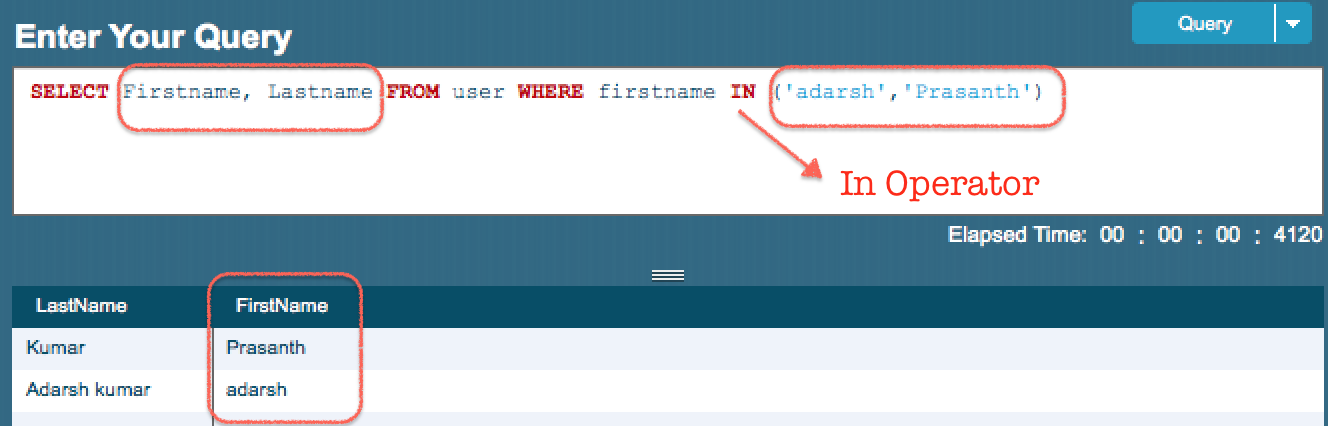
From above SOQL query, the preceding query will return all users where the firstname name equals to ‘adarsh’ and ‘Prasanth’. As shown above the values for IN must be in parenthesis and string values must be added in between single quotes. IN and NOT IN operators are also used for semi-joins and anti-joins.
SOQL IN operator compared with equals operator
Use the equals operator when you are comparing a field with one value. Use the IN operator when the same field can match any value from a list.
| Requirement | SOQL condition |
|---|---|
| First name must be exactly Prasanth | WHERE FirstName = 'Prasanth' |
| First name can be Adarsh or Prasanth | WHERE FirstName IN ('Adarsh', 'Prasanth') |
| User Id must match one Id from a collection in Apex | WHERE Id IN :userIds |
For a small fixed list, literal values are easy to read. In Apex code, bind variables are usually preferred because the list can be built from code and passed safely into the SOQL query.
SOQL IN operator with Apex bind variables
In Apex, the IN operator is commonly used with a Set or List. The colon symbol before the variable name tells Salesforce to bind the Apex variable into the SOQL query.
Set<Id> accountIds = new Set<Id>();

for (Account acc : [SELECT Id FROM Account WHERE Industry = 'Technology']) {
    accountIds.add(acc.Id);
}

List<Contact> contacts = [
    SELECT FirstName, LastName, AccountId
    FROM Contact
    WHERE AccountId IN :accountIds
];
In the above Apex example, accountIds is a set of Account record Ids. The Contact query returns contacts whose AccountId is present in that set.
This approach is useful when the values come from earlier logic, another query, selected records, trigger context, or user input that has already been validated.
SOQL NOT IN Operator
SOQL NOT IN operator is similar to NOT operator. This operator is used to specify multiple values in the WHERE clause for non matching and filtering records. This operator retrieve the data if the values does not equal to any of the specified values in a WHERE clause.
Example – SOQL NOT IN operator
In this example, we will use NOT IN operator in WHERE expression to filter the rows.
SELECT Firstname, Lastname FROM user WHERE firstname NOT IN ('Prasanth')Output
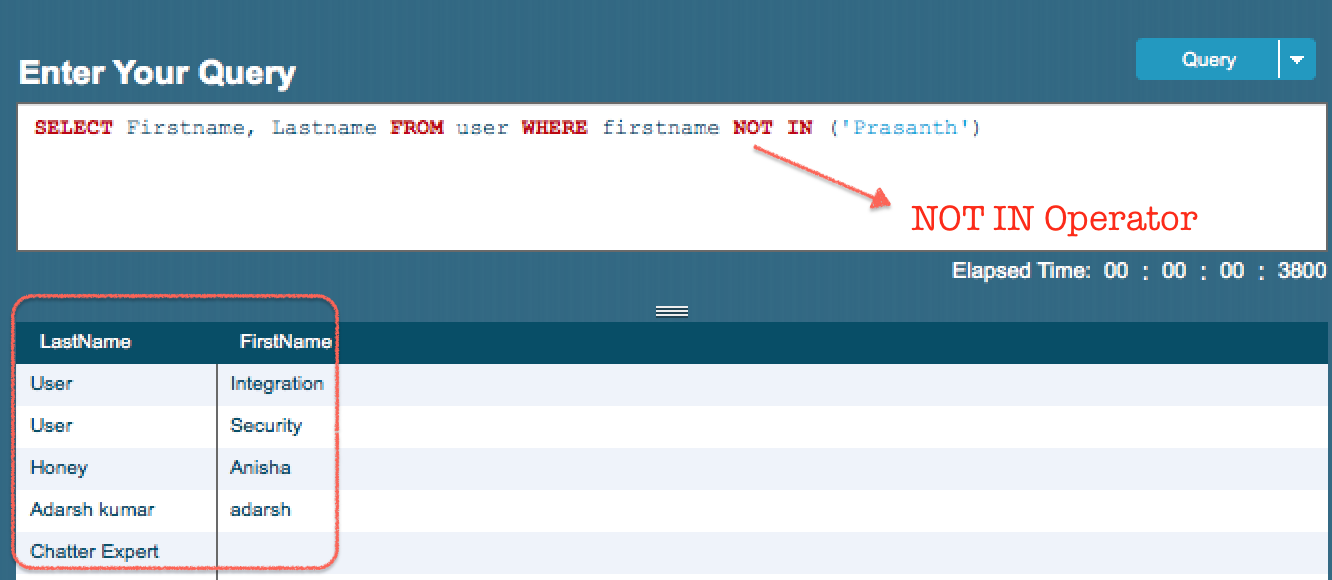
As shown above, the result will not contain any user which equals to ‘Prasanth’.
Use NOT IN when records matching a known list must be excluded. For example, the following query returns accounts whose type is not Customer or Partner.
SELECT Id, Name, Type
FROM Account
WHERE Type NOT IN ('Customer', 'Partner')
SOQL IN operator in semi-join queries
A semi-join query uses IN with a subquery to return records from one object based on matching records from another object. This is common when you want parent records that have related child records matching a condition.
SELECT Id, Name
FROM Account
WHERE Id IN (
    SELECT AccountId
    FROM Contact
    WHERE Email != null
)
The query above returns Account records that have at least one related Contact with a non-empty Email value. The subquery returns Contact AccountId values, and the outer query matches those values against Account Id.
SOQL NOT IN operator in anti-join queries
An anti-join query uses NOT IN with a subquery to exclude records that have a matching record in another object.
SELECT Id, Name
FROM Account
WHERE Id NOT IN (
    SELECT AccountId
    FROM Contact
    WHERE Email != null
)
This query returns Account records whose Id is not present in the list of AccountId values returned by the Contact subquery. In plain terms, it excludes accounts that have a contact with an email address.
Using SOQL IN safely in Apex code
When values come from Apex variables, prefer bind variables instead of building a SOQL string manually. Bind variables make the query easier to read and avoid quoting mistakes in string values.
List<String> firstNames = new List<String>{'Adarsh', 'Prasanth'};

List<User> users = [
    SELECT FirstName, LastName
    FROM User
    WHERE FirstName IN :firstNames
];
The variable firstNames supplies the list of values to the IN condition. This is cleaner than constructing a text query such as 'WHERE FirstName IN (...)' by hand.
Common mistakes with SOQL IN and NOT IN operators
| Mistake | Why it is a problem | Better approach |
|---|---|---|
| Writing values without parentheses | IN expects a list or bound collection. | Use WHERE Name IN ('A', 'B'). |
| Forgetting single quotes for string values | SOQL string literals must be quoted. | Use 'Prasanth', not Prasanth. |
Using = with a list | The equals operator compares with one value only. | Use IN when there are multiple values. |
| Manually joining user-entered strings into dynamic SOQL | It can cause quoting errors and unsafe query construction. | Use Apex bind variables where possible. |
| Using an empty Apex collection without checking the intended result | An empty filter list usually means no records should match. | Check isEmpty() before running the query when needed. |
Official Salesforce reference for SOQL bind variables
For Apex-specific usage, Salesforce documents how SOQL statements can use Apex variables as bind expressions. See the official Salesforce reference for using Apex variables in SOQL queries.
FAQs on SOQL IN operator in Salesforce
What is the SOQL IN operator used for?
The SOQL IN operator is used to compare a field with multiple possible values. The record is returned when the field value matches any value in the list or bound collection.
What is the difference between equals and IN in SOQL?
The equals operator compares a field with one value. The IN operator compares a field with a list of values, such as WHERE Name IN ('A', 'B').
Can I use a Set or List with SOQL IN in Apex?
Yes. In Apex, you can bind a Set or List to an IN condition by using a colon before the variable name, for example WHERE Id IN :accountIds.
When should I use SOQL NOT IN?
Use NOT IN when you want to exclude records whose field value is present in a list or returned by a subquery.
Can SOQL IN be used with subqueries?
Yes. SOQL supports semi-join queries such as WHERE Id IN (SELECT AccountId FROM Contact), where records from one object are filtered using values from another object.
SOQL IN operator editorial QA checklist
- Confirm that literal string values inside
INandNOT INare enclosed in single quotes. - Check that each
INexample uses parentheses for literal lists or a colon for Apex bind variables. - Use
INfor multiple possible matches and=for one exact match. - Verify that semi-join examples compare compatible fields, such as
Account.IdwithContact.AccountId. - When showing Apex code, prefer
SetorListbind variables instead of manually building dynamic SOQL strings.
SOQL IN and NOT IN operator summary
In this Salesforce developer tutorial, we have learned about SOQL IN operator and SOQL NOT IN operator. Use IN to match a field against multiple values, use NOT IN to exclude matching values, and use Apex bind variables when the value list is prepared in code. In our upcoming SOQL tutorials, we learn about relationship between custom objects in SOQL.