 TutorialKart.com
Convert Java Code to Kotlin Code
Many projects and applications are coded using Java programming language. In a Kotlin application, you can keep Java files and Kotlin files in the same project because Kotlin is designed to interoperate with Java. If you want to gradually migrate a class, utility file, or Android component, you can convert Java code to Kotlin code and then review the generated Kotlin manually.
For a Java to Kotlin file conversion, the usual options are the converter built into IntelliJ IDEA or Android Studio, an online Kotlin converter for small snippets, and JetBrains conversion support in editors such as Visual Studio Code. The converter gives you a useful first draft, but it is not a replacement for testing, null-safety review, and idiomatic Kotlin cleanup.
A quick route for the above said methods is given below.
- Use IntelliJ IDEA
Main menu -> Code -> Convert Java File to Kotlin File - You can use the online converter from Kotlin Official Website.
https://try.kotlinlang.org/ -> Convert from Java
Of course, we shall go in detail using a step by step process and screenshots to better understand the process to convert Java code to Kotlin code.
Note: If you are using IntelliJ IDEA or any other IDE with Kotlin Plugin, you can write Kotlin code along with Java code in the same project. Java and Kotlin source files are usually kept as separate .java and .kt files, although both can call each other when the project is configured correctly.
When Java to Kotlin Conversion Is Useful
Converting Java to Kotlin is useful when you want to modernize part of an existing Java codebase without rewriting the full project at once. This is common in Android projects, server-side Kotlin projects, and shared libraries where Java code already exists.
- Small Java utility classes: These are often the easiest files to convert first.
- Android activities, fragments, and view models: Convert one file at a time and test the related screen after each conversion.
- Data classes and model classes: After conversion, many Java POJOs can be simplified using Kotlin
data class. - New Kotlin modules in an old Java project: Java files can remain in the project while new code is written in Kotlin.
Avoid converting a large group of files in one step unless you already have good tests. A file-by-file migration is easier to review and debug.
Use IntelliJ IDEA – Convert Java File to Kotlin File
IntelliJ IDEA is an Integrated Development Environment by JetBrains. Android Studio is also based on IntelliJ IDEA, so Android developers will find a similar Java to Kotlin conversion option inside the IDE.
Following are the steps to convert your Java File to Kotlin File using IntelliJ IDEA,
Step 1: Open your Project in IntelliJ IDEA, and open the Java file. Before conversion, make sure the project builds successfully. This makes it easier to identify whether any errors after conversion came from the converter or from existing code.
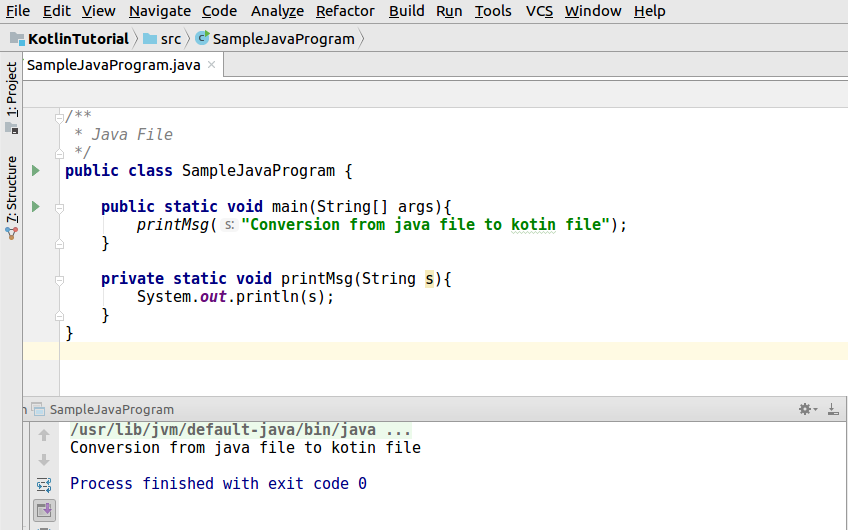
Step 2: In the main menu bar, click on “Code”. Click on the item “Convert Java File to Kotlin File”
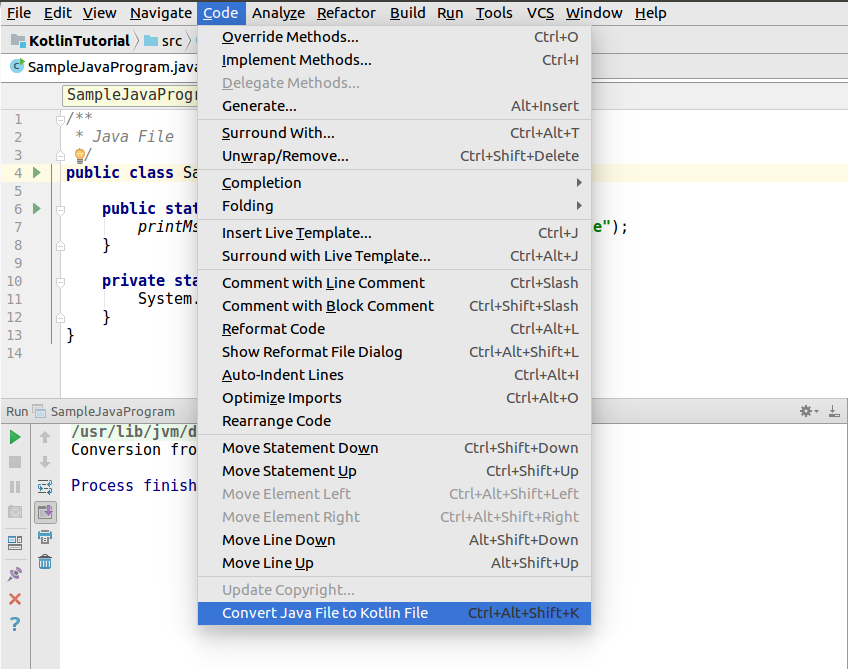
Step 3: If you get a message “Some code in the rest of your project may require corrections after performing this conversion. Do you still want to find such code and correct it too?”, you may click OK.

Step 4: Finally, your Java file is converted to a Kotlin file. Try running it.
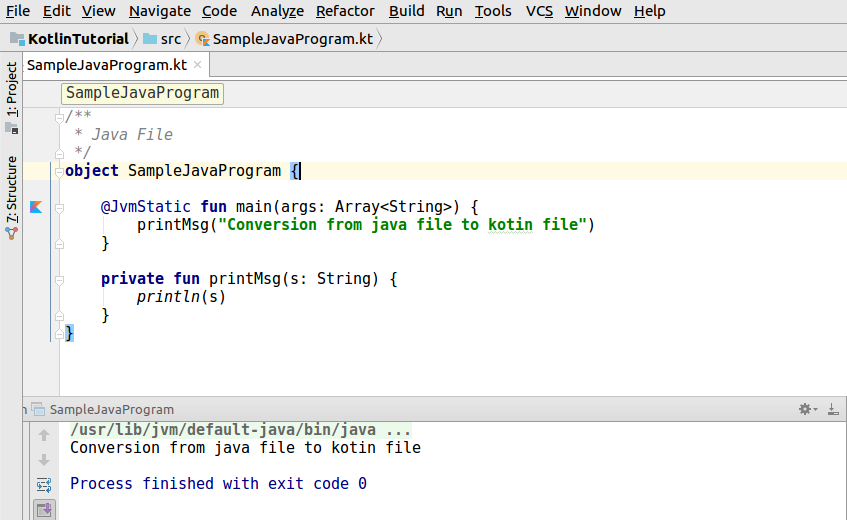
Step 5: Review the converted Kotlin file. The converter may produce correct Kotlin syntax, but some parts may still be more Java-like than idiomatic Kotlin. Check nullability, property declarations, collection usage, and visibility modifiers before committing the file.
Use the Online Java to Kotlin Converter for Small Snippets
The online converter is useful when you want to test a small Java method, class, or syntax pattern without opening a full project. Do not paste private project code, credentials, keys, or proprietary business logic into an online editor.
Step 1: Hit the URL “https://try.kotlinlang.org/” in your favorite browser and click on “Convert from Java” button, highlighted in the below picture.

Step 2: Paste you Java Code in the left editor box and click on “Convert to Kotlin” button present in the bottom right corner of the window.
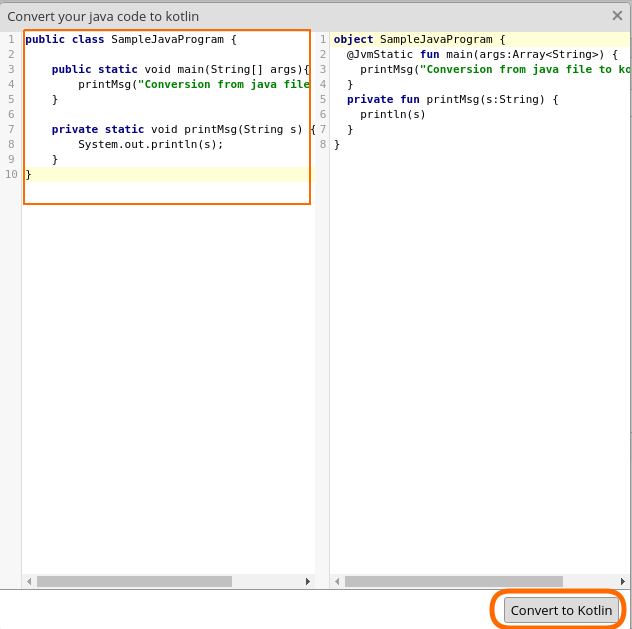
Step 3: Copy the converted Kotlin code into your project only after you have checked imports, package names, and any generated nullability assumptions.
Java Code Before Kotlin Conversion
Consider the following simple Java class. It has a constructor, fields, getter methods, and a method that returns formatted text.
public class Student {
    private final String name;
    private final int marks;

    public Student(String name, int marks) {
        this.name = name;
        this.marks = marks;
    }

    public String getName() {
        return name;
    }

    public int getMarks() {
        return marks;
    }

    public String getResult() {
        return name + " scored " + marks + " marks";
    }
}
Kotlin Code After Java to Kotlin Conversion
The converter may generate Kotlin similar to the following. After conversion, this class can be simplified further because Kotlin supports concise primary constructors and read-only properties.
class Student(val name: String, val marks: Int) {
    val result: String
        get() = "$name scored $marks marks"
}
If the Java class is only used to store values, you may also consider a Kotlin data class. Use this only when generated methods such as equals(), hashCode(), toString(), and copy() match your requirement.
data class Student(val name: String, val marks: Int) {
    val result: String
        get() = "$name scored $marks marks"
}
What to Check After Converting Java File to Kotlin File
A Java to Kotlin converter handles syntax conversion, but the converted file should still be reviewed by a developer. The most common review points are listed below.
- Null safety: Check whether converted types should be nullable, such as
String?, or non-null, such asString. - Platform types from Java: Kotlin may not always know whether a value coming from Java can be null.
- Static members: Java
staticmethods and fields may become companion object members, top-level declarations, or object declarations depending on the case. - Getters and setters: Java getter/setter methods often become Kotlin properties.
- Collections: Review whether a converted collection should be mutable or read-only.
- Visibility: Confirm whether
public,private,protected, orinternalis appropriate after conversion. - Tests: Run unit tests, build the project, and test the feature that uses the converted file.
Java and Kotlin Interoperability During Migration
You do not have to convert an entire Java project at once. Kotlin and Java can be used together in the same project. This is one reason many teams migrate gradually: a Kotlin file can call Java code, and Java code can call Kotlin code with some interop rules.
When Java calls Kotlin code, you may need to review generated JVM names, top-level functions, companion objects, overloads, and nullability annotations. The official Kotlin documentation on Java and Kotlin interoperability is a useful reference when converted Kotlin code must still be used from Java.
Java to Kotlin Conversion in Android Projects
For Android projects, Java to Kotlin conversion is commonly done inside Android Studio. Before converting Android files, make sure Kotlin is added to the project and Gradle sync is successful. Android Developers provides a reference on adding Kotlin to an Android project.
After converting an Android file, check imports for Android framework classes, generated binding classes, annotations, lifecycle methods, and overridden functions. In Android code, small conversion mistakes may not always be visible until the related screen or component is tested.
Common Java to Kotlin Conversion Mistakes
- Accepting converted code without review: The converter is a starting point, not a final code-quality check.
- Ignoring nullable values: Java code may allow null values where Kotlin code should handle them explicitly.
- Converting too many files together: Batch conversion can make it harder to locate the source of new errors.
- Not checking Java callers: If Java code still calls the converted Kotlin file, verify the Java call sites.
- Leaving Java-style Kotlin unchanged: Converted code may work, but you can often simplify it using Kotlin properties, data classes, top-level functions, and standard library functions.
QA Checklist for Java to Kotlin File Conversion
- The original Java file compiled successfully before conversion.
- The converted Kotlin file has the correct package declaration and imports.
- Nullable and non-nullable types have been reviewed manually.
- Java call sites still compile after the file becomes Kotlin.
- Unit tests or feature-level tests have been run after conversion.
- The converted code has been cleaned up where Kotlin properties, data classes, or standard library functions improve readability.
FAQs on Java to Kotlin File Conversion
Is Kotlin fully interoperable with Java?
Kotlin is designed for Java interoperability, so Kotlin and Java files can usually work together in the same project. However, developers still need to understand interop details such as nullability, static members, top-level functions, and JVM names.
Is it hard to switch from Java to Kotlin?
For a Java developer, the basic switch is usually manageable because Kotlin runs on the JVM and shares many familiar concepts. The harder part is learning Kotlin-specific features such as null safety, extension functions, data classes, coroutines, and idiomatic collection operations.
Can I convert only one Java file to Kotlin?
Yes. You can convert one Java file to Kotlin and keep the rest of the project in Java. This is often the safest way to migrate because each converted file can be reviewed and tested separately.
Does the Java to Kotlin converter produce perfect Kotlin code?
No. The converter usually produces useful Kotlin code, but it may still need cleanup. Review nullability, properties, visibility, collections, and Java call sites before treating the conversion as complete.
Can Java code call the Kotlin file after conversion?
Yes, Java code can call Kotlin code, but the Java call syntax may change for top-level functions, companion objects, default arguments, properties, and nullable types. Check all Java usages after converting the file.
Java to Kotlin File Conversion Summary
In this Kotlin Tutorial, we learned how to convert Java File to Kotlin File. IntelliJ IDEA and Android Studio can convert a Java file directly from the Code menu, while an online converter can help with small snippets. After conversion, always review the Kotlin code manually and run the project tests.
If you are doing Android application development using Kotlin, you may refer how to convert Java File in Android application to Kotlin File.