 TutorialKart.com
In this Kotlin tutorial, we learn how to delete a file or folder recursively using File.deleteRecursively(). We cover the syntax, the return value, a folder deletion example, safety checks before deleting, how to delete only the contents of a directory, and common mistakes to avoid when removing files from Kotlin code.
Kotlin File.deleteRecursively() for deleting folders and files
To delete a file/folder and its children in Kotlin, use extension function to java.io.File, File.deleteRecursively().
The deleteRecursively() function is available on java.io.File. If the File object represents a normal file, the file is deleted. If it represents a directory, Kotlin attempts to delete every file and subdirectory inside it, and then deletes the directory itself.
Recursive deletion is a destructive operation. Always verify the path before calling this function, especially when the path comes from user input, a configuration file, or a generated string.
Kotlin File.deleteRecursively() syntax
The syntax of File.deleteRecursively() method is
fun File.deleteRecursively(): Boolean (source)This function returns true if the operation is successful, else false.
Any error during the operation could result in partial deletion of the files in the given directory.
In practice, this means that a return value of false does not always mean nothing was deleted. Some files may already have been removed before the failure occurred. The failure can happen because of permissions, locked files, read-only files, an invalid path, or another process using a file.
What Kotlin deleteRecursively() deletes
| File object points to | Result of deleteRecursively() |
|---|---|
| A regular file | Deletes that file. |
| An empty directory | Deletes the directory. |
| A directory with files | Deletes the files and then the directory. |
| A directory with nested folders | Deletes nested files and folders recursively, then deletes the original directory. |
| A path that cannot be deleted | Returns false; partial deletion may have happened. |
Example 1 – Delete Files Recursively in Folder
In the following example, we delete all the files and folders present in “folderA” and also delete the “folderA” itself, recursively, using File.deleteRecursively() method.
example.kt
import java.io.File

fun main(args: Array<String>) {
    var fileA = File("folderA")
    fileA.deleteRecursively()
}
folderA
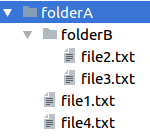
When you run this program, all files and folders inside and including folderA shall be deleted.
The path File("folderA") is a relative path. It is resolved from the current working directory of the program. If the program is started from another directory, Kotlin may look for folderA in a different location.
Kotlin deleteRecursively() with return value check
The previous example calls deleteRecursively() directly. In production code or scripts, it is better to check the Boolean return value and print or handle a failure.
example.kt
import java.io.File

fun main() {
    val folder = File("folderA")

    val deleted = folder.deleteRecursively()

    if (deleted) {
        println("folderA deleted")
    } else {
        println("folderA could not be deleted completely")
    }
}
Output when deletion succeeds
folderA deletedIf the function returns false, inspect the target path before retrying. A second attempt may delete remaining files, but it is better to understand why the first attempt failed.
Check the Kotlin file path before recursive deletion
Before deleting a folder recursively, check whether the path exists and whether it is the directory you intended to remove. This is especially important when the path is constructed dynamically.
example.kt
import java.io.File

fun main() {
    val folder = File("folderA")

    if (!folder.exists()) {
        println("Path does not exist: ${folder.path}")
        return
    }

    if (!folder.isDirectory) {
        println("Path is not a directory: ${folder.path}")
        return
    }

    val deleted = folder.deleteRecursively()
    println("Deleted: $deleted")
}
This example avoids deleting a path that does not exist and avoids treating a normal file as the expected directory. You can add more checks, such as allowing deletion only inside a known application working folder.
Delete only the contents of a Kotlin directory recursively
deleteRecursively() deletes the target directory also. If you want to keep the parent directory and delete only its files and subfolders, call deleteRecursively() on each child of the directory.
example.kt
import java.io.File

fun main() {
    val folder = File("folderA")

    if (folder.exists() && folder.isDirectory) {
        folder.listFiles()?.forEach { child ->
            child.deleteRecursively()
        }
    }

    println("folderA still exists: ${folder.exists()}")
}
This pattern is useful for clearing a cache folder, temporary output folder, or generated files directory while keeping the main directory available for later writes.
Kotlin recursive delete using an absolute path
For scripts and command-line programs, an absolute path can make the target clearer. Still, verify the path before deleting it.
example.kt
import java.io.File

fun main() {
    val folder = File("/tmp/kotlin-demo/folderA")

    println("Deleting: ${folder.absolutePath}")

    if (folder.exists()) {
        val deleted = folder.deleteRecursively()
        println("Deleted: $deleted")
    }
}
Use a path that is correct for your operating system. For example, Windows paths may look like C:\Users\User\AppData\Local\Temp\folderA.
Common mistakes with Kotlin File.deleteRecursively()
- Assuming that
falsemeans no file was deleted. Recursive deletion can partially complete before failing. - Using a relative path without checking the current working directory.
- Calling
deleteRecursively()on the parent folder when the requirement is to delete only its contents. - Ignoring permission errors, locked files, or files being used by another process.
- Deleting a dynamically built path without validating that it stays inside the expected folder.
Kotlin File.deleteRecursively() FAQs
Does Kotlin deleteRecursively() delete the folder itself?
Yes. If the File object points to a directory, deleteRecursively() deletes the contents of that directory and then deletes the directory itself.
What does deleteRecursively() return in Kotlin?
It returns a Boolean. The value is true when the file or directory is deleted successfully, and false when the operation cannot be completed successfully.
Can Kotlin deleteRecursively() partially delete files?
Yes. If an error occurs while deleting a directory tree, some files may already have been deleted. Handle a false result carefully and inspect the remaining files before retrying.
How do I delete only files inside a folder in Kotlin?
Use folder.listFiles() and call deleteRecursively() on each child file or subfolder. Do not call deleteRecursively() directly on the parent folder if you want the parent folder to remain.
Is File.deleteRecursively() available for java.io.File in Kotlin?
Yes. deleteRecursively() is a Kotlin extension function for java.io.File, so import java.io.File and call it on a File object.
Kotlin recursive deletion editorial QA checklist
- Confirm that examples using
Fileincludeimport java.io.File. - Make sure the tutorial clearly says that
deleteRecursively()deletes the target folder itself. - Check that new Kotlin code blocks use the
language-kotlinclass and output-only blocks use theoutputclass. - Verify that examples do not encourage deleting unchecked user-provided paths.
- Keep the partial deletion warning close to the return value explanation.
Kotlin deleteRecursively() conclusion
In this Kotlin Tutorial, we learned to delete a folder and its children recursively, using File.deleteRecursively() method. We also checked the return value, verified the target path before deletion, and used a separate pattern to delete only the contents of a directory while keeping the parent folder.