 TutorialKart.com
Kotlin Enum Class
Kotlin Enum – Enum is a special data type that allows a variable to hold a value only from a set of predefined constants.
Use a Kotlin enum class when a value must be one item from a fixed set, such as color, direction, order status, user role, or log level. Each enum constant is a singleton object of the enum type, so the compiler can check that only valid constants are assigned.
In this tutorial, we shall learn about Kotlin Enum Class : Syntax, Initialization, how enum classes are different from regular classes. An example program is provided to demonstrate the usage of Kotlin Enum.
| Kotlin enum feature | What it means | Example |
|---|---|---|
| Fixed constants | The enum can contain only the constants declared inside it. | GOLD, SILVER, BLACK |
| Properties | Each enum constant can store associated values. | GOLD(0xffd323) |
| Built-in name | Returns the declared constant name. | MobileColor.GOLD.name |
| Built-in ordinal | Returns the zero-based declaration position. | MobileColor.GOLD.ordinal |
| Iteration | All constants can be listed and looped over. | MobileColor.entries |
Kotlin enum class syntax for fixed constants
The syntax to define an Enum class in Kotlin is
enum class <enum_class_name> {
  constant1,
  constant2,
  constant3
}
Any number of constants could be specified inside the class separated by comma. Each Enum constant is implicitly an Object of type <enum_class_name>.
Following is an example of defining a Kotlin Enum class “MobileColor” with constants GOLD, SILVER, WHITE, BLACK and RED.
enum class MobileColor {
    GOLD, SILVER, WHITE, BLACK, RED
}
Enum constant names are usually written in uppercase because they behave like constants. This is a convention, not a separate language rule.
Kotlin Enum Initialization
As Kotlin Enum is an object of an Enum class, these enum objects could be initialized. We shall use the same example of MobileColor enum class to demonstrate the initialization of enums.
enum class MobileColor(val value: Int) {
    GOLD(0xffd323),
    SILVER(0xeaeaea),
    WHITE(0xffffff),
    BLACK(0x000000),
    RED(0xFF0000)
}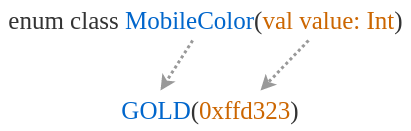
Please note that we have provided val in the definition, so the constructor parameter becomes a read-only property that can be accessed as mobile1.color.value.
When an enum class has constructor parameters, every enum constant must pass values for those parameters. In the above example, each MobileColor constant stores one integer color value.
Kotlin enum constants with properties and constructor values
An enum class can hold more than one property. The values are supplied for each constant in the order defined in the primary constructor.
enum class HttpStatus(val code: Int, val message: String) {
    OK(200, "Success"),
    NOT_FOUND(404, "Not Found"),
    SERVER_ERROR(500, "Server Error")
}

fun main() {
    val status = HttpStatus.NOT_FOUND
    println("${status.code}: ${status.message}")
}
Output
404: Not FoundThis pattern is useful when the enum constant needs a stable code, label, display name, or configuration value.
Example – Kotlin Enum Class
Following Kotlin Application demonstrates the usage of enum class MobileColor.
We have initialized a Data Class, Mobile, which has a value named color that can accept an Enum object of Enum class type MobileColor.
example.kt
/**
 * Kotlin Example to Enum Classes in Kotlin
 */
fun main(args: Array<String>) {
    val mobile1: Mobile = Mobile("IPhone",MobileColor.GOLD)
    val mobile2: Mobile = Mobile("SONY",MobileColor.BLACK)

    // access enum variables
    println("The color of my "+mobile1.name+" is "+mobile1.color)
    println("The color of my "+mobile2.name+" is "+mobile2.color)

    // access the value of the variable in Enum Object
    println(mobile1.color.toString() + " value is "+mobile1.color.value)
    println(mobile2.color.toString() + " value is "+mobile2.color.value)
}

data class Mobile(val name:String, val color: MobileColor)

enum class MobileColor(val value: Int) {
    GOLD(0xffd323),
    SILVER(0xeaeaea),
    WHITE(0xffffff),
    BLACK(0x000000),
    RED(0xFF0000)
}
Output
The color of my IPhone is GOLD
The color of my SONY is BLACK
GOLD value is 16765731
BLACK value is 0
Now let us try the same example, without having any value for the Enum constants.
example.kt
/**
 * Kotlin Example to Enum Classes in Kotlin
 */
fun main(args: Array<String>) {
    val mobile1 = Mobile("IPhone",MobileColor.GOLD)
    val mobile2 = Mobile("SONY",MobileColor.BLACK)

    // access enum variables
    println("The color of my "+mobile1.name+" is "+mobile1.color)
    println("The color of my "+mobile2.name+" is "+mobile2.color)
}

data class Mobile(val name:String, val color: MobileColor)

enum class MobileColor {
    GOLD,
    SILVER,
    WHITE,
    BLACK,
    RED
}
We have not given any value initialized for Enum constants.
Now, run this application and you shall see the following output in Console.
Output
The color of my IPhone is GOLD
The color of my SONY is BLACK

Process finished with exit code 0
Access Kotlin enum name, ordinal, and all constants
Every Kotlin enum constant has a name and an ordinal. The name is the declared constant name. The ordinal is the zero-based position of the constant in the enum declaration.
enum class MobileColor {
    GOLD, SILVER, WHITE, BLACK, RED
}

fun main() {
    val color = MobileColor.BLACK

    println(color.name)
    println(color.ordinal)

    for (item in MobileColor.entries) {
        println("${item.ordinal} - ${item.name}")
    }
}
Output
BLACK
3
0 - GOLD
1 - SILVER
2 - WHITE
3 - BLACK
4 - RED
Use name when you need the declared enum name. Be careful with ordinal in stored data, because changing the enum order changes the ordinal values.
Convert a String to a Kotlin enum constant safely
To get an enum constant from a string, Kotlin can use valueOf(). The input must match the enum constant name exactly, otherwise an exception is thrown. For user input, wrap the conversion in a safe helper function.
enum class MobileColor {
    GOLD, SILVER, WHITE, BLACK, RED
}

fun parseMobileColor(input: String): MobileColor? {
    return try {
        MobileColor.valueOf(input.trim().uppercase())
    } catch (e: IllegalArgumentException) {
        null
    }
}

fun main() {
    println(parseMobileColor("gold"))
    println(parseMobileColor("blue"))
}
Output
GOLD
null
This approach lets the program handle invalid input without stopping at runtime.
Use Kotlin enum constants in a when expression
Enums work well with when because the allowed values are known. When all enum constants are handled, the when expression can return a value without a separate default branch.
enum class OrderStatus {
    PLACED, PACKED, SHIPPED, DELIVERED
}

fun messageFor(status: OrderStatus): String {
    return when (status) {
        OrderStatus.PLACED -> "Order received"
        OrderStatus.PACKED -> "Order packed"
        OrderStatus.SHIPPED -> "Order shipped"
        OrderStatus.DELIVERED -> "Order delivered"
    }
}

fun main() {
    println(messageFor(OrderStatus.SHIPPED))
}
Output
Order shippedIf a new enum constant is added later, the compiler can point out places where the when expression needs to be updated.
Add functions inside a Kotlin enum class
A Kotlin enum class can contain functions. When functions or properties are declared after the constants, place a semicolon after the last enum constant.
enum class Direction {
    NORTH, SOUTH, EAST, WEST;

    fun isVertical(): Boolean {
        return this == NORTH || this == SOUTH
    }
}

fun main() {
    println(Direction.NORTH.isVertical())
    println(Direction.WEST.isVertical())
}
Output
true
false
Kotlin enum constants with custom behavior
Each enum constant can also provide its own behavior by overriding an abstract function declared inside the enum class.
enum class Operation {
    PLUS {
        override fun apply(a: Int, b: Int) = a + b
    },
    MINUS {
        override fun apply(a: Int, b: Int) = a - b
    };

    abstract fun apply(a: Int, b: Int): Int
}

fun main() {
    println(Operation.PLUS.apply(10, 4))
    println(Operation.MINUS.apply(10, 4))
}
Output
14
6
This style is useful when each constant represents a different operation, state transition, or rule.
How Kotlin enum class is different from a regular class
You cannot create new instances of an Enum class outside of its definition. In other words outside enum definition, you cannot create an object of type Enum Class by passing values to its primary constructor. You can do so for regular classes.
A regular Kotlin class can create as many objects as needed with a constructor call. An enum class has only the constants declared in the enum body. This makes an enum suitable for closed sets of values, not for data that grows at runtime.
| Comparison point | Kotlin enum class | Regular Kotlin class |
|---|---|---|
| Number of objects | Limited to declared constants | Can create many objects |
| Constructor use | Used only by declared enum constants | Used whenever a new object is created |
| Best for | Fixed choices such as status, color, role | General data models and behavior |
| Built-in members | Has name, ordinal, and enum listing support | Only members you define or inherit |
Common mistakes with Kotlin enum classes
- Creating enum objects with a constructor: use declared constants such as
MobileColor.GOLD; do not try to call the enum constructor from outside. - Forgetting the semicolon before enum functions: add
;after the last constant when the enum class contains members after the constant list. - Using ordinal as a stored database value: prefer a stable custom property such as
codebecause enum order may change. - Calling valueOf() directly on user input: invalid text causes an exception, so use a safe parser when input is not controlled.
- Using enum for values that are not fixed: choose a regular class, data class, or sealed hierarchy when values can be added dynamically.
Kotlin enum editorial QA checklist
- The tutorial explains that a Kotlin enum class represents a fixed set of constants.
- The enum syntax examples show constants separated by commas inside
enum class. - The initialization section explains constructor properties such as
val value: Int. - The examples cover
name,ordinal, listing constants, and safe string conversion. - The article warns against using
ordinalas a long-term stored value. - The difference between enum classes and regular Kotlin classes is explained with object creation limits.
FAQs on Kotlin enum classes
What is an enum class in Kotlin?
An enum class in Kotlin defines a fixed set of constants. A variable of that enum type can hold only one of those declared constants.
Can Kotlin enum constants have values?
Yes. Add constructor parameters to the enum class and pass values from each constant, for example GOLD(0xffd323) in enum class MobileColor(val value: Int).
How do I convert a String to an enum in Kotlin?
Use EnumClass.valueOf(text) when the text matches the constant name exactly. For user input, trim and normalize the text, and catch IllegalArgumentException to handle invalid values safely.
How do I loop through all Kotlin enum constants?
Use MobileColor.entries to access all constants and then iterate with a for loop. In older Kotlin code, you may also see enumValues<MobileColor>().
When should I use enum class instead of a regular Kotlin class?
Use an enum class when the set of possible values is known and fixed. Use a regular class or data class when you need to create many different objects at runtime.
Conclusion: Kotlin enum classes for fixed sets of values
In this Kotlin Tutorial – Kotlin Enum Classes, we have learnt the syntax and usage with help of an Example program.
Kotlin enum classes are useful when a value must come from a predefined set. They can be simple constants, or they can include properties, functions, and constant-specific behavior when the use case needs more structure.