 TutorialKart.com
R For Loop
R For Loop executes a set of statements once for each value in a vector, sequence, list, or other iterable object. In R, a for loop is commonly used when you want to repeat the same operation for every item, print values one by one, build a result, or stop the iteration when a condition is met.
This tutorial explains R for loop syntax, execution flow, examples with vectors and sequences, index-based looping, and the use of the break statement inside a for loop.
- R for loop syntax
- Execution flow of R for loop
- R for loop example with a vector
- R for loop with numeric sequence
- R for loop using vector index
- R for loop with break statement
- R for loop QA checklist
- R for loop FAQs
R for loop syntax
The syntax of For Loop in R is
for (x in vector) {
     statement(s)
}
Here, x is a loop variable. During each iteration, R assigns the next value from vector to x, and then runs the statements inside the braces. The word in is part of the R for loop syntax and tells R where the loop variable should take its values from.
The object after in is often a vector, but it can also be a sequence such as 1:5, a character vector, or a list. The loop ends after all values from that object are used, unless a control statement such as break stops it earlier.
for (item in c("first", "second", "third")) {
  print(item)
}
Execution flow of R for loop
The following flow chart depicts the flow of execution for a For Loop in R.
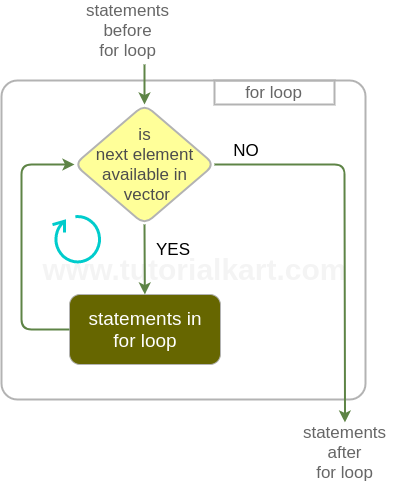
The statements in the for loop are executed for each element in vector. And when there are no further elements in the vector, the execution control is out of the for loop and continues executing statements after for loop.
In simple terms, R follows these steps while running a for loop: it takes the first value, executes the loop body, moves to the next value, and repeats the same process until the source vector or sequence is exhausted.
Example 1 – R for loop over vector elements
An example program of for loop iterating over elements of an integer vector.
r_for_loop_ex.R
# R for loop Example

a = c(2, 45, 9, 12)

for(i in a) {
	print(i)
}
Output
$ Rscript r_for_loop_ex.R
[1] 2
[1] 45
[1] 9
[1] 12
In this example, a is an integer vector. The loop variable i first receives 2, then 45, then 9, and finally 12. The print(i) statement runs once for each of these values.
Example 2 – R for loop with numeric sequence
A for loop in R is often written with a numeric sequence when the number of iterations is known. The expression 1:5 creates the sequence 1, 2, 3, 4, 5.
r_for_loop_sequence_ex.R
# R for loop with numeric sequence

for(i in 1:5) {
  print(i * i)
}
Output
[1] 1
[1] 4
[1] 9
[1] 16
[1] 25
This loop prints the square of each number from 1 to 5. Use this form when you want a simple counter. When the sequence may be empty or depends on a vector length, seq_along() is usually safer than writing 1:length(x).
Example 3 – R for loop using vector index
Sometimes you need both the position and the value of each element. In such cases, loop through the index values using seq_along() and access the vector element with square brackets.
r_for_loop_index_ex.R
# R for loop using vector index

marks = c(76, 88, 59)

for(i in seq_along(marks)) {
  print(paste("Student", i, "scored", marks[i]))
}
Output
[1] "Student 1 scored 76"
[1] "Student 2 scored 88"
[1] "Student 3 scored 59"
This pattern is useful when the loop logic depends on the element number, not only on the element value. It also avoids a common issue with 1:length(marks) when the vector has length zero.
Example 4 – Break statement inside R for loop
A for loop could be broken abruptly using r break statement intentionally inside the for loop. An example is provided below.
r_for_loop_break_ex.R
# R for loop example with break statement

a = c(12, 45, 9, 12)

for(i in a) {
	if(i==9){
		break
	}
	print(i)
}
Output
$ Rscript r_for_loop_break_ex.R
[1] 12
[1] 45
The inclusion of break statement might look similar to R Repeat Loop Statement.
In this example, the loop prints 12 and 45. When i becomes 9, the condition i==9 is true, so break stops the loop immediately. The final 12 is not printed because the loop has already ended.
R for loop with next statement to skip one iteration
The next statement skips the current iteration and moves the loop to the next value. Use it when one or more values should be ignored without stopping the entire loop.
r_for_loop_next_ex.R
# R for loop example with next statement

numbers = c(4, 0, 8, 0, 12)

for(n in numbers) {
  if(n == 0) {
    next
  }
  print(n)
}
Output
[1] 4
[1] 8
[1] 12
Here, the loop skips the values equal to 0 and continues with the remaining numbers. Unlike break, the next statement does not end the whole for loop.
R for loop over character vector
A for loop is not limited to numbers. You can loop through character values in the same way.
r_for_loop_character_ex.R
# R for loop over character vector

cities = c("Delhi", "Mumbai", "Chennai")

for(city in cities) {
  print(paste("City:", city))
}
Output
[1] "City: Delhi"
[1] "City: Mumbai"
[1] "City: Chennai"
R for loop with custom increments using seq()
R does not place the increment inside the for loop header as some other languages do. Instead, create the required sequence first. For example, seq(2, 10, by = 2) creates even numbers from 2 to 10.
# R for loop with custom increment

for(i in seq(2, 10, by = 2)) {
  print(i)
}
Output
[1] 2
[1] 4
[1] 6
[1] 8
[1] 10
This is the usual R way to write a for loop with increments. You can also use negative increments, such as seq(10, 2, by = -2), when the loop has to move in reverse order.
Common mistakes in R for loop code
- Using
1:length(x)for empty vectors: preferseq_along(x)when looping over positions. - Expecting C-style syntax: R uses
for(i in values), not a header with initialization, condition, and increment parts. - Forgetting braces for multiple statements: use
{ }when the loop body has more than one statement. - Using
breakwhennextis needed:breakends the loop, whilenextonly skips one iteration. - Growing large vectors inside a loop: for large data, it is usually better to pre-allocate the result vector or use vectorized R functions when they fit the task.
R for loop QA checklist
- Check that the loop source after
inis the correct vector, sequence, or list. - Confirm that the loop variable name does not accidentally overwrite a value that is needed later.
- Use
seq_along(vector)when looping through indexes of a vector. - Verify whether the loop should stop with
breakor only skip a value withnext. - Test the loop with an empty vector and a one-element vector when the input length can vary.
R for loop FAQs
What is a for loop in R?
A for loop in R is a control structure that repeats a block of code for each value in a vector, sequence, list, or similar object. During each iteration, the loop variable takes the next value from the source object.
How do you make a for loop in R?
Use the syntax for(variable in values) { statements }. For example, for(i in 1:3) { print(i) } prints the values 1, 2, and 3 one after another.
How do you write a for loop with increments in R?
Create the incremented sequence with seq() and loop over it. For example, for(i in seq(2, 10, by = 2)) runs the loop for 2, 4, 6, 8, and 10.
What is the difference between break and next in an R for loop?
break stops the entire for loop immediately. next skips only the current iteration and continues with the next value in the loop source.
Should I always use a for loop in R?
No. A for loop is clear and useful for many tasks, especially when each iteration has several steps. For simple operations on whole vectors, R’s vectorized functions are often shorter and faster to write.
Summary of R for loop syntax and examples
In this R Tutorial – R for loop, we have learnt about the syntax and execution flow of for loop with Example R scripts.
A for loop in R repeats statements for each value in a vector or sequence. Use direct value iteration when you only need the value, use seq_along() when you need the index, use seq() for custom increments, use break to stop the loop, and use next to skip only the current iteration.