 TutorialKart.com
R if else if
In this tutorial, we shall learn about R if…else if…else statement, its Syntax and the Execution Flow in and around the if…else if…else statement with an R Example Script.
The R if...else if...else statement is used when a program has to choose one block of code from several possible branches. R checks the first if condition. If it is TRUE, that block runs and the remaining else if and else parts are skipped. If it is FALSE, R checks the next else if condition, and the process continues.
if…else if…else statement is an extension of R if…else block. So, if the condition provided to the if statement is true, then the statements in the if statement block are executed, else another R if…else statement is evaluated. You may append as many number of if…else statement one to each other.
Following is a flow diagram depicting the flow of execution around and in an if..else if…else statement.
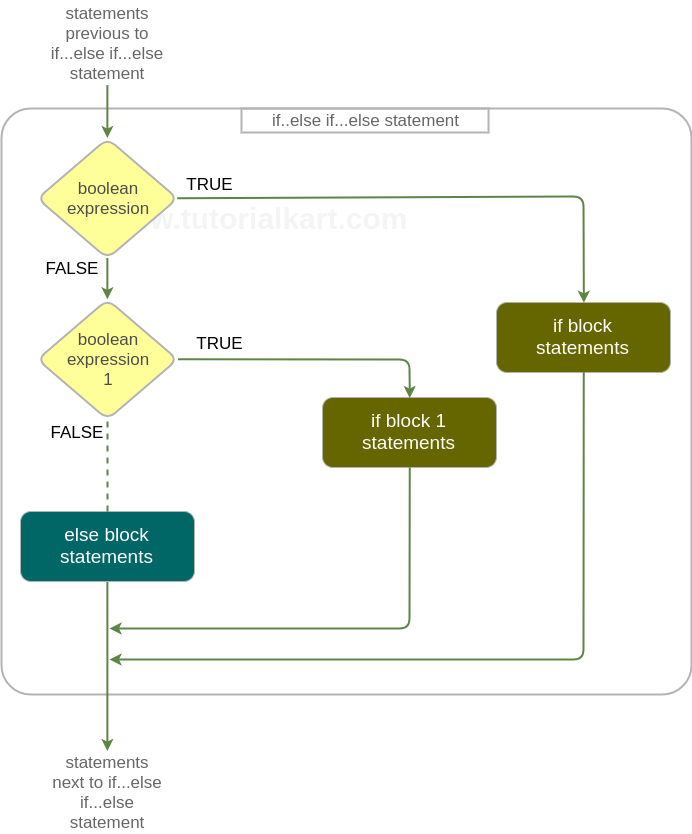
How R evaluates an if else if else statement
Only one branch of an R if...else if...else chain is executed. The first condition that evaluates to TRUE decides the branch. After that branch runs, R exits the complete conditional statement.
- If the first
ifcondition isTRUE, theifblock is executed. - If the first condition is
FALSE, R checks the nextelse ifcondition. - If one of the
else ifconditions isTRUE, that corresponding block is executed. - If no condition is
TRUE, the finalelseblock is executed, if it is present.
The final else block is optional, but it is useful when you want a default action for all unmatched cases.
Syntax – If – Else If
The syntax of if-else-if statement is
if(boolean_expression){
     if_block_statements
 } else if(boolean_expression_1) {
     if_block_1_statements
 } else if(boolean_expression_1) {
     if_block_2_statements
 }
 .
 .
 else {
     else_block_statements
 }
The boolean_expression is any expression that evaluates to a boolean value. And if the boolean value = TRUE, execution flow enters the if block, else execution flow enters the next R if…else block.
Last else block is optional. But if you want any default code to be run in case any of the above if blocks do not execute, else block would serve as default block.
R else if syntax with distinct conditions
In actual R programs, each else if condition normally tests a different case. A clean pattern is shown below.
if (condition_1) {
  # statements when condition_1 is TRUE
} else if (condition_2) {
  # statements when condition_2 is TRUE
} else if (condition_3) {
  # statements when condition_3 is TRUE
} else {
  # statements when none of the above conditions are TRUE
}
Keep the closing brace of the previous block and the keyword else together on the same line, as in } else if (...). This style avoids parsing errors in interactive R sessions and makes the chain easier to read.
Example 1 – R If Else If
In this example, we will write an if-else-if statement. If block whose condition becomes true will be executed.
r_if_else_if_else_example.R
# R if...else if...else statement Example

b = 7

if(b==6){
	print ("Condition b==6 is TRUE")
} else if(b==7){
	print ("Condition b==7 is TRUE")
} else if(b==8){
	print ("Condition b==8 is TRUE")
} else{
	print ("No if condition is TRUE for b")
}
Output
$ Rscript r_if_else_if_else_example.R
[1] "Condition b==7 is TRUE"
Here, b == 6 is FALSE, so R moves to the next condition. The condition b == 7 is TRUE, so R prints the matching message and does not evaluate the later b == 8 branch.
R if else if with numeric grades
The if...else if...else structure is commonly used for ranges, such as marks, scores, or categories. The order of conditions matters. Put the most specific or highest-priority condition first.
marks <- 82

if (marks >= 90) {
  grade <- "A"
} else if (marks >= 75) {
  grade <- "B"
} else if (marks >= 60) {
  grade <- "C"
} else if (marks >= 40) {
  grade <- "D"
} else {
  grade <- "Fail"
}

print(grade)
Output
[1] "B"Although 82 >= 60 and 82 >= 40 are also true, R stops at marks >= 75 because that is the first true condition in the chain.
Multiple conditions in R else if using && and ||
You can combine conditions inside an R if or else if statement. Use && when both conditions must be true, and use || when at least one condition must be true.
age <- 20
has_id <- TRUE

if (age >= 18 && has_id == TRUE) {
  print("Allowed")
} else if (age >= 18 && has_id == FALSE) {
  print("ID required")
} else {
  print("Not allowed")
}
Output
[1] "Allowed"For scalar control flow, prefer && and || inside if conditions. The operators & and | are vectorized operators and are usually used when comparing vectors element by element.
Does R use elif?
R does not use the keyword elif. The correct R keyword sequence is else if, written as two words.
# Correct in R
if (x > 0) {
  print("Positive")
} else if (x < 0) {
  print("Negative")
} else {
  print("Zero")
}
Using elif in R will not work because it is not an R control-flow keyword.
Using == in R if else if conditions
In R, == is the equality comparison operator. It checks whether the value on the left is equal to the value on the right. This is different from <- or =, which are used for assignment in many R contexts.
status <- "active"

if (status == "active") {
  print("Account is active")
} else if (status == "paused") {
  print("Account is paused")
} else {
  print("Unknown status")
}
Output
[1] "Account is active"A common mistake is to write an assignment when a comparison is required. For conditions, use comparison operators such as ==, !=, >, >=, <, and <=.
R if else if versus ifelse for vectors
Use if...else if...else when your program must make one decision for one condition. Use ifelse() when you want to apply a conditional rule across a vector.
scores <- c(35, 60, 78, 92)
result <- ifelse(scores >= 40, "Pass", "Fail")

print(result)
Output
[1] "Fail" "Pass" "Pass" "Pass"The regular R if statement expects a single TRUE or FALSE value. If you pass a vector condition to if, R cannot use all elements as separate control-flow decisions. For vectorized classification, use ifelse() or a package-specific helper such as dplyr::if_else().
Common R if else if mistakes
- Writing elif instead of else if: R uses
else if, notelif. - Using a vector condition in if: Use a single logical value in
if. For vectors, useifelse(). - Placing else on a new standalone line: Keep
elsewith the closing brace of the previous block, as in} else {. - Putting broad conditions first: In range checks, order conditions carefully so the first true match is the intended one.
- Confusing assignment and comparison: Use
==for equality comparison inside a condition.
QA checklist for R if else if tutorial examples
- Check that every R
else ifbranch has a condition inside parentheses. - Confirm that the final
elseblock has no condition. - Verify that examples using
ifevaluate to one logical value, not a vector of logical values. - Check that equality tests use
==and not assignment by mistake. - Run every R script and confirm that the shown output matches the actual output.
Frequently asked questions on R if else if
Does R have elif?
No. R does not have an elif keyword. Use else if as two separate words.
How do I use if else in R with multiple conditions?
Use logical operators inside the condition. Use && when both scalar conditions must be true, and use || when at least one scalar condition must be true.
What does == mean in an R if condition?
The operator == checks equality. For example, x == 10 returns TRUE when x is equal to 10.
Can I use R if else if with vectors?
A regular if statement is meant for a single logical decision. For vectors, use ifelse() or another vectorized function.
Is the else block required in R else if chains?
No. The final else block is optional. Add it when you need a default action for cases that do not match any earlier condition.
Conclusion
In this R Tutorial, we learnt about R if…else if…else statement, its Syntax and the Execution Flow in and around the if…else statement with an R Example Script. The key points are to write else if correctly, order the conditions carefully, use comparison operators such as ==, and choose ifelse() when you need vectorized conditional results.