 TutorialKart.com
Functions in R
Functions in R are reusable blocks of code that perform a specific task. They make R scripts easier to read, test, and maintain because the same logic can be written once and called whenever it is needed.
In this tutorial, we shall learn what a function is in R, the difference between built-in R functions and user-defined R functions, the syntax of the function() keyword, and how to call functions with no arguments, with arguments, and with return values.
What is a function in R?
A function is a set of instructions used to perform a specific task. In R, a function usually receives input values called arguments, runs statements inside the function body, and produces a result.
For example, consider a function that does addition. It accepts numbers as arguments, calculates their sum, and then either prints the result or returns the result to the calling code.
R functions are useful because they help you avoid repeating the same statements again and again. Instead of writing the same logic in many places, you can create one function and call it with different input values.
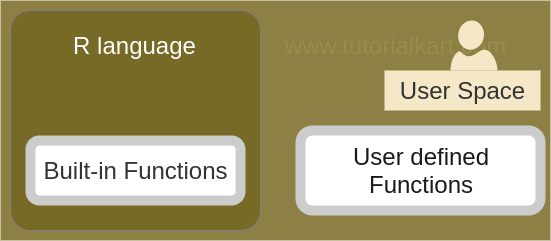
R programming language provides functions to group a set of instructions and form a task. There are two main types of functions in R language. They are:
- Built-in R functions
- User defined R functions
Built-in R functions for common calculations
Built-in R functions are functions that are already available in R. You do not need to define them before using them. R provides many built-in functions for mathematical calculations, statistical summaries, string handling, data inspection, type conversion, and more.
Following are some commonly used built-in R functions:
| Built-in R function | Purpose | Example use |
|---|---|---|
sum() | Finds the total of values | sum(10, 20, 30) |
mean() | Finds the arithmetic mean | mean(c(2, 4, 6)) |
min() | Finds the smallest value | min(5, 2, 9) |
max() | Finds the largest value | max(5, 2, 9) |
length() | Returns the number of elements | length(c(4, 8, 12)) |
sqrt() | Finds the square root | sqrt(25) |
round() | Rounds numeric values | round(3.14159, 2) |
paste() | Combines text values | paste("R", "Functions") |
Examples of mathematical built-in functions include cos(x), sin(x), tan(x), sum(range), and mean(range).
numbers <- c(10, 20, 30, 40)

print(sum(numbers))
print(mean(numbers))
print(length(numbers))
Output
[1] 100
[1] 25
[1] 4
User defined R functions with function()
User defined R functions are functions created by the programmer. You write them when built-in functions do not directly match the task you want to perform, or when you want to reuse a custom calculation in several places.
Some scenarios demand you to write functions whether it is to implement a new algorithm or write your business logic. For such cases, R programming language provides ability to write user defined functions using the function() keyword.
Following is an example of user defined R function, where you need to implement an addition of two numbers.
# R function
addition = function(a,b){
	return (a+b)
}
Here, addition is the function name, a and b are arguments, and return(a+b) sends the calculated value back to the code that calls the function.
Syntax of an R function using function()
The syntax of an R function is
function_name = function(arguments){
    function_body
}
function_name – Required : name of the function by which you want to reference it from rest of the code
arguments – Optional : the values that are going to be used inside the function block.
function_body – Optional : the set of statements which perform a task collectively. Body of the function may contain return_value. return_value is the final result of transformation of arguments.
You may also see the assignment operator <- used instead of = while defining functions in R. Both are commonly understood in R code, but <- is widely used in R examples and style guides.
function_name <- function(argument1, argument2) {
    statements
    return(value)
}
Return values in R functions
An R function can return a value in two ways. You can use the return() function explicitly, or you can let R return the value of the last evaluated expression in the function body.
# Explicit return
square_explicit <- function(x) {
    return(x * x)
}

# Implicit return: last expression is returned
square_implicit <- function(x) {
    x * x
}

print(square_explicit(5))
print(square_implicit(5))
Output
[1] 25
[1] 25
Use return() when it makes the code clearer or when you want to exit a function early. For short functions, returning the last expression is also common in R.
Calling an R function from a script
Once a function is defined, you may call it from other part of R script file. We shall learn with example R scripts to call a function in the following scenarios :
- r function that has no arguments
- r function that has arguments
- r function that returns a value
The general form of a function call is to write the function name followed by parentheses. If the function needs arguments, place the argument values inside the parentheses.
function_name()
function_name(value1, value2)
Example 1 – R function that has no arguments
In this example, we will write a function that takes no arguments.
r_function_no_args.R
# R function with no arguments
sayHello = function(){
	print("Hello !")
}

sayHello()
Output
$ Rscript r_function_no_args.R
[1] "Hello !"
The function has no arguments. Therefore, the function call uses empty parentheses: sayHello().
Example 2 – R function that has arguments
In this example, we will write a function with three parameters. So, when we are calling this function, we have to pass three values as arguments.
r_function_args.R
# R function with arguments
addition = function(a,b,c){
	print(a+b+c)
}

addition(4,15,6)
Output
$ Rscript r_function_args.R
[1] 25
The function accepts arguments, does addition and prints the result to console.
Example 3 – R function that returns a value
In this example, we will write a function that returns a value. We will store this returned value in a variable, say d.
r_function_return.R
# R function with arguments and return value
addition = function(a,b,c){
	return (a+b+c)
}

d = addition(4,15,6)

print(d)
Output
$ Rscript r_function_return.R
[1] 25
The function accepts arguments, does addition and returns the result to the point of function calling.
Named arguments and positional arguments in R functions
Arguments can be passed to R functions by position or by name. When you pass arguments by position, R matches values to parameters in the order in which they appear. When you pass arguments by name, R matches values using the parameter names.
calculate_total <- function(price, quantity) {
    price * quantity
}

# Positional arguments
print(calculate_total(50, 3))

# Named arguments
print(calculate_total(quantity = 3, price = 50))
Output
[1] 150
[1] 150
Named arguments are helpful when a function has several parameters or when you want the function call to be easier to read.
Default argument values in R functions
An R function can define default values for its arguments. If the caller does not provide a value for that argument, R uses the default value.
greet_user <- function(name = "Guest") {
    paste("Hello", name)
}

print(greet_user())
print(greet_user("Arun"))
Output
[1] "Hello Guest"
[1] "Hello Arun"
Default arguments are useful when a function should work with a common value but still allow the caller to override it when required.
Local variables inside R function body
Variables created inside a function are local to that function. They are available while the function is running, but they are not normally available outside the function body.
calculate_area <- function(length, width) {
    area <- length * width
    return(area)
}

print(calculate_area(8, 5))
Output
[1] 40In this example, area is created inside the function body. The value is returned from the function, but the variable itself belongs to the function’s local scope.
R function writing best practices
When writing functions in R, keep each function focused on one clear task. A function that tries to do too many unrelated things becomes difficult to test and reuse.
- Use clear function names such as
calculate_total,clean_names, orconvert_celsius_to_fahrenheit. - Use clear argument names that describe the expected input.
- Prefer returning values instead of only printing values, especially when the result must be used later.
- Use default arguments only when the default value is sensible for most calls.
- Avoid depending on variables outside the function unless that behavior is intentional.
- Test the function with small input values before using it in a larger script.
Common errors while creating R functions
The following mistakes are common when learning functions in R.
| Mistake | Why it happens | Fix |
|---|---|---|
| Calling a function before defining it | The function object is not available yet in the script | Define the function first, then call it |
| Missing parentheses in a function call | Writing only the function name does not execute it | Use function_name() |
| Passing too few required arguments | The function expects values that were not supplied | Pass all required arguments or provide default values |
| Using a variable outside its local scope | The variable was created inside the function body | Return the value from the function and store it outside |
| Printing a value when a return value is needed | print() displays output but may not be convenient for reuse | Use return() or make the last expression the desired result |
FAQs on functions in R
What are functions in R?
Functions in R are reusable code blocks that perform a task. They can accept arguments, run statements inside a function body, and return a result.
What are the main types of R functions?
The main types are built-in R functions and user defined R functions. Built-in functions are already provided by R, while user defined functions are written by the programmer using function().
How do you write a function in R?
You can write a function in R by assigning the function() definition to a function name. For example, add <- function(a, b) { a + b } creates a function named add.
Does an R function always need return()?
No. An R function can use return(), but it can also return the value of the last evaluated expression in the function body.
Can R functions have default arguments?
Yes. R functions can define default argument values. If the caller does not pass a value for that argument, R uses the default value defined in the function.
QA checklist for this R functions tutorial
- Confirm that every R function example uses valid
function()syntax. - Check that examples distinguish between printing a result and returning a result.
- Verify that output values match the calculations in the corresponding R code.
- Ensure newly added code blocks use PrismJS-compatible classes such as
language-r,language-r syntax, oroutput. - Keep the existing R functions image and existing tutorial link unchanged.
Conclusion on R functions
In this R Tutorial, we have learnt about types of R functions, their syntax and how to call a defined function from other part of the R script file. We also covered built-in functions, user defined functions, return values, named arguments, default arguments, local variables, and common mistakes to avoid while writing functions in R.