 TutorialKart.com
R If Else
In R, an if...else statement is used when a program has to choose between two possible blocks of code. If the condition is TRUE, R runs the statements inside the if block. If the condition is FALSE, R runs the statements inside the else block.
This tutorial explains the syntax, execution flow, examples, common mistakes, and the difference between if...else, else if, and vectorized ifelse() in R.
if...else statement is an extension of if statement with an else block. So, if the condition provided to the if statement is true, then the statements in the if statement block are executed, else the statements in the else block are executed.
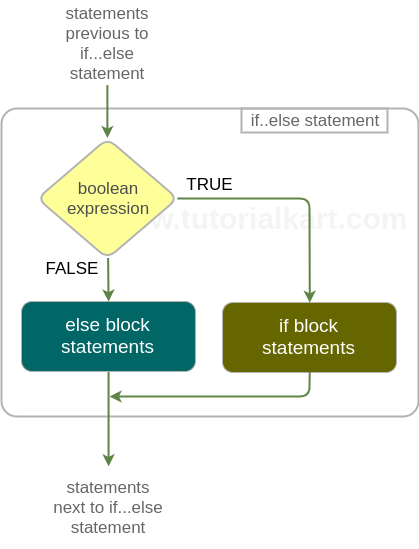
Following is a flow diagram depicting the flow of execution around and in an if..else statement.
Syntax – R if-else
The syntax of R if else statement is
if(boolean_expression){
     if_block_statements
 } else {
     else_block_statements
 }
The boolean_expression is any expression that evaluates to a logical value. If the logical value is TRUE, execution flow enters the if block. If the logical value is FALSE, execution flow enters the else block.
In R, the condition used with if should produce a single logical value, either TRUE or FALSE. This is important because if...else controls one decision in the program flow, not a whole vector of decisions.
How R if else chooses the block to execute
The execution of an R if...else statement can be read in this order:
- R evaluates the condition inside the parentheses.
- If the condition is
TRUE, only theifblock is executed. - If the condition is
FALSE, only theelseblock is executed. - After one block is completed, execution continues with the statements after the
if...elsestructure.
The two blocks are mutually exclusive. In one run, R does not execute both the if block and the else block.
Example 1 – R If-Else
In this example, we will write two if-else statements. For the first if-else statement, the condition evaluates to TRUE and therefore if block will be executed. For the second if-else statement, the condition evaluates to FALSE and therefore else block will be executed.
r_if_else_example.R
# R if..else statement Example

# for TRUE condition
a = 6

if(a==6){
	print ("Condition a==6 is TRUE")
	print ("This is second statement in if block")
} else{
	print ("Condition a==6 is FALSE")
	print ("This is second statement in else block")
}

# for FALSE condition
b = 7

if(b==6){
	print ("Condition b==6 is TRUE")
	print ("This is second statement in if block")
} else{
	print ("Condition b==6 is FALSE")
	print ("This is second statement in else block")
}
Output
$ Rscript r_if_else_example.R
[1] "Condition a==6 is TRUE"
[1] "This is second statement in if block"
[1] "Condition b==6 is FALSE"
[1] "This is second statement in else block"
R if else example for checking whether a number is positive or negative
The following example uses if...else to check whether a number is greater than or equal to zero.
x <- -12

if (x >= 0) {
  print("The number is positive or zero")
} else {
  print("The number is negative")
}
Output
[1] "The number is negative"Since x contains -12, the condition x >= 0 evaluates to FALSE. Therefore, R skips the if block and executes the else block.
R if else with user-defined conditions
The condition in an R if...else statement can use comparison operators such as ==, !=, >, <, >=, and <=. It can also combine multiple conditions using logical operators such as && and ||.
marks <- 72
attendance <- 85

if (marks >= 40 && attendance >= 75) {
  print("Student is eligible")
} else {
  print("Student is not eligible")
}
Output
[1] "Student is eligible"Here, both conditions are true: marks >= 40 and attendance >= 75. Because the conditions are joined with &&, R executes the if block only when both are true.
R else if ladder for more than two decisions
Use else if when there are more than two possible branches. R checks the conditions from top to bottom and executes the first matching block.
if (condition1) {
  statements_for_condition1
} else if (condition2) {
  statements_for_condition2
} else {
  statements_when_no_condition_matches
}
The following example assigns a grade based on marks.
marks <- 68

if (marks >= 90) {
  grade <- "A"
} else if (marks >= 75) {
  grade <- "B"
} else if (marks >= 50) {
  grade <- "C"
} else {
  grade <- "D"
}

print(grade)
Output
[1] "C"The value 68 does not satisfy the first two conditions, but it satisfies marks >= 50. So, R assigns "C" to grade.
Place else on the same line as the closing brace in R scripts
In R scripts, it is a common and safe style to place else on the same line as the closing brace of the if block. This avoids parsing issues in interactive use and makes the relationship between if and else clear.
# Recommended style
if (x > 0) {
  print("Positive")
} else {
  print("Not positive")
}
Avoid separating else as if it starts a completely independent statement. Keeping it next to the closing brace improves readability and prevents avoidable syntax errors.
R if else vs ifelse() for vectors
Use if...else when you are making one control-flow decision. Use ifelse() when you need to apply a condition element by element across a vector.
scores <- c(35, 42, 78, 29, 90)
result <- ifelse(scores >= 40, "Pass", "Fail")

print(result)
Output
[1] "Fail" "Pass" "Pass" "Fail" "Pass"Here, ifelse() checks each value in scores. It returns "Pass" for scores greater than or equal to 40 and "Fail" for the remaining scores.
Common mistakes in R if else statements
While writing if...else in R, watch for the following mistakes.
- Using assignment instead of comparison: use
==to compare values, not=or<-. - Passing a vector as the condition:
ifexpects one logical value. For vectorized checks, useifelse(). - Forgetting braces in multi-line blocks: use braces when a branch contains more than one statement.
- Writing conditions that can produce
NA: handle missing values with functions such asis.na()before using them in decisions. - Putting
elsein an unclear position: keepelseconnected to the precedingifblock.
R if else checklist for reviewing examples
Use this checklist when reviewing an R if...else example or tutorial code.
- The condition inside
ifreturns a single logical value. - The
ifblock andelseblock are both enclosed clearly when they contain multiple statements. - The code uses
==for equality comparison. - The example output matches the actual condition used in the script.
- Vector conditions are handled with
ifelse()instead of plainif...else.
FAQs on R if else statement
What is if else in R?
if...else in R is a conditional control structure. It executes one block of code when a condition is TRUE and another block when the condition is FALSE.
Can R if else handle more than two conditions?
Yes. Use an else if ladder when you need to test multiple conditions. R checks the conditions in order and executes the first matching block.
What is the difference between if else and ifelse() in R?
if...else is used for one control-flow decision. ifelse() is a vectorized function used to return values for each element of a vector based on a condition.
Should else be written on the same line as the closing brace in R?
It is recommended to write else on the same line as the closing brace of the if block, as in } else {. This style keeps the structure clear and avoids common parsing issues.
Why does R warn when if gets a condition with length greater than one?
if expects a single logical value. When the condition returns multiple values, R cannot use the whole vector as one control-flow decision. Use ifelse() for element-wise vector decisions.
Conclusion
In this R Tutorial, we learnt about R if…else statement, its syntax and the execution flow in and around the if…else statement with R example scripts. Use if...else for a two-way decision, else if for multiple branches, and ifelse() when the decision has to be applied across a vector.