 TutorialKart.com
In this OpenCV Python tutorial, you will learn how to rotate an image by 90, 180, and 270 degrees. For right-angle rotations, cv2.rotate() is the simplest method. For custom angles or rotation with scaling, you can use cv2.getRotationMatrix2D() with cv2.warpAffine().
Rotate an Image 90, 180, or 270 Degrees in OpenCV Python
OpenCV supports two common ways to rotate an image in Python. Use cv2.rotate() when the angle is exactly 90, 180, or 270 degrees. Use an affine rotation matrix when you need an arbitrary angle such as 30 degrees, 45 degrees, or when you want to control the rotation center and scale.
For most 90-degree, 180-degree, and 270-degree image rotations, cv2.rotate() is preferred because it is short, clear, and automatically returns the correct output dimensions for right-angle rotations.
OpenCV cv2.rotate() Syntax for 90, 180, and 270 Degree Rotation
rotated = cv2.rotate(src, rotateCode)The rotateCode value decides the direction and angle of rotation.
| Rotation needed | OpenCV rotate code | Result |
|---|---|---|
| 90 degrees clockwise | cv2.ROTATE_90_CLOCKWISE | Width and height are swapped |
| 180 degrees | cv2.ROTATE_180 | Width and height stay the same |
| 90 degrees counter-clockwise / 270 degrees clockwise | cv2.ROTATE_90_COUNTERCLOCKWISE | Width and height are swapped |
Copy-Ready OpenCV Python Code to Rotate Image 90, 180, and 270 Degrees
The following example reads an image, rotates it in three right-angle directions, displays the results, and also saves the rotated images to disk.
import cv2

img = cv2.imread('/home/arjun/Desktop/logos/python.png')

if img is None:
    raise FileNotFoundError('Image file could not be read. Check the image path.')

rotated_90_clockwise = cv2.rotate(img, cv2.ROTATE_90_CLOCKWISE)
rotated_180 = cv2.rotate(img, cv2.ROTATE_180)
rotated_90_counterclockwise = cv2.rotate(img, cv2.ROTATE_90_COUNTERCLOCKWISE)

cv2.imwrite('rotated_90_clockwise.png', rotated_90_clockwise)
cv2.imwrite('rotated_180.png', rotated_180)
cv2.imwrite('rotated_90_counterclockwise.png', rotated_90_counterclockwise)

cv2.imshow('Original Image', img)
cv2.imshow('90 Degrees Clockwise', rotated_90_clockwise)
cv2.imshow('180 Degrees', rotated_180)
cv2.imshow('90 Degrees Counterclockwise', rotated_90_counterclockwise)

cv2.waitKey(0)
cv2.destroyAllWindows()
In OpenCV, image arrays are stored with shape (height, width, channels). When you rotate a rectangular image by 90 or 270 degrees, the output image shape becomes (width, height, channels). For 180 degrees, the image shape remains the same.
Using cv2.getRotationMatrix2D() and cv2.warpAffine() for Image Rotation
The affine transformation method is useful when the rotation angle is not limited to 90, 180, or 270 degrees. It calculates a rotation matrix and then applies that matrix to the input image.
M = cv2.getRotationMatrix2D(center, angle, scale)
rotated = cv2.warpAffine(img, M, (w, h))
where
- center: center point around which the image is rotated.
- angle: angle of rotation in degrees. Positive values rotate the image counter-clockwise.
- scale: scale factor applied during rotation. Use
1.0to preserve the original scale. - M: 2 × 3 affine transformation matrix returned by
cv2.getRotationMatrix2D(). - rotated: output image returned by
cv2.warpAffine().
Note: In cv2.warpAffine(), the output size is passed as (width, height), not (height, width). If you rotate an image by 90 or 270 degrees using affine transformation and want the full image to fit without cropping, you need to adjust the output canvas size or use cv2.rotate() for these right-angle rotations.
Rotate Image by 90, 180, and 270 Degrees Using Affine Matrix
The following example shows the affine rotation approach. It reads an image, creates a rotation matrix for each angle, and displays the rotated output.
rotate-image.py
import cv2

# read image as grey scale
img = cv2.imread('/home/arjun/Desktop/logos/python.png')
# get image height, width
(h, w) = img.shape[:2
                    ]
# calculate the center of the image
center = (w / 2, h / 2)

angle90 = 90
angle180 = 180
angle270 = 270

scale = 1.0

# Perform the counter clockwise rotation holding at the center
# 90 degrees
M = cv2.getRotationMatrix2D(center, angle90, scale)
rotated90 = cv2.warpAffine(img, M, (h, w))

# 180 degrees
M = cv2.getRotationMatrix2D(center, angle180, scale)
rotated180 = cv2.warpAffine(img, M, (w, h))

# 270 degrees
M = cv2.getRotationMatrix2D(center, angle270, scale)
rotated270 = cv2.warpAffine(img, M, (h, w))


cv2.imshow('Original Image',img)
cv2.waitKey(0) # waits until a key is pressed
cv2.destroyAllWindows() # destroys the window showing image

cv2.imshow('Image rotated by 90 degrees',rotated90)
cv2.waitKey(0) # waits until a key is pressed
cv2.destroyAllWindows() # destroys the window showing image

cv2.imshow('Image rotated by 180 degrees',rotated180)
cv2.waitKey(0) # waits until a key is pressed
cv2.destroyAllWindows() # destroys the window showing image

cv2.imshow('Image rotated by 270 degrees',rotated270)
cv2.waitKey(0) # waits until a key is pressed
cv2.destroyAllWindows() # destroys the window showing image
Original Image Before OpenCV Rotation
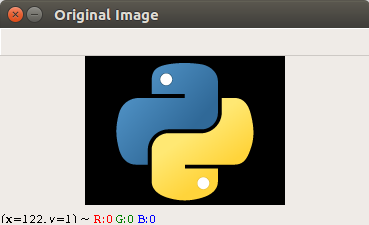
Image Rotated 90 Degrees Counter-Clockwise in OpenCV Python
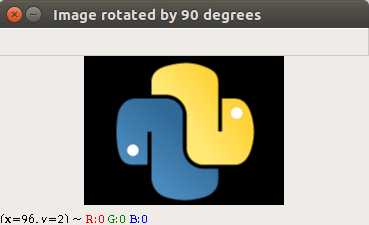
Image Rotated 180 Degrees in OpenCV Python
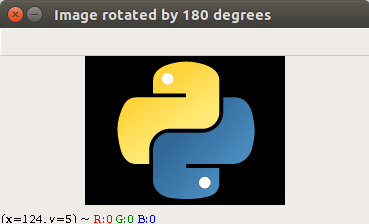
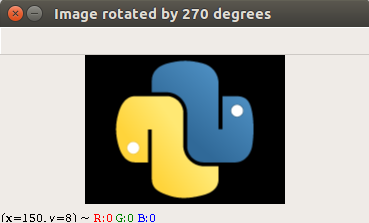
Image Rotated 270 Degrees Counter-Clockwise in OpenCV Python
Rotate an OpenCV Image Without Cropping for a Custom Angle
When you rotate an image by a custom angle using warpAffine(), parts of the image may be clipped if the output canvas is the same size as the original image. To keep the full rotated image, calculate the new bounding width and height and update the translation part of the rotation matrix.
import cv2
import numpy as np

img = cv2.imread('/home/arjun/Desktop/logos/python.png')

if img is None:
    raise FileNotFoundError('Image file could not be read. Check the image path.')

(h, w) = img.shape[:2]
center = (w / 2, h / 2)
angle = 45
scale = 1.0

M = cv2.getRotationMatrix2D(center, angle, scale)

cos = abs(M[0, 0])
sin = abs(M[0, 1])

new_w = int((h * sin) + (w * cos))
new_h = int((h * cos) + (w * sin))

M[0, 2] += (new_w / 2) - center[0]
M[1, 2] += (new_h / 2) - center[1]

rotated = cv2.warpAffine(img, M, (new_w, new_h))

cv2.imshow('Rotated without cropping', rotated)
cv2.waitKey(0)
cv2.destroyAllWindows()
Choosing Between cv2.rotate() and warpAffine() in OpenCV Python
| Requirement | Recommended OpenCV method | Reason |
|---|---|---|
| Rotate image 90 degrees clockwise | cv2.rotate() | Built-in rotate code handles dimensions correctly |
| Rotate image 180 degrees | cv2.rotate() | Simple and readable for half-turn rotation |
| Rotate image 270 degrees clockwise | cv2.rotate() | Same as 90 degrees counter-clockwise |
| Rotate by 30, 45, or any custom angle | cv2.getRotationMatrix2D() and cv2.warpAffine() | Affine matrix allows custom angle, scale, and center |
| Rotate around a point that is not the image center | cv2.getRotationMatrix2D() and cv2.warpAffine() | The rotation center can be set manually |
Common Mistakes While Rotating Images in OpenCV Python
- Passing
(height, width)instead of(width, height)tocv2.warpAffine(). - Using affine rotation for 90 or 270 degrees without adjusting the output canvas, which can crop the image.
- Expecting positive affine angles to rotate clockwise. In OpenCV rotation matrices, positive angles rotate counter-clockwise.
- Not checking whether
cv2.imread()returnedNonebefore rotating the image. - Confusing 270 degrees clockwise with 270 degrees counter-clockwise. A 270-degree clockwise rotation is the same as a 90-degree counter-clockwise rotation.
FAQs on OpenCV Python Image Rotation
How do I rotate an image 90 degrees in OpenCV Python?
Use cv2.rotate(img, cv2.ROTATE_90_CLOCKWISE) for a 90-degree clockwise rotation. Use cv2.rotate(img, cv2.ROTATE_90_COUNTERCLOCKWISE) for a 90-degree counter-clockwise rotation.
How do I rotate an image 180 degrees in OpenCV?
Use cv2.rotate(img, cv2.ROTATE_180). A 180-degree rotation keeps the output image width and height the same as the original image.
How do I rotate an image 270 degrees in OpenCV Python?
Use cv2.rotate(img, cv2.ROTATE_90_COUNTERCLOCKWISE) for a 270-degree clockwise result. If you mean 270 degrees counter-clockwise, use cv2.rotate(img, cv2.ROTATE_90_CLOCKWISE).
When should I use cv2.getRotationMatrix2D() instead of cv2.rotate()?
Use cv2.getRotationMatrix2D() with cv2.warpAffine() when the rotation angle is not 90, 180, or 270 degrees, or when you need to rotate around a custom center point or apply scaling during rotation.
Why is my rotated image cropped after using warpAffine()?
The image is cropped because the output canvas size passed to cv2.warpAffine() is too small for the rotated result. Calculate a larger bounding canvas and adjust the translation values in the rotation matrix to keep the full rotated image visible.
OpenCV Image Rotation QA Checklist
- Use
cv2.rotate()for 90, 180, and 270 degree examples unless the tutorial is specifically explaining affine transformations. - Verify that every
warpAffine()example passes the output size as(width, height). - State clearly whether the example rotates clockwise or counter-clockwise.
- Check that image paths are placeholders or valid local paths for the reader’s environment.
- For custom-angle rotation, mention cropping and show how to expand the output canvas when needed.
Conclusion
In this OpenCV Tutorial, we learned how to rotate an image by 90, 180, and 270 degrees in Python. For fixed right-angle rotations, cv2.rotate() is the most direct method. For custom-angle rotation, use cv2.getRotationMatrix2D() and cv2.warpAffine(), and adjust the output canvas when you need to avoid cropping.