 TutorialKart.com
NER Training in OpenNLP with Name Finder Training Java Example
In this OpenNLP Tutorial, we shall learn how to build a model for Named Entity Recognition using custom training data [that varies from requirement to requirement]. We shall do NER Training in OpenNLP with Name Finder Training Java Example program and generate a model, which can be used to detect the custom Named Entities that are specific to our requirement and of course similar to those provided in the training file.
Apache OpenNLP provides a Name Finder component for token-level named entity recognition. The training process takes annotated sentences, converts them into NameSample objects, trains a TokenNameFinderModel, and saves the model as a .bin file. You can then load that model in another Java program and identify entities such as person names, locations, organizations, products, skills, medical terms, or any other entity type that is consistently annotated in your training data.
Prerequisites :
To follow this tutorial, you should have basic understanding of Java programming language and setup of OpenNLP libraries in a Java project to use the OpenNLP Name Finder Training API.
When to Train a Custom OpenNLP NER Name Finder Model
A pre-trained named entity model is useful only when its entity types and input domain match your requirement. Train a custom OpenNLP NER model when your text contains domain-specific names or when you need entity categories that are not available in the standard models.
- Extracting product names, course names, ticket IDs, invoice labels, or internal project names.
- Detecting people, places, or organizations in text that uses local spellings, abbreviations, or informal writing.
- Finding multiple entity types from the same sentence, such as
person,location, andrelation. - Building a private model from your own data instead of sending text to an external service.
The trained model learns from the patterns present in your annotated examples. If the training file is small, inconsistent, or different from production text, the model may still compile successfully but return weak predictions.
Following is a step-by-step process in generating a model for custom training data :
Step 1: Prepare Training Data for OpenNLP Name Finder
As sugguested by OpenNLP manual, atleast 15,000 sentences should be available in the training file, so that the trained model may perform well.
Annotations should be provided for Named Entities in the training file using the below format.
<START:named_entitiy_type>Named Entity<END> remaining sentence.
An example could be : <START:person>Johny<END> and<START:person>Ricky<END> are brothers.
Note : If there is only one named entity type, mentioning named_entity_type is not required. <START>Johny<END> and<START>Ricky<END> are brothers.
Multiple types could be given in a single training file.
An example for training sentence having multiple types is : <START:person>Johny<END> and<START:person>Ricky<END> are <START:relation>brothers<END>.
The type is mentioned after the <START: tag.
AnnotatedSentences.txt [ source is from apache openNLP, but modified to demonstrate the usage of multiple types for the Named Entities.]
OpenNLP NER Annotation Rules to Follow in the Training File
Good training data matters more than the Java code. Keep the annotation style consistent from the first sentence to the last sentence.
- Use one sentence per line in the training file.
- Keep the entity text inside
<START:type>and<END>. - Use the same entity type names everywhere. For example, do not mix
person,people, andnamefor the same category. - Add a space between two separately annotated entities when the original sentence requires a space.
- Include negative examples also. Not every line needs an entity.
- Use examples that look like the text you will process after deployment.
For example, the sentence below contains two entity types in the same line. This is useful when your final model needs to return the entity label along with the entity span.
<START:person>Alisa Fernandes<END> is a tourist from <START:location>Spain<END>.Once we are ready with the training data, we shall proceed with writing the Java program to train on these sentences.
Step 2: Read the OpenNLP NER Training Data as NameSample Objects
Read the training data file into ObjectStream<NameSample>
InputStreamFactory in = null;
try {
	in = new MarkableFileInputStreamFactory(new File("AnnotatedSentences.txt"));
} catch (FileNotFoundException e2) {
	e2.printStackTrace();
}

ObjectStream sampleStream = null;
try {
	sampleStream = new NameSampleDataStream(
        new PlainTextByLineStream(in, StandardCharsets.UTF_8));
} catch (IOException e1) {
	e1.printStackTrace();
}
MarkableFileInputStreamFactory reads the file, PlainTextByLineStream provides one line at a time, and NameSampleDataStream converts the annotated text into OpenNLP name samples. Each valid training line becomes one sample used by the training algorithm.
Step 3: Set OpenNLP Name Finder Training Parameters
TrainingParameters params = new TrainingParameters();
params.put(TrainingParameters.ITERATIONS_PARAM, 70);
params.put(TrainingParameters.CUTOFF_PARAM, 1);
The number of iterations controls how many passes the trainer can make over the training events. The cutoff value controls how frequently a feature must appear before it is used. For a small demonstration file, a low cutoff helps the model train. For a larger real project, tune these values with a separate test set instead of relying only on training accuracy.
Step 4: Train the Custom OpenNLP TokenNameFinderModel
TokenNameFinderModel nameFinderModel = null;
try {
	nameFinderModel = NameFinderME.train("en", null, sampleStream,
	    params, TokenNameFinderFactory.create(null, null, Collections.emptyMap(), new BioCodec()));
} catch (IOException e) {
	e.printStackTrace();
}
The call to NameFinderME.train() creates a TokenNameFinderModel. The first argument is the language code, the second argument is the type when training a single type directly, the third argument is the training stream, and the remaining arguments provide training parameters and the name finder factory.
In this example, the training file itself contains typed annotations such as <START:person> and <START:relation>. The BioCodec helps represent begin-inside-outside style sequence labels while training the model.
Step 5: Save the OpenNLP NER Model to a Binary File
Once you have generated the model, save it for loading it in other computers or using at a later point of time.
File output = new File("ner-custom-model.bin");
FileOutputStream outputStream = new FileOutputStream(output);
nameFinderModel.serialize(outputStream);
The saved ner-custom-model.bin file contains the trained model. Keep the training data and the model version together in your project notes so that you can reproduce the model later when data or entity definitions change.
Step 6: Test the Trained OpenNLP Name Finder Model in Java
To verify the program, use the model and predict the types from a sentence.
Complete program is given below :
import java.io.File;
import java.io.FileNotFoundException;
import java.io.FileOutputStream;
import java.io.IOException;
import java.nio.charset.StandardCharsets;
import java.util.Collections;

import opennlp.tools.namefind.BioCodec;
import opennlp.tools.namefind.NameFinderME;
import opennlp.tools.namefind.NameSample;
import opennlp.tools.namefind.NameSampleDataStream;
import opennlp.tools.namefind.TokenNameFinder;
import opennlp.tools.namefind.TokenNameFinderFactory;
import opennlp.tools.namefind.TokenNameFinderModel;
import opennlp.tools.util.InputStreamFactory;
import opennlp.tools.util.MarkableFileInputStreamFactory;
import opennlp.tools.util.ObjectStream;
import opennlp.tools.util.PlainTextByLineStream;
import opennlp.tools.util.Span;
import opennlp.tools.util.TrainingParameters;

/**
 * NER Training in OpenNLP with Name Finder Training Java Example
 * @author www.tutorialkart.com
 */
public class NERTrainingExample {

	public static void main(String[] args) {

		// reading training data
		InputStreamFactory in = null;
		try {
			in = new MarkableFileInputStreamFactory(new File("AnnotatedSentences.txt"));
		} catch (FileNotFoundException e2) {
			e2.printStackTrace();
		}

	    ObjectStream sampleStream = null;
		try {
			sampleStream = new NameSampleDataStream(
	            new PlainTextByLineStream(in, StandardCharsets.UTF_8));
		} catch (IOException e1) {
			e1.printStackTrace();
		}

		// setting the parameters for training
	    TrainingParameters params = new TrainingParameters();
	    params.put(TrainingParameters.ITERATIONS_PARAM, 70);
	    params.put(TrainingParameters.CUTOFF_PARAM, 1);

	    // training the model using TokenNameFinderModel class
	    TokenNameFinderModel nameFinderModel = null;
		try {
			nameFinderModel = NameFinderME.train("en", null, sampleStream,
			    params, TokenNameFinderFactory.create(null, null, Collections.emptyMap(), new BioCodec()));
		} catch (IOException e) {
			e.printStackTrace();
		}

		// saving the model to "ner-custom-model.bin" file
		try {
			File output = new File("ner-custom-model.bin");
			FileOutputStream outputStream = new FileOutputStream(output);
			nameFinderModel.serialize(outputStream);
		} catch (FileNotFoundException e) {
			e.printStackTrace();
		} catch (IOException e) {
			e.printStackTrace();
		}

		// testing the model and printing the types it found in the input sentence
	    TokenNameFinder nameFinder = new NameFinderME(nameFinderModel);

	    String[] testSentence ={"Alisa","Fernandes","is","a","tourist","from","Spain"};

	    System.out.println("Finding types in the test sentence..");
	    Span[] names = nameFinder.find(testSentence);
	    for(Span name:names){
	    	String personName="";
	    	for(int i=name.getStart();i<name.getEnd();i++){
	    		personName+=testSentence[i]+" ";
	    	}
	    	System.out.println(name.getType()+" : "+personName+"\t [probability="+name.getProb()+"]");
	    }
	}

}
Output :
Indexing events using cutoff of 1

	Computing event counts...  done. 1392 events
	Indexing...  done.
Collecting events... Done indexing.
Incorporating indexed data for training...
done.
	Number of Event Tokens: 1392
	    Number of Outcomes: 3
	  Number of Predicates: 9268
Computing model parameters...
Performing 70 iterations.
  1:  . (1358/1392) 0.9755747126436781
  2:  . (1387/1392) 0.9964080459770115
  3:  . (1390/1392) 0.9985632183908046
  4:  . (1392/1392) 1.0
  5:  . (1392/1392) 1.0
  6:  . (1392/1392) 1.0
  7:  . (1392/1392) 1.0
Stopping: change in training set accuracy less than 1.0E-5
Stats: (1392/1392) 1.0
...done.
Compressed 9268 parameters to 428
4 outcome patterns
Finding types in the test sentence..
person : Alisa Fernandes 	 [probability=0.6643846020606172]
The training log shows that the model was trained and then used on a tokenized sentence. The probability printed in the output is the confidence score for the predicted span. In a real application, test the model on many unseen sentences and inspect both correct and incorrect predictions before using the model in production.
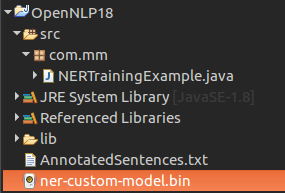
Once the program is run, the model is saved to “ner-custom-model.bin” as shown in the following screenshot.
Using the Saved OpenNLP NER Model in a Separate Java Program
After training, most projects load the saved model in a separate prediction program or service. The input sentence must be tokenized in the same practical way as the text you expect to process. The simple example below loads the saved model and finds names from a token array.
try (InputStream modelInputStream = new FileInputStream("ner-custom-model.bin")) {
    TokenNameFinderModel model = new TokenNameFinderModel(modelInputStream);
    NameFinderME finder = new NameFinderME(model);

    String[] tokens = {"Ricky", "visited", "Spain", "last", "summer"};
    Span[] spans = finder.find(tokens);

    for (Span span : spans) {
        System.out.println(span.getType() + " " + span);
    }

    finder.clearAdaptiveData();
}
Call clearAdaptiveData() when you finish processing an unrelated document. Name Finder can adapt to earlier context in a document, so clearing adaptive data prevents one document from influencing the next one.
Improving Accuracy of an OpenNLP Custom NER Training Model
If the model does not detect entities correctly, improve the data before changing the code. Most weak NER models are caused by inconsistent labels, too few examples, or training sentences that do not match the final input text.
- Use enough examples for every entity type. A type with only a few examples is usually unreliable.
- Keep labels consistent. Decide whether a title such as “Dr.” or “Mr.” is part of a person name and annotate it the same way everywhere.
- Add confusing negative examples. If a word sometimes appears as a normal word and sometimes as an entity, include both cases.
- Split data for testing. Do not judge the model only on the same sentences used for training.
- Review false positives and false negatives. Add corrected examples for the patterns that fail most often.
Common Errors in OpenNLP Name Finder Training
| Issue | Likely reason | What to check |
|---|---|---|
| Model trains but finds no entities | Training examples are too few or different from test text | Add more representative annotated sentences and test on unseen data. |
| Wrong entity type is returned | Labels are inconsistent or overlapping in meaning | Review entity definitions and use one label for one concept. |
| Training file fails to parse | Malformed <START> and <END> tags | Check every sentence for matching start and end tags. |
| Accuracy looks perfect during training | The log reports training-set accuracy | Evaluate on a separate test file before trusting the model. |
QA Checklist for This OpenNLP NER Training Tutorial
- The training data format uses valid OpenNLP Name Finder tags such as
<START:person>and<END>. - The Java example reads
AnnotatedSentences.txtas a UTF-8 line stream and converts it intoNameSampleobjects. - The training parameters are explained as demonstration values, not universal best settings.
- The tutorial saves the trained model as
ner-custom-model.binand explains how to load it later. - The testing guidance warns against judging the model only from training-set accuracy.
FAQs on NER Training in OpenNLP Name Finder
How much training data is needed for OpenNLP NER training?
For a dependable custom Name Finder model, use a large and representative training file. The OpenNLP manual suggests at least 15,000 sentences for good performance. Small files are useful for learning the API, but they usually do not produce reliable production models.
Can one OpenNLP NER model detect multiple entity types?
Yes. You can annotate different types in the same training file using tags such as <START:person>, <START:location>, and <START:relation>. The model can then return the type for each detected span.
Why does my OpenNLP Name Finder model work on training sentences but fail on new text?
This usually happens when the model has memorized patterns from the training data but has not learned enough general patterns. Add more varied examples, keep annotations consistent, and test on sentences that were not used during training.
What is the use of ner-custom-model.bin in this Java example?
ner-custom-model.bin is the serialized OpenNLP Name Finder model created after training. You can load this file later in a Java program and use it to detect named entities without retraining every time.
Should OpenNLP NER input be tokenized before calling find()?
Yes. NameFinderME.find() expects an array of tokens. In simple examples the tokens are written manually, but in an application you should tokenize the sentence before passing it to the Name Finder.
Conclusion :
In this Apache OpenNLP Tutorial, we have learnt how to generate a custom model for Named Entity Recognition, save the model file to file system, and test the model to predict named entity types in a test sentence. For better results, spend most of the effort on clean and representative annotations, then evaluate the saved Name Finder model on unseen text before using it in a real application.