 TutorialKart.com
Command Line Tools in Apache OpenNLP
Command line tools in Apache OpenNLP let you run common natural language processing tasks from a terminal or command prompt. In this OpenNLP tutorial, we shall learn how to set up the Apache OpenNLP CLI and use it for tasks such as tokenization, sentence detection, named entity recognition, part-of-speech tagging, chunking, parsing, and document categorization.
The OpenNLP command line interface is useful when you want to quickly test a model, process a text file, train a model, evaluate a model, or run a small NLP task without writing Java code. For application development, you can later use the same OpenNLP components through the Java API.
Apache OpenNLP CLI requirements before running commands
Before you run OpenNLP command line tools, make sure that Java is installed and available from the terminal. The OpenNLP script uses Java to start the command line tools, so a missing Java installation or an incorrect JAVA_HOME setting is a common reason for startup errors.
- Install a Java Runtime Environment or JDK that is compatible with the OpenNLP version you downloaded.
- Download the Apache OpenNLP binary distribution, not the source distribution, if you only want to use the CLI tools.
- Keep model files, such as sentence detector, tokenizer, or POS tagger models, in a separate folder so commands are easier to read.
- Use the official Apache OpenNLP download page for current releases and the Apache OpenNLP models page for pre-trained model files used for testing or getting started.
The screenshots below show the older mirror-based download flow that was used when this tutorial was first written. The command line steps remain useful, but for a fresh installation you should prefer the official Apache OpenNLP download page linked above.
Step 1: Download the Apache OpenNLP binary package
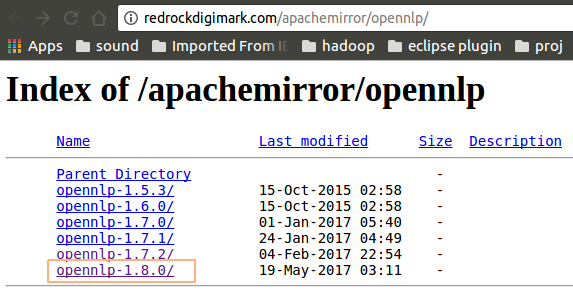
Click on the latest build of Apache OpenNLP from http://redrockdigimark.com/apachemirror/opennlp/.
Click on the bin package (zip). We are not going to build it from source, we are just going to use the pre-built version.
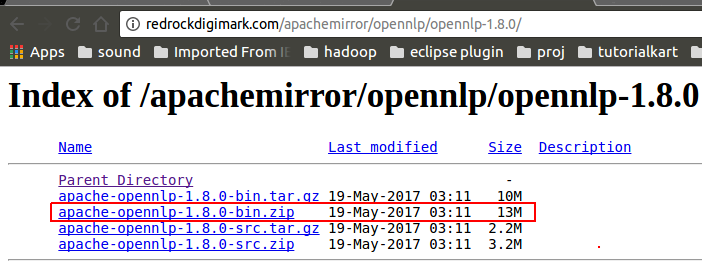
In current OpenNLP releases, the binary package usually contains the command line launcher scripts inside the bin directory. On Linux and macOS, the script is named opennlp. On Windows, the batch file is named opennlp.bat.
Step 2: Extract Apache OpenNLP and open the bin folder
Unzip the package and navigate into bin folder.
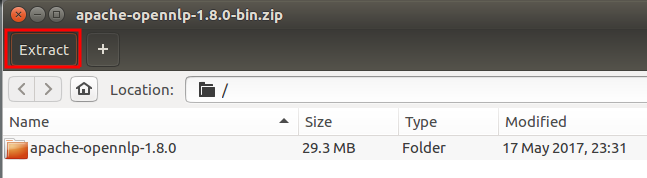
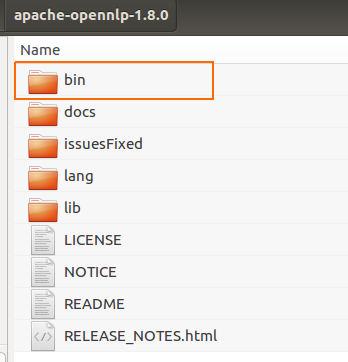
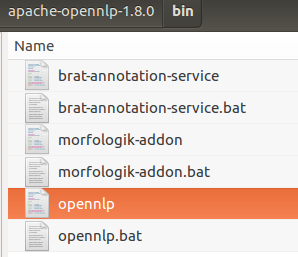
You can run the commands directly from the bin folder, as shown in the original examples below. For repeated use, set OPENNLP_HOME to the extracted OpenNLP folder and add the bin folder to your system PATH.
For Ubuntu : Open the terminal and run the following command.
./opennlpFor Windows : Open the command prompt and give the command opennlp.bat
opennlp.batThe following Usage of OpenNLP should be echoed on to the terminal or prompt.
arjun@arjun-VPCEH26EN:~/apache-opennlp-1.8.0/bin$ ./opennlp
OpenNLP 1.8.0. Usage: opennlp TOOL
where TOOL is one of:
  Doccat                            learned document categorizer
  DoccatTrainer                     trainer for the learnable document categorizer
  DoccatEvaluator                   Measures the performance of the Doccat model with the reference data
  DoccatCrossValidator              K-fold cross validator for the learnable Document Categorizer
  DoccatConverter                   converts leipzig data format to native OpenNLP format
  DictionaryBuilder                 builds a new dictionary
  SimpleTokenizer                   character class tokenizer
  TokenizerME                       learnable tokenizer
  TokenizerTrainer                  trainer for the learnable tokenizer
  TokenizerMEEvaluator              evaluator for the learnable tokenizer
  TokenizerCrossValidator           K-fold cross validator for the learnable tokenizer
  TokenizerConverter                converts foreign data formats (ad,pos,conllx,namefinder,parse) to native OpenNLP format
  DictionaryDetokenizer
  SentenceDetector                  learnable sentence detector
  SentenceDetectorTrainer           trainer for the learnable sentence detector
  SentenceDetectorEvaluator         evaluator for the learnable sentence detector
  SentenceDetectorCrossValidator    K-fold cross validator for the learnable sentence detector
  SentenceDetectorConverter         converts foreign data formats (ad,pos,conllx,namefinder,parse,moses,letsmt) to native OpenNLP format
  TokenNameFinder                   learnable name finder
  TokenNameFinderTrainer            trainer for the learnable name finder
  TokenNameFinderEvaluator          Measures the performance of the NameFinder model with the reference data
  TokenNameFinderCrossValidator     K-fold cross validator for the learnable Name Finder
  TokenNameFinderConverter          converts foreign data formats (evalita,ad,conll03,bionlp2004,conll02,muc6,ontonotes,brat) to native OpenNLP format
  CensusDictionaryCreator           Converts 1990 US Census names into a dictionary
  POSTagger                         learnable part of speech tagger
  POSTaggerTrainer                  trains a model for the part-of-speech tagger
  POSTaggerEvaluator                Measures the performance of the POS tagger model with the reference data
  POSTaggerCrossValidator           K-fold cross validator for the learnable POS tagger
  POSTaggerConverter                converts foreign data formats (ad,conllx,parse,ontonotes,conllu) to native OpenNLP format
  LemmatizerME                      learnable lemmatizer
  LemmatizerTrainerME               trainer for the learnable lemmatizer
  LemmatizerEvaluator               Measures the performance of the Lemmatizer model with the reference data
  ChunkerME                         learnable chunker
  ChunkerTrainerME                  trainer for the learnable chunker
  ChunkerEvaluator                  Measures the performance of the Chunker model with the reference data
  ChunkerCrossValidator             K-fold cross validator for the chunker
  ChunkerConverter                  converts ad data format to native OpenNLP format
  Parser                            performs full syntactic parsing
  ParserTrainer                     trains the learnable parser
  ParserEvaluator                   Measures the performance of the Parser model with the reference data
  ParserConverter                   converts foreign data formats (ontonotes,frenchtreebank) to native OpenNLP format
  BuildModelUpdater                 trains and updates the build model in a parser model
  CheckModelUpdater                 trains and updates the check model in a parser model
  TaggerModelReplacer               replaces the tagger model in a parser model
  EntityLinker                      links an entity to an external data set
  NGramLanguageModel                gives the probability and most probable next token(s) of a sequence of tokens in a language model
All tools print help when invoked with help parameter
Example: opennlp SimpleTokenizer help
arjun@arjun-VPCEH26EN:~/apache-opennlp-1.8.0/bin$
Your version number and tool list may differ from the older OpenNLP 1.8.0 output shown above. That is normal because newer OpenNLP releases can add, rename, or reorganize command line tools. The important part is that the script prints Usage: opennlp TOOL and a list of available tools.
Optional OpenNLP PATH setup for running the CLI from any folder
If you do not want to navigate to the bin directory every time, configure OPENNLP_HOME and update your PATH. Replace the folder path in the examples with the folder where you extracted Apache OpenNLP.
Linux or macOS terminal:
export OPENNLP_HOME="$HOME/apache-opennlp"
export PATH="$OPENNLP_HOME/bin:$PATH"
opennlp SimpleTokenizer help
Windows Command Prompt:
set OPENNLP_HOME=C:\tools\apache-opennlp
set PATH=%OPENNLP_HOME%\bin;%PATH%
opennlp.bat SimpleTokenizer help
This setup is optional. It is convenient for shell scripts, batch files, and repeated experiments because you can call opennlp without typing the full path to the executable script.
Step 3: Run OpenNLP help for a specific command line tool
Run OpenNLP Command for help on any of the modules echoed to console in the above step.
Help regarding any of the available task could be checked out using the Example mentioned in the response to OpenNLP command.
$ ./opennlp SimpleTokenizer helpThe response to the above command is shown below.
arjun@arjun-VPCEH26EN:~/apache-opennlp-1.8.0/bin$ ./opennlp SimpleTokenizer help
Usage: opennlp SimpleTokenizer < sentences
The help line tells us that SimpleTokenizer reads sentence text from standard input. That is why the examples below use input redirection with the < symbol.
Step 4: Verify Apache OpenNLP CLI with SimpleTokenizer
As an example, lets try to actually use SimpleTokenizer.
Create a text file, “sentences.txt” in the bin folder with sentences in it like below.
I am Joey.
And I don't share food.
Welcome to friends.
Run the command
./opennlp SimpleTokenizer < sentences.txtThe following output of SimpleTokenizer on sentences.txt is echoed to the terminal or prompt.
arjun@arjun-VPCEH26EN:~/apache-opennlp-1.8.0/bin$ ./opennlp SimpleTokenizer < sentences.txt
I am Joey .
And I don ' t share food .
Welcome to friends .


Average: 750.0 sent/s
Total: 3 sent
Runtime: 0.004s
Execution time: 0.033 seconds
arjun@arjun-VPCEH26EN:~/apache-opennlp-1.8.0/bin$
SimpleTokenizer has found the tokens in the sentences and echoed on to the terminal. It also reported that there are three sentences in the file, “sentences.txt”.
How OpenNLP command line input and output redirection works
Many Apache OpenNLP command line tools read text from standard input and write results to standard output. This makes the tools easy to combine with files, pipes, and scripts.
| CLI pattern | What it does |
|---|---|
opennlp SimpleTokenizer < sentences.txt | Reads text from sentences.txt and prints tokenized text to the terminal. |
opennlp SimpleTokenizer < sentences.txt > tokens.txt | Reads input from one file and saves the tokenized output into another file. |
cat sentences.txt | opennlp SimpleTokenizer | Uses a pipe to send text into the OpenNLP tool on Linux or macOS. |
For example, the following command saves the tokenized result instead of printing it only on the screen.
./opennlp SimpleTokenizer < sentences.txt > tokens.txtAfter running the command, open tokens.txt to check the generated tokens.
I am Joey .
And I don ' t share food .
Welcome to friends .
Using model-based Apache OpenNLP command line tools
SimpleTokenizer is a simple character-class tokenizer and does not need a model file. Many other OpenNLP CLI tools are model-based. For example, sentence detection, learnable tokenization, POS tagging, name finding, chunking, and parsing normally require a trained .bin model file.
The exact model filename depends on the language and model set you downloaded. Keep the model file path clear in the command so that OpenNLP can load it correctly.
opennlp SentenceDetector path/to/sentence-model.bin < input.txt
opennlp TokenizerME path/to/tokenizer-model.bin < input.txt
opennlp POSTagger path/to/pos-model.bin < tokens.txt
Use help with each tool to confirm the required parameters for your OpenNLP version. For example, run opennlp SentenceDetector help or opennlp POSTagger help before building a script around a command.
Apache OpenNLP CLI tools commonly used from the terminal
| OpenNLP CLI tool | Typical use | Usually needs a model? |
|---|---|---|
SimpleTokenizer | Splits text into simple tokens. | No |
TokenizerME | Runs a learnable tokenizer. | Yes |
SentenceDetector | Detects sentence boundaries. | Yes |
POSTagger | Assigns part-of-speech tags to tokens. | Yes |
TokenNameFinder | Finds named entities such as names or locations, depending on the model. | Yes |
Doccat | Classifies text into document categories. | Yes |
ChunkerME | Finds phrase chunks from POS-tagged input. | Yes |
The available tools and exact names can vary by OpenNLP release. Always check the tool list printed by your installed opennlp command and compare it with the official Apache OpenNLP documentation.
Apache OpenNLP command line troubleshooting checklist
javacommand not found: install Java and check theJAVA_HOMEandPATHsettings.- Permission denied on Linux or macOS: run
chmod +x opennlpinside thebindirectory if the script is not executable. - OpenNLP command works only inside bin: set
OPENNLP_HOMEand add$OPENNLP_HOME/binor%OPENNLP_HOME%\bintoPATH. - Model file not found: pass the correct path to the
.binmodel file and avoid moving the model after writing the command. - No text is processed: make sure you are passing input through standard input, file redirection, or a pipe.
Apache OpenNLP CLI editorial QA checklist for this tutorial
- The tutorial explains that Apache OpenNLP command line tools are launched through
opennlporopennlp.bat. - The setup section distinguishes between the binary package and the source package.
- The examples show Linux/macOS and Windows command usage separately.
- The SimpleTokenizer verification uses a reproducible input file and shows the expected tokenized output.
- The model-based tools section reminds readers that many NLP tasks require a downloaded or trained
.binmodel.
Apache OpenNLP command line tools FAQs
How to use command line tools in Apache OpenNLP?
Download the Apache OpenNLP binary distribution, extract it, open the bin folder, and run ./opennlp on Linux or macOS, or opennlp.bat on Windows. Then call a tool name such as SimpleTokenizer, SentenceDetector, or POSTagger with the required input and model files.
Do Apache OpenNLP command line tools need Java?
Yes. Apache OpenNLP runs on Java. If the CLI does not start, first check that Java is installed and that your terminal can run the java command.
Why does SimpleTokenizer run without an OpenNLP model file?
SimpleTokenizer is a simple tokenizer based on character classes, so it can run without a trained model. Learnable tools such as TokenizerME, SentenceDetector, and POSTagger usually require a compatible .bin model file.
Can Apache OpenNLP CLI commands be used in shell scripts?
Yes. OpenNLP CLI tools can be used in shell scripts or batch files. Set OPENNLP_HOME, add the bin directory to PATH, and use file redirection or pipes to pass input and save output.
Where should OpenNLP model files be stored for command line use?
You can store model files in any readable folder. A practical approach is to keep them in a separate models directory and pass the full or relative model path in each command.
Summary of using command line tools in Apache OpenNLP
In this OpenNLP Tutorial, we have learned how to set up and use command line tools in Apache OpenNLP. We started the OpenNLP CLI, checked help for a specific tool, verified the setup with SimpleTokenizer, and reviewed how model-based commands use input files and .bin model files. In further tutorials, we shall see how to perform other natural language processing tasks using Apache OpenNLP command line tools.