 TutorialKart.com
Training of Document Categorizer using Naive Bayes Algorithm in OpenNLP
In this tutorial, we shall learn how to train an Apache OpenNLP Document Categorizer model using the Naive Bayes algorithm. The trained model can classify a new document into one of the categories present in the training data.
Document categorizing, or document classification, is application-specific. A support system may classify tickets by status, an email system may classify messages by intent, and a movie application may classify plots by genre. Therefore, Apache OpenNLP does not provide one pre-built model for every document classification problem. We train a model with labeled examples.
In this tutorial, the OpenNLP Document Categorizer is trained to classify two movie genre categories: Thriller and Romantic. The input document text is the movie plot.
How Naive Bayes works for OpenNLP document classification
Naive Bayes is a supervised classification algorithm. During training, it observes the words and features associated with each category. During prediction, OpenNLP calculates probability scores for the available categories and selects the category with the highest score.
This makes Naive Bayes a useful baseline for text classification tasks such as topic classification, simple sentiment categorization, support ticket routing, and movie genre classification. For API reference, see the OpenNLP manual and the NaiveBayesTrainer documentation.
Training data format for OpenNLP DocumentCategorizer
The training data file should contain one labeled document per line. The first token is the category name, followed by a space and then the document text.
Category document text goes hereFor example, consider the below line which is from the training file.
Thriller John Hannibal Smith Liam Neeson is held captive in Mexicowhere
- Category is “Thriller”
- Data of the document is “John Hannibal Smith Liam Neeson is held captive in Mexico”.
Find the complete training file used in the example, here en-movie-category.
Project folders used by this OpenNLP Naive Bayes example
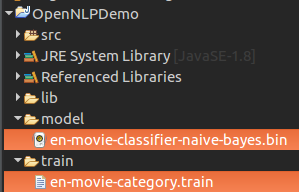
The Java program reads the training file from the train folder and writes the generated model to the model folder.
project-root/
├── train/
│   └── en-movie-category.train
└── model/
    └── en-movie-classifier-naive-bayes.bin
Create the model folder before running the program if it is not already present.
Steps to train OpenNLP Document Categorizer using Naive Bayes
Following are the steps to train Document Categorizer that uses Naive Bayes Algorithm for creating a Model :
Step 1: Prepare the training data.
Keep one document per line. Use consistent category names such as Thriller and Romantic. A larger and more representative training file generally gives better classification results than a very small sample file.
Step 2: Read the training data file.
InputStreamFactory dataIn = new MarkableFileInputStreamFactory(new File("train"+File.separator+"en-movie-category.train"));
ObjectStream lineStream = new PlainTextByLineStream(dataIn, "UTF-8");
ObjectStream sampleStream = new DocumentSampleStream(lineStream);
Step 3: Define the training parameters.
TrainingParameters params = new TrainingParameters();
params.put(TrainingParameters.ITERATIONS_PARAM, 10+"");
params.put(TrainingParameters.CUTOFF_PARAM, 0+"");
params.put(AbstractTrainer.ALGORITHM_PARAM, NaiveBayesTrainer.NAIVE_BAYES_VALUE);
The ITERATIONS_PARAM value controls the number of training iterations. The CUTOFF_PARAM value controls the minimum number of times a feature must occur before it is used. In this small example, cutoff is set to 0.
Step 4: Train and create a model from the training data and defined training parameters.
DoccatModel model = DocumentCategorizerME.train("en", sampleStream, params, new DoccatFactory());Step 5: Save the newly trained model to a local file, which can be used later for predicting movie genre.
BufferedOutputStream modelOut = new BufferedOutputStream(new FileOutputStream("model"+File.separator+"en-movie-classifier-naive-bayes.bin"));
model.serialize(modelOut);
Step 6: Test the model for a sample string and print the probabilities for the string to belong to different categories. The method DocumentCategorizer.categorize(String[] wordsOfDoc) takes words of a document as an argument in the form of an array of Strings.
DocumentCategorizer doccat = new DocumentCategorizerME(model);
double[] aProbs = doccat.categorize("Afterwards Stuart and Charlie notice Kate in the photos Stuart took at Leopolds ball and realise that her destiny must be to go back and be with Leopold That night while Kate is accepting her promotion at a company banquet he and Charlie race to meet her and show her the pictures Kate initially rejects their overtures and goes on to give her acceptance speech but it is there that she sees Stuarts picture and realises that she truly wants to be with Leopold".replaceAll("[^A-Za-z]", " ").split(" "));
Complete Java program for OpenNLP Naive Bayes document classification
The complete program is provided in the following Java file.
DocClassificationNaiveBayesTrainer.java
import java.io.BufferedOutputStream;
import java.io.File;
import java.io.FileOutputStream;
import java.io.IOException;

import opennlp.tools.doccat.DoccatFactory;
import opennlp.tools.doccat.DoccatModel;
import opennlp.tools.doccat.DocumentCategorizer;
import opennlp.tools.doccat.DocumentCategorizerME;
import opennlp.tools.doccat.DocumentSample;
import opennlp.tools.doccat.DocumentSampleStream;
import opennlp.tools.ml.AbstractTrainer;
import opennlp.tools.ml.naivebayes.NaiveBayesTrainer;
import opennlp.tools.util.InputStreamFactory;
import opennlp.tools.util.MarkableFileInputStreamFactory;
import opennlp.tools.util.ObjectStream;
import opennlp.tools.util.PlainTextByLineStream;
import opennlp.tools.util.TrainingParameters;

/**
 * oepnnlp version 1.7.2
 * Training of Document Categorizer using Naive Bayes Algorithm in OpenNLP for Document Classification
 * @author www.tutorialkart.com
 */
public class DocClassificationNaiveBayesTrainer {

	public static void main(String[] args) {

		try {
			// read the training data
			InputStreamFactory dataIn = new MarkableFileInputStreamFactory(new File("train"+File.separator+"en-movie-category.train"));
			ObjectStream lineStream = new PlainTextByLineStream(dataIn, "UTF-8");
			ObjectStream sampleStream = new DocumentSampleStream(lineStream);

			// define the training parameters
			TrainingParameters params = new TrainingParameters();
			params.put(TrainingParameters.ITERATIONS_PARAM, 10+"");
			params.put(TrainingParameters.CUTOFF_PARAM, 0+"");
			params.put(AbstractTrainer.ALGORITHM_PARAM, NaiveBayesTrainer.NAIVE_BAYES_VALUE);

			// create a model from traning data
			DoccatModel model = DocumentCategorizerME.train("en", sampleStream, params, new DoccatFactory());
			System.out.println("\nModel is successfully trained.");

			// save the model to local
			BufferedOutputStream modelOut = new BufferedOutputStream(new FileOutputStream("model"+File.separator+"en-movie-classifier-naive-bayes.bin"));
			model.serialize(modelOut);
			System.out.println("\nTrained Model is saved locally at : "+"model"+File.separator+"en-movie-classifier-naive-bayes.bin");

			// test the model file by subjecting it to prediction
			DocumentCategorizer doccat = new DocumentCategorizerME(model);
			String[] docWords = "Afterwards Stuart and Charlie notice Kate in the photos Stuart took at Leopolds ball and realise that her destiny must be to go back and be with Leopold That night while Kate is accepting her promotion at a company banquet he and Charlie race to meet her and show her the pictures Kate initially rejects their overtures and goes on to give her acceptance speech but it is there that she sees Stuarts picture and realises that she truly wants to be with Leopold".replaceAll("[^A-Za-z]", " ").split(" ");
			double[] aProbs = doccat.categorize(docWords);

			// print the probabilities of the categories
			System.out.println("\n---------------------------------\nCategory : Probability\n---------------------------------");
			for(int i=0;i<doccat.getNumberOfCategories();i++){
				System.out.println(doccat.getCategory(i)+" : "+aProbs[i]);
			}
			System.out.println("---------------------------------");

			System.out.println("\n"+doccat.getBestCategory(aProbs)+" : is the predicted category for the given sentence.");
		}
		catch (IOException e) {
			System.out.println("An exception in reading the training file. Please check.");
			e.printStackTrace();
		}
	}
}
Console output after training the OpenNLP movie genre classifier
When the above program is run, the output to the console is as shown below :
Indexing events using cutoff of 0

	Computing event counts...  done. 66 events
	Indexing...  done.
Collecting events... Done indexing.
Incorporating indexed data for training...
done.
	Number of Event Tokens: 66
	    Number of Outcomes: 2
	  Number of Predicates: 6886
Computing model parameters...
Stats: (27/66) 0.4090909090909091
...done.

Model is successfully trained.
Compressed 6886 parameters to 6886
3 outcome patterns

Trained Model is saved locally at : model/en-movie-classifier-naive-bayes.bin

---------------------------------
Category : Probability
---------------------------------
Thriller : 2.1694037140217655E-14
Romantic : 0.9999999999999782
---------------------------------

Romantic : is the predicted category for the given sentence.
The result is Romantic because the probability for Romantic is higher than the probability for Thriller. The model can only choose from the categories available in the training data.
The location of the training file and the locally saved model file are shown in the following picture :
Interpreting OpenNLP DocumentCategorizer probability scores
The categorize() method returns an array of probability scores. Use getCategory(i) to map each score to a category and getBestCategory(aProbs) to get the predicted label.
A high score means the model found that category most likely among the categories it knows. It does not guarantee that the prediction is correct. If the input text is outside the training domain, or if the training data is too small, the model may still return a confident but incorrect category.
Loading the saved OpenNLP Naive Bayes model for later prediction
After training, save the model once and load the .bin file later for predictions. Use the same text cleaning approach during prediction that you used while training and testing.
try (InputStream modelIn = new FileInputStream("model" + File.separator + "en-movie-classifier-naive-bayes.bin")) {
    DoccatModel model = new DoccatModel(modelIn);
    DocumentCategorizerME categorizer = new DocumentCategorizerME(model);

    String[] document = "A young couple meets again after many years and chooses love over ambition"
            .replaceAll("[^A-Za-z]", " ")
            .split(" ");

    double[] probabilities = categorizer.categorize(document);
    System.out.println(categorizer.getBestCategory(probabilities));
}
Common checks for better OpenNLP Naive Bayes classification
- Use one category label followed by document text on every training line.
- Keep category names consistent;
Romanticandromanticare not the same label. - Add enough representative examples for each category.
- Test the model with documents that were not used for training.
- Create the
modelfolder before serializing the trained model. - Check the API documentation for your OpenNLP version if this OpenNLP 1.7.2 example gives compilation errors in a newer setup.
FAQs on OpenNLP Naive Bayes document categorizer training
Can we use Naive Bayes for document classification in OpenNLP?
Yes. OpenNLP can train a document categorizer with Naive Bayes by setting AbstractTrainer.ALGORITHM_PARAM to NaiveBayesTrainer.NAIVE_BAYES_VALUE.
What is the training file format for OpenNLP DocumentCategorizer?
Each line should start with the category label, followed by the document text. The first token is treated as the category.
How does OpenNLP choose the best category?
The categorizer computes probability scores for all known categories. The category with the highest score is returned by getBestCategory().
Do I need to train the OpenNLP document categorizer every time?
No. Train the model once, serialize it to a .bin file, and load that saved model for later predictions.
Why is my OpenNLP Naive Bayes classifier giving poor predictions?
Common reasons include too little training data, inconsistent labels, prediction text that differs from the training domain, or categories with overlapping vocabulary.
QA checklist for this OpenNLP Naive Bayes tutorial
- The training file path matches
train/en-movie-category.train. - The model output path matches
model/en-movie-classifier-naive-bayes.bin. - The Naive Bayes trainer is selected with
NaiveBayesTrainer.NAIVE_BAYES_VALUE. - The probability output is printed with the matching category name.
- The final prediction is obtained with
getBestCategory(aProbs).
Conclusion: training OpenNLP Document Categorizer with Naive Bayes
In this Apache OpenNLP Tutorial, we have learnt the training input requirements for the Document Categorizer API, how to select the Naive Bayes algorithm, how to serialize the trained model, and how to test the model by printing category probabilities for a sample movie plot.