 TutorialKart.com
What is sentence detection in Apache OpenNLP?
Sentence Detection, also called sentence segmentation, is the process of finding where each sentence starts and ends in a paragraph. In Apache OpenNLP, sentence detection is usually used as an early preprocessing step before tokenization, part-of-speech tagging, chunking, named entity recognition, or other Natural Language Processing tasks.
The task looks simple when a sentence ends with a full stop, question mark, or exclamation mark. In real text, it is more difficult because the same punctuation can appear in abbreviations, decimal values, initials, file names, URLs, and email addresses. For example, a period in Dr. or 3.14 should not always be treated as a sentence boundary.
OpenNLP SentenceDetectorME class used in this Java example
Apache OpenNLP provides the SentenceDetectorME class for maximum entropy based sentence detection. The detector needs a trained sentence model such as en-sent.bin. Once the model is loaded, the sentDetect() method returns the detected sentences as a string array.
The example below keeps the setup simple: place the English sentence detection model file in the project path, load it with FileInputStream, create a SentenceModel, and pass that model to SentenceDetectorME.
Sentence detection example in OpenNLP using Java
The following example, SentenceDetectExample.java shows how to use SentenceDetectorME class to detect sentences in a paragraph/string. If you would like to know how to setup eclipse project, refer to setup of java project with openNLP libraries, in eclipse. The process should be same, even for a different IDE(adding the required jars to the build path should do the magic).
SentenceDetectExample.java
import java.io.FileInputStream;
import java.io.IOException;
import java.io.InputStream;

import com.fasterxml.jackson.databind.exc.InvalidFormatException;

import opennlp.tools.sentdetect.SentenceDetectorME;
import opennlp.tools.sentdetect.SentenceModel;

/**
 * Sentence Detection Example in openNLP using Java
 * @author tutorialkart
 */
public class SentenceDetectExample {

	public static void main(String[] args) {
		try {
			new SentenceDetectExample().sentenceDetect();
		} catch (IOException e) {
			e.printStackTrace();
		}
	}

	/**
	 * This method is used to detect sentences in a paragraph/string
	 * @throws InvalidFormatException
	 * @throws IOException
	 */
	public void sentenceDetect() throws InvalidFormatException,	IOException {
		String paragraph = "This is a statement. This is another statement. Now is an abstract word for time, that is always flying.";

		// refer to model file "en-sent,bin", available at link http://opennlp.sourceforge.net/models-1.5/
		InputStream is = new FileInputStream("en-sent.bin");
		SentenceModel model = new SentenceModel(is);

		// feed the model to SentenceDetectorME class
		SentenceDetectorME sdetector = new SentenceDetectorME(model);

		// detect sentences in the paragraph
		String sentences[] = sdetector.sentDetect(paragraph);

		// print the sentences detected, to console
		for(int i=0;i<sentences.length;i++){
			System.out.println(sentences[i]);
		}
		is.close();
	}
}
When SentenceDetectExample,java is run, the console output is as shown in the following.
This is a statement.
This is another statement.
Now is an abstract word for time, that is always flying.
The project structure and model file location, etc., for the example is shown below:
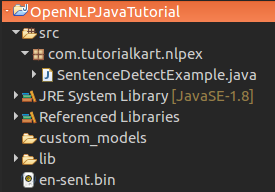
How the OpenNLP sentence detection example works
en-sent.binis the trained English sentence detection model used by the program.SentenceModelreads the model file from the input stream.SentenceDetectorMEapplies the model to the paragraph.sentDetect(paragraph)returns each detected sentence as a separate string.- The
forloop prints each sentence on a new line.
Apache OpenNLP model file for sentence detection
The model file en-sent.bin is available at http://opennlp.sourceforge.net/models-1.5/. Stay updated regarding latest releases of openNLP or model files, at https://opennlp.apache.org/download.html
For a small local example, keeping en-sent.bin in the project root is enough. In a larger Java application, it is better to keep the model under a resources folder and load it from the classpath so the file is included when the application is packaged.
Using OpenNLP with Maven dependencies
If your Java project uses Maven, add the OpenNLP tools dependency instead of manually adding jar files to the build path. Use a version that matches the OpenNLP release you are using in your project.
<dependency>
    <groupId>org.apache.opennlp</groupId>
    <artifactId>opennlp-tools</artifactId>
    <version>2.5.0</version>
</dependency>
If you are following the older jar-based setup used in the example, the same Java logic still applies. The main requirement is that the OpenNLP tools library and the sentence model file are available when the program runs.
Finding sentence positions and probabilities in OpenNLP
Besides returning the sentence strings, SentenceDetectorME can also return sentence spans and probability scores. This is useful when you need the start and end offsets of each sentence inside the original paragraph.
Span[] spans = sdetector.sentPosDetect(paragraph);

for (Span span : spans) {
    System.out.println(span.getStart() + " - " + span.getEnd());
    System.out.println(paragraph.substring(span.getStart(), span.getEnd()));
}

double[] probabilities = sdetector.getSentenceProbabilities();
sentPosDetect() returns Span objects. Each span contains the start index and end index of a detected sentence. After calling sentPosDetect(), getSentenceProbabilities() returns the probability values for the detected sentence boundaries.
Common issues in OpenNLP sentence detection Java programs
If the example does not run as expected, check these topic-specific points before changing the code logic.
- Model file not found: verify that
en-sent.binis in the working directory or provide the full file path. - Wrong model for the language: use a sentence model trained for the language of the input text.
- Abbreviations split incorrectly: consider training a custom sentence detection model if your text contains many domain-specific abbreviations.
- Unexpected empty output: confirm that the input paragraph is not empty and that the model stream was loaded successfully.
- Old import warnings: with newer OpenNLP projects, prefer the exception types required by your installed OpenNLP version and IDE.
When to train a custom OpenNLP sentence detection model
The default English sentence model works for many general English paragraphs. A custom model is useful when the input text has patterns that are not handled well by the default model, such as medical notes, legal citations, product logs, chat messages, support tickets, or text with frequent short abbreviations.
If you are interested in knowing of how to train and generate a model yourself for Sentence Detection, refer to training a model for Sentence Detection in openNLP.
Java documentation for OpenNLP SentenceDetectorME
Find the java documentation for SentenceDetectorME at official site and play with the other methods like getSentenceProbabilities(), sentPosDetect(String s), etc., for a better understanding. The Apache OpenNLP manual also describes command-line usage, model loading, and sentence detector behavior for supported OpenNLP versions.
Reference links: Apache OpenNLP manual and Apache OpenNLP downloads.
QA checklist for this OpenNLP sentence detection tutorial
- Confirm that the Java example loads the
en-sent.binmodel from the documented location. - Check that the console output shows three separate sentences for the sample paragraph.
- Verify that every new Java or XML code block uses a PrismJS-compatible language class.
- Make sure angle brackets inside code blocks are escaped as
<and>when shown as HTML content. - Confirm that the tutorial explains both
sentDetect()andsentPosDetect()for practical sentence detection use cases.
OpenNLP sentence detection FAQs
What does SentenceDetectorME do in OpenNLP?
SentenceDetectorME detects sentence boundaries in a text input using a trained sentence model. In this tutorial, it reads the English model en-sent.bin and returns each detected sentence from the paragraph.
Which OpenNLP model is used for English sentence detection?
The common English sentence detection model is en-sent.bin. The model must be available to the Java program through a file path, classpath resource, or another input stream.
Why does sentence detection split text incorrectly after abbreviations?
Abbreviations contain periods, and a period is also a common sentence-ending character. If your text has many domain-specific abbreviations, the default model may not always choose the expected boundary. Training a custom sentence model can improve results for that domain.
How can I get sentence start and end indexes in OpenNLP?
Use sentPosDetect() instead of only sentDetect(). It returns Span objects that contain the start and end character offsets of each detected sentence in the original paragraph.
Do I need to train a model for every sentence detection project?
No. For general English text, the pre-trained English sentence model is often enough. Train a custom model when your input text has unusual punctuation, abbreviations, or domain-specific sentence patterns that the default model does not handle well.
Summary of sentence detection in OpenNLP using Java
In this Apache OpenNLP Tutorial, we have seen Sentence Detection Example in OpenNLP using Java. The main steps are to load the en-sent.bin sentence model, create a SentenceDetectorME object, call sentDetect() for sentence strings, and use sentPosDetect() when sentence offsets are required.