 TutorialKart.com
In this Apache OpenNLP tutorial, you will learn how to build a POS Tagger example in Java. The program tokenizes an input sentence, loads the OpenNLP POS model, tags each token with a Penn Treebank part-of-speech tag, and prints the probability for each predicted tag.
POS Tagger Example in Apache OpenNLP using Java
POS Tagger Example in Apache OpenNLP marks each word in a sentence with the word type.
In natural language processing, part-of-speech tagging identifies whether a token is used as a noun, verb, adjective, number, punctuation mark, and so on. Apache OpenNLP provides the POSModel and POSTaggerME classes for this task.
In this tutorial, we will learn how to use POS Tagger in Apache OpenNLP for Parts-of-Speech tagging.
Following is an example showing the output of POS Tagger for a given input sentence.
| Input to POS Tagger | John is 27 years old. |
| Output of POS Tagger | John_NNP is_VBZ 27_CD years_NNS old_JJ ._. |
The word types are the tags attached to each word. These Parts Of Speech tags used are from Penn Treebank.
| Tag | Description |
|---|---|
| NNP | Proper Noun, Singular |
| VBZ | Verb, 3rd person singular present |
| CD | Cardinal Number |
| NNS | Noun, Plural |
| JJ | Adjective |
| . | . |
For a complete list of Parts Of Speech tags from Penn Treebank, please refer https://www.ling.upenn.edu/courses/Fall_2003/ling001/penn_treebank_pos.html
How Apache OpenNLP POS Tagging Works in This Java Example
The OpenNLP POS tagger does not read a raw sentence directly in this example. First, the sentence is split into tokens using the tokenizer model. Then the token array is passed to POSTaggerME.tag(). The tagger returns one POS tag for each token in the same order.
For the sentence John is 27 years old., the tokenizer produces tokens such as John, is, 27, years, old, and .. The POS tagger then labels them as proper noun, verb, cardinal number, plural noun, adjective, and punctuation.
Steps to Use POS Tagger in OpenNLP
Following are the steps to obtain the tags programmatically in Java using Apache OpenNLP.
Step 1: Tokenize the given input sentence into tokens.
String sentence = "John is 27 years old.";
// tokenize the sentence
tokenModelIn = new FileInputStream("en-token.bin");
TokenizerModel tokenModel = new TokenizerModel(tokenModelIn);
Tokenizer tokenizer = new TokenizerME(tokenModel);
String tokens[] = tokenizer.tokenize(sentence);
Step 2: Read the parts-of-speech maxent model, “en-pos-maxent.bin” into a stream.
InputStream posModelIn = new FileInputStream("en-pos-maxent.bin");Step 3: Read the stream into parts-of-speech model, POSModel.
POSModel posModel = new POSModel(posModelIn);Step 4: Load the model into parts-of-speech tagger, POSTaggerME .
POSTaggerME posTagger = new POSTaggerME(posModel);Step 5: Grab the tags using the method POSTaggerME.tag(), and probability for the tag to be given using the method PosTaggerME.probs();
String tags[] = posTagger.tag(tokens);
double probs[] = posTagger.probs();
Step 6: Finally, print what we got, the token, their respective tags and probabilities of the tags.
Example – POS Tagger in OpenNLP
In this example, we will implement all the steps mentioned above.
POSTaggerExample.java
import java.io.FileInputStream;
import java.io.IOException;
import java.io.InputStream;

import opennlp.tools.postag.POSModel;
import opennlp.tools.postag.POSTaggerME;
import opennlp.tools.tokenize.Tokenizer;
import opennlp.tools.tokenize.TokenizerME;
import opennlp.tools.tokenize.TokenizerModel;

/**
 * www.tutorialkart.com
 * POS Tagger Example in Apache OpenNLP using Java
 */
public class POSTaggerExample {

	public static void main(String[] args) {

		InputStream tokenModelIn = null;
		InputStream posModelIn = null;

		try {
			String sentence = "John is 27 years old.";
			// tokenize the sentence
			tokenModelIn = new FileInputStream("en-token.bin");
			TokenizerModel tokenModel = new TokenizerModel(tokenModelIn);
			Tokenizer tokenizer = new TokenizerME(tokenModel);
			String tokens[] = tokenizer.tokenize(sentence);

			// Parts-Of-Speech Tagging
			// reading parts-of-speech model to a stream
			posModelIn = new FileInputStream("en-pos-maxent.bin");
			// loading the parts-of-speech model from stream
			POSModel posModel = new POSModel(posModelIn);
			// initializing the parts-of-speech tagger with model
			POSTaggerME posTagger = new POSTaggerME(posModel);
			// Tagger tagging the tokens
			String tags[] = posTagger.tag(tokens);
			// Getting the probabilities of the tags given to the tokens
			double probs[] = posTagger.probs();

			System.out.println("Token\t:\tTag\t:\tProbability\n---------------------------------------------");
			for(int i=0;i<tokens.length;i++){
				System.out.println(tokens[i]+"\t:\t"+tags[i]+"\t:\t"+probs[i]);
			}

		}
		catch (IOException e) {
			// Model loading failed, handle the error
			e.printStackTrace();
		}
		finally {
			if (tokenModelIn != null) {
				try {
					tokenModelIn.close();
				}
				catch (IOException e) {
				}
			}
			if (posModelIn != null) {
				try {
					posModelIn.close();
				}
				catch (IOException e) {
				}
			}
		}
	}
}
When the above program is run, the output to the console is shown in the following.
Output
Token	:	Tag	:	Probability
---------------------------------------------
John	:	NNP	:	0.9874932809932121
is   	:	VBZ	:	0.9667574183085389
27   	:	CD	:	0.9890000667325892
years	:	NNS	:	0.979181322666035
old  	:	JJ	:	0.9894752224172251
.   	:	.	:	0.9923321017451305
The output contains three useful values for each token: the original token, the assigned POS tag, and the model probability for that tag. A higher probability means the model is more confident about the tag it assigned in that context.
Apache OpenNLP POS Tagger Project Structure and Model Files
The structure of the project is shown below:
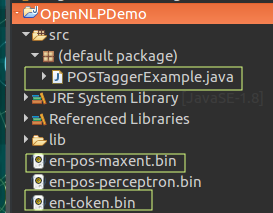
Please note that in this example, the model files, en-pos-maxent.bin and en-token.bin are placed right under the project folder. Please find the models at http://opennlp.sourceforge.net/models-1.5/ .
If the model files are stored in another folder, update the file path in new FileInputStream(...). For example, if you place the files inside a folder named models, use paths such as models/en-token.bin and models/en-pos-maxent.bin.
InputStream tokenModelIn = new FileInputStream("models/en-token.bin");
InputStream posModelIn = new FileInputStream("models/en-pos-maxent.bin");
Apache OpenNLP POS Tagger Classes Used in the Java Program
| OpenNLP class or method | Purpose in this POS tagger example |
|---|---|
TokenizerModel | Loads the tokenizer model from en-token.bin. |
TokenizerME | Splits the input sentence into tokens. |
POSModel | Loads the POS tagging model from en-pos-maxent.bin. |
POSTaggerME | Assigns part-of-speech tags to the token array. |
tag(tokens) | Returns the POS tag for each token. |
probs() | Returns the probabilities for the tags assigned in the most recent tagging operation. |
Printing OpenNLP POS Tags as token_tag Pairs
Many POS tagging examples show the result in the format word_TAG. After you get the tokens and tags arrays, you can combine the values using their index positions.
for (int i = 0; i < tokens.length; i++) {
    System.out.print(tokens[i] + "_" + tags[i] + " ");
}
For the same sample sentence, the output is:
John_NNP is_VBZ 27_CD years_NNS old_JJ ._. Using WhitespaceTokenizer with Apache OpenNLP POS Tagger
If your input is already clean and separated by spaces, you can use WhitespaceTokenizer for a smaller demonstration. This avoids loading the tokenizer model, but it is less flexible than a trained tokenizer for normal text because punctuation handling may differ.
import java.io.FileInputStream;
import java.io.InputStream;

import opennlp.tools.postag.POSModel;
import opennlp.tools.postag.POSTaggerME;
import opennlp.tools.tokenize.WhitespaceTokenizer;

public class SimplePOSTaggerExample {
    public static void main(String[] args) throws Exception {
        String sentence = "John is 27 years old .";
        String[] tokens = WhitespaceTokenizer.INSTANCE.tokenize(sentence);

        try (InputStream posModelIn = new FileInputStream("en-pos-maxent.bin")) {
            POSModel posModel = new POSModel(posModelIn);
            POSTaggerME posTagger = new POSTaggerME(posModel);

            String[] tags = posTagger.tag(tokens);

            for (int i = 0; i < tokens.length; i++) {
                System.out.println(tokens[i] + " : " + tags[i]);
            }
        }
    }
}
Output
John : NNP
is : VBZ
27 : CD
years : NNS
old : JJ
. : .
Common Apache OpenNLP POS Tagger Errors and Fixes
| Problem | Likely reason | Fix |
|---|---|---|
FileNotFoundException for en-pos-maxent.bin | The model file is not in the working directory used by the Java program. | Place the model file in the correct folder or pass the correct relative or absolute path. |
| Different POS tags for a similar sentence | POS tagging depends on the trained model and the surrounding context. | Check the exact input sentence, tokenizer output, and model file used. |
| Punctuation is not tagged as expected | The sentence may not have been tokenized correctly before POS tagging. | Use the tokenizer model instead of simple string splitting for normal text. |
ClassNotFoundException for OpenNLP classes | The OpenNLP tools library is not added to the Java project classpath. | Add the OpenNLP tools JAR or Maven/Gradle dependency to the project. |
When to Train a Custom POS Tagger in Apache OpenNLP
The example in this tutorial uses a pre-trained English POS model. That is enough for learning the OpenNLP POS tagging API and for many general English examples. A custom POS tagger is useful when your text belongs to a special domain, uses unusual vocabulary, or follows a tagging convention that is different from the model you are using.
For a custom POS tagger, you need correctly tagged training data. The quality and consistency of this training data matter because the model learns tagging patterns from it.
Apache OpenNLP POS Tagger FAQ
What is POS tagging in Apache OpenNLP?
POS tagging in Apache OpenNLP is the process of assigning a part-of-speech tag to each token in a sentence. For example, a word may be tagged as a noun, verb, adjective, number, or punctuation mark.
Which OpenNLP classes are used for POS tagging in Java?
The main classes used in this example are POSModel and POSTaggerME. The sentence is first tokenized using classes such as TokenizerModel and TokenizerME.
Why should a sentence be tokenized before POS tagging?
The POS tagger works on tokens, not directly on a raw sentence string. Tokenization separates the sentence into words, numbers, and punctuation so that the tagger can assign one tag to each token.
What does POSTaggerME.probs() return?
POSTaggerME.probs() returns the probabilities for the tags assigned in the most recent call to tag(). These values indicate the model’s confidence for the selected tags.
Can OpenNLP POS Tagger be trained with custom data?
Yes. Apache OpenNLP can be used to train a custom POS tagging model if you have properly tagged training data. This is useful for domain-specific text or custom tagging requirements.
Editorial QA Checklist for Apache OpenNLP POS Tagger Example
- The Java example loads both
en-token.binanden-pos-maxent.binbefore tagging the sentence. - The tutorial explains that tokenization must happen before POS tagging.
- The sample output maps every token to exactly one POS tag.
- The meaning of common Penn Treebank tags such as
NNP,VBZ,CD,NNS, andJJis shown. - The model file location and common file path errors are covered for Java project setup.
Apache OpenNLP POS Tagger Conclusion
In this Apache OpenNLP Tutorial, we have seen how to tag parts of speech to the words in a sentence using POSModel and POSTaggerME classes of openNLP Tagger API.
The important sequence is: tokenize the sentence, load the POS model, create a POSTaggerME object, call tag(tokens), and read probabilities with probs() when needed. For reliable results, use the correct model files and check the tokenization output before interpreting the POS tags.
Following are some of the other example programs we have,