 TutorialKart.com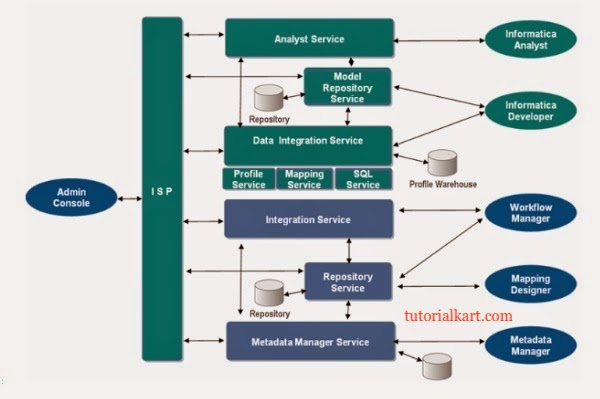
Informatica PowerCenter architecture overview for ETL developers
Informatica is an ETL tool used for extracting the data from various sources (flat files, relational database, xml etc), transform the data and finally load the data into a centralised location such as data warehouse or operational data store.
Informatica PowerCenter architecture is built around a domain, nodes, application services, a repository database, client tools, and source and target systems. In simple terms, developers create ETL metadata in PowerCenter Client tools, the repository stores that metadata, and the Integration Service reads the metadata to move data from sources to targets.
Informatica Powercenter has a service oriented architecture (SOA) that provides the ability to scale services and share resources across multiple machines. Informatica PowerCenter Architecture diagram is shown below.
Logical diagram of Informatica PowerCenter services and clients
The Blue part shown in above image is same as version 8 and the green part is new in 9.
The logical diagram helps you understand which components are used by administrators, developers, and runtime services. The client tools connect to the Repository Service. The Repository Service reads and writes metadata in the repository database. The Integration Service uses that metadata to execute workflows and sessions.
Informatica PowerCenter architecture diagram and execution flow
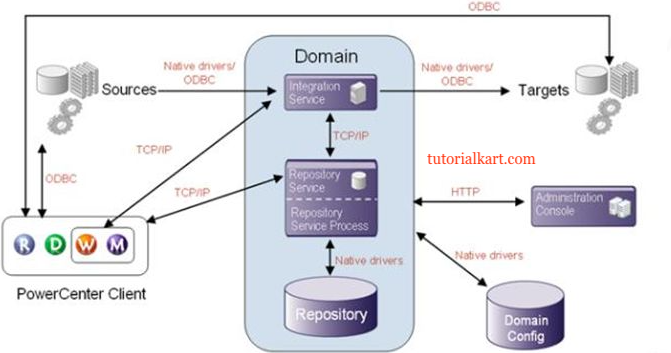
Now we know, what is the use of each component at server and client level. Whenever you want to develop a code, we first need to call server level Repository service to the Client level Repository manager(R). Then with the help of user credentials go inside the repository service at Repository manager(R) and create a folder.
Once you create folder in R then move to Designer(D). Then in PowerCenter Designer, with the help of same credentials go inside repository service and open the same folder by giving the double click. Then develop the code inside the folder in Designer. Here the code development is nothing but a process of data flow from which table(source table) to which table(target table) called mapping nothing but a defining ETL process.
Once code development is done at PowerCenter Designer then move to Workflow manager(W). Open the same folder in workflow manager as how in Designer and provide data base connection information inside the session once after creating session and database connection information individually. Then create workflow and assign session to the workflow. This developed code in Client tools is called as Meta data. Now save with Ctrl S.
Whenever you save code this Meta data will be physically saved in Repository Service at each client tool level but logically this Meta data will be saved in Repository database.
When you executing workflow, the repository service takes all the workflow related Meta data from Repository database and assigns it to integration service. With the help of Meta data, integration service goes to Source database and Extracts, Transforms and loads data to target database based on mapping that you developed in Informatica PowerCenter Designer. In this process integration service creates several logs among them session and workflow logs are important.
Step-by-step data flow in Informatica PowerCenter architecture
- The developer connects to the repository from Repository Manager, Designer, Workflow Manager, or Workflow Monitor.
- The developer creates sources, targets, transformations, mappings, sessions, and workflows as metadata.
- The Repository Service saves this metadata in the repository database.
- When a workflow starts, the Integration Service reads the workflow and session metadata through the Repository Service.
- The Integration Service connects to source systems, extracts data, applies transformation logic, and loads the processed data into target systems.
- PowerCenter writes workflow and session logs so developers and administrators can monitor success, errors, rejected rows, and performance details.
Physical diagram of PowerCenter domain, nodes, and services
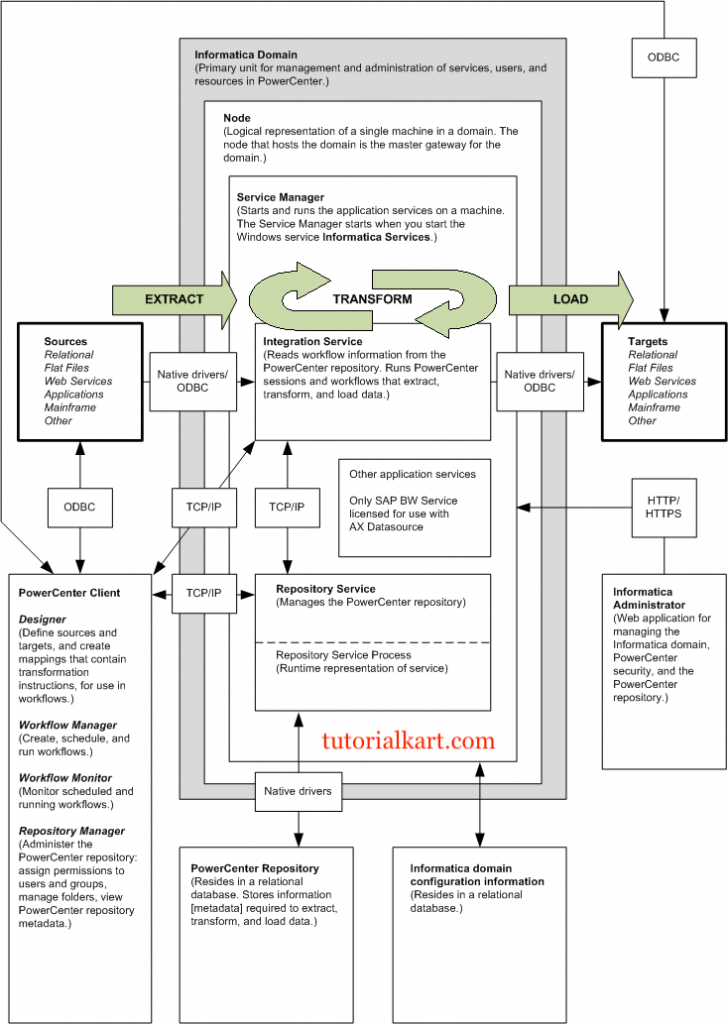
The physical diagram shows how the PowerCenter platform can be distributed across machines. A domain can contain one or more nodes. Application services such as the Repository Service and Integration Service can run on selected nodes based on the installation and administration design. This separation allows administration, metadata management, and workflow execution to be handled by different services.
Informatica PowerCenter components in the architecture
Informatica is a Service-Oriented-Architecuture (SOA) which contains the following important components.
Informatica Administrator: Web application used to administer the domain and PowerCenter
Informatica Domain: Domain is the primary unit for management and administration of services in Powercenter. The components of domain are one or more nodes, service manager an application services.
Nodes: Node is logical representation of machine in a domain. A domain can have multiple nodes. Master gateway node is the one that hosts the domain. You can configure nodes to run application services like integration service or repository service. All requests from other nodes go through the master gateway node.
Service Manager: Service manager is for supporting the domain and the application services. The Service Manager runs on each node in the domain. The Service Manager starts and runs the application services on a machine.
Application services: Group of services which represents the Informatica server based functionality. Application services include powercenter repository service, integration service, Data integration service, Metadata manage service etc.
Powercenter Repository: The metadata is store in a relational database. The tables contain the instructions to extract, transform and load data.
Powercenter Repository service: Accepts requests from the client to create and modify the metadata in the repository. It also accepts requests from the integration service for metadata to run workflows.
Powercenter Integration Service: Informatica integration service extracts data from the source, transforms the data as per the instructions coded in the workflow and loads the data into the targets.
Metadata Manager Service: Runs the metadata manager web application. You can analyse the metadata from various metadata repositories.
PowerCenter client tools used in the ETL development cycle
The client layer is where developers and administrators create, organize, run, and monitor ETL objects. Each client tool works with metadata stored in the repository, but each tool has a different role in the development cycle.
| PowerCenter client tool | Main purpose in the architecture |
|---|---|
| Repository Manager | Create and manage folders, users, groups, permissions, and repository objects. |
| Designer | Define source definitions, target definitions, transformations, mapplets, and mappings. |
| Workflow Manager | Create sessions, workflows, tasks, connections, scheduling options, and runtime settings. |
| Workflow Monitor | Track workflow runs, session status, execution time, failed tasks, and log details. |
Repository Service and Integration Service difference in PowerCenter
The Repository Service and Integration Service are often confused by beginners because both are required during workflow execution. Their responsibilities are different.
| Service | What it manages | When it is used |
|---|---|---|
| PowerCenter Repository Service | Metadata stored in the repository database | When client tools save objects and when runtime services need workflow metadata |
| PowerCenter Integration Service | Workflow execution and data movement | When sessions and workflows extract, transform, and load data |
A simple way to remember the difference is this: the Repository Service manages ETL instructions, while the Integration Service executes those instructions.
Metadata in Informatica PowerCenter architecture
In PowerCenter, metadata means the definitions and instructions that describe how ETL processing should happen. Examples of metadata include source definitions, target definitions, transformations, mappings, sessions, workflows, schedules, connection information, and runtime properties.
The actual business data is not stored in the repository as normal ETL output. The repository stores the design and execution instructions. During runtime, the Integration Service uses those instructions to read from source systems and write to target systems.
Common beginner mistakes in Informatica PowerCenter architecture
- Confusing repository metadata with source data: The repository stores ETL definitions, not the full operational data loaded by mappings.
- Mixing up mapping and workflow: A mapping defines data transformation logic. A workflow controls how and when that logic runs.
- Ignoring connection objects: Sessions need correct source and target connection details before a workflow can run successfully.
- Checking only workflow status: A workflow may fail because of a session error, source connection issue, target constraint, rejected row, or transformation problem. Always review session logs.
- Assuming all services run on one machine: In smaller installations they may run together, but the architecture supports services across multiple nodes.
Informatica PowerCenter architecture FAQs
What is Informatica PowerCenter architecture?
Informatica PowerCenter architecture is the arrangement of domain, nodes, services, repository, client tools, and source and target systems that work together to design, store, execute, and monitor ETL workflows.
What is the role of the Repository Service in PowerCenter?
The Repository Service manages connections between PowerCenter clients, runtime services, and the repository database. It allows users to create, modify, read, and manage metadata such as mappings, sessions, and workflows.
What is the role of the Integration Service in PowerCenter?
The Integration Service executes workflows and sessions. It reads metadata, connects to sources and targets, extracts data, applies transformations, loads data, and creates runtime logs.
What is a node in Informatica PowerCenter?
A node is a logical representation of a machine inside an Informatica domain. Application services can run on nodes, and a domain can have one or more nodes depending on the installation design.
Where is PowerCenter metadata stored?
PowerCenter metadata is stored in the repository database and accessed through the Repository Service. The metadata includes mappings, sessions, workflows, source definitions, target definitions, and related ETL configuration.
Editorial QA checklist for this Informatica PowerCenter architecture tutorial
- Verify that the article clearly explains the difference between Repository Service and Integration Service.
- Check that the ETL execution flow starts from client-created metadata and ends with data loaded into the target system.
- Confirm that domain, node, Service Manager, application services, repository, and client tools are all described in context.
- Ensure image alt text and surrounding copy support the topic of Informatica PowerCenter architecture.
- Review beginner-facing explanations for clarity, especially mapping, session, workflow, and metadata terminology.