 TutorialKart.com
In this Informatica tutorial, you will learn what Informatica PowerCenter ETL tools are, how the Extract, Transform, and Load process works, and how the main PowerCenter services and client tools work together in a data integration project.
Informatica PowerCenter is commonly used to move data from source systems into a data warehouse, operational data store, reporting database, or flat-file target. The main idea is simple: extract data from one or more sources, transform it according to business rules, and load the prepared data into a target system.
Informatica PowerCenter ETL tools and where they fit in data integration
Informatica PowerCenter provides an environment that allows you to load data into a centralised location, such as a data warehouse or operational data store (ODS). We can extract data from multiple sources, transform the data according to business logic you build in the client application, and load the transformed data into file and relational targets.
In Informatica, source definitions, target definitions, mappings, transformations, sessions, workflows, connection information, and permissions are stored as metadata in the PowerCenter repository. This repository-driven approach helps teams manage ETL logic, reuse objects, monitor workflow runs, and maintain a controlled data movement process.
PowerCenter is not a single screen or one executable. It is a group of ETL services, repository objects, server processes, and client tools that work together. A developer designs the logic in the client tools, the repository stores the metadata, and the Integration Service runs the actual extraction, transformation, and loading tasks.
ETL meaning in Informatica PowerCenter
Informatica is a data integration tool based on ETL architecture. ETL means Extract, Transform, and Load. Using Informatica PowerCenter ETL tools, data acquisition can be done from different business systems and prepared for reporting, analytics, migration, and downstream applications.
Data acquisition is the process of extracting relevant business information, transforming the data into the required business format, and loading it into a target system.
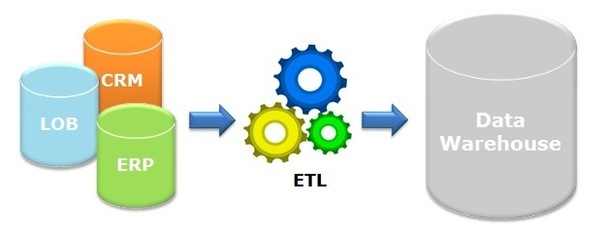
In a typical Informatica PowerCenter ETL flow, the data passes through the following stages.
- Data extraction: Read data from relational databases, flat files, applications, or other supported source systems.
- Data transformation: Apply business rules such as filtering, joining, lookup, aggregation, expression calculation, data cleansing, and format conversion.
- Data loading: Write the transformed data into a target such as a data warehouse table, operational data store, reporting table, or file.
Extract stage in Informatica PowerCenter ETL
In the extract stage, PowerCenter reads data from source systems. A source can be a database table, view, flat file, or another supported source type. In the Designer, developers import or define the source structure so that mapping logic can refer to the source fields correctly.
Transform stage in Informatica PowerCenter mappings
In the transform stage, PowerCenter applies the data rules required by the business. For example, a mapping may remove invalid rows, convert date formats, join customer and order data, calculate totals, use a lookup table, or split incoming records into multiple output flows.
Load stage in Informatica PowerCenter sessions
In the load stage, the transformed data is written into the target. The load can be an insert, update, delete, upsert, or file output depending on the target design and session properties. In production ETL jobs, load strategy, commit settings, error handling, and rejected records are reviewed carefully.
Code-based ETL tools and GUI-based ETL tools
There are two common ways to build ETL processes: by writing code or by using graphical ETL tools. Informatica PowerCenter belongs to the GUI-based ETL tool category, although SQL and expressions are still used inside mappings and transformations.
| ETL tool type | How it is built | Examples | When it is useful |
|---|---|---|---|
| Code-based ETL tools | ETL logic is written mainly in programming languages, scripts, SQL, or PL/SQL. | SQL scripts, PL/SQL procedures, SAS Base, custom Python or shell scripts | Useful when the team wants full code control, versioning through code repositories, or custom logic that is not convenient in a GUI. |
| GUI-based ETL tools | ETL logic is designed using graphical interfaces, drag-and-drop transformations, workflow designers, and configuration screens. | Informatica PowerCenter, IBM DataStage, Ab Initio, Oracle Data Integrator, Data Services, and SSIS | Useful when teams need visual mapping design, reusable metadata, monitoring screens, and enterprise-style ETL administration. |
Main Informatica PowerCenter ETL components
Informatica PowerCenter ETL tools consist of the following core services and components.
1. PowerCenter Repository : The PowerCenter repository resides in a relational database. The repository database tables contain the metadata required to extract, transform, and load data. This metadata includes source definitions, target definitions, mappings, sessions, workflows, folders, users, groups, and permissions.
2. PowerCenter Client : The PowerCenter Client is an application used to define sources and targets, build mappings and mapplets with the transformation logic, and create workflows to run the mapping logic. The PowerCenter Client connects to the repository through the PowerCenter Repository Service to modify repository metadata. It connects to the Integration Service to start workflows.
3. PowerCenter Repository Service : The PowerCenter Repository Service accepts requests from the PowerCenter Client to create and modify repository metadata and accepts requests from the Integration Service for metadata when a workflow runs.
4. PowerCenter Integration Service : The PowerCenter Integration Service extracts data from sources and loads data to targets. It reads workflow and mapping metadata from the repository, connects to source and target systems, performs transformation logic, and writes session logs and run information.
In many PowerCenter environments, administrators also work with domain services, user security, connection objects, schedules, and monitoring tools. For a beginner, the most important relationship to remember is this: the Client designs the ETL logic, the Repository stores the metadata, and the Integration Service runs the ETL workflow.
PowerCenter Client tools used by Informatica developers
The PowerCenter Client application consists of tools that are used to manage the repository and to design mappings, mapplets, sessions, and workflows to load the data. The PowerCenter Client application has the following tools:
1. Designer : Informatica PowerCenter Designer screen lets you create mappings that contain transformation instructions for the Integration Service. It is where source definitions, target definitions, transformations, mappings, and mapplets are created or edited.
2. Mapping Architect for Visio : Use the Mapping Architect for Visio to create mapping templates that generate multiple mappings. This is useful when a team needs a repeatable mapping pattern for similar source and target structures.
3. Repository Manager : Use the Repository Manager to assign permissions to users and groups, manage folders, copy objects, compare objects, and organize repository metadata.
4. Workflow Manager : Use the Workflow Manager to create, schedule, and run workflows. A workflow is a set of instructions that describes how and when to run tasks related to extracting, transforming, and loading data.
5. Workflow Monitor : Use the Workflow Monitor to monitor scheduled and running workflows for each Integration Service. Developers and support teams use it to check session status, run times, failed sessions, logs, and workflow history.
How to use Informatica PowerCenter ETL tool in a simple project
A beginner-friendly way to understand Informatica PowerCenter is to follow the order in which a simple ETL job is usually built. The exact screens may vary by version and project standards, but the basic development flow remains similar.
- Define the source: Import or create the source definition for the input table, view, or file.
- Define the target: Import or create the target definition where the cleaned or transformed data will be loaded.
- Create a mapping: Use the Designer to connect sources, transformations, and targets.
- Add transformations: Add filters, expressions, lookups, joiners, aggregators, routers, or other transformations needed by the business rule.
- Create a session: Configure how the mapping should run, including connections, target load settings, and session properties.
- Create a workflow: Add the session to a workflow and define the run order, schedule, or dependencies.
- Run and monitor: Start the workflow and use Workflow Monitor to check status, logs, rejected rows, and performance details.
Informatica PowerCenter ETL tools for source, mapping, workflow, and monitoring tasks
| PowerCenter task | Tool or component used | What it helps you do |
|---|---|---|
| Import source and target metadata | Designer | Define the structure of input and output data used in mappings. |
| Build transformation logic | Designer | Create mappings with filters, expressions, lookups, joins, aggregations, and target load logic. |
| Store ETL metadata | PowerCenter Repository | Keep source, target, mapping, session, workflow, permission, and folder metadata in one controlled repository. |
| Serve repository metadata | Repository Service | Provide metadata to the Client tools and Integration Service. |
| Run ETL workflows | Integration Service | Execute mappings, connect to sources and targets, transform rows, and write output data. |
| Create and schedule workflows | Workflow Manager | Build sessions, workflows, tasks, dependencies, and schedules. |
| Check workflow status and logs | Workflow Monitor | Monitor running, completed, failed, and scheduled workflows. |
Is Informatica PowerCenter easy to learn for ETL beginners?
Informatica PowerCenter is easier to start with when the learner already understands basic database concepts such as tables, columns, primary keys, joins, SQL queries, and data types. The graphical interface helps beginners see the data flow visually, but the tool still requires careful understanding of mapping logic, transformation behavior, workflow execution, session logs, and target load rules.
For a beginner, the best learning path is to understand ETL first, then learn the PowerCenter Client tools, and then build small mappings before moving to scheduling, error handling, performance tuning, and production support tasks.
Common mistakes when learning Informatica PowerCenter ETL tools
- Learning the screens without understanding ETL concepts such as extraction, transformation, load strategy, and metadata.
- Confusing mappings, sessions, and workflows. A mapping defines logic, a session configures how that logic runs, and a workflow controls execution.
- Ignoring session logs. Logs are essential for debugging source connection errors, transformation errors, target load failures, and rejected rows.
- Not checking source and target data types before designing transformations.
- Using too many transformations without reviewing performance, pushdown options, lookup caching, and database-side processing.
FAQs on Informatica PowerCenter ETL tools
Is Informatica PowerCenter an ETL tool?
Yes. Informatica PowerCenter is an ETL and data integration tool. It is used to extract data from source systems, transform the data using mappings and transformations, and load the result into targets such as data warehouses, operational data stores, relational tables, or files.
What are the main components of Informatica PowerCenter?
The main Informatica PowerCenter components are the PowerCenter Repository, PowerCenter Client, Repository Service, and Integration Service. The Client is used to design and manage ETL logic, the Repository stores metadata, the Repository Service manages repository access, and the Integration Service runs workflows and sessions.
How do you use Informatica ETL tool in a project?
In a simple ETL project, you define the source and target, create a mapping in Designer, add the required transformations, create a session, add the session to a workflow, run the workflow, and monitor the result in Workflow Monitor.
Is Informatica PowerCenter easy to learn?
Informatica PowerCenter is manageable for beginners who already know basic SQL and database concepts. The graphical tools make data flow easier to see, but learners still need to understand mappings, transformations, sessions, workflows, metadata, and logs.
What is the difference between PowerCenter Designer and Workflow Manager?
PowerCenter Designer is used to create source definitions, target definitions, mappings, mapplets, and transformation logic. Workflow Manager is used to create sessions, workflows, tasks, dependencies, and schedules that run the mapping logic.
QA checklist for this Informatica PowerCenter ETL tools tutorial
- Confirm that the tutorial explains ETL as Extract, Transform, and Load before describing PowerCenter tools.
- Check that Repository, Repository Service, Integration Service, and PowerCenter Client are described as separate components.
- Verify that Designer, Repository Manager, Workflow Manager, and Workflow Monitor are not mixed up.
- Ensure the article distinguishes mapping, session, and workflow because these are common beginner confusion points.
- Review the ETL image alt text and confirm that it remains relevant to Informatica PowerCenter ETL tools.
Informatica PowerCenter ETL tools summary
In this tutorial, you learned how Informatica PowerCenter ETL tools support data acquisition through extraction, transformation, and loading. You also learned the roles of the PowerCenter Repository, Repository Service, Integration Service, PowerCenter Client, Designer, Repository Manager, Workflow Manager, and Workflow Monitor.
In our next Informatica tutorial, you will learn about Informatica PowerCenter ETL tools such as Informatica PowerCenter Designer, Repository Manager, Workflow Manager, and Workflow Monitor in detail.