 TutorialKart.com
What is PowerCenter Integration Service ?
The PowerCenter Integration Service is the application service in Informatica PowerCenter that runs workflows and sessions. It reads workflow, session, and mapping metadata from the PowerCenter repository, connects to source systems, applies transformation logic, and loads the transformed data into target systems.
In simple terms, developers design mappings and workflows in PowerCenter tools, but the PowerCenter Integration Service performs the actual data movement at runtime. It coordinates workflow tasks, starts session execution, manages data buffers and processing threads, and writes run details and logs back to the repository.
The PowerCenter Integration Service moves data from sources to targets based on PowerCenter workflow, session and mapping related metadata stored in a PowerCenter repository. When a workflow starts, the PowerCenter Integration Service retrieves mapping, session and workflow related metadata from the repository. It extracts data from the mapping sources and stores the data in memory while it applies the transformation rules configured in the mapping.
The PowerCenter Integration Service loads the transformed data into one or more targets. To move data from sources to targets, the PowerCenter Integration Service uses components are PowerCenter Integration Service Process, Load Balancer and Data Transformation Manager process (DTM):
PowerCenter Integration Service process: Integration Service starts one or more service processes to run and monitor workflows. When a workflow run, the Integration Service process starts and locks the workflow, runs the workflow tasks, and starts the process to run sessions.
Load Balancer: It uses the Load Balancer to dispatch tasks. The Load Balancer dispatches tasks to achieve optimal performance. It may dispatch tasks to a single node or across the nodes in a grid.
Data Transformation Manager (DTM) process: It starts a DTM process to run each Session and Command task within a workflow. The DTM process performs session validations, creates threads to initialise the session, read, write, and transform data, and handles pre and post session operations.
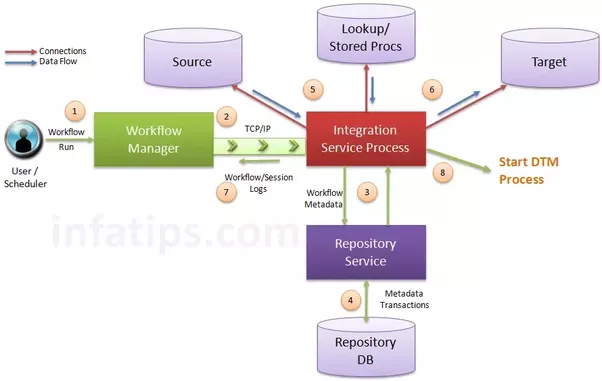
PowerCenter Integration Service runtime flow
A workflow run normally passes through the following runtime flow. The exact behavior can vary based on workflow design, grid configuration, session settings, and available resources, but this sequence explains the main responsibility of the Integration Service.
- The workflow is started from Workflow Manager, Workflow Monitor, a schedule, or a command-line request such as pmcmd.
- The PowerCenter Integration Service process connects to the Repository Service and reads workflow, session, mapping, connection, and parameter metadata.
- The Integration Service process creates the workflow log, locks the workflow for the run, evaluates workflow tasks, and starts the required sessions.
- For each session, the Integration Service starts a DTM process to validate the session and prepare readers, transformation threads, and writers.
- The DTM reads data from source systems, applies mapping transformations, and writes data to target systems.
- The Integration Service records status, statistics, and historical run information in the repository and creates session logs for review.
Informatica PowerCenter Integration Service Connectivity
The PowerCenter Integration Service is a repository client. It connects to the PowerCenter Repository Service to retrieve workflow and mapping metadata from the repository database. When the PowerCenter Integration Service process requests a repository connection, the request is routed through the master gateway, which sends back PowerCenter Repository Service information to the PowerCenter Integration Service process. The PowerCenter Integration Service process connects to the PowerCenter Repository Service. The PowerCenter Repository Service connects to the repository and performs repository metadata transactions for the client application.
The PowerCenter Workflow Manager communicates with the PowerCenter Integration Service process over a TCP/IP connection. The PowerCenter Workflow Manager communicates with the PowerCenter Integration Service process each time you schedule or edit a workflow, display workflow details, and request workflow and session logs. Use the connection information defined for the domain to access the PowerCenter Integration Service from the PowerCenter Workflow Manager.
The PowerCenter Integration Service process connects to the source or target database using ODBC or native drivers. The PowerCenter Integration Service process maintains a database connection pool for stored procedures or lookup databases in a workflow. The PowerCenter Integration Service process allows an unlimited number of connections to lookup or stored procedure databases. If a database user does not have permission for the number of connections a session requires, the session fails. You can optionally set a parameter to limit the database connections. For a session, the PowerCenter Integration Service process holds the connection as long as it needs to read data from source tables or write data to target tables.
PowerCenter Integration Service connections with repository, sources, and targets
The Integration Service does not work alone. It depends on other PowerCenter services, client tools, databases, files, and operating system resources. The table below summarizes the important connections involved in a workflow run.
| Connection point | How the PowerCenter Integration Service uses it |
|---|---|
| Repository Service | Retrieves workflow, session, mapping, connection, and parameter metadata and writes run history. |
| Workflow Manager and Workflow Monitor | Receives workflow start, schedule, edit, and monitoring requests through PowerCenter Client tools. |
| pmcmd | Accepts command-line workflow and task control requests when configured for administrative operations. |
| Source systems | Reads source rows from relational databases, flat files, applications, or other configured source connections. |
| Target systems | Writes transformed data to target tables, files, or supported target connections. |
| Lookup and stored procedure databases | Opens additional connections when mappings use lookups, stored procedures, or related transformation logic. |
PowerCenter Integration Service
The PowerCenter Integration Service is an application service that runs sessions and workflows.
Integration Service Process
The PowerCenter Integration Service starts a PowerCenter Integration Service process to run and monitor workflows. The PowerCenter Integration Service process is also known as the pmserver process. The PowerCenter Integration Service process accepts requests from the PowerCenter Client and from pmcmd.
It performs the following tasks:
- Manage workflow scheduling.
- Lock and read the workflow.
- Read the parameter file.
- Create the workflow log.
- Run workflow tasks and evaluates the conditional links connecting tasks.
- Start the DTM process or processes to run the session. ·
- Write historical run information to the repository. ·
- Send post-session email in the event of a DTM failure.
The Integration Service process is responsible for workflow-level control. It does not perform every row-level transformation directly. For row-level session work, it starts the Data Transformation Manager process, which handles readers, transformation logic, writers, memory buffers, and session-level processing.
Load Balancer
The Load Balancer is the object of the PowerCenter Integration Service and that dispatches tasks to achieve optimal performance and scalability. When you run a workflow, the Load Balancer dispatches the Session, Command, and predefined EventWait tasks within the workflow. The Load Balancer matches task requirements with resource availability to identify the best node to run a task. It dispatches the task to a Integration Service process running on the node. It may dispatch tasks to a single node or across nodes.
The Load Balancer dispatches tasks in the order it receives them. When the Load Balancer needs to dispatch more Session and Command tasks than the PowerCenter Integration Service can run, it places the tasks it cannot run in a queue. When nodes become available, the Load Balancer dispatches tasks from the queue in the order determined by the workflow service level.
Load Balancer functionality
Dispatch process: The Load Balancer performs several steps to dispatch tasks.
Resources: The Load Balancer can use PowerCenter resources to determine if it can dispatch a task to a node.
Resource provision thresholds: The Load Balancer uses resource provision thresholds to determine whether it can start additional tasks on a node.
Dispatch mode: The dispatch mode determines how the Load Balancer selects nodes for dispatch. ·
Service levels : When multiple tasks are waiting in the dispatch queue, the Load Balancer uses service levels to determine the order in which to dispatch tasks from the queue.
How the PowerCenter Load Balancer selects nodes for workflow tasks
In a domain with more than one node, the Load Balancer helps decide where a task should run. It checks the task requirements, available node resources, dispatch mode, and configured thresholds before assigning the task. If no suitable node is available immediately, the task can wait in the dispatch queue until resources become available.
This behavior is useful in larger PowerCenter environments where multiple workflows or sessions may run at the same time. It helps distribute execution across available nodes instead of forcing every task to run on one machine.
Data Transformation Manager (DTM)
Data Transformation Manager (DTM) Process the Integration Service process starts the DTM process to run a session. The DTM process is also known as the pmdtm process. The DTM is the process associated with the session task.
The DTM is where most session-level data processing happens. It validates the session, expands parameters and variables, builds the execution plan, creates reader and writer threads, allocates memory, processes transformations, and handles pre-session and post-session operations. If a session fails, the session log produced by the DTM is one of the first places to check.
Processing Threads
The DTM allocates process memory for the session and divides it into buffers. This is also known as buffer memory. The DTM uses multiple threads to process data in a session. The main DTM thread is called the master thread.
Reader threads read source data, transformation threads apply mapping logic, and writer threads load rows into target systems. For partitions or complex mappings, the DTM may create multiple processing pipelines. The number and behavior of threads depend on mapping design, session properties, partitioning, database connections, and Integration Service configuration.
PowerCenter Integration Service process vs DTM process
The Integration Service process and the DTM process are related, but they do different work. The Integration Service process controls the workflow run, while the DTM process executes a session. The comparison below helps clarify the difference.
| Area | Integration Service process | DTM process |
|---|---|---|
| Common process name | pmserver | pmdtm |
| Main responsibility | Runs and monitors workflows | Runs a session |
| Metadata usage | Reads workflow and task metadata | Reads session and mapping execution details |
| Runtime work | Schedules tasks, creates workflow logs, starts DTM processes, records history | Reads source data, applies transformations, writes targets, creates session logs |
| Failure analysis | Check workflow log and service status | Check session log, transformation errors, source or target errors |
Grids
When you run a Integration Service on a grid, a master service process runs on one node and worker service processes run on the remaining nodes in the grid. The master service process runs the workflow and workflow tasks, and it distributes the Session, Command, and predefined EventWait tasks to itself and other nodes. A DTM process runs on each node where a session runs. If a session run on a grid, a worker service process can run multiple DTM processes on different nodes to distribute session threads.
A grid is used when an Informatica domain has multiple nodes and the Integration Service is configured to use those nodes for execution. In a grid, task distribution is handled by the Load Balancer, while session execution still happens through DTM processes on the selected nodes. A grid can improve scalability when the environment and workflows are designed to use multiple nodes effectively.
Code Pages and Data Movement Modes
The PowerCenter Integration Service can move data in either ASCII or Unicode data movement mode. These modes determine how the Integration Service handles character data. You choose the data movement mode in the Integration Service configuration settings. If you want to move multibyte data, choose Unicode data movement mode. To ensure that characters are not lost during conversion from one code page to another, you must also choose the appropriate code pages for your connections.
ASCII Data Movement Mode
In ASCII data movement mode when all sources and targets are 7bit ASCII or EBCDIC character sets. In ASCII mode, the PowerCenter Integration Service recognizes 7bit ASCII and EBCDIC characters and stores each character in a single byte.
Unicode Data Movement Mode
Use Unicode data movement mode when sources or targets use 8bit or multibyte character sets and contain character data. In Unicode mode, the PowerCenter Integration Service recognizes multibyte character sets as defined by supported code pages.
PowerCenter Integration Service and Repository Service difference
The Repository Service manages access to the repository database where PowerCenter metadata is stored. The Integration Service uses that metadata to run workflows and sessions. Therefore, the Repository Service is metadata-focused, while the Integration Service is execution-focused.
| Service | Main purpose | Typical dependency |
|---|---|---|
| PowerCenter Repository Service | Provides access to repository metadata | Repository database |
| PowerCenter Integration Service | Executes workflows and sessions using repository metadata | Repository Service, source connections, target connections, node resources |
Where PowerCenter Integration Service fits in ETL processing
PowerCenter is commonly used for ETL and data integration workloads. In that context, the Integration Service is the runtime engine that performs the extract, transform, and load work defined in mappings and sessions. It can read from configured sources, transform rows through mapping logic, and write the result to configured targets.
The Integration Service should not be confused with Informatica Intelligent Cloud Services, also known as IICS. PowerCenter is the traditional PowerCenter platform, while IICS is Informatica’s cloud data management platform. Both can be used for data integration, but their administration, runtime model, and deployment style are different.
Common PowerCenter Integration Service troubleshooting checks
When a workflow or session does not run as expected, check the Integration Service and DTM-related areas first. These checks help isolate whether the issue is with service availability, metadata access, database connectivity, session design, or runtime resources.
- Verify that the PowerCenter Integration Service is enabled and running in the Informatica domain.
- Check whether the Repository Service is available and the Integration Service can connect to it.
- Review the workflow log to see whether the workflow started, locked, and evaluated tasks correctly.
- Review the session log to identify DTM errors, source errors, transformation errors, or target load errors.
- Confirm that source, target, lookup, and stored procedure connection objects use valid credentials and drivers.
- Check node resources, dispatch queue behavior, and grid configuration when tasks wait or run slowly.
- Review code page and data movement mode settings when character data appears incorrectly in the target.
FAQs on PowerCenter Integration Service
What is Integration Service in Informatica PowerCenter?
The Integration Service in Informatica PowerCenter is the application service that runs workflows and sessions. It reads metadata from the repository, starts workflow tasks, creates DTM processes for sessions, moves data from sources, applies transformations, and loads targets.
What is the difference between PowerCenter Integration Service and DTM?
The PowerCenter Integration Service process controls workflow execution and starts session runs. The DTM process is started for a session and performs the actual session-level work such as reading source data, applying transformations, and writing target data.
What is Informatica PowerCenter used for?
Informatica PowerCenter is used for data integration and ETL workloads. It helps design mappings, define workflows, connect to source and target systems, transform data, and load data into target databases, files, or applications.
Is IICS an ETL tool like PowerCenter?
IICS, or Informatica Intelligent Cloud Services, is a cloud-based Informatica platform that includes data integration capabilities. PowerCenter is a traditional PowerCenter platform, while IICS is cloud-based. Both can support ETL-style workloads, but they are administered and deployed differently.
Is SSIS similar to Informatica PowerCenter?
SSIS and Informatica PowerCenter are both used for data integration and ETL tasks. SSIS is commonly used in Microsoft SQL Server environments, while PowerCenter is an enterprise data integration platform used across many source and target systems.
Editorial QA checklist for PowerCenter Integration Service content
- Confirm that the article clearly states that the PowerCenter Integration Service runs workflows and sessions.
- Check that the difference between Integration Service process, Load Balancer, and DTM process is explained without mixing their responsibilities.
- Verify that existing internal links to DTM, Load Balancer, and DTM threads are preserved.
- Ensure that grid behavior is described as task distribution across nodes, not as automatic improvement for every workflow.
- Confirm that code page and data movement mode descriptions mention when Unicode mode is needed for multibyte character data.
- Review the FAQ answers so they remain specific to Informatica PowerCenter Integration Service and related search intent.
Summary of PowerCenter Integration Service responsibilities
The PowerCenter Integration Service is the runtime service that executes PowerCenter workflows and sessions. It communicates with the Repository Service for metadata, accepts requests from client tools and commands, uses the Load Balancer to dispatch tasks, starts DTM processes for session execution, manages source and target connections, and records workflow and session results. Understanding this service is essential for administering PowerCenter, troubleshooting workflow failures, and tuning session execution.