 TutorialKart.com
Controller extension in Salesforce is an Apex class that extends the behavior of a Visualforce Standard Controller or custom controller in Salesforce. A controller extension is commonly used when the standard controller already provides useful actions such as save, edit, delete, view, and cancel, but the Visualforce page also needs custom Apex logic.
In simple terms, a controller extension lets you keep the built-in controller behavior and add extra methods, properties, validation logic, navigation logic, or SOQL-based data retrieval for the same Visualforce page. This tutorial explains the syntax, setup steps, working example, and important rules for creating a controller extension in Salesforce.
What a controller extension does in Salesforce Visualforce
A controller extension in Salesforce adds new behavior to an existing Visualforce controller. When a page uses a standard controller, the page can already work with one Salesforce object record. The extension class can then add custom methods that the standard controller does not provide.
For example, a Visualforce page for an Account record may use the standard Account controller for saving the record and use an extension method to display a custom greeting, calculate a value, redirect the user, or load related records.
Controller extension syntax in Salesforce Apex
A Visualforce controller extension is an Apex class with a constructor. The constructor receives the controller instance that the extension is extending. For a standard controller, the constructor argument is ApexPages.StandardController. For a custom controller, the constructor argument is the custom controller class name.
public class ExtensionClassName {
    public ExtensionClassName(ApexPages.StandardController controller) {
        // Extension initialization logic
    }
}
The extension is attached to a Visualforce page by using the extensions attribute in the <apex:page> tag.
<apex:page standardController="Account" extensions="ExtensionClassName">
    <!-- Visualforce markup -->
</apex:page>
Controller extension in Salesforce
In this Salesforce Tutorial, we are going to learn about Controller extension in Salesforce and how can we build Controller extension in Salesforce. Let us learn about controller extension with a simple example.
- Navigate to Setup | Build | Develop | Apex classes | New.
In current Salesforce Setup, you can also search for Apex Classes in the Quick Find box, open Apex Classes, and click New. The older Setup path is still useful for understanding where the class is created in classic Salesforce documentation and older org screenshots.
In this Salesforce Visualforce tutorial, we are going to build Salesforce extension controller by creating Apex class. A controller extension is any Apex class containing a constructor that takes a single argument of type ApexPages.StandardController or CustomControllerName, where ExtensionController is the name of a custom controller in this example.
public class ExtensionController {

    private final Account acct;


    public ExtensionController {
(ApexPages.StandardController stdController) {
        this.acct = (Account)stdController.getRecord();
    }

    public String getGreeting() {
        return 'Hello ' + acct.name + ' (' + acct.id + ')';
    }
}
The Apex class above shows the intended idea of an extension class. The constructor receives the standard controller, gets the current Account record, and the getGreeting() method returns a value that can be displayed on the Visualforce page.
Corrected Apex controller extension example for Account
The following version shows a clean Apex controller extension structure for the same Account example. Use this structure when creating the class in your Salesforce org.
public with sharing class ExtensionController {

    private final Account acct;

    public ExtensionController(ApexPages.StandardController stdController) {
        this.acct = (Account) stdController.getRecord();
    }

    public String getGreeting() {
        return 'Hello ' + acct.Name + ' (' + acct.Id + ')';
    }
}
In this example, public with sharing makes the class respect the current user’s sharing rules. The standard controller supplies the Account record, and the extension adds the custom getGreeting() method.
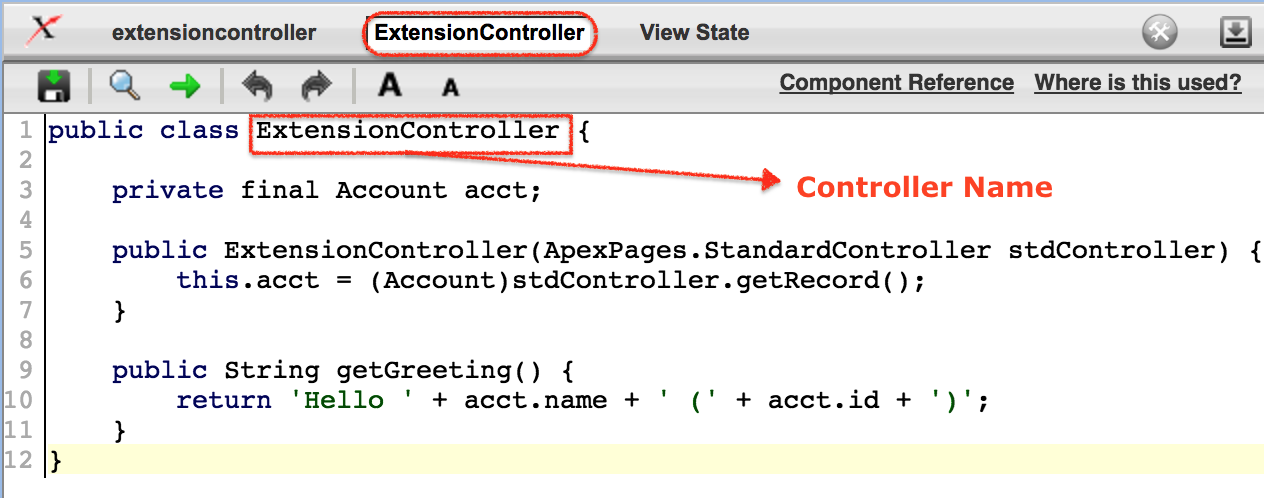
- {!greeting} expression references the getGreeting method in extension controller.
Visualforce can call public getter methods by using expression syntax. A method named getGreeting() can be referenced as {!greeting} in the page markup.
Adding a Salesforce controller extension to a Visualforce page
After creating Controller extension in Salesforce by creating an Apex class, now we have to implement Controller extension in Salesforce using visualforce pages. Let us create visualforce page as shown below.
- In this example, we have named the Visualforce page as extensioncontroller. The extension controller is added to visualforce page using the extension attribute in <apex:page> component. Both standard controller and extension attributes must be used in <apex:page> component.
<apex:page standardController="Account" extensions="ExtensionController">
    {!greeting} <p/>
    <apex:form >
        <apex:inputField value="{!account.name}"/> <p/>
        <apex:commandButton value="Save" action="{!save}"/>
    </apex:form>
</apex:page>
In the above Visualforce page, the standard controller is Account and the extension class is ExtensionController. The page uses both controller behaviors: the standard controller provides the Account record and the standard save action, while the extension provides the custom greeting value.
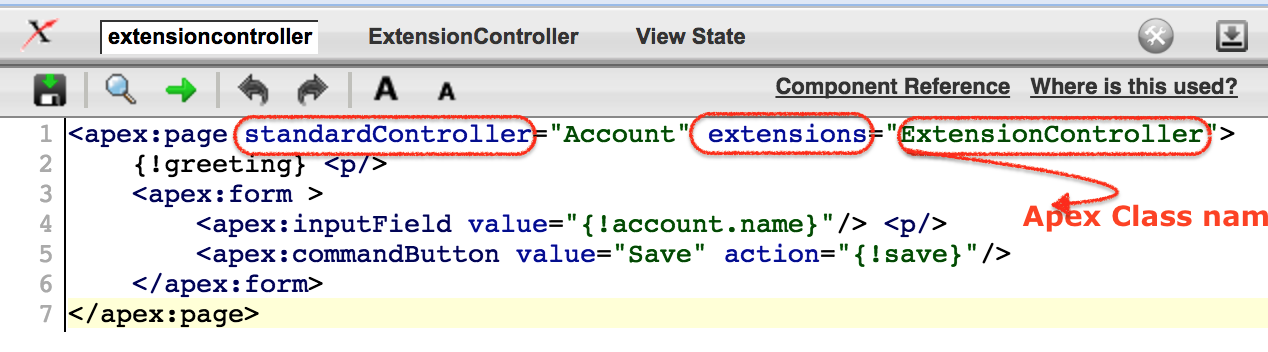
Every controller methods and controller extension methods are referenced with {!} notation in visualforce markup.
- <apex:inputField> tag retrieves the name of the account using standard controller.
- <apex:commandButton> tag saves the method with its action attribute.
How the Visualforce page uses standard controller and extension methods
| Page element | Where the behavior comes from | Purpose in this example |
|---|---|---|
standardController="Account" | Standard controller | Loads and manages the Account record. |
extensions="ExtensionController" | Controller extension | Adds custom Apex logic to the page. |
{!greeting} | Extension getter method | Displays the string returned by getGreeting(). |
{!account.name} | Standard controller record | Binds the Account Name field to the input field. |
{!save} | Standard controller action | Saves the Account record. |
Visualforce extension controller Output.
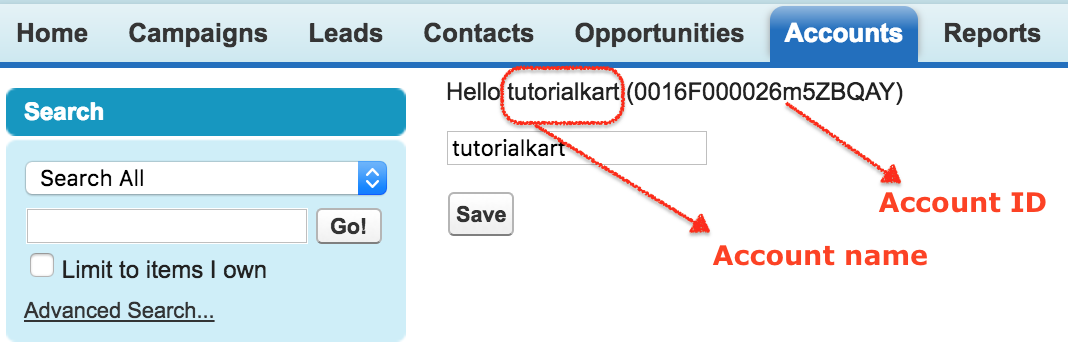
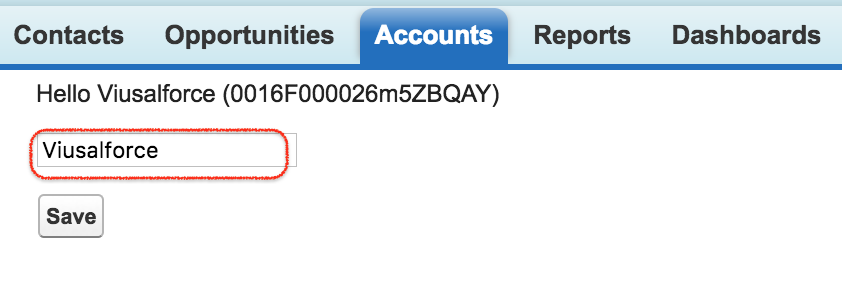
The above shown image is the output for extension controller in visualforce. Account Id must be added at the end of the URl and click on Save button to get the output. As shown above the the name of the account is tutorialkart, if we change the name and Saved. The account named is renamed as shown below.
Testing the Salesforce controller extension page with an Account Id
To test this Visualforce page, open an existing Account record and pass its record Id in the page URL. The page should show the greeting value and the Account Name field. When the Account Name is changed and the Save button is clicked, the standard controller save action updates the Account record.
/apex/extensioncontroller?id=001xxxxxxxxxxxxxxxReplace 001xxxxxxxxxxxxxxx with a valid Account Id from your org. The prefix can vary by object, but Account record Ids commonly begin with 001.
Custom controller and controller extension difference in Salesforce
A common confusion is the difference between a custom controller and a controller extension. Both are Apex classes, but they are used for different page design needs.
| Feature | Custom controller | Controller extension |
|---|---|---|
| Main purpose | Replaces the standard controller with fully custom Apex logic. | Adds custom Apex logic to a standard or custom controller. |
| Visualforce page attribute | Uses controller. | Uses extensions with standardController or controller. |
| Standard actions | Not available unless you write them. | Can reuse standard controller actions such as save, edit, delete, view, and cancel where available. |
| Typical use case | Use when the page flow and data handling are fully custom. | Use when standard controller behavior is mostly enough but extra logic is needed. |
When to use a controller extension in Salesforce Visualforce
Use a controller extension when the Visualforce page can depend on a standard controller for basic record operations but also needs custom Apex logic. This approach avoids rewriting standard behavior that Salesforce already provides.
- Use a controller extension to add extra buttons, custom navigation, or custom page messages.
- Use it to calculate values that are not stored directly on the record.
- Use it to query and display related records on the same Visualforce page.
- Use it to run validation or business checks before allowing a custom action.
- Use it when the standard controller handles the main record but the page needs additional helper methods.
Important Apex rules for Salesforce controller extensions
Important points that to be remembered before creating custom and extension controllers in salesforce.
- Governor limits.
- Apex class can be run in the system mode and user mode by using without sharing and with sharing.
- The webservice method must be defined as global.
- We can not implement DML (Data manipulation Language) constructor method of a controller.
- try to use Sets, Maps and List in your code, it increases the efficiency of the code.
For controller extensions, also keep these practical points in mind:
- Avoid DML operations inside the constructor. Use action methods for save or update logic.
- Use
with sharingwhen the extension should respect record sharing rules. - Keep SOQL queries selective and avoid placing repeated queries inside loops.
- Use the standard controller methods where possible instead of rewriting standard save or cancel logic.
- Write test methods for extension methods, especially when the extension performs DML, navigation, SOQL, or conditional business logic.
Common mistakes while creating a controller extension in Salesforce
- Using
controllerinstead ofextensionswhen the page is meant to extend a standard controller. - Forgetting to include the correct constructor argument, such as
ApexPages.StandardController. - Referencing a getter method incorrectly in Visualforce expression syntax.
- Trying to use a record field that was not available or not queried when using custom controller logic.
- Putting too much business logic directly into the Visualforce page instead of keeping it in the Apex extension class.
FAQs on controller extension in Salesforce
What is a controller extension in Salesforce?
A controller extension in Salesforce is an Apex class that extends the behavior of a Visualforce standard controller or custom controller. It adds custom methods, properties, and logic while still allowing the page to use the base controller.
What is the difference between custom controller and controller extension?
A custom controller replaces the standard controller and provides all page behavior through custom Apex. A controller extension adds extra Apex behavior to an existing standard or custom controller.
How do I add a controller extension to a Visualforce page?
Add the extension class name in the extensions attribute of the <apex:page> tag. For example, use <apex:page standardController="Account" extensions="ExtensionController">.
Can a Visualforce page use more than one controller extension?
Yes, a Visualforce page can use multiple extension classes by listing them in the extensions attribute, separated by commas. The page still has one main standard or custom controller.
Should DML be written in a Salesforce controller extension constructor?
DML should not be placed in the constructor. The constructor should initialize data needed by the page. Save, update, delete, and other DML operations should be handled in action methods.
Editorial QA checklist for this Salesforce controller extension tutorial
- Does the tutorial define controller extension as an Apex class that extends a Visualforce standard or custom controller?
- Does the example show the required constructor using
ApexPages.StandardController? - Does the Visualforce markup correctly use
standardControllerandextensionstogether? - Does the explanation distinguish custom controller and controller extension without mixing their use cases?
- Does the tutorial warn against DML in constructors and mention governor limits, sharing, and test coverage concerns?