 TutorialKart.com
Visualforce is used in Salesforce when an admin or developer needs a custom user interface that cannot be built easily with standard page layouts, Lightning App Builder, Flow screens, or standard Salesforce components. It is a tag-based framework for building Salesforce pages that can display data, run controller logic, support custom styling, and extend the standard Salesforce experience.
Are you interested to know why Visualforce is used in Salesforce? Right today we clearly understand why visualforce is used and how the changes will happen after using Visualforce in Salesforce. There is a lot more concepts that to be covered in Visualforce tutorials. Let us understand about why visualforce is used in Salesforce.com.
In our previous Salesforce tutorials, we learned that Salesforce was all about no software. So why should we learn about developing with visualforce. There are two primary reasons for learning visualforce. They are
Why Visualforce is used in Salesforce ?
- To extend and customize the look and feel of the Salesforce instance.
- Using Visualforce, we can create brand new website with highly sophisticated user interfaces.
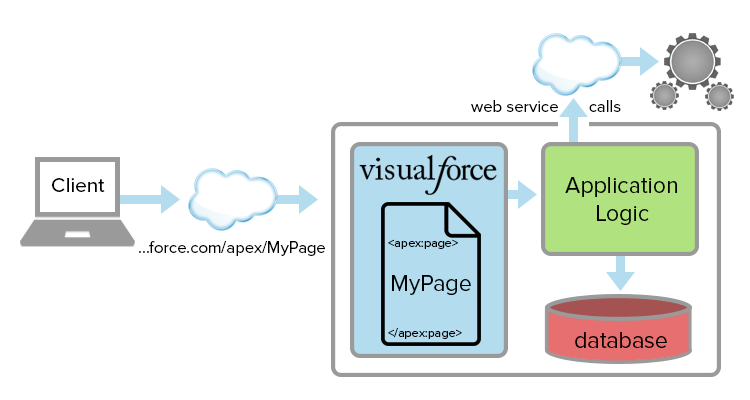
Visualforce is a tag-based markup language, which has user interface frameworks to build Visualforce pages, websites and dynamic applications. Visualforce supports many development technologies like JQuery, JavaScript, CSS, HTML, Flash and Ajax.
In Salesforce development, Visualforce pages are usually combined with standard controllers, custom controllers, controller extensions, Apex logic, SOQL queries, Salesforce objects, and security settings. A Visualforce page can be simple, such as a custom record display, or more advanced, such as a branded form, printable document, wizard screen, or page embedded inside another Salesforce experience.
Salesforce Visualforce use cases that still matter
Visualforce is most useful when the requirement needs page-level control over layout, rendering, data display, or server-side Apex behavior. It is not required for every Salesforce customization, but it remains relevant in many existing Salesforce orgs and in some specific new requirements.
- Custom record pages: Display Salesforce records in a custom layout that is different from the standard page layout.
- Wizard-style screens: Guide users through multi-step forms, approvals, service processes, or data entry flows.
- PDF and printable documents: Generate printable output such as invoices, quotes, certificates, summaries, and formatted reports.
- Email templates: Build data-driven Salesforce email templates that need custom merge logic or layout control.
- Embedded page sections: Add custom Visualforce sections inside record pages, tabs, or Salesforce apps.
- Legacy Salesforce apps: Maintain older pages that were built before Lightning Web Components became the preferred UI framework.
- Sites and portals: Support older Salesforce Sites, customer-facing pages, or partner-facing functionality that already uses Visualforce.
Example : Let us discuss about Customer Account. Customer Account detail page lists everything one long page and user must scroll up and down to to access. We can customize Account page navigation by adding tab styles using Visualforce.
Why Visualforce is used in Salesforce ?
- Visualforce is used to create components that can be embedded into dashboards or accesses from their own custom tab.
- We can embed sections with in the detail page.
- Using visualforce we design visualforce page to display the activities for last 10 months and we can embed that section at the top of the contact detail page.
- Using Visualforce, we can design high quality data driven email templates in Salesforce.
- Build Visualforce pages with little code.
- Sophisticated website unrelated to Salesforce can be build using visualforce.
How Visualforce pages work with Apex controllers in Salesforce
A Visualforce page defines the user interface, while the controller decides how data is read, saved, validated, or processed. Salesforce provides standard controllers for common object operations, and developers can also write Apex custom controllers when the page needs custom business logic.
| Visualforce part | Purpose in Salesforce | Example use |
|---|---|---|
| Visualforce page | Defines the page layout and components | Show Account details, related data, or a custom form |
| Standard controller | Uses built-in Salesforce record behavior | Create, view, edit, or save a standard or custom object record |
| Custom controller | Uses Apex code for custom logic | Run calculations, load multiple objects, or control a wizard |
| Controller extension | Adds extra logic to a standard controller | Keep standard record behavior but add custom buttons or validations |
A simple Visualforce page can use a standard controller without writing Apex. More advanced pages usually need Apex because they must query records, apply business rules, handle button actions, or return a custom result to the user.
<apex:page standardController="Account">
    <apex:pageBlock title="Account Summary">
        <apex:pageBlockSection>
            <apex:outputField value="{!Account.Name}"/>
            <apex:outputField value="{!Account.Phone}"/>
            <apex:outputField value="{!Account.Industry}"/>
        </apex:pageBlockSection>
    </apex:pageBlock>
</apex:page>
The example above shows a Visualforce page using the Account standard controller. It can display Account fields without a custom Apex class. This is one reason Visualforce is approachable for beginners: simple pages can start with built-in Salesforce behavior, and Apex can be added later when the requirement becomes more complex.
Difference between Apex and Visualforce in Salesforce development
A common beginner question is the difference between Apex and Visualforce. Visualforce is used to build the page interface. Apex is the programming language used to write backend logic on the Salesforce Platform. They often work together, but they are not the same thing.
| Comparison point | Visualforce | Apex |
|---|---|---|
| Main role | Builds user interface pages | Runs server-side business logic |
| Syntax style | Tag-based markup | Object-oriented programming language |
| Used for | Forms, page layouts, record display, PDF output | Queries, calculations, validations, transactions, integrations |
| Beginner example | Show Account fields on a custom page | Load related records or save custom data |
For example, a Visualforce page may display a button named Create Renewal Opportunity. The Apex controller behind the page can check the current Account, create a new Opportunity record, set default values, and show a confirmation message.
Visualforce versus Lightning Web Components in current Salesforce projects
For most new custom user interface development in Salesforce, Lightning Web Components are usually the preferred approach because they are built for the modern Lightning Experience and use modern web standards. However, Visualforce is not automatically wrong or useless. It depends on the requirement, the existing Salesforce org, and the amount of legacy code already in use.
| Requirement | Visualforce may fit when | LWC may fit when |
|---|---|---|
| Existing page maintenance | The org already has working Visualforce pages | The page is being redesigned for Lightning Experience |
| New custom UI | The requirement depends on Visualforce-only behavior or older architecture | The requirement needs a modern, responsive Lightning interface |
| PDF rendering | A Visualforce page is used for formatted printable output | The UI does not need server-side PDF rendering |
| Developer skill set | The team maintains Apex and Visualforce code | The team works with JavaScript, HTML, CSS, and Lightning components |
The practical rule is simple: learn Visualforce if you support existing Salesforce implementations, work with Visualforce email templates or PDF pages, or need to understand older Salesforce customizations. Learn Lightning Web Components when building new interactive user interfaces for Lightning Experience.
When Visualforce is a good choice in Salesforce
- The Salesforce org already has Visualforce pages that need maintenance or small improvements.
- The page must render a formatted PDF or printable document from Salesforce data.
- The requirement needs a custom page with server-side Apex logic and controlled page flow.
- The business wants to embed a custom page section in a record page, tab, or app.
- The implementation depends on older Salesforce Sites, portal pages, or packages that use Visualforce.
- The team needs to understand legacy code before migrating parts of the UI to Lightning Web Components.
When Visualforce is not the first choice in Salesforce
- A standard page layout, Dynamic Forms, or Lightning record page can meet the requirement without code.
- A Flow screen can guide the user through the process with less custom development.
- The page needs a highly interactive Lightning-style user interface.
- The project is a new Lightning Experience implementation with no dependency on older Visualforce code.
- The requirement can be solved with standard Salesforce configuration, reports, dashboards, or automation.
This distinction is important because Visualforce should not be used just because it is available. In Salesforce, the best solution is often the simplest maintainable solution: standard configuration first, Flow where it fits, Lightning Web Components for modern custom UI, and Visualforce when its specific capabilities or legacy role make sense.
Visualforce page example for an Account detail improvement
Suppose the standard Account detail page is too long and users need a compact summary at the top. A Visualforce page can show important Account fields and related information in one controlled section. That page can then be added to a custom tab, linked from a button, or embedded where the Salesforce layout allows it.
- Display Account name, phone, industry, owner, and key status fields.
- Show a filtered list of recent activities or important related records.
- Add custom buttons that call controller actions.
- Apply custom CSS for clearer grouping and spacing.
- Use Apex logic when the page needs data from multiple objects.
This type of requirement explains why Visualforce is used in Salesforce even when standard CRM pages already exist. The standard page gives a general layout, while Visualforce gives the developer more control over what the user sees and how the page behaves.
Important Visualforce concepts beginners should know
- Visualforce page: The markup file that defines the screen shown to the user.
- Visualforce component: A reusable piece of Visualforce markup or a standard Salesforce UI tag.
- Standard controller: Built-in controller behavior for a Salesforce object.
- Custom controller: Apex class written to control a Visualforce page.
- Controller extension: Apex class that adds behavior to a standard or custom controller.
- View state: Page state data that Salesforce keeps between requests; large view state can affect performance.
- Governor limits: Salesforce platform limits that Apex and Visualforce code must respect.
To create Visualforce page, we use Visualforce components and Visualforce Controllers. In our upcoming Visualforce tutorial we will implement adding tabs on the detail page, displaying activities for last 10 months and also we learn about how to create our own custom controllers to create web pages.
Salesforce Visualforce learning path after this tutorial
After understanding why Visualforce is used in Salesforce, the next step is to learn how a page is created, saved, previewed, and connected to Salesforce data. A good learning order is:
- Create a basic Visualforce page with static text.
- Use standard Visualforce components such as
apex:page,apex:form,apex:pageBlock, andapex:outputField. - Connect a Visualforce page to a standard controller such as Account or Contact.
- Add a custom Apex controller for business logic.
- Use Visualforce with buttons, tabs, record pages, and email templates.
- Review performance, security, sharing rules, CRUD/FLS checks, and governor limits before production use.
Salesforce Visualforce references for further reading
For current details, compare this tutorial with official Salesforce resources such as the Salesforce Visualforce Developer Guide, the Salesforce Help page on Visualforce, and the Salesforce Developer Documentation.
FAQs on why Visualforce is used in Salesforce
What is the main purpose of Visualforce in Salesforce?
The main purpose of Visualforce is to build custom Salesforce user interfaces. It is used when standard page layouts or Lightning configuration do not provide enough control over the page layout, data display, form behavior, or server-side controller logic.
What is the difference between Apex and Visualforce?
Visualforce is used to create the page interface, while Apex is used to write server-side logic. A Visualforce page can display fields, forms, buttons, and messages. Apex can query records, process data, save changes, and control what happens when users interact with the page.
Is Visualforce outdated in Salesforce?
Visualforce is an older Salesforce UI framework, but it is still used in many orgs, especially for legacy pages, PDF rendering, email templates, Salesforce Sites, and custom pages that already depend on Apex controllers. For most new Lightning user interfaces, Lightning Web Components are usually preferred.
What is the difference between Visualforce and Lightning Web Components?
Visualforce is a server-side, tag-based framework for Salesforce pages. Lightning Web Components are a modern client-side component model based on web standards. Visualforce is common in older implementations and some PDF or page-rendering use cases, while LWC is generally better for new interactive Lightning Experience development.
Can Visualforce pages be used in Lightning Experience?
Yes, many Visualforce pages can be used in Lightning Experience, but the user experience depends on how the page is designed. Pages built for the older Salesforce Classic interface may need review for styling, navigation, responsiveness, and compatibility before they work well for Lightning users.
Editorial QA checklist for this Visualforce tutorial
- Confirm that the tutorial explains Visualforce as a Salesforce UI framework, not as a replacement for Apex or Lightning Web Components.
- Check that the reasons for using Visualforce include custom pages, embedded sections, PDFs, email templates, legacy apps, and Apex-backed page logic.
- Review whether new development guidance clearly distinguishes Visualforce from Lightning Web Components.
- Confirm that the Visualforce code example uses a standard controller and does not imply that Apex is required for every page.
- Check all official Salesforce documentation links when updating Visualforce limitations, Lightning compatibility, or current platform terminology.