 TutorialKart.com
A standard list controller in Salesforce is a Visualforce controller that works with a set of records instead of one record. It is commonly used when a Visualforce page must display records from a list view, provide pagination, or run list-style actions such as next, previous, save, cancel, and list. In a Visualforce page, you enable a standard list controller by using standardController with recordSetVar.
Standard list Controllers in Salesforce are used to filter records of a particular object or a page. They are useful for Visualforce pages that display and act on a set of records, such as list pages, related-list style pages, and mass action pages. Salesforce documentation describes standard list controllers as controllers for pages that handle multiple records from a supported object.
In Salesforce.com, we can use standard list controllers for many standard objects and for supported custom objects. Some commonly used objects are listed below.
| Account | Asset | Campaign |
| Case | Contact | Idea |
| Lead | Opportunity | Order |
| Product2 | Solution | User objects |
| Custom objects |
Standard list controller syntax in a Visualforce page
To insert a standard list controller in a Visualforce page, add the standardController attribute to the <apex:page> component and set it to the API name of the object. Then add the recordSetVar attribute on the same component. The value of recordSetVar becomes the variable name used to access the collection of records in Visualforce markup.
As a Salesforce developer, you should understand both Salesforce Apex programming and Visualforce page markup. However, a basic standard list controller page can be created without writing a custom Apex controller.
What recordSetVar does in a Salesforce standard list controller
The recordSetVar attribute changes the behavior of the page from single-record mode to list-record mode. Without recordSetVar, a standard controller usually works with a single record identified by an id parameter. With recordSetVar, the page works with a set of records selected by the current list view or by a specified list view filter.
<apex:page standardController="Tutorial__c" recordSetVar="tutorial"
tabStyle="account" sidebar="false">
In the syntax above, Tutorial__c is the custom object API name, and tutorial is the Visualforce collection variable. At runtime, the standard list controller does not depend on a single record id. It loads records based on list-controller behavior, usually from the user’s current or selected list view.
<apex:page standardController="ObjectApiName" recordSetVar="records">
    <apex:pageBlock title="Records">
        <apex:pageBlockTable value="{!records}" var="record">
            <apex:column value="{!record.Name}" />
        </apex:pageBlockTable>
    </apex:pageBlock>
</apex:page>
This is the basic pattern for a standard list controller in Salesforce: object API name in standardController, collection variable in recordSetVar, and a Visualforce repeat or table component that renders the records.
Standard list controller example for Tutorial__c records
In this Salesforce developer tutorial, we will create a Visualforce page that displays a list of records from the Tutorial__c custom object. Follow the steps given below.
- Create a new Visualforce page with the name
standardlistcontroller. - Add the standardController attribute in the <apex:page> component.
- Add the recordSetVar attribute in the same <apex:page> component.
- Use <apex:pageBlockTable> to display each record in the list.
<apex:page standardController="Tutorial__c" recordSetVar="tutorial"
tabStyle="account" sidebar="false">
  <apex:pageBlock >
      <apex:pageBlockTable value="{!tutorial}" var="a">
          <apex:column value="{!a.name}"/>
      </apex:pageBlockTable>
  </apex:pageBlock>
</apex:page>
In this example, {!tutorial} refers to the record collection, and var="a" creates a temporary variable for each row while the table is rendered. The column then displays the Name field for each Tutorial__c record in the current list set.
Output for Standard list controller visualforce page.
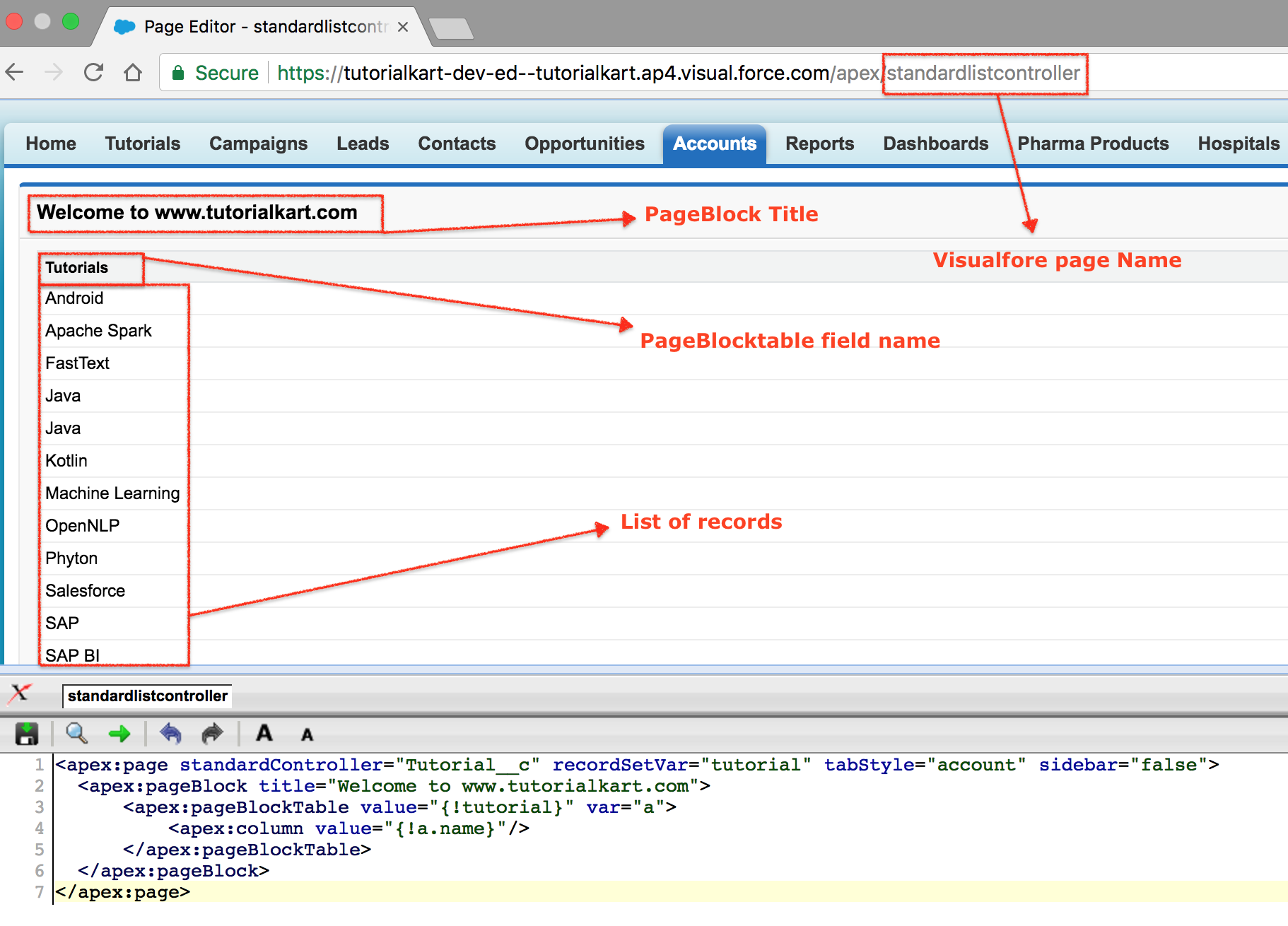
As shown in the standard list controller example, the returned records are based on list-controller behavior. The records can be affected by the selected list view, and sorting can follow the list view definition even when the sorted column is not shown in the Visualforce table.
Using a list view with a Visualforce standard list controller
A standard list controller can use Salesforce list views. This is important because administrators and users often define list views to filter records such as “My Open Leads,” “Recently Created Accounts,” or “All Opportunities.” A Visualforce page that uses a standard list controller can work with those list-view filters instead of hardcoding a custom SOQL query.
When you want the page to use a particular list view, you can pass the list view filter id in the page URL by using the filterId parameter. This is useful when linking from a custom button, tab, or list view action.
/apex/standardlistcontroller?filterId=00BXXXXXXXXXXXXThe exact filterId value depends on the list view in the Salesforce org. If no specific filter is passed, the page can use the list view context available to the current user.
Pagination actions in Salesforce standard list controllers
One common reason to use a standard list controller in Visualforce is pagination. The standard list controller provides built-in navigation actions such as first, previous, next, and last. These actions let the page move through records without requiring a custom Apex controller.
<apex:page standardController="Account" recordSetVar="accounts">
    <apex:form>
        <apex:pageBlock title="Account List">
            <apex:pageBlockTable value="{!accounts}" var="acc">
                <apex:column value="{!acc.Name}" />
                <apex:column value="{!acc.Phone}" />
            </apex:pageBlockTable>

            <apex:pageBlockButtons location="bottom">
                <apex:commandButton action="{!first}" value="First" />
                <apex:commandButton action="{!previous}" value="Previous" />
                <apex:commandButton action="{!next}" value="Next" />
                <apex:commandButton action="{!last}" value="Last" />
            </apex:pageBlockButtons>
        </apex:pageBlock>
    </apex:form>
</apex:page>
In this example, the page displays Account records and adds pagination buttons at the bottom of the page block. The buttons call standard list controller actions directly through Visualforce expressions.
Standard list controller action tags in Visualforce
Standard list controller action methods perform logic or navigation when a page event occurs on a Visualforce page. Using Visualforce markup, we can call an action from a button, a link, an AJAX event, a polling event, a JavaScript function, or the page load itself. Some commonly used Visualforce action tags are listed below.
| Visualforce tag | How it is used with a standard list controller |
|---|---|
| <apex:commandButton> | Creates a button that can call an action such as save, cancel, next, or previous. |
| <apex:commandLink> | Creates a link that can call a list-controller action. |
| <apex:actionSupport> | Adds AJAX support for events such as onclick, onchange, and onmouseover. |
| <apex:actionPoller> | Periodically calls an action at a specified interval. |
| <apex:actionFunction> | Defines a JavaScript function that can call a controller action. |
| <apex:page> | Can call an action when the Visualforce page is loaded. |
Action methods supported by Salesforce standard list controllers
The standard list controller supports action methods for saving, canceling, returning to the list page, and moving through record pages. These built-in actions reduce the amount of Apex code required for simple list pages.
| Action method | Purpose in a Visualforce standard list controller |
|---|---|
| save | Saves changes made to records in the current set when the page is designed for editing. |
| quicksave | Saves changes and keeps the user on the same page. |
| list | Returns the user to the list page for the object. |
| cancel | Cancels the current operation and returns to the appropriate page. |
| first | Moves to the first page of records. |
| last | Moves to the last page of records. |
| next | Moves to the next page of records. |
| previous | Moves to the previous page of records. |
Standard list controller versus standard controller in Salesforce
A standard controller and a standard list controller both use Salesforce’s built-in Visualforce controller behavior, but they are used for different page patterns.
| Feature | Standard controller | Standard list controller |
|---|---|---|
| Record scope | Works with one record. | Works with a collection of records. |
| Visualforce setup | Uses standardController="Account". | Uses standardController="Account" recordSetVar="accounts". |
| Typical URL context | Often uses an id parameter. | Can use list view context or a filterId. |
| Common use case | Record detail, edit, or custom single-record page. | List pages, table pages, pagination, and mass-action style pages. |
| Built-in navigation | Single-record actions such as save and cancel. | List navigation actions such as first, previous, next, and last. |
When to use a standard list controller in Visualforce
Use a standard list controller in Salesforce when the Visualforce page mainly needs to display, navigate, or act on multiple records from the same object. It is a good fit for simple list pages because it can use built-in Salesforce list view behavior and pagination actions.
- Use it when the page displays a table of records from one object.
- Use it when users need next and previous navigation through record sets.
- Use it when list view filtering is enough for the page requirement.
- Use it when you want to avoid a custom Apex controller for a simple Visualforce list page.
- Do not use it as the only controller when the page needs complex cross-object logic, custom SOQL rules, or advanced business processing that is not available through standard list controller behavior.
Common mistakes with Salesforce standard list controllers
- Forgetting recordSetVar: Without
recordSetVar, the page does not behave as a list controller page. - Using a field name incorrectly: Field references must match the object’s field API names, such as
Name,Phone, or a custom field likeStatus__c. - Expecting one record id: A standard list controller works with a record set, not a single record from an
idparameter. - Assuming every object behaves the same way: Test the page with the target object and user profile because object access, field access, tabs, and list views can affect what the user sees.
- Not testing list view context: If the page depends on a specific list view, test the URL with the correct
filterId.
Editorial QA checklist for this standard list controller tutorial
- Confirm that every Visualforce code sample uses both
standardControllerandrecordSetVarwhere list-controller behavior is being explained. - Check that custom object examples use the correct
__csuffix, such asTutorial__c. - Verify that pagination examples call valid standard list controller actions:
first,previous,next, andlast. - Confirm that the article clearly separates standard controller behavior from standard list controller behavior.
- Review all Visualforce tags for proper opening and closing syntax before publishing.
FAQs on standard list Controllers in Salesforce
What is a standard list controller in Salesforce?
A standard list controller in Salesforce is a built-in Visualforce controller that works with multiple records from a supported object. It is enabled by adding recordSetVar to an <apex:page> that also uses standardController.
Why is recordSetVar required in a Visualforce list page?
The recordSetVar attribute tells Visualforce that the page should use list-controller behavior. It also defines the variable name used to access the collection of records in components such as <apex:pageBlockTable>.
Can a standard list controller use Salesforce list views?
Yes. A standard list controller can work with list view context. A page can also receive a filterId parameter in the URL to use a specific list view filter.
What pagination actions are available in a standard list controller?
The common pagination actions are first, previous, next, and last. These actions help users move through pages of records without a custom Apex controller.
When should I use a custom Apex controller instead of a standard list controller?
Use a custom Apex controller or controller extension when the page needs custom SOQL, complex business rules, cross-object processing, or behavior that is not available from the standard list controller.