 TutorialKart.com
Spark Shell is an interactive command-line shell for Apache Spark. It lets you write Scala statements, create RDDs and DataFrames, run Spark jobs, and inspect results without creating a full application project first.
In this tutorial, we shall learn how to start the Scala Spark Shell, understand the default sc and spark variables, run a word count example, save the output, load a Scala file into the shell, and exit the shell safely.
Spark also provides an interactive Python shell called pyspark. This page focuses on spark-shell, which is the Scala shell.
Prerequisites for Scala Spark Shell
It is assumed that you already installed Apache Spark on your local machine. If not, please refer Install Spark on Ubuntu or Install Spark on MacOS.
Before starting spark-shell, make sure that Java is installed, the Spark bin directory is available in your PATH, and the terminal can find the spark-shell command. Apache Spark’s official quick start guide is also a useful reference when you want to compare shell examples with the current Spark documentation: Apache Spark Quick Start.
java -version
spark-shell --version
If both commands respond without a “command not found” error, you can continue with the Scala Spark Shell examples below.
Scala Spark Shell hands-on word count tutorial
Start Spark interactive Scala Shell
To start Scala Spark shell open a Terminal and run the following command.
$ spark-shellFor the word-count example, we shall start with option --master local[4] meaning the spark context of this spark shell acts as a master on local node with 4 threads.
$ spark-shell --master local[4]In local mode, Spark runs on your machine instead of connecting to a cluster manager. The number inside the brackets controls how many local worker threads Spark may use for the job.
| spark-shell master option | Meaning in local testing | When to use it |
|---|---|---|
local | Runs Spark locally with one worker thread. | Small examples where parallelism is not important. |
local[2] | Runs Spark locally with two worker threads. | Simple tests that need limited parallelism. |
local[4] | Runs Spark locally with four worker threads. | The word count example in this tutorial. |
local[*] | Uses as many local threads as logical cores on the machine. | Convenient local development when you do not want to choose a fixed number. |
If you accidentally started spark shell without options, kill the shell instance.
~$spark-shell --master "local[4]"
Using Sparks default log4j profile: org/apache/spark/log4j-defaults.properties
Setting default log level to "WARN".
To adjust logging level use sc.setLogLevel(newLevel). For SparkR, use setLogLevel(newLevel).
17/11/12 13:07:31 WARN NativeCodeLoader: Unable to load native-hadoop library for your platform... using builtin-java classes where applicable
17/11/12 13:07:31 WARN Utils: Your hostname, tutorialkart resolves to a loopback address: 127.0.0.1; using 192.168.0.104 instead (on interface wlp7s0)
17/11/12 13:07:31 WARN Utils: Set SPARK_LOCAL_IP if you need to bind to another address
17/11/12 13:07:41 WARN ObjectStore: Failed to get database global_temp, returning NoSuchObjectException
Spark context Web UI available at http://192.168.0.104:4040
Spark context available as 'sc' (master = local[4], app id = local-1510472252847).
Spark session available as 'spark'.
Welcome to
      ____              __
     / __/__  ___ _____/ /__
    _\ \/ _ \/ _ `/ __/  '_/
   /___/ .__/\_,_/_/ /_/\_\   version 2.2.0
      /_/

Using Scala version 2.11.8 (OpenJDK 64-Bit Server VM, Java 1.8.0_151)
Type in expressions to have them evaluated.
Type :help for more information.

scala>
From the above Shell startup, following points could be made
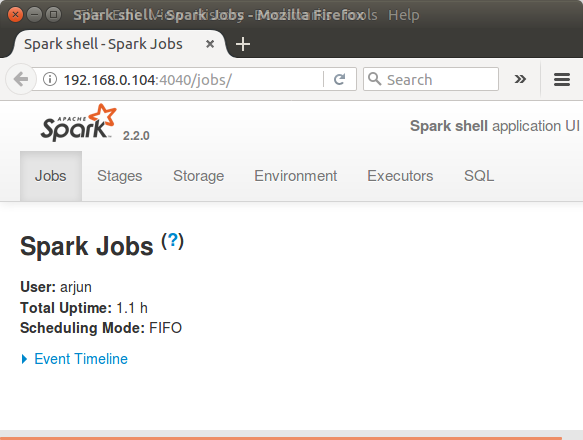
Spark context Web UI is available at http://192.168.0.104:4040 . Open a browser and hit the url.
Spark context available as sc, meaning you may access the spark context in the shell as variable named ‘sc’.
Spark session available as spark, meaning you may access the spark session in the shell as variable named ‘spark’.
The sc variable is useful for RDD examples such as textFile, flatMap, and reduceByKey. The spark variable is a SparkSession and is commonly used for DataFrame, Dataset, SQL, and catalog operations.
sc.master
spark.version
spark.sql("select current_date()").show()
During learning, you may reduce log noise inside the shell with the following Scala statement.
sc.setLogLevel("ERROR")Prepare a small input file for Spark Shell word count
The original word count commands below use placeholder paths such as /path/to/text/file. For a quick local test, create a small input file first and then replace the paths in the Scala commands with your own paths.
mkdir -p /tmp/spark-shell-wordcount
cat > /tmp/spark-shell-wordcount/input.txt <<'EOF'
spark shell runs scala code
spark shell runs spark jobs
scala code counts words
EOF
Also make sure that the output directory does not already exist. saveAsTextFile creates the output directory, and Spark returns an error if the same output path is already present.
rm -rf /tmp/spark-shell-wordcount/outputWord-Count Example with Spark (Scala) Shell
Following are the three commands that we shall use for Word Count Example in Spark Shell :
/** map */
var map = sc.textFile("/path/to/text/file").flatMap(line => line.split(" ")).map(word => (word,1));

/** reduce */
var counts = map.reduceByKey(_ + _);

/** save the output to file */
counts.saveAsTextFile("/path/to/output/")
Map text lines to word and count pairs in Spark Shell
In this step, using Spark context variable, sc, we read a text file.
sc.textFile("/path/to/text/file")then we split each line using space " " as separator.
flatMap(line => line.split(" "))and we map each word to a tuple (word, 1), 1 being the number of occurrences of word.
map(word => (word,1))We use the tuple (word,1) as (key, value) in reduce stage.
Reduce word tuples by key in Scala Spark Shell
We reduce all the words based on Key
var counts = map.reduceByKey(_ + _);reduceByKey(_ + _) groups records with the same word and adds their counts. For example, if Spark sees ("spark", 1) three times, the reduced result for that key becomes ("spark", 3).
Save word count output from Spark Shell to a directory
The counts could be saved to local file.
counts.saveAsTextFile("/path/to/output/")When you run all the commands in a Terminal, Spark Shell looks like:
scala> var map = sc.textFile("/home/arjun/data.txt").flatMap(line => line.split(" ")).map(word => (word,1));
map: org.apache.spark.rdd.RDD[(String, Int)] = MapPartitionsRDD[5] at map at <console>:24

scala> var counts = map.reduceByKey(_ + _);
counts: org.apache.spark.rdd.RDD[(String, Int)] = ShuffledRDD[6] at reduceByKey at <console>:26

scala> counts.saveAsTextFile("/home/arjun/output/");

scala>
You can verify the output of word count.
$ ls
part-00000  part-00001  _SUCCESS
Sample of the contents of output file, part-00000, is shown below :
/home/arjun/output$cat part-00000
(branches,1)
(sent,1)
(mining,1)
(tasks,4)
We have successfully counted unique words in a file with Word Count example run on Scala Spark Shell.
You may use Spark Context Web UI to check the details of the Job (Word Count) that we have just run.
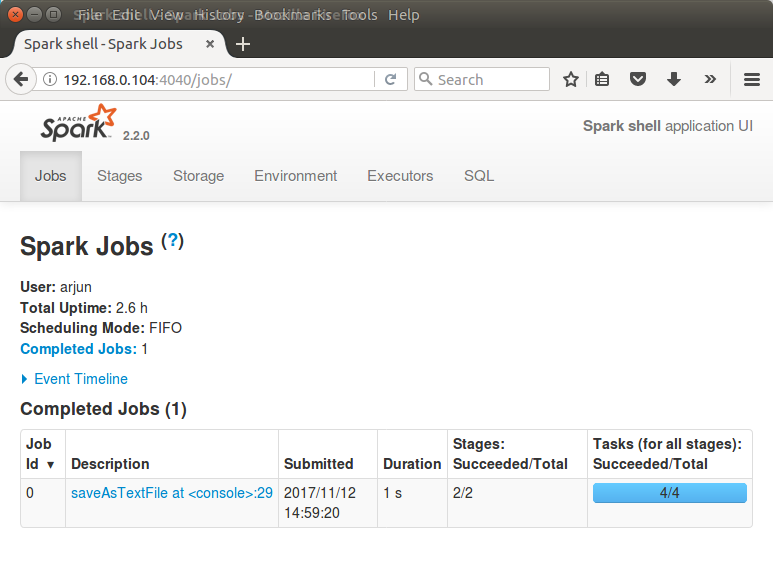
Navigate through other tabs to get an idea of Spark Web UI and the details about the Word Count Job.
Run the same Scala Spark Shell word count with the sample file
Using the sample file created earlier, you can run the complete word count with concrete paths. The following commands are for the Scala prompt inside spark-shell.
val words = sc.textFile("/tmp/spark-shell-wordcount/input.txt")
  .flatMap(line => line.split("\\s+"))
  .map(word => (word.toLowerCase, 1))

val counts = words.reduceByKey(_ + _)

counts.collect().foreach(println)
(code,2)
(counts,1)
(jobs,1)
(runs,2)
(scala,2)
(shell,2)
(spark,3)
(words,1)The exact order of output rows may differ because Spark distributes work across partitions. The counts are the important result, not the display order.
Load a Scala file into spark-shell instead of typing every command
For more than a few lines of Scala code, save the statements in a .scala file and load the file from the Spark Shell. This avoids repeated typing and makes the example easier to rerun.
cat > /tmp/spark-shell-wordcount/wordcount.scala <<'EOF'
val words = sc.textFile("/tmp/spark-shell-wordcount/input.txt")
  .flatMap(line => line.split("\\s+"))
  .map(word => (word.toLowerCase, 1))

val counts = words.reduceByKey(_ + _)

counts.collect().foreach(println)
EOF
Then load the file from the Scala prompt.
scala> :load /tmp/spark-shell-wordcount/wordcount.scalaThis is still an interactive shell workflow. For production jobs, package the Scala code as an application and submit it with spark-submit.
Spark Shell Suggestions
Use Tab completion for Spark RDD and DataFrame methods
Spark Shell can provide suggestions. Type part of the command and click on ‘Tab’ key for suggestions.
scala> counts.sa
sample        sampleByKeyExact      saveAsHadoopFile            saveAsNewAPIHadoopFile   saveAsSequenceFile
sampleByKey   saveAsHadoopDataset   saveAsNewAPIHadoopDataset   saveAsObjectFile         saveAsTextFile
Tab completion is especially helpful when you are exploring methods on RDD, DataFrame, and SparkSession objects.
Common Scala Spark Shell errors in the word count example
| Issue in spark-shell | Likely reason | How to fix it |
|---|---|---|
command not found: spark-shell | Spark’s bin directory is not in PATH. | Run the command from Spark’s bin directory or update your shell profile. |
| Output path already exists | saveAsTextFile does not overwrite an existing directory. | Choose a new output path or remove the old directory before running the save command. |
| Many WARN messages appear at startup | Spark prints environment and logging warnings during startup. | Read the warning once; for normal examples, use sc.setLogLevel("ERROR") to reduce log noise. |
| Word count output order changes | RDD records are processed across partitions. | Use sortByKey() before collecting if you need display order for learning. |
| Cannot open Spark Web UI on port 4040 | The port may be different if another Spark application is already using 4040. | Check the startup message for the actual Web UI URL. |
Exit or kill the Spark Shell instance
The normal way to leave spark-shell is to type :quit at the Scala prompt, or press Control+D.
scala> :quitTo kill the spark shell instance, hit Control+Z on the current shell and kill the spark instance using process id, pid, and with the help of kill command.
Find pid :
~$ ps -aef|grep spark
arjun     8895  8113  0 13:01 pts/16   00:00:00 bash /usr/lib/spark/bin/spark-shell
arjun     8906  8895 91 13:01 pts/16   00:01:13 /usr/lib/jvm/default-java/jre/bin/java -cp /usr/lib/spark/conf/:/usr/lib/spark/jars/* -Dscala.usejavacp=true -Xmx1g org.apache.spark.deploy.SparkSubmit --class org.apache.spark.repl.Main --name Spark shell spark-shell
arjun     9106  8113  0 13:03 pts/16   00:00:00 grep --color=auto spark
In this case, 8906 is the pid.
Kill the instance using pid :
~$ kill -9 8906Scala Spark Shell FAQ
What is Scala Spark Shell used for?
Scala Spark Shell is used to run Spark code interactively. It is useful for learning Spark APIs, testing transformations, checking DataFrame or RDD logic, and exploring data before creating a complete Spark application.
What is the difference between spark-shell and spark-submit?
spark-shell is interactive and best for experiments, learning, and quick checks. spark-submit runs a packaged Spark application and is the usual choice for scheduled or production jobs.
Why are sc and spark already available in Spark Shell?
When Spark Shell starts, it creates a SparkContext named sc and a SparkSession named spark. This lets you start running RDD, DataFrame, SQL, and Dataset examples without writing boilerplate setup code.
Why does saveAsTextFile create part files instead of one text file?
Spark writes output by partition. Each partition may create a separate part- file, and _SUCCESS indicates that the write completed successfully. This is normal behavior for distributed Spark output.
Can I run a Scala file from Spark Shell?
Yes. Save the Scala statements in a file and use the REPL command :load /path/to/file.scala inside spark-shell. For larger applications, use spark-submit instead.
Editorial QA checklist for this Scala Spark Shell tutorial
- Confirm that every new command-line block uses
language-bashand every output-only block usesoutput. - Keep the original Spark Shell screenshots and image URLs unchanged.
- Verify that the word count output path is described as a directory, not a single file.
- Check that
sc,spark,local[4], Spark Web UI, and:loadare explained in the Scala Spark Shell context. - Make sure the FAQ questions stay specific to Spark Shell and do not become generic Apache Spark questions.
What you learned in this Scala Spark Shell example
In this Apache Spark Tutorial – Scala Spark Shell, we have learnt how to start Spark Shell in local mode, use the default sc and spark variables, run a word count example, save output files, inspect the Spark Web UI, load Scala code from a file, and exit the shell properly.