 TutorialKart.com
A Spark Scala application is a JVM program written in Scala that uses Apache Spark libraries to process data locally or on a Spark cluster. In this tutorial, we shall set up a Scala project with Apache Spark in Eclipse IDE and run a simple WordCount example.
The example uses Spark Core RDD operations, so it is easy to see the basic flow: read a text file, split each line into words, convert each word into a pair, reduce the pairs by key, and write the result. The same structure is useful when you later package the application as a JAR and run it with spark-submit.
Spark Scala WordCount project requirements in Eclipse
Before creating the Eclipse project, check these items. Most Spark Scala setup errors come from using an incompatible Scala library, missing Spark JARs, or writing output to a folder that already exists.
- Java: Install a JDK version supported by the Spark distribution you are using.
- Scala: Use the same Scala binary version that your Spark build uses. For example, Spark artifacts ending in
_2.13require Scala 2.13. - Apache Spark: Download Spark from the official Spark downloads page and use the JARs from its
jarsdirectory for this Eclipse setup. - Eclipse Scala support: Install a Scala plugin that works with your Eclipse version, or use a Scala-enabled Eclipse distribution if that is available for your environment.
- Input file: Create a local input file at
data/wordcount/input.txt, because the example below reads from that path.
For current Spark and Scala compatibility notes, refer to the official Apache Spark documentation. If you are building a production-style project, prefer sbt or Maven dependency management instead of adding every Spark JAR manually.
Setup Spark Scala Application in Eclipse
Following is a step by step process to setup Spark Scala Application in Eclipse.
1. Install Scala support in Eclipse for Spark Scala code
Download Scala Eclipse (in Ubuntu) or install scala plugin from Eclipse Marketplace. After installation, restart Eclipse and confirm that you can create a Scala project.
If your Eclipse installation does not provide stable Scala support for the Spark version you want to use, you can still use this tutorial as a project-structure reference and build the same WordCount program with sbt from the command line.
2. Create a new Scala project for Spark WordCount
Open Eclipse and Create a new Scala Project. Give the project a clear name such as SparkScalaWordCount. Inside the project, create the folders data/wordcount and place your input file as data/wordcount/input.txt.
spark scala spark
apache spark wordcount
scala application example
The above sample input is enough to test whether the project reads the file and counts repeated words correctly.
3. Download Apache Spark for the Scala Eclipse application
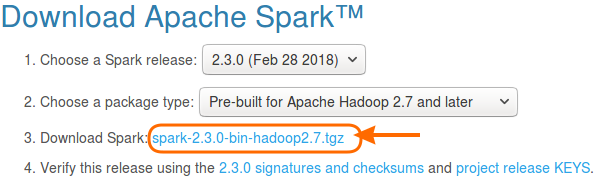
Hit the url https://spark.apache.org/downloads.html.
Choose a Spark package that matches your environment. For a local WordCount example, a pre-built Spark package is sufficient. Extract the downloaded archive and note the location of its jars directory, because Eclipse needs those libraries on the project build path.
4. Add Apache Spark libraries to the Eclipse Scala build path
Go to Java Build Path, and add all the jars present under spark-n.n.n-bin-hadoopN.N/jars/. This should be similar to the process of creating a Java Project with Apache Spark libraries.
This manual JAR method is acceptable for a local learning example. However, it is easy to miss a dependency or mix versions. When you move beyond this tutorial, use sbt or Maven so that Spark dependencies are declared in one build file.
5. Match Scala library version with the Spark Scala binary version
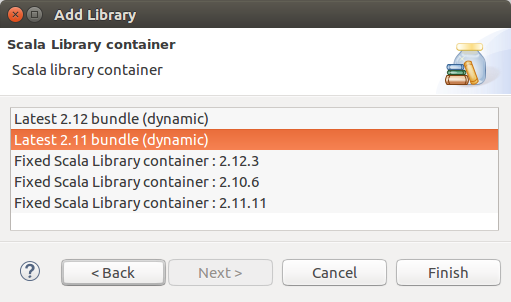
If you get any errors with the scala version of the eclipse, you may change and give a try. To change scala version of your project :Java Build Path -> Libraries -> Add Library -> Scala Library -> Choose a lower version than the latest and click on Finish. Give a try with all the versions available if you have an issue with Scala version.
A more precise way to check compatibility is to look at the Spark artifact suffix. A dependency such as spark-core_2.13 means the application must compile with Scala 2.13. A dependency such as spark-core_2.12 means the application must compile with Scala 2.12. Mixing Scala binary versions is a common reason for NoSuchMethodError, ClassNotFoundException, and unresolved Spark imports.
6. Create WordCount.scala for the Spark Scala RDD example
Right click on the project and create a new Scala class. Name it WordCount. The class would be WordCount.scala.
In the following example, we provided input placed at data/wordcount/input.txt. The output is generated at root of the Project, or you may change its location as well. The output folder contains files with result and status (SUCCESS/FAILURE).
WordCount.scala
import org.apache.spark.SparkContext
import org.apache.spark.SparkConf

object WordCount {
    def main(args: Array[String]) {

        /* configure spark application */
        val conf = new SparkConf().setAppName("Spark Scala WordCount Example").setMaster("local[1]")

        /* spark context*/
        val sc = new SparkContext(conf)

        /* map */
        var map = sc.textFile("data/wordcount/input.txt").flatMap(line => line.split(" ")).map(word => (word,1))

        /* reduce */
        var counts = map.reduceByKey(_ + _)

        /* print */
        counts.collect().foreach(println)

        /* or save the output to file */
        counts.saveAsTextFile("out.txt")

        sc.stop()
    }
}
7. Run the Spark Scala WordCount application from Eclipse
Run WordCount.scala as Scala application. Upon successful run, the result should be stored in out.txt folder.
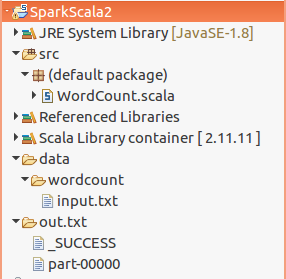
When the program runs, Spark creates a folder named out.txt, not a single text file. Inside that folder, you should see one or more part- files and a _SUCCESS marker. If out.txt already exists, delete it before running the program again or change the output path in counts.saveAsTextFile(...).
(spark,3)
(scala,2)
(apache,1)
(wordcount,1)
(application,1)
(example,1)
The order of printed pairs can vary because Spark transformations are distributed. The important part is that each word is grouped with its final count.
How the Spark Scala WordCount example works
The WordCount program uses a short chain of Spark RDD transformations and actions.
new SparkConf()creates the application configuration. The app name appears in Spark logs and UI screens.setMaster("local[1]")runs the example locally with one worker thread. You can uselocal[*]to use all available local cores for testing.sc.textFile(...)reads the input text file as an RDD of lines.flatMap(line => line.split(" "))splits each line into words and flattens the result into one RDD of words.map(word => (word, 1))creates a pair RDD where every word starts with count 1.reduceByKey(_ + _)groups matching words and adds their counts.collect()brings the result to the driver for printing. Use it only for small results.saveAsTextFile("out.txt")writes the result to an output directory.
For a tutorial-size input file, collect() is fine. For large data, avoid collecting all records to the driver. Save the result, inspect a limited sample, or use actions that do not require the complete dataset in driver memory.
Optional sbt build file for a Spark Scala WordCount JAR
Search results for this topic often include JAR packaging and spark-submit issues. The Eclipse setup above adds Spark JARs directly, but a real Spark Scala application is usually built with sbt or Maven. With sbt, the Spark dependency is declared in build.sbt.
name := "spark-scala-wordcount"

version := "1.0"

scalaVersion := "2.13.16"

libraryDependencies += "org.apache.spark" %% "spark-core" % "4.1.1" % "provided"
Change scalaVersion and spark-core version to match the Spark release you are using. The %% operator adds the Scala binary suffix automatically. The provided scope is commonly used when the Spark runtime already supplies Spark libraries on the cluster.
sbt packageAfter packaging, submit the generated JAR with Spark. The exact JAR path depends on your project name, Scala binary version, and package settings.
spark-submit \
  --class WordCount \
  --master local[1] \
  target/scala-2.13/spark-scala-wordcount_2.13-1.0.jar
For cluster deployment details, refer to the official Spark submitting applications guide. When submitting to a cluster, do not hard-code local-only file paths unless the file is available to the driver and executors in that environment.
Common Spark Scala WordCount errors in Eclipse
The following checks help resolve the most frequent issues when a Scala WordCount JAR or Eclipse run does not work as expected.
| Issue | Likely cause | Fix |
|---|---|---|
object apache is not a member of package org | Spark JARs are not on the build path. | Add all JARs from the Spark jars directory or use sbt/Maven dependencies. |
NoSuchMethodError or binary incompatibility errors | Scala version in Eclipse does not match Spark artifacts. | Use the Scala binary version shown by the Spark artifact suffix, such as _2.13. |
| Output path already exists | saveAsTextFile does not overwrite an existing directory. | Delete out.txt before rerunning or write to a new output path. |
JAR runs in Eclipse but not with spark-submit | Main class, packaging, or dependency scope is wrong. | Confirm the object name, use the right --class, and package dependencies correctly. |
| Input file not found | The relative path is resolved from a different working directory. | Use the correct project working directory or provide an absolute path for local testing. |
Spark Scala application FAQ for WordCount in Eclipse
Can I run this Spark Scala WordCount example without installing Hadoop?
Yes. For local testing, a pre-built Spark package can run this WordCount example with local[1] or local[*]. Hadoop libraries included with the Spark distribution are enough for the local file example shown here.
Why does Spark create an out.txt folder instead of an out.txt file?
saveAsTextFile writes distributed output as a directory. The actual records are written in one or more part- files inside that directory, along with status files such as _SUCCESS.
Should I use Eclipse JARs or sbt for a Spark Scala application?
Adding Spark JARs in Eclipse is simple for learning. For repeatable builds, dependency upgrades, and JAR packaging, sbt or Maven is better because the Spark version and Scala version are declared in a build file.
Which Scala version should I use for Spark WordCount?
Use the Scala binary version that matches your Spark artifacts. For example, spark-core_2.13 should be compiled with Scala 2.13, while spark-core_2.12 should be compiled with Scala 2.12.
Why does my Spark Scala WordCount JAR fail with ClassNotFoundException?
Common causes are an incorrect --class value, a package name mismatch, a JAR that was not rebuilt after code changes, or Spark dependencies missing from the runtime. Check the main object name and rebuild the JAR before running spark-submit.
Spark Scala WordCount QA checklist before publishing or rerunning
- Verify that the input path in
sc.textFile("data/wordcount/input.txt")exists relative to the Eclipse working directory. - Confirm that the Spark JARs on the Eclipse build path all come from the same Spark distribution.
- Confirm that the Scala library selected in Eclipse matches the Spark Scala binary version.
- Delete the existing
out.txtoutput directory before rerunning the same example. - Use
local[1]for predictable beginner output andlocal[*]only when you want local parallel execution. - For JAR submission, verify the
--classvalue and the generated JAR path before runningspark-submit.
Spark Scala WordCount application recap
In this Apache Spark Tutorial – Spark Scala Application, we have learnt to setup a Scala Project in Eclipse with Apache Spark libraries, and run WordCount example application. We also reviewed Scala version matching, output folder behavior, sbt packaging, spark-submit, and common Eclipse setup errors.