 TutorialKart.com
Spark RDD flatMap()
In this Spark Tutorial, we shall learn to flatMap one RDD to another. Flat-Mapping is transforming each RDD element using a function that could return multiple elements to new RDD. Simple example would be applying a flatMap to Strings and using split function to return words to new RDD.
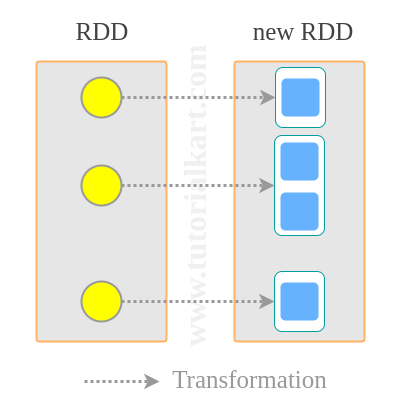
What Spark RDD flatMap() Does
RDD.flatMap() is a Spark transformation that applies a function to each element of an RDD and then flattens all returned values into one output RDD. The function passed to flatMap() should return an iterable, iterator, sequence, list, or similar collection of zero, one, or many values for each input element.
For example, if an RDD contains three lines of text, flatMap() can split each line into words and place all words in a single RDD. This is why flatMap() is commonly used in word count programs, log parsing, token extraction, and cases where one input record can produce multiple output records.
Syntax of Spark RDD flatMap()
RDD.flatMap(<function>)where <function> is the transformation function that could return multiple elements to new RDD for each of the element of source RDD.
In Java, the function usually returns an Iterator. In PySpark, the function can return a list, tuple, generator, or another iterable. Spark then combines the returned values from all input elements into one flattened RDD.
RDD flatMap() Transformation Flow
The following example shows the basic idea of flatMap(). Each input sentence is split into words. Instead of keeping the words grouped by sentence, Spark returns a single RDD of words.
Input RDD:
["Welcome to TutorialKart", "Learn Apache Spark"]

Function applied to each element:
line => line.split(" ")

Values returned by the function:
["Welcome", "to", "TutorialKart"]
["Learn", "Apache", "Spark"]

Output RDD after flatMap():
["Welcome", "to", "TutorialKart", "Learn", "Apache", "Spark"]
Spark RDD map() vs flatMap()
The main difference between map() and flatMap() is the shape of the output. map() returns exactly one output element for each input element. flatMap() can return zero, one, or many output elements for each input element and then flattens the result.
| Transformation | Function result for each input | Output shape | Typical use |
|---|---|---|---|
map() | One value | One output element per input element | Convert each row, line, or value to another value |
flatMap() | Zero, one, or many values | Flattened output RDD | Split lines into words, remove empty records, expand lists |
The following small PySpark example shows the difference clearly.
lines = sc.parallelize(["Apache Spark", "RDD flatMap"])

mapped = lines.map(lambda line: line.split(" ")).collect()
flat_mapped = lines.flatMap(lambda line: line.split(" ")).collect()

print(mapped)
print(flat_mapped)
[["Apache", "Spark"], ["RDD", "flatMap"]]
["Apache", "Spark", "RDD", "flatMap"]Java Example – Spark RDD flatMap
In this example, we will use flatMap() to convert a list of strings into a list of words. In this case, flatMap() kind of converts a list of sentences to a list of words.
RDDflatMapExample.java
import java.util.Arrays;

import org.apache.spark.SparkConf;
import org.apache.spark.api.java.JavaRDD;
import org.apache.spark.api.java.JavaSparkContext;

public class RDDflatMapExample {

	public static void main(String[] args) {
		// configure spark
		SparkConf sparkConf = new SparkConf().setAppName("Read Text to RDD")
										.setMaster("local[2]").set("spark.executor.memory","2g");
		// start a spark context
		JavaSparkContext sc = new JavaSparkContext(sparkConf);

		// provide path to input text file
		String path = "data/rdd/input/sample.txt";

		// read text file to RDD
		JavaRDD<String> lines = sc.textFile(path);

		// flatMap each line to words in the line
		JavaRDD<String> words = lines.flatMap(s -> Arrays.asList(s.split(" ")).iterator());

		// collect RDD for printing
		for(String word:words.collect()){
			System.out.println(word);
		}
	}
}
Following is the input file we used in the above Java application.
sample.text
Welcome to TutorialKart
Learn Apache Spark
Learn to work with RDD
Run this Spark Java application, and you will get following output in the console.
Output
17/11/29 12:33:59 INFO DAGScheduler: ResultStage 0 (collect at RDDflatMapExample.java:26) finished in 0.513 s
17/11/29 12:33:59 INFO DAGScheduler: Job 0 finished: collect at RDDflatMapExample.java:26, took 0.793858 s
Welcome
to
TutorialKart
Learn
Apache
Spark
Learn
to
work
with
RDD
17/11/29 12:33:59 INFO SparkContext: Invoking stop() from shutdown hook
Java flatMap() Example Using parallelize()
The previous Java example reads input from a text file. For a quick test, you can also create an RDD directly with parallelize() and apply flatMap() on it.
JavaRDD<String> lines = sc.parallelize(Arrays.asList(
    "Spark RDD flatMap example",
    "flatMap returns a flattened RDD"
));

JavaRDD<String> words = lines.flatMap(
    line -> Arrays.asList(line.split(" ")).iterator()
);

for (String word : words.collect()) {
    System.out.println(word);
}
Spark
RDD
flatMap
example
flatMap
returns
a
flattened
RDDPython Example – Spark RDD.flatMap()
We shall implement the same use case as in the previous example, but as a Python application.
spark-rdd-flatmap-example.py
import sys

from pyspark import SparkContext, SparkConf

if __name__ == "__main__":

  # create Spark context with Spark configuration
  conf = SparkConf().setAppName("Read Text to RDD - Python")
  sc = SparkContext(conf=conf)

  # read input text file to RDD
  lines = sc.textFile("/home/tutorialkart/workspace/spark/sample.txt")

  # flatMap each line to words
  words = lines.flatMap(lambda line: line.split(" "))

  # collect the RDD to a list
  llist = words.collect()

  # print the list
  for line in llist:
    print line
Run the following command in your console, from the location of your python file.
$ spark-submit spark-rdd-flatmap-example.pySpark will submit this python application for running.
17/11/29 15:15:30 INFO DAGScheduler: ResultStage 0 (collect at /home/tutorialkart/workspace/spark/spark-rdd-flatmap-example.py:18) finished in 1.127 s
17/11/29 15:15:30 INFO DAGScheduler: Job 0 finished: collect at /home/tutorialkart/workspace/spark/spark-rdd-flatmap-example.py:18, took 1.299076 s
Welcome
to
TutorialKart
Learn
Apache
Spark
Learn
to
work
with
RDD
17/11/29 15:15:30 INFO SparkContext: Invoking stop() from shutdown hook
If you are using Python 3, use print(line) instead of the older print line syntax shown in the original script above.
PySpark RDD flatMap() Example with Empty Values Removed
A useful property of flatMap() is that the function can return an empty collection. This allows you to remove unwanted records while transforming the RDD.
rdd = sc.parallelize(["Spark", "", "RDD", "flatMap", ""])

result = rdd.flatMap(lambda value: [] if value == "" else [value])

print(result.collect())
['Spark', 'RDD', 'flatMap']Common Spark RDD flatMap() Use Cases
Use RDD.flatMap() when each input element may need to produce multiple output elements. Common use cases include:
- Splitting lines of text into words for word count programs.
- Extracting tokens, tags, or fields from log lines.
- Expanding a record that contains a list into separate records.
- Filtering records by returning an empty collection for values that should be skipped.
- Converting nested collections into a single flattened RDD.
Important Notes for RDD flatMap() in Spark
flatMap()is a transformation, so it is lazily evaluated. Spark executes it only when an action such ascollect(),count(), orsaveAsTextFile()is called.- The function passed to
flatMap()must return an iterable set of values, not a single scalar value. - Use
flatMap()when the number of output elements is not necessarily equal to the number of input elements. - Use
map()when each input element should produce exactly one output element. - Avoid using
collect()on large RDDs in production jobs because it brings all results to the driver program.
Spark RDD flatMap() FAQs
What does RDD flatMap do?
RDD.flatMap() applies a function to every element of an RDD and flattens the returned collections into one output RDD. One input element can produce zero, one, or many output elements.
What is the difference between map() and flatMap() in Spark?
map() returns one output element for each input element. flatMap() returns a flattened RDD where each input element can produce multiple output elements. For example, splitting a line into words is better suited for flatMap() than map().
Can Spark flatMap() return no values for an input element?
Yes. The function passed to flatMap() can return an empty list or empty iterator. This is useful when you want to remove some elements while transforming the RDD.
Is RDD flatMap() an action or a transformation?
flatMap() is a transformation. It creates a new RDD definition and is evaluated lazily. Spark runs the transformation when an action is called.
When should I use flatMap() instead of filter()?
Use filter() when you only need to keep or remove complete input elements. Use flatMap() when you also need to expand each input element into multiple values, such as splitting a sentence into words.
Editorial QA Checklist for Spark RDD flatMap()
- Confirm that every new code block uses a PrismJS-compatible class such as
language-python,language-java,language-bash,language-plaintext syntax, oroutput. - Check that the Java example explains why
flatMap()returns an iterator. - Check that the PySpark examples distinguish
map()output fromflatMap()output. - Confirm that the tutorial states that
flatMap()is a lazy transformation and not an action. - Verify that the FAQ answers cover RDD flatMap behavior, Spark map vs flatMap, empty return values, and common use cases.
Conclusion for Spark RDD flatMap()
In this Spark Tutorial, we learned the syntax and examples for RDD.flatMap() method.
The key point is that flatMap() both transforms and flattens data. Use it when one input element can produce multiple output elements, such as converting lines into words or expanding nested records into a single RDD.