 TutorialKart.com
Spark RDD map() transformation in Java and Python
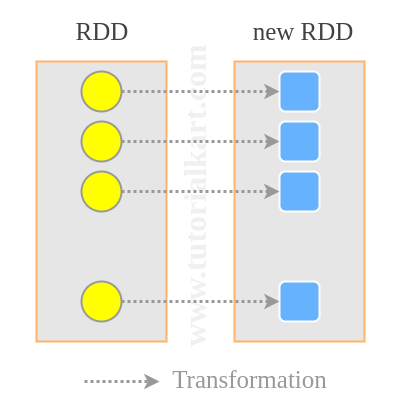
In this Spark Tutorial, we shall learn how to use the Spark RDD map() transformation to convert one RDD into another RDD. The map() function applies a transformation function to every element of the source RDD and returns a new RDD. A simple example is calculating the logarithmic value of each integer in an RDD and storing the returned values in a new RDD.
map() is a transformation, not an action. Spark records the transformation lazily and executes it only when an action such as collect(), count(), take(), or saveAsTextFile() is called. The Apache Spark RDD programming guide describes RDD transformations and actions in detail at spark.apache.org/docs/latest/rdd-programming-guide.html.
- Spark RDD map() syntax
- How RDD map() works
- Java RDD map() examples
- Python RDD map() examples
- RDD map() vs flatMap()
- Spark RDD map() FAQs
Spark RDD map() syntax and transformation function
RDD.map(<function>)where <function> is the transformation function for each of the element of source RDD.
The function receives one input element at a time and returns one output value for that element. The output value can be of the same type or a different type. For example, an RDD<Integer> can be mapped to an RDD<Double>, and an RDD<String> can be mapped to an RDD<Integer>.
JavaRDD<R> result = inputRDD.map(item -> transform(item));result = input_rdd.map(lambda item: transform(item))How Spark RDD map() processes each element
The map() transformation keeps a one-to-one relationship between input elements and output elements. If the input RDD has five elements, the mapped RDD also has five elements. Only the value of each element changes based on the function passed to map().
- Input: one element from the source RDD.
- Function: your Java lambda, Java function, or Python lambda.
- Output: one transformed value for that input element.
- Execution: delayed until an action triggers Spark computation.
This makes map() useful for type conversion, parsing text, extracting fields, calculating derived values, normalizing strings, and preparing records for later RDD transformations.
Java and Python examples for Spark RDD map()
Java Example 1 – Spark RDD map() from Integer to Double
In this example, we will create an RDD with some integers. We shall then call map() function on this RDD to map integer items to their logarithmic values The item in RDD is of type Integer, and the output for each item would be Double. So we are mapping an RDD<Integer> to RDD<Double>.
RDDmapExample2.java
import java.util.Arrays;

import org.apache.spark.SparkConf;
import org.apache.spark.api.java.JavaRDD;
import org.apache.spark.api.java.JavaSparkContext;

public class RDDmapExample2 {

	public static void main(String[] args) {
		// configure spark
		SparkConf sparkConf = new SparkConf().setAppName("Read Text to RDD")
										.setMaster("local[2]").set("spark.executor.memory","2g");
		// start a spark context
		JavaSparkContext sc = new JavaSparkContext(sparkConf);

		// initialize an integer RDD
		JavaRDD<Integer> numbers = sc.parallelize(Arrays.asList(14,21,88,99,455));

		// map each line to number of words in the line
		JavaRDD<Double> log_values = numbers.map(x -> Math.log(x));

		// collect RDD for printing
		for(double value:log_values.collect()){
			System.out.println(value);
		}
	}
}
Run this Spark Application and you would get the following output in the console.
17/11/28 16:31:11 INFO DAGScheduler: ResultStage 0 (collect at RDDmapExample2.java:23) finished in 0.373 s
17/11/28 16:31:11 INFO DAGScheduler: Job 0 finished: collect at RDDmapExample2.java:23, took 1.067919 s
2.6390573296152584
3.044522437723423
4.477336814478207
4.59511985013459
6.12029741895095
17/11/28 16:31:11 INFO SparkContext: Invoking stop() from shutdown hook
The important line is numbers.map(x -> Math.log(x)). Spark applies the lambda expression to each integer and creates a new RDD containing logarithmic values. The original numbers RDD is not modified.
Java Example 2 – Spark RDD.map() for word count per line
In this example, we will map an RDD of Strings to an RDD of Integers with each element in the mapped RDD representing the number of words in the input RDD. The final mapping would be RDD<String> -> RDD<Integer>.
RDDmapExample.java
import org.apache.spark.SparkConf;
import org.apache.spark.api.java.JavaRDD;
import org.apache.spark.api.java.JavaSparkContext;

public class RDDmapExample {

	public static void main(String[] args) {
		// configure spark
		SparkConf sparkConf = new SparkConf().setAppName("Read Text to RDD")
										.setMaster("local[2]").set("spark.executor.memory","2g");
		// start a spark context
		JavaSparkContext sc = new JavaSparkContext(sparkConf);

		// provide path to input text file
		String path = "data/rdd/input/sample.txt";

		// read text file to RDD
		JavaRDD<String> lines = sc.textFile(path);

		// map each line to number of words in the line
		JavaRDD<Integer> n_words = lines.map(x -> x.split(" ").length);

		// collect RDD for printing
		for(int n:n_words.collect()){
			System.out.println(n);
		}
	}
}
Following is the input text file we used.
data/rdd/input/sample.txt
Welcome to TutorialKart
Learn Apache Spark
Learn to work with RDD
Run the above Java Example, and you would get the following output in console.
17/11/28 16:25:22 INFO DAGScheduler: ResultStage 0 (collect at RDDmapExample.java:24) finished in 0.568 s
17/11/28 16:25:22 INFO DAGScheduler: Job 0 finished: collect at RDDmapExample.java:24, took 0.852748 s
3
3
5
17/11/28 16:25:22 INFO SparkContext: Invoking stop() from shutdown hook
We have successfully created a new RDD with strings transformed to number of words in it.
For production text processing, prefer splitting on one or more whitespace characters instead of a single space. That avoids incorrect counts when a line contains multiple spaces or tabs.
JavaRDD<Integer> nWords = lines.map(line -> line.trim().split("\\s+").length);Python Example 1 – PySpark RDD.map() from integers to logarithmic values
In this example, we will map integers in RDD to their logarithmic values using Python.
spark-rdd-map-example-2.py
import sys, math

from pyspark import SparkContext, SparkConf

if __name__ == "__main__":

  # create Spark context with Spark configuration
  conf = SparkConf().setAppName("Map Numbers to their Log Values - Python")
  sc = SparkContext(conf=conf)

  # read input text file to RDD
  numbers = sc.parallelize([14,21,88,99,455])

  # map lines to n_words
  log_values = numbers.map(lambda n : math.log10(n))

  # collect the RDD to a list
  llist = log_values.collect()

  # print the list
  for line in llist:
    print line
Run the following command to submit this Python program to run as Spark Application.
$ spark-submit spark-rdd-map-example-2.pyFollowing is the output of this Python Application in console.
17/11/28 19:40:42 INFO DAGScheduler: ResultStage 0 (collect at /home/arjun/workspace/spark/spark-rdd-map-example-2.py:18) finished in 1.253 s
17/11/28 19:40:42 INFO DAGScheduler: Job 0 finished: collect at /home/arjun/workspace/spark/spark-rdd-map-example-2.py:18, took 1.945158 s
1.14612803568
1.32221929473
1.94448267215
1.9956351946
2.65801139666
17/11/28 19:40:42 INFO SparkContext: Invoking stop() from shutdown hook
The Python example uses math.log10(), so the result is base-10 logarithm. The Java example above uses Math.log(), which returns the natural logarithm. Choose the function based on the result you need.
Python Example 2 – PySpark RDD.map() for number of words in each line
In this example, we will map sentences to number of words in the sentence.
spark-rdd-map-example.py
import sys

from pyspark import SparkContext, SparkConf

if __name__ == "__main__":

  # create Spark context with Spark configuration
  conf = SparkConf().setAppName("Read Text to RDD - Python")
  sc = SparkContext(conf=conf)

  # read input text file to RDD
  lines = sc.textFile("/home/arjun/workspace/spark/sample.txt")

  # map lines to n_words
  n_words = lines.map(lambda line : len(line.split()))

  # collect the RDD to a list
  llist = n_words.collect()

  # print the list
  for line in llist:
    print line
Run the above python program using following spark-submit command.
$ spark-submit spark-rdd-map-example.py17/11/28 19:31:44 INFO DAGScheduler: ResultStage 0 (collect at /home/arjun/workspace/spark/spark-rdd-map-example.py:18) finished in 0.716 s
17/11/28 19:31:44 INFO DAGScheduler: Job 0 finished: collect at /home/arjun/workspace/spark/spark-rdd-map-example.py:18, took 0.866953 s
3
3
5
17/11/28 19:31:44 INFO SparkContext: Invoking stop() from shutdown hookPython Example 3 – PySpark RDD map() for parsing CSV-style records
A common use of RDD.map() is to parse text rows into structured values. The following PySpark example maps each comma-separated line into a tuple containing name, department, and salary.
from pyspark import SparkContext

sc = SparkContext("local", "Parse CSV Rows with RDD map")

rows = sc.parallelize([
    "Asha,Engineering,90000",
    "Ravi,Sales,65000",
    "Meena,Support,58000"
])

employees = rows.map(lambda row: row.split(",")) \
                .map(lambda fields: (fields[0], fields[1], int(fields[2])))

for employee in employees.collect():
    print(employee)

sc.stop()
The first map() converts each string into a list of fields. The second map() converts the salary field from string to integer and returns a tuple.
('Asha', 'Engineering', 90000)
('Ravi', 'Sales', 65000)
('Meena', 'Support', 58000)
Spark RDD map() vs flatMap() for one output or many outputs
Use map() when each input element should produce exactly one output element. Use flatMap() when each input element may produce zero, one, or many output elements and the final result should be flattened.
| Operation | Input example | Function result per input | Final RDD shape | Best use case |
|---|---|---|---|---|
map() | "Learn Apache Spark" | ["Learn", "Apache", "Spark"] | One list per line | Transform each record into one value |
flatMap() | "Learn Apache Spark" | ["Learn", "Apache", "Spark"] | One word per output element | Split records into multiple output elements |
lines = sc.parallelize(["Learn Apache Spark", "RDD map example"])

mapped = lines.map(lambda line: line.split())
flattened = lines.flatMap(lambda line: line.split())

print(mapped.collect())
print(flattened.collect())
[['Learn', 'Apache', 'Spark'], ['RDD', 'map', 'example']]
['Learn', 'Apache', 'Spark', 'RDD', 'map', 'example']Common mistakes while using Spark RDD map()
- Using collect() on large RDDs:
collect()brings all results to the driver. Usetake(),count(), or save the RDD when the data is large. - Using map() when flatMap() is needed: if your function returns a list and you want individual elements, use
flatMap(). - Ignoring whitespace issues: for word counts,
split(" ")can miscount lines with extra spaces. Use a whitespace pattern where appropriate. - Creating non-serializable dependencies inside closures: the function passed to
map()must run on Spark executors, so keep the function simple and serializable. - Expecting map() to run immediately:
map()is lazy. Add an action to trigger execution.
When to choose RDD map() in Spark applications
RDD.map() is suitable when you are working directly with RDDs and need low-level control over records. For newer Spark applications that use structured data, DataFrame operations are often preferred because Spark can optimize them more effectively. Still, RDD.map() is useful for custom parsing, low-level transformations, and examples that teach how distributed transformations work.
Spark RDD map() FAQs
What does RDD map() do in Apache Spark?
RDD.map() applies a function to each element of an RDD and returns a new RDD containing the transformed values. It does not change the original RDD.
Is Spark RDD map() a transformation or an action?
map() is a transformation. Spark evaluates it lazily and runs it only when an action such as collect(), count(), or saveAsTextFile() is called.
Can RDD map() change the data type of an RDD?
Yes. The output RDD can have a different element type from the input RDD. For example, you can map an RDD<String> to an RDD<Integer> by returning the length or word count of each string.
What is the difference between RDD map() and flatMap()?
map() returns one output element for each input element. flatMap() can return multiple output elements for each input element and flattens them into a single RDD.
Why does my RDD map() code not print anything until collect() is called?
Spark transformations are lazy. The map() call only builds a transformation plan. An action such as collect() triggers Spark to execute that plan.
Editorial QA checklist for this Spark RDD map() tutorial
- Does the tutorial clearly explain that
RDD.map()returns one output element for each input element? - Do the Java and Python examples show both type-changing and text-processing use cases?
- Are command examples marked as command-line examples and result blocks marked as output where newly added?
- Does the page warn readers not to use
collect()for large RDDs? - Does the FAQ answer the difference between
map(),flatMap(), transformations, and actions?
Conclusion
In this Spark Tutorial, we learned the syntax and examples for RDD.map() method. The key point is that map() transforms each element independently and returns a new RDD with one output element for every input element.