 TutorialKart.com
Spark Python Application – Word Count Example with spark-submit
Apache Spark provides APIs for many popular programming languages. Python is one of them. A Spark application written in Python is commonly called a PySpark application, and it can be submitted using the spark-submit command line interface.
In this tutorial, we shall learn to write a Spark application in Python Programming Language and submit the application to run in Spark with local input and minimal options. The step by step process of creating and running Spark Python Application is demonstrated using a word-count example.
This example uses the RDD API because word count is a simple way to understand how Spark reads data, transforms records, groups values by key, and writes distributed output. For new PySpark projects, the DataFrame API and SparkSession are usually preferred, but the RDD example is still useful for learning the execution flow.
What a Spark Python Application Does
A Spark Python application runs Python code on top of Apache Spark. The driver program starts the application, Spark creates jobs and stages from transformations and actions, and the executors process the data partitions. In local mode, the same machine acts as the driver and worker, which is suitable for learning and small tests.
PySpark is useful when the input data is larger than what a normal single-machine Python script can comfortably process, or when the same code needs to run on a Spark cluster. If the data easily fits in memory on one machine and the task is simple tabular analysis, a Python library such as pandas may be enough. Spark is designed for distributed processing, while pandas is mainly used for single-machine data analysis.
Prerequisites for Running a PySpark Word Count Program
Before running the example, make sure the following requirements are available on your system.
- Apache Spark is installed and the
spark-submitcommand is available from the terminal. - Python is installed and accessible from the command line.
- The input text file exists at the path used in the Python script.
- The output directory does not already exist, because Spark fails if
saveAsTextFile()tries to write to an existing output path.
You can refer to the official Apache Spark quick start, PySpark documentation, and spark-submit guide for current platform-specific setup and submission options.
Prepare Input Text File for Spark Word Count
For Word-Count Example, we shall provide a text file as input. Input file contains multiple lines and each line has multiple words separated by white space.
Input File is located at : /home/input.txt
The program shown below reads from /home/arjun/input.txt. If your file is located somewhere else, update the path in the Python script before running spark-submit.
cat /home/arjun/input.txtApache Spark supports Python
Python applications can run on Spark
Spark can process large text filesSpark Application – Python Program
Following is Python program that does word count in Apache Spark.
wordcount.py
import sys

from pyspark import SparkContext, SparkConf

if __name__ == "__main__":

  # create Spark context with Spark configuration
  conf = SparkConf().setAppName("Word Count - Python").set("spark.hadoop.yarn.resourcemanager.address", "192.168.0.104:8032")
  sc = SparkContext(conf=conf)

  # read in text file and split each document into words
  words = sc.textFile("/home/arjun/input.txt").flatMap(lambda line: line.split(" "))

  # count the occurrence of each word
  wordCounts = words.map(lambda word: (word, 1)).reduceByKey(lambda a,b:a +b)

  wordCounts.saveAsTextFile("/home/arjun/output/")
How the PySpark Word Count Program Works
The program has four main parts. First, it creates the Spark configuration and Spark context. Next, it reads the input file as an RDD. Then it splits each line into words, converts each word into a pair, and uses reduceByKey() to add the counts for the same word. Finally, it saves the output as text files in the output directory.
| Code part | Purpose in the Spark Python application |
|---|---|
SparkConf().setAppName(...) | Sets the application name shown in Spark logs and Spark UI. |
SparkContext(conf=conf) | Creates the entry point for the RDD-based Spark program. |
textFile(...) | Loads the input file into an RDD of lines. |
flatMap(lambda line: line.split(" ")) | Splits each line into individual words. |
map(lambda word: (word, 1)) | Creates a key-value pair for each word. |
reduceByKey(lambda a,b:a +b) | Adds counts for each matching word. |
saveAsTextFile(...) | Writes distributed output files to the target folder. |
In Spark, transformations such as flatMap(), map(), and reduceByKey() are evaluated lazily. The actual computation starts when an action is called. In this example, saveAsTextFile() is the action that triggers the job.
Modern PySpark SparkSession Version of the Word Count Program
The existing example uses SparkContext, which is valid for RDD-based learning examples. In newer PySpark applications, you will often see SparkSession used as the main entry point. The following version performs the same word count with a Spark session while still using RDD operations.
from pyspark.sql import SparkSession

spark = SparkSession.builder.appName("Word Count - Python").getOrCreate()
sc = spark.sparkContext

words = sc.textFile("/home/arjun/input.txt").flatMap(lambda line: line.split())
word_counts = words.map(lambda word: (word, 1)).reduceByKey(lambda a, b: a + b)

word_counts.saveAsTextFile("/home/arjun/output/")

spark.stop()
This version avoids setting a hard-coded resource manager address inside the program. Cluster-specific settings can be supplied through spark-submit options when required.
Submit Python Application to Spark
To submit the above Spark Application to Spark for running, Open a Terminal or Command Prompt from the location of wordcount.py, and run the following command :
$ spark-submit wordcount.pyFor a local test, you can also pass the local master explicitly. The following command uses all available local cores.
spark-submit --master local[*] wordcount.pyIf the output directory already exists from an earlier run, remove it or change the output path before submitting the application again.
rm -rf /home/arjun/output/
spark-submit --master local[*] wordcount.py
arjun@tutorialkart:~/workspace/spark$ spark-submit wordcount.py
17/11/14 10:54:57 INFO spark.SparkContext: Running Spark version 2.2.0
17/11/14 10:54:57 WARN util.NativeCodeLoader: Unable to load native-hadoop library for your platform... using builtin-java classes where applicable
17/11/14 10:54:57 INFO spark.SparkContext: Submitted application: Word Count - Python
17/11/14 10:54:57 INFO spark.SecurityManager: Changing view acls to: arjun
17/11/14 10:54:57 INFO spark.SecurityManager: Changing modify acls to: arjun
17/11/14 10:54:57 INFO spark.SecurityManager: Changing view acls groups to:
17/11/14 10:54:57 INFO spark.SecurityManager: Changing modify acls groups to:
17/11/14 10:54:57 INFO spark.SecurityManager: SecurityManager: authentication disabled; ui acls disabled; users with view permissions: Set(arjun); groups with view permissions: Set(); users with modify permissions: Set(arjun); groups with modify permissions: Set()
17/11/14 10:54:58 INFO util.Utils: Successfully started service 'sparkDriver' on port 38850.
17/11/14 10:54:58 INFO spark.SparkEnv: Registering MapOutputTracker
17/11/14 10:54:58 INFO spark.SparkEnv: Registering BlockManagerMaster
17/11/14 10:54:58 INFO storage.BlockManagerMasterEndpoint: Using org.apache.spark.storage.DefaultTopologyMapper for getting topology information
17/11/14 10:54:58 INFO storage.BlockManagerMasterEndpoint: BlockManagerMasterEndpoint up
17/11/14 10:54:58 INFO storage.DiskBlockManager: Created local directory at /tmp/blockmgr-c896b1d3-faab-463b-a00f-695f108c515e
17/11/14 10:54:58 INFO memory.MemoryStore: MemoryStore started with capacity 366.3 MB
17/11/14 10:54:58 INFO spark.SparkEnv: Registering OutputCommitCoordinator
17/11/14 10:54:58 INFO util.log: Logging initialized @2864ms
17/11/14 10:54:58 INFO server.Server: jetty-9.3.z-SNAPSHOT
17/11/14 10:54:58 INFO server.Server: Started @2997ms
17/11/14 10:54:58 WARN util.Utils: Service 'SparkUI' could not bind on port 4040. Attempting port 4041.
17/11/14 10:54:58 INFO server.AbstractConnector: Started ServerConnector@127b57de{HTTP/1.1,[http/1.1]}{0.0.0.0:4041}
17/11/14 10:54:58 INFO util.Utils: Successfully started service 'SparkUI' on port 4041.
17/11/14 10:54:58 INFO handler.ContextHandler: Started o.s.j.s.ServletContextHandler@71fa1670{/jobs,null,AVAILABLE,@Spark}
17/11/14 10:54:58 INFO handler.ContextHandler: Started o.s.j.s.ServletContextHandler@4ee9fdba{/jobs/json,null,AVAILABLE,@Spark}
17/11/14 10:54:58 INFO handler.ContextHandler: Started o.s.j.s.ServletContextHandler@1ff54937{/jobs/job,null,AVAILABLE,@Spark}
17/11/14 10:54:58 INFO handler.ContextHandler: Started o.s.j.s.ServletContextHandler@173df742{/jobs/job/json,null,AVAILABLE,@Spark}
17/11/14 10:54:58 INFO handler.ContextHandler: Started o.s.j.s.ServletContextHandler@18a2ad0f{/stages,null,AVAILABLE,@Spark}
17/11/14 10:54:58 INFO handler.ContextHandler: Started o.s.j.s.ServletContextHandler@72942f18{/stages/json,null,AVAILABLE,@Spark}
17/11/14 10:54:58 INFO handler.ContextHandler: Started o.s.j.s.ServletContextHandler@78a3e7ef{/stages/stage,null,AVAILABLE,@Spark}
17/11/14 10:54:58 INFO handler.ContextHandler: Started o.s.j.s.ServletContextHandler@4e295bb8{/stages/stage/json,null,AVAILABLE,@Spark}
17/11/14 10:54:58 INFO handler.ContextHandler: Started o.s.j.s.ServletContextHandler@658a8f39{/stages/pool,null,AVAILABLE,@Spark}
17/11/14 10:54:58 INFO handler.ContextHandler: Started o.s.j.s.ServletContextHandler@5a7c87c5{/stages/pool/json,null,AVAILABLE,@Spark}
17/11/14 10:54:58 INFO handler.ContextHandler: Started o.s.j.s.ServletContextHandler@7b22142b{/storage,null,AVAILABLE,@Spark}
17/11/14 10:54:58 INFO handler.ContextHandler: Started o.s.j.s.ServletContextHandler@7c723018{/storage/json,null,AVAILABLE,@Spark}
17/11/14 10:54:58 INFO handler.ContextHandler: Started o.s.j.s.ServletContextHandler@58fd3f7b{/storage/rdd,null,AVAILABLE,@Spark}
17/11/14 10:54:58 INFO handler.ContextHandler: Started o.s.j.s.ServletContextHandler@1f151ef{/storage/rdd/json,null,AVAILABLE,@Spark}
17/11/14 10:54:58 INFO handler.ContextHandler: Started o.s.j.s.ServletContextHandler@2cfc831c{/environment,null,AVAILABLE,@Spark}
17/11/14 10:54:58 INFO handler.ContextHandler: Started o.s.j.s.ServletContextHandler@390dc31e{/environment/json,null,AVAILABLE,@Spark}
17/11/14 10:54:58 INFO handler.ContextHandler: Started o.s.j.s.ServletContextHandler@37a527a1{/executors,null,AVAILABLE,@Spark}
17/11/14 10:54:58 INFO handler.ContextHandler: Started o.s.j.s.ServletContextHandler@16fdd972{/executors/json,null,AVAILABLE,@Spark}
17/11/14 10:54:58 INFO handler.ContextHandler: Started o.s.j.s.ServletContextHandler@3ab9cfcc{/executors/threadDump,null,AVAILABLE,@Spark}
17/11/14 10:54:58 INFO handler.ContextHandler: Started o.s.j.s.ServletContextHandler@7ccd147f{/executors/threadDump/json,null,AVAILABLE,@Spark}
17/11/14 10:54:58 INFO handler.ContextHandler: Started o.s.j.s.ServletContextHandler@57f8eaed{/static,null,AVAILABLE,@Spark}
17/11/14 10:54:58 INFO handler.ContextHandler: Started o.s.j.s.ServletContextHandler@5c542cff{/,null,AVAILABLE,@Spark}
17/11/14 10:54:58 INFO handler.ContextHandler: Started o.s.j.s.ServletContextHandler@625a6ecc{/api,null,AVAILABLE,@Spark}
17/11/14 10:54:58 INFO handler.ContextHandler: Started o.s.j.s.ServletContextHandler@7843ba8c{/jobs/job/kill,null,AVAILABLE,@Spark}
17/11/14 10:54:58 INFO handler.ContextHandler: Started o.s.j.s.ServletContextHandler@20d38629{/stages/stage/kill,null,AVAILABLE,@Spark}
17/11/14 10:54:58 INFO ui.SparkUI: Bound SparkUI to 192.168.0.104, and started at http://192.168.0.104:4041
17/11/14 10:54:59 INFO spark.SparkContext: Added file file:/home/arjun/workspace/spark/wordcount.py at file:/home/arjun/workspace/spark/wordcount.py with timestamp 1510637099122
17/11/14 10:54:59 INFO util.Utils: Copying /home/arjun/workspace/spark/wordcount.py to /tmp/spark-39c98eb0-0434-40db-aa7c-aa4a5327a41c/userFiles-469dc820-60ab-43c3-bcd6-8c5133cb4470/wordcount.py
17/11/14 10:54:59 INFO executor.Executor: Starting executor ID driver on host localhost
17/11/14 10:54:59 INFO util.Utils: Successfully started service 'org.apache.spark.network.netty.NettyBlockTransferService' on port 39082.
17/11/14 10:54:59 INFO netty.NettyBlockTransferService: Server created on 192.168.0.104:39082
17/11/14 10:54:59 INFO storage.BlockManager: Using org.apache.spark.storage.RandomBlockReplicationPolicy for block replication policy
17/11/14 10:54:59 INFO storage.BlockManagerMaster: Registering BlockManager BlockManagerId(driver, 192.168.0.104, 39082, None)
17/11/14 10:54:59 INFO storage.BlockManagerMasterEndpoint: Registering block manager 192.168.0.104:39082 with 366.3 MB RAM, BlockManagerId(driver, 192.168.0.104, 39082, None)
17/11/14 10:54:59 INFO storage.BlockManagerMaster: Registered BlockManager BlockManagerId(driver, 192.168.0.104, 39082, None)
17/11/14 10:54:59 INFO storage.BlockManager: Initialized BlockManager: BlockManagerId(driver, 192.168.0.104, 39082, None)
17/11/14 10:54:59 INFO handler.ContextHandler: Started o.s.j.s.ServletContextHandler@72050d48{/metrics/json,null,AVAILABLE,@Spark}
17/11/14 10:55:00 INFO memory.MemoryStore: Block broadcast_0 stored as values in memory (estimated size 238.2 KB, free 366.1 MB)
17/11/14 10:55:00 INFO memory.MemoryStore: Block broadcast_0_piece0 stored as bytes in memory (estimated size 22.9 KB, free 366.0 MB)
17/11/14 10:55:00 INFO storage.BlockManagerInfo: Added broadcast_0_piece0 in memory on 192.168.0.104:39082 (size: 22.9 KB, free: 366.3 MB)
17/11/14 10:55:00 INFO spark.SparkContext: Created broadcast 0 from textFile at NativeMethodAccessorImpl.java:0
17/11/14 10:55:00 INFO mapred.FileInputFormat: Total input paths to process : 1
17/11/14 10:55:00 INFO output.FileOutputCommitter: File Output Committer Algorithm version is 1
17/11/14 10:55:00 INFO spark.SparkContext: Starting job: saveAsTextFile at NativeMethodAccessorImpl.java:0
17/11/14 10:55:00 INFO scheduler.DAGScheduler: Registering RDD 3 (reduceByKey at /home/arjun/workspace/spark/wordcount.py:15)
17/11/14 10:55:00 INFO scheduler.DAGScheduler: Got job 0 (saveAsTextFile at NativeMethodAccessorImpl.java:0) with 2 output partitions
17/11/14 10:55:00 INFO scheduler.DAGScheduler: Final stage: ResultStage 1 (saveAsTextFile at NativeMethodAccessorImpl.java:0)
17/11/14 10:55:00 INFO scheduler.DAGScheduler: Parents of final stage: List(ShuffleMapStage 0)
17/11/14 10:55:00 INFO scheduler.DAGScheduler: Missing parents: List(ShuffleMapStage 0)
17/11/14 10:55:00 INFO scheduler.DAGScheduler: Submitting ShuffleMapStage 0 (PairwiseRDD[3] at reduceByKey at /home/arjun/workspace/spark/wordcount.py:15), which has no missing parents
17/11/14 10:55:01 INFO memory.MemoryStore: Block broadcast_1 stored as values in memory (estimated size 9.3 KB, free 366.0 MB)
17/11/14 10:55:01 INFO memory.MemoryStore: Block broadcast_1_piece0 stored as bytes in memory (estimated size 5.8 KB, free 366.0 MB)
17/11/14 10:55:01 INFO storage.BlockManagerInfo: Added broadcast_1_piece0 in memory on 192.168.0.104:39082 (size: 5.8 KB, free: 366.3 MB)
17/11/14 10:55:01 INFO spark.SparkContext: Created broadcast 1 from broadcast at DAGScheduler.scala:1006
17/11/14 10:55:01 INFO scheduler.DAGScheduler: Submitting 2 missing tasks from ShuffleMapStage 0 (PairwiseRDD[3] at reduceByKey at /home/arjun/workspace/spark/wordcount.py:15) (first 15 tasks are for partitions Vector(0, 1))
17/11/14 10:55:01 INFO scheduler.TaskSchedulerImpl: Adding task set 0.0 with 2 tasks
17/11/14 10:55:01 INFO scheduler.TaskSetManager: Starting task 0.0 in stage 0.0 (TID 0, localhost, executor driver, partition 0, PROCESS_LOCAL, 4834 bytes)
17/11/14 10:55:01 INFO scheduler.TaskSetManager: Starting task 1.0 in stage 0.0 (TID 1, localhost, executor driver, partition 1, PROCESS_LOCAL, 4834 bytes)
17/11/14 10:55:01 INFO executor.Executor: Running task 0.0 in stage 0.0 (TID 0)
17/11/14 10:55:01 INFO executor.Executor: Running task 1.0 in stage 0.0 (TID 1)
17/11/14 10:55:01 INFO executor.Executor: Fetching file:/home/arjun/workspace/spark/wordcount.py with timestamp 1510637099122
17/11/14 10:55:01 INFO util.Utils: /home/arjun/workspace/spark/wordcount.py has been previously copied to /tmp/spark-39c98eb0-0434-40db-aa7c-aa4a5327a41c/userFiles-469dc820-60ab-43c3-bcd6-8c5133cb4470/wordcount.py
17/11/14 10:55:01 INFO rdd.HadoopRDD: Input split: file:/home/arjun/input.txt:0+4248
17/11/14 10:55:01 INFO rdd.HadoopRDD: Input split: file:/home/arjun/input.txt:4248+4248
17/11/14 10:55:02 INFO python.PythonRunner: Times: total = 419, boot = 347, init = 50, finish = 22
17/11/14 10:55:02 INFO python.PythonRunner: Times: total = 410, boot = 342, init = 55, finish = 13
17/11/14 10:55:02 INFO executor.Executor: Finished task 1.0 in stage 0.0 (TID 1). 1612 bytes result sent to driver
17/11/14 10:55:02 INFO executor.Executor: Finished task 0.0 in stage 0.0 (TID 0). 1612 bytes result sent to driver
17/11/14 10:55:02 INFO scheduler.TaskSetManager: Finished task 0.0 in stage 0.0 (TID 0) in 1037 ms on localhost (executor driver) (1/2)
17/11/14 10:55:02 INFO scheduler.TaskSetManager: Finished task 1.0 in stage 0.0 (TID 1) in 1013 ms on localhost (executor driver) (2/2)
17/11/14 10:55:02 INFO scheduler.TaskSchedulerImpl: Removed TaskSet 0.0, whose tasks have all completed, from pool
17/11/14 10:55:02 INFO scheduler.DAGScheduler: ShuffleMapStage 0 (reduceByKey at /home/arjun/workspace/spark/wordcount.py:15) finished in 1.089 s
17/11/14 10:55:02 INFO scheduler.DAGScheduler: looking for newly runnable stages
17/11/14 10:55:02 INFO scheduler.DAGScheduler: running: Set()
17/11/14 10:55:02 INFO scheduler.DAGScheduler: waiting: Set(ResultStage 1)
17/11/14 10:55:02 INFO scheduler.DAGScheduler: failed: Set()
17/11/14 10:55:02 INFO scheduler.DAGScheduler: Submitting ResultStage 1 (MapPartitionsRDD[8] at saveAsTextFile at NativeMethodAccessorImpl.java:0), which has no missing parents
17/11/14 10:55:02 INFO memory.MemoryStore: Block broadcast_2 stored as values in memory (estimated size 75.7 KB, free 366.0 MB)
17/11/14 10:55:02 INFO memory.MemoryStore: Block broadcast_2_piece0 stored as bytes in memory (estimated size 28.3 KB, free 365.9 MB)
17/11/14 10:55:02 INFO storage.BlockManagerInfo: Added broadcast_2_piece0 in memory on 192.168.0.104:39082 (size: 28.3 KB, free: 366.2 MB)
17/11/14 10:55:02 INFO spark.SparkContext: Created broadcast 2 from broadcast at DAGScheduler.scala:1006
17/11/14 10:55:02 INFO scheduler.DAGScheduler: Submitting 2 missing tasks from ResultStage 1 (MapPartitionsRDD[8] at saveAsTextFile at NativeMethodAccessorImpl.java:0) (first 15 tasks are for partitions Vector(0, 1))
17/11/14 10:55:02 INFO scheduler.TaskSchedulerImpl: Adding task set 1.0 with 2 tasks
17/11/14 10:55:02 INFO scheduler.TaskSetManager: Starting task 0.0 in stage 1.0 (TID 2, localhost, executor driver, partition 0, ANY, 4621 bytes)
17/11/14 10:55:02 INFO scheduler.TaskSetManager: Starting task 1.0 in stage 1.0 (TID 3, localhost, executor driver, partition 1, ANY, 4621 bytes)
17/11/14 10:55:02 INFO executor.Executor: Running task 0.0 in stage 1.0 (TID 2)
17/11/14 10:55:02 INFO executor.Executor: Running task 1.0 in stage 1.0 (TID 3)
17/11/14 10:55:02 INFO storage.ShuffleBlockFetcherIterator: Getting 2 non-empty blocks out of 2 blocks
17/11/14 10:55:02 INFO storage.ShuffleBlockFetcherIterator: Getting 2 non-empty blocks out of 2 blocks
17/11/14 10:55:02 INFO storage.ShuffleBlockFetcherIterator: Started 0 remote fetches in 13 ms
17/11/14 10:55:02 INFO storage.ShuffleBlockFetcherIterator: Started 0 remote fetches in 12 ms
17/11/14 10:55:02 INFO output.FileOutputCommitter: File Output Committer Algorithm version is 1
17/11/14 10:55:02 INFO output.FileOutputCommitter: File Output Committer Algorithm version is 1
17/11/14 10:55:02 INFO python.PythonRunner: Times: total = 49, boot = -558, init = 600, finish = 7
17/11/14 10:55:02 INFO python.PythonRunner: Times: total = 61, boot = -560, init = 613, finish = 8
17/11/14 10:55:02 INFO output.FileOutputCommitter: Saved output of task 'attempt_20171114105500_0001_m_000001_3' to file:/home/arjun/output/_temporary/0/task_20171114105500_0001_m_000001
17/11/14 10:55:02 INFO output.FileOutputCommitter: Saved output of task 'attempt_20171114105500_0001_m_000000_2' to file:/home/arjun/output/_temporary/0/task_20171114105500_0001_m_000000
17/11/14 10:55:02 INFO mapred.SparkHadoopMapRedUtil: attempt_20171114105500_0001_m_000000_2: Committed
17/11/14 10:55:02 INFO mapred.SparkHadoopMapRedUtil: attempt_20171114105500_0001_m_000001_3: Committed
17/11/14 10:55:02 INFO executor.Executor: Finished task 0.0 in stage 1.0 (TID 2). 1638 bytes result sent to driver
17/11/14 10:55:02 INFO executor.Executor: Finished task 1.0 in stage 1.0 (TID 3). 1638 bytes result sent to driver
17/11/14 10:55:02 INFO scheduler.TaskSetManager: Finished task 0.0 in stage 1.0 (TID 2) in 264 ms on localhost (executor driver) (1/2)
17/11/14 10:55:02 INFO scheduler.TaskSetManager: Finished task 1.0 in stage 1.0 (TID 3) in 261 ms on localhost (executor driver) (2/2)
17/11/14 10:55:02 INFO scheduler.TaskSchedulerImpl: Removed TaskSet 1.0, whose tasks have all completed, from pool
17/11/14 10:55:02 INFO scheduler.DAGScheduler: ResultStage 1 (saveAsTextFile at NativeMethodAccessorImpl.java:0) finished in 0.262 s
17/11/14 10:55:02 INFO scheduler.DAGScheduler: Job 0 finished: saveAsTextFile at NativeMethodAccessorImpl.java:0, took 1.787527 s
17/11/14 10:55:02 INFO spark.SparkContext: Invoking stop() from shutdown hook
17/11/14 10:55:02 INFO server.AbstractConnector: Stopped Spark@127b57de{HTTP/1.1,[http/1.1]}{192.168.0.104:4041}
17/11/14 10:55:02 INFO ui.SparkUI: Stopped Spark web UI at http://192.168.0.104:4041
17/11/14 10:55:02 INFO spark.MapOutputTrackerMasterEndpoint: MapOutputTrackerMasterEndpoint stopped!
17/11/14 10:55:02 INFO memory.MemoryStore: MemoryStore cleared
17/11/14 10:55:02 INFO storage.BlockManager: BlockManager stopped
17/11/14 10:55:02 INFO storage.BlockManagerMaster: BlockManagerMaster stopped
17/11/14 10:55:02 INFO scheduler.OutputCommitCoordinator$OutputCommitCoordinatorEndpoint: OutputCommitCoordinator stopped!
17/11/14 10:55:02 INFO spark.SparkContext: Successfully stopped SparkContext
17/11/14 10:55:02 INFO util.ShutdownHookManager: Shutdown hook called
17/11/14 10:55:02 INFO util.ShutdownHookManager: Deleting directory /tmp/spark-39c98eb0-0434-40db-aa7c-aa4a5327a41c/pyspark-14935fce-0b7b-4473-b000-e16d0b7005d9
17/11/14 10:55:02 INFO util.ShutdownHookManager: Deleting directory /tmp/spark-39c98eb0-0434-40db-aa7c-aa4a5327a41cVerify Output Files Created by the Spark Python Application
The word counts are written to the output folder. Verify the counts for the correctness of the program. (We have provided the output path in wordcount.py Python script).
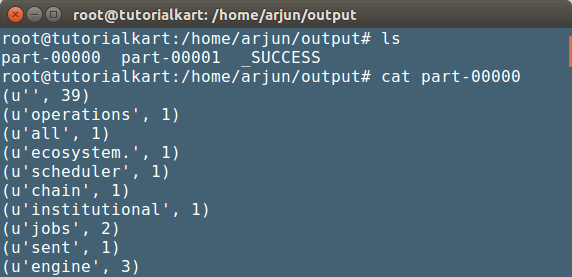
Output has been written to two part files. Files contain tuples of word and the corresponding number of occurrences in the input file.
Because Spark writes output in partitions, the result is a directory, not a single file. Each part-* file contains a portion of the final output. You can list and read the output files from the terminal.
ls /home/arjun/output/
cat /home/arjun/output/part-*
('Apache', 1)
('Spark', 3)
('supports', 1)
('Python', 2)
('applications', 1)Common spark-submit Errors in Python Word Count Example
The following issues are common when running a first PySpark application from the terminal.
| Error or symptom | Likely reason | Fix |
|---|---|---|
spark-submit: command not found | Spark is not installed or the Spark bin directory is not in the system path. | Install Spark correctly and add its bin directory to PATH. |
| Input path not found | The file path in sc.textFile() does not exist. | Create the file or update the script with the correct path. |
| Output directory already exists | saveAsTextFile() does not overwrite an existing directory. | Delete the old output directory or use a new output path. |
| Spark UI uses port 4041 instead of 4040 | Port 4040 is already in use by another Spark application. | This is usually not a failure. Open the port shown in the log. |
| Native Hadoop library warning | Spark could not load a platform-specific native Hadoop library. | For many local tests this is only a warning. Check the rest of the log for actual errors. |
When to Use PySpark Instead of a Normal Python Script
A normal Python script is simpler when the input is small and the work runs comfortably on one machine. PySpark is useful when the program needs distributed execution, cluster resources, Spark SQL, streaming, machine learning pipelines, or integration with distributed storage systems.
For this word-count tutorial, the input file is small and local because the goal is to understand the structure of a Spark Python application. The same pattern can be adapted for larger files stored in HDFS, Amazon S3, Azure storage, or another storage system supported by the Spark environment.
Editorial QA Checklist for Spark Python Application Tutorial
- Confirm that the example clearly explains the role of
spark-submitin running the Python file. - Check that the input path in the explanation matches the path used in
wordcount.py. - Verify that readers are warned about deleting or changing the output directory before rerunning the job.
- Confirm that the tutorial explains why Spark creates multiple
part-*output files. - Check that the page distinguishes PySpark from pandas and normal Python scripts without overstating when Spark is needed.
FAQs on Spark Python Application with PySpark
What is Spark used for in Python?
Spark is used in Python through PySpark for distributed data processing. It helps Python developers read, transform, analyze, and write large datasets using Spark features such as RDDs, DataFrames, Spark SQL, streaming, and machine learning libraries.
How do I run a Python file in Apache Spark?
You can run a Python file in Apache Spark using the spark-submit command. For example, run spark-submit wordcount.py from the folder where the Python file is saved, or pass options such as --master local[*] for local execution.
Is Spark like pandas in Python?
Spark and pandas are both used for data processing, but they are not the same. pandas works mainly on a single machine and is convenient for smaller datasets. Spark is designed for distributed processing and can run jobs across multiple cores or machines.
Is Spark better than Python for every data task?
No. Spark is not a replacement for Python. PySpark is a Python API for Apache Spark. Use normal Python or pandas for small local tasks, and use Spark when the data size, processing time, or cluster requirement justifies distributed execution.
Why does Spark word count create multiple output files?
Spark processes data in partitions and writes one output part file per output partition. That is why saveAsTextFile() creates an output directory containing files such as part-00000 and part-00001 instead of writing one single file.
What You Learned in This Spark Python Word Count Example
In this Apache Spark Tutorial, Python Application for Spark, we have learnt to run a simple Spark Application written in Python Programming language.