 TutorialKart.com
Spark Dataset to JSON file using Dataset.write().json()
Spark Dataset provides a writer interface for saving non-streaming data to external storage. JSON is one of the supported output formats. In this tutorial, we shall learn how to write a Spark Dataset to JSON file output, what Spark creates on disk, and which write options are useful when you need overwrite mode, null fields, or a single part file for local testing.
What Spark creates when a Dataset is written as JSON
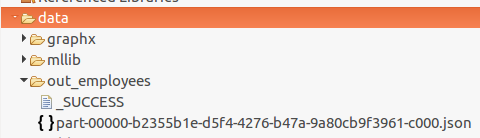
When you call Dataset.write().json(path), Spark writes the result to the path as an output directory. Inside that directory, Spark creates one or more part-*.json files and success or status files such as _SUCCESS. The number of part files depends on the number of partitions in the Dataset.
The JSON written by Spark is newline-delimited JSON, also called JSON Lines. Each row becomes one JSON object on one line. Spark does not write the complete Dataset as one pretty-printed JSON array.
data/out_employees/
├── _SUCCESS
└── part-00000-....json
Steps to write Spark Dataset to JSON file output
To write Spark Dataset to JSON file output, use the Dataset writer and call the json() method with the target output directory.
- Apply the
write()method to the Dataset. The write method returns a writer that can save data in different formats.
Dataset.write() - Call
json()and provide the path to the folder where Spark has to create the JSON output files.
Dataset.write().json(pathToJSONout) - Use
mode()when the output folder may already exist. Without an explicit mode, Spark fails if the target path already exists. - Use
option()for JSON-specific settings such as whether to include fields with null values.
Basic Spark Dataset JSON write syntax in Java
The most common forms are shown below. The first statement writes to a new folder. The second statement replaces an existing folder. The third statement keeps keys whose values are null in the generated JSON objects.
dataset.write().json("data/out_employees/");

dataset.write()
       .mode("overwrite")
       .json("data/out_employees/");

dataset.write()
       .option("ignoreNullFields", "false")
       .json("data/out_employees/");
Java example to write Spark Dataset to JSON file
In the following Java example, we read employee data into a typed Dataset<Employee> and write the Dataset to JSON output in the folder specified by the path.
WriteDataSetToJSON.java
import java.io.Serializable;

import org.apache.spark.sql.Dataset;
import org.apache.spark.sql.Encoder;
import org.apache.spark.sql.Encoders;
import org.apache.spark.sql.SparkSession;

public class WriteDataSetToJSON {
	public static class Employee implements Serializable{
		public String name;
		public int salary;
	}

	public static void main(String[] args) {
		// configure spark
		SparkSession spark = SparkSession
				.builder()
				.appName("Spark Example - Write Dataset to JSON File")
				.master("local[2]")
				.getOrCreate();

		Encoder<Employee> employeeEncoder = Encoders.bean(Employee.class);
		String jsonPath = "data/employees.json";
		Dataset<Employee> ds = spark.read().json(jsonPath).as(employeeEncoder);

		// write dataset to JSON file
		ds.write().json("data/out_employees/");
	}
}
Output
A folder /out_employees/ is created with a JSON part file and status files that indicate whether the write completed successfully or failed.
Reading the generated Spark JSON output back
To verify the JSON output, read the output directory instead of a single file name. Spark automatically reads all matching JSON part files from the directory.
Dataset<Row> output = spark.read().json("data/out_employees/");
output.show(false);
Useful write options for Spark Dataset JSON output
While ds.write().json(path) is enough for a basic export, most real jobs need one or two additional settings. These options help avoid common JSON write issues in Spark.
| Spark JSON write need | Java writer pattern | When to use it |
|---|---|---|
| Overwrite an existing output directory | mode("overwrite") | Use when the same job path is regenerated. |
| Append JSON rows to existing output | mode("append") | Use when adding new partition files to an existing output path. |
| Keep keys with null values | option("ignoreNullFields", "false") | Use when downstream systems expect every field in the schema. |
| Compress JSON output | option("compression", "gzip") | Use for large JSON output to reduce storage size. |
For the full list of supported JSON data source options, refer to the Apache Spark JSON data source documentation. For the Java writer API, refer to the Apache Spark DataFrameWriter API documentation.
Writing one JSON part file from a Spark Dataset
For distributed processing, multiple part files are normal and preferred. For a small local example or a unit test, you may want one JSON part file. In that case, reduce the Dataset to one partition before writing.
ds.coalesce(1)
  .write()
  .mode("overwrite")
  .json("data/out_employees_single/");
Use this carefully on large datasets. coalesce(1) moves the final output through one partition, so it can slow down the job or cause memory pressure when the Dataset is large.
Common Spark Dataset JSON write mistakes
- Expecting a single file path: pass a directory path such as
data/out_employees/, not a final file name such asemployees.json. - Expecting a JSON array: Spark writes one JSON object per line, not one array containing all rows.
- Writing to an existing folder without mode: use
mode("overwrite"),mode("append"), or another save mode based on the requirement. - Missing null-valued keys: set
option("ignoreNullFields", "false")when null fields must appear in the output. - Using one output file for large data: avoid
coalesce(1)for production-size datasets unless a downstream tool strictly requires one part file.
FAQ on Spark Dataset JSON file writing
Why does Spark create a folder when writing a Dataset to JSON?
Spark writes data in parallel. Each partition can create its own part-*.json file, so the output path is treated as a directory rather than a single JSON file.
Can Spark write a Dataset as one JSON file?
Yes, for small data you can use coalesce(1) before writing. This creates one data partition and usually one JSON part file, but it is not recommended for large distributed output.
How do I overwrite an existing JSON output directory in Spark?
Use ds.write().mode("overwrite").json("path"). Without overwrite mode, Spark fails when the target output path already exists.
Why are null fields missing from Spark JSON output?
Spark can omit fields whose values are null while generating JSON. Use option("ignoreNullFields", "false") when the output JSON must include keys with null values.
Is Spark JSON output the same as a JSON array?
No. Spark JSON output is newline-delimited JSON. Each row is written as a separate JSON object on its own line, which is easier for distributed processing.
QA checklist for this Spark Dataset JSON tutorial
- Confirm that the tutorial describes Spark JSON output as a directory with
part-*.jsonfiles. - Confirm that the Java example still reads into a typed
Dataset<Employee>and writes withds.write().json(). - Confirm that overwrite, append, null-field, compression, and single-part-file behavior are explained without changing the original Java code block.
- Confirm that new code blocks use PrismJS-compatible classes such as
language-java syntaxoroutput. - Confirm that the existing image URL, image ID, and image alt text remain unchanged.
Key takeaway for writing Spark Dataset to JSON file
In this Spark Tutorial – Write Dataset to JSON file, we have learnt to use the write() method of the Dataset class and export the data to JSON output using the json() method. Remember that Spark writes JSON output as a folder of part files, and use write options such as mode("overwrite") and option("ignoreNullFields", "false") when your job requires them.