 TutorialKart.com
Create HTTP Web Server in Node.js
In this tutorial, we shall learn to create HTTP Web Server in Node.js using http.createServer() method of HTTP Built-in Module.
Node.js provides built-in module, HTTP, which is stable and is compatible with NPM ecosystem.
The HTTP module is useful when you want to understand how a Node.js server receives a request and sends a response without using a framework such as Express. The same request-response idea is used later in web applications, REST APIs, and backend services.
What this Node.js HTTP server example does
The example in this page creates a small local web server that listens on port 9000. When you open http://127.0.0.1:9000/ in a browser, Node.js receives the HTTP request, writes a response header, sends a short HTML response, and ends the response.
- http is the built-in Node.js module used to create the server.
- req represents the incoming request from the browser or client.
- res represents the response that the server sends back.
- listen(9000) starts the server on port 9000.
Before creating the Node.js HTTP web server
Make sure Node.js is installed on your computer. You can confirm it from a terminal or command prompt with the following command.
node -vCreate a working folder for this tutorial, and create a JavaScript file named httpWebServer.js. The examples below use CommonJS require(), which is simple for a first HTTP server example.
Steps to create HTTP Web Server in Node.js
Following is a step by step tutorial, to Create HTTP Web Server in Node.js.
Step 1 : Include HTTP Module
Create a .js file with name httpWebServer.js and open in a text editor.
Include the Built-in Node.js module, HTTP, using require function as shown below.
var http = require('http');The require('http') statement loads the HTTP module from Node.js itself. You do not have to install a separate npm package for this basic server.
Step 2 : Create Server
Create a server using the method createServer() to listen at port numbered 9000.
// include http module in the file
var http = require('http');

// create a server
http.createServer(function (req, res) {
	// code to feed or request and prepare response
}).listen(9000); //the server object listens on port 9000
The function passed to http.createServer() runs for every request made to the server. In this example, the function receives two objects: req for request details such as URL and method, and res for writing the response.
Step 3 : Prepare response
We shall prepare a response with HTTP header and a message.
// include http module in the file
var http = require('http');

// create a server
http.createServer(function (req, res) {
	// http header
	// 200 - is the OK message
	// to respond with html content, 'Content-Type' should be 'text/html'
	res.writeHead(200, {'Content-Type': 'text/html'});
	res.write('Node.js says hello!'); //write a response to the client
	res.end(); //end the response
}).listen(9000); //the server object listens on port 9000
The status code 200 tells the client that the request was handled successfully. The Content-Type header tells the browser how to read the response body. Since this example sends text that can be displayed as HTML, it uses text/html.
Step 4 : Run the Web Server
Run the httpWebServer.js file (from previous step) to create and make the server listen at port 9000.
$ node httpWebServer.jsThe server will be up and running.
The command keeps running because the Node.js process is listening for incoming requests. To stop the server from the terminal, press Ctrl + C.
Step 5 : Test the Web Server
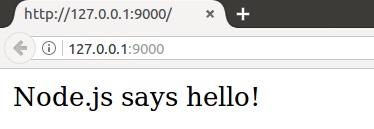
Open a browser and hit the url, “http://127.0.0.1:9000/”, to trigger a request to our Web Server.
You can also test the same server from a terminal with curl.
curl http://127.0.0.1:9000/Node.js says hello!We have now created an HTTP Web Server that listens on port 9000 and responds with the HTML formatted text message “Node.js says hello!” for any request.
This is not a full-fledged production web server, but it shows the core flow clearly: create a server, listen on a port, read the request, write the response, and end the response.
Complete Node.js HTTP server file
Here is the same simple server as a complete file that you can copy into httpWebServer.js. This version also logs the server URL in the terminal after the server starts.
const http = require('http');

const hostname = '127.0.0.1';
const port = 9000;

const server = http.createServer(function (req, res) {
    res.writeHead(200, {'Content-Type': 'text/html'});
    res.write('Node.js says hello!');
    res.end();
});

server.listen(port, hostname, function () {
    console.log(`Server running at http://${hostname}:${port}/`);
});
Run the file with Node.js.
node httpWebServer.jsServer running at http://127.0.0.1:9000/Handle different URLs in the Node.js HTTP server
A real web server usually sends different responses for different URLs. The req.url property helps you check the requested path. The following example responds differently for /, /about, and unknown paths.
const http = require('http');

const server = http.createServer(function (req, res) {
    if (req.url === '/') {
        res.writeHead(200, {'Content-Type': 'text/html'});
        res.end('<h1>Home Page</h1>');
        return;
    }

    if (req.url === '/about') {
        res.writeHead(200, {'Content-Type': 'text/html'});
        res.end('<h1>About Page</h1>');
        return;
    }

    res.writeHead(404, {'Content-Type': 'text/html'});
    res.end('<h1>404 - Page Not Found</h1>');
});

server.listen(9000);
After running the file, try http://127.0.0.1:9000/, http://127.0.0.1:9000/about, and any unknown path such as http://127.0.0.1:9000/contact.
Send JSON from a Node.js HTTP server
The same HTTP module can send JSON responses. This is useful when you are learning how API responses work before moving to a framework.
const http = require('http');

const server = http.createServer(function (req, res) {
    const data = {
        message: 'Node.js says hello!',
        path: req.url
    };

    res.writeHead(200, {'Content-Type': 'application/json'});
    res.end(JSON.stringify(data));
});

server.listen(9000);
When a response is JSON, use application/json as the content type and send a valid JSON string with JSON.stringify().
Common errors while running a Node.js HTTP server
| Error or issue | Likely reason | Fix |
|---|---|---|
EADDRINUSE | Port 9000 is already used by another process. | Stop the other process or change the port number. |
| Browser cannot connect | The server file is not running, or the URL/port is wrong. | Run node httpWebServer.js and open http://127.0.0.1:9000/. |
| Response keeps loading | The response was not ended. | Call res.end() after writing the response. |
| HTML appears as plain text | The content type is not set correctly. | Use {'Content-Type': 'text/html'} for HTML output. |
When to use the built-in Node.js HTTP module
The built-in HTTP module is a good choice when you are learning server basics, building a very small service, or experimenting with request and response handling. For larger applications, a framework can reduce repeated code for routing, middleware, static files, validation, and error handling.
For deeper reference, see the official Node.js HTTP documentation and MDN’s guide to a Node server without a framework.
QA checklist for this Node.js HTTP web server tutorial
- Confirm the file name used in the command matches
httpWebServer.js. - Confirm the server listens on port
9000before testing the browser URL. - Check that every response path calls
res.end(). - Use
text/htmlfor HTML responses andapplication/jsonfor JSON responses. - Stop the running server with
Ctrl + Cbefore changing ports or rerunning the file.
FAQs on creating an HTTP web server in Node.js
How do I make an HTTP web server in Node.js?
Use the built-in http module, create a server with http.createServer(), write a response using the res object, and call listen() with a port number such as 9000.
What does http.createServer() do in Node.js?
http.createServer() creates an HTTP server object. The callback function passed to it runs whenever a client sends a request to the server.
Why do we open http://127.0.0.1:9000/ for this Node.js server?
127.0.0.1 points to your local computer, and 9000 is the port used in the example. Together, the URL sends a request to the Node.js server running on your own machine.
What is the difference between res.writeHead(), res.write(), and res.end()?
res.writeHead() sends the status code and headers, res.write() writes response body data, and res.end() finishes the response. A simple server can also send the final body directly inside res.end().
Can I send JSON from a Node.js HTTP server without Express?
Yes. Set the response header to application/json and send a JSON string using JSON.stringify(). Express is not required for a basic JSON response.
Conclusion: creating a Node.js HTTP web server
In this Node.js Tutorial – Create HTTP Web Server in Node.js, we have used http.createServer() method of HTTP Built-in Node.js module to create HTTP Web Server that responds to the requests made at a port.