 TutorialKart.com
Node.js Parse URL
Node.js Parse URL : In this tutorial, we shall learn how to parse URL in Node.js or split a URL into readable parts and extract search parameters using built-in Node.js URL module.
To parse URL in Node.js : use url module, and with the help of parse and query functions, you can extract all the components of URL.
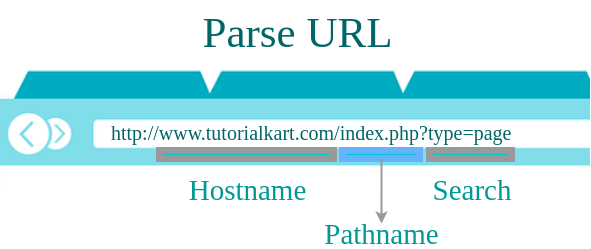
Modern Node.js supports two URL APIs: the WHATWG URL class used by browsers and the older url.parse() API from the node:url module. For new code, prefer new URL() with URLSearchParams. The older url.parse() examples are still shown in this tutorial because many existing Node.js projects and older code samples use them.
- Parts of a URL parsed in Node.js
- Steps to parse URL components with url.parse()
- Example 1 – Parse URL in Node.js
- Modern Node.js URL parsing with new URL()
- Parsing relative request URLs in Node.js
- Reading query string values with URLSearchParams
- Node.js URL parsing QA checklist
- Node.js URL parse FAQ
Parts of a URL parsed in Node.js
A URL contains several meaningful parts. When Node.js parses a URL, you can read values such as protocol, hostname, port, pathname, search string, and query parameters.
| URL part | Example value | Meaning in Node.js parsing |
|---|---|---|
protocol | http: | Scheme used by the URL. |
host | localhost:8080 | Hostname with port, when a port is present. |
hostname | localhost | Host name without the port. |
port | 8080 | Port number as a string. |
pathname | /index.php | Path portion of the URL without the query string. |
search | ?type=page&action=update&id=5221 | Full query string including the leading question mark. |
searchParams | type=page | Modern API for reading query parameter names and values. |
Steps – Parse URL components in Node.js with url.parse()
Following is a step-by-step guide to program on how to parse URL into readable parts in Node.js.
Step 1: Include URL module
var url = require('url');Step 2: Take URL to a variable
Following is a sample URL that we shall parse.
var address = 'http://localhost:8080/index.php?type=page&action=update&id=5221';Step 3: Parse URL using parse function.
var q = url.parse(address, true);The second argument true tells Node.js to parse the query string into an object. Without this argument, q.query is returned as a string.
Step 4: Extract HOST, PATHNAME and SEARCH string using dot operator.
q.host
q.pathname
q.search
Step 5: Parse URL Search Parameters using query function.
var qdata = q.query;Step 6: Access Search Parameters
qdata.type
qdata.action
qdata.id
Example 1 – Parse URL in Node.js
In this example, we will take a URL, and parse it into readable parts using url module.
urlParsingExample.js
// include url module
var url = require('url');
var address = 'http://localhost:8080/index.php?type=page&action=update&id=5221';
var q = url.parse(address, true);

console.log(q.host); //returns 'localhost:8080'
console.log(q.pathname); //returns '/index.php'
console.log(q.search); //returns '?type=page&action=update&id=5221'

var qdata = q.query; // returns an object: { type: page, action: 'update',id='5221' }
console.log(qdata.type); //returns 'page'
console.log(qdata.action); //returns 'update'
console.log(qdata.id); //returns '5221'
Output
$ node urlParsingExample.js
localhost:8080
/index.php
?type=page&action=update&id=5221
page
update
5221
The example above keeps the original url.parse() approach. In current Node.js applications, the WHATWG URL class is usually clearer for complete URLs and gives direct access to searchParams.
Modern Node.js URL parsing with new URL()
The URL class parses a complete URL and returns a URL object with readable properties. It is the recommended style for most new Node.js code because it follows the same standard URL API used in browsers. See the official Node.js URL API documentation for the full list of properties and methods.
const address = 'http://localhost:8080/index.php?type=page&action=update&id=5221';
const parsedUrl = new URL(address);

console.log(parsedUrl.protocol);
console.log(parsedUrl.host);
console.log(parsedUrl.hostname);
console.log(parsedUrl.port);
console.log(parsedUrl.pathname);
console.log(parsedUrl.search);
console.log(parsedUrl.searchParams.get('type'));
console.log(parsedUrl.searchParams.get('action'));
console.log(parsedUrl.searchParams.get('id'));
Output
http:
localhost:8080
localhost
8080
/index.php
?type=page&action=update&id=5221
page
update
5221
Parse relative request URLs in a Node.js HTTP server
In a Node.js HTTP server, req.url is normally a relative URL such as /index.php?type=page&id=5221, not a full URL with protocol and host. The URL constructor needs a base URL when parsing this kind of relative request URL.
const http = require('http');

const server = http.createServer((req, res) => {
  const parsedUrl = new URL(req.url, 'http://localhost:8080');

  const pathname = parsedUrl.pathname;
  const type = parsedUrl.searchParams.get('type');
  const id = parsedUrl.searchParams.get('id');

  res.writeHead(200, { 'Content-Type': 'text/plain' });
  res.end(`Path: ${pathname}, Type: ${type}, ID: ${id}`);
});

server.listen(8080);
When the request is http://localhost:8080/index.php?type=page&id=5221, the server reads /index.php as the pathname, page as the type, and 5221 as the id.
Read Node.js query string values with URLSearchParams
URLSearchParams is useful when you want to read query parameters safely and clearly. Use get() for a single value, getAll() for repeated parameters, and has() to check whether a parameter is present.
const parsedUrl = new URL('https://example.com/products?tag=node&tag=url&page=2');

console.log(parsedUrl.searchParams.get('page'));
console.log(parsedUrl.searchParams.get('tag'));
console.log(parsedUrl.searchParams.getAll('tag'));
console.log(parsedUrl.searchParams.has('page'));
Output
2
node
[ 'node', 'url' ]
true
Use getAll() when a query parameter can appear more than once, such as filters, tags, categories, or selected options.
url.parse() and new URL() difference in Node.js
Both APIs can split a URL into parts, but they behave differently. url.parse() belongs to the legacy Node.js URL API. new URL() belongs to the standard WHATWG URL API and is the better choice for new code.
| Requirement | Use in Node.js |
|---|---|
| New code that parses complete URLs | Use new URL(address). |
| Reading query parameters | Use parsedUrl.searchParams.get('name'). |
| Parsing a relative request URL | Use new URL(req.url, baseUrl). |
| Maintaining old CommonJS code | url.parse(address, true) may still be seen in existing projects. |
| Handling repeated query parameters | Use URLSearchParams.getAll(). |
Node.js URL parsing QA checklist
- Use
new URL()for new examples unless the tutorial is specifically teaching legacyurl.parse(). - Use a base URL when parsing
req.urlfrom the Node.js HTTP module. - Use
searchParams.get()for simple query parameters andsearchParams.getAll()for repeated query parameters. - Do not treat
pathnameandsearchas the same value;pathnameexcludes the query string. - Validate and sanitize query parameter values before using them in database queries, file paths, redirects, or HTML output.
- Keep examples clear about whether the URL is absolute, relative, or coming from an HTTP request.
Node.js parse URL FAQ
How do I parse a URL in Node.js?
For new code, create a URL object with new URL(address). Then read properties such as host, pathname, search, and searchParams. Older code may use url.parse(address, true).
How do I get query parameters from a URL in Node.js?
With the modern API, use parsedUrl.searchParams.get('name'). With the legacy API, use url.parse(address, true).query.name.
Why does new URL(req.url) fail in a Node.js server?
req.url is usually a relative URL, such as /users?id=10. Pass a base URL: new URL(req.url, 'http://localhost').
What is the difference between pathname and search in Node.js URL parsing?
pathname is the path part, such as /index.php. search is the query string with the question mark, such as ?type=page&id=5221.
Should I use url.parse() or new URL() in Node.js?
Use new URL() for new code. Use url.parse() only when maintaining older examples or legacy code that already depends on the old Node.js URL API.
Node.js URL parsing summary
In this Node.js Tutorial – Parse URL, we have learnt how to parse or split a URL into readable parts in Node.js using built-in Node.js URL module. And extract host, pathname, search and search parameters.
For new Node.js applications, prefer the WHATWG URL class with URLSearchParams. Keep url.parse() in mind when reading older tutorials or maintaining older Node.js code.