 TutorialKart.com
Node.js Redirect URL
Node.js Redirect URL : In this tutorial, we shall learn to redirect a url.
In Node.js, a redirect is an HTTP response that tells the browser or API client to make another request to a different URL. The server does not secretly load the new page for the client. It sends a 3xx status code with a Location header, and the client follows that location.
A redirect could be applied in situations like :
- Some of the resources are moved permanently to a new location and you want to redirect your users to the new location of moved resources.
- Some of the pages in your web application are removed, and when a request comes for that page, you would like your users be redirected to home page or some custom page.
- A user signs in successfully and should be sent back to the original page that required authentication.
- An old route must point to a new route while keeping bookmarks and external links working.
There are three main types of HTTP redirects. Please refer wiki page for redirects.
For practical Node.js applications, the redirect status code matters. Use 301 or 308 when a URL has permanently moved. Use 302 or 307 for a temporary redirect. Use 303 after a form submission when the next request should be a GET request. For reference, you may also check the MDN guide to HTTP redirections.
| Redirect code | Meaning in a Node.js response | Common use case |
|---|---|---|
301 | Moved Permanently | Old page has permanently moved to a new URL. |
302 | Found / temporary redirect | Temporary routing, login flow, or short-term page change. |
303 | See Other | Redirect after a POST request so the browser loads the next page with GET. |
307 | Temporary Redirect | Temporary redirect where the HTTP method must be preserved. |
308 | Permanent Redirect | Permanent redirect where the HTTP method must be preserved. |
But remember that the HTTP redirect code (say 301, 302, 307, etc.,) affect the page ranking for the original or redirected url, and each of the redirect codes affect differently. For example, if you have moved the resource permanently, using 301 HTTP code in the response passes the juice to the redirected URL, while 302 or 307 does not.
For the following examples, consider that there are two pages : page-a.html and page-b.html, that your web application serves. And we have a 404_not_found.html to be displayed when a requested resource is not present.
Example 1 – Node.js Redirect URL
In this example, we shall demonstrate the scenario where the requested URL has to be redirected. When we get a request for page-c.html, we shall send a redirect response (to look for page-b.html) to the web-client.
node-js-http-redirect.js
var http = require('http');
var fs = require('fs');

// create a http server
http.createServer(function (req, res) {

	if (req.url == '/page-c.html') {
		// redirect to page-b.html with 301 (Moved Permanently) HTTP code in the response
		res.writeHead(301, { "Location": "http://" + req.headers['host'] + '/page-b.html' });
		return res.end();
	} else {
		// for other URLs, try responding with the page
		console.log(req.url)
		// read requested file
		fs.readFile(req.url.substring(1),
			function(err, data) {
				if (err) throw err;
				res.writeHead(200);
				res.write(data.toString('utf8'));
				return res.end();
		});
	}
}).listen(8085);
$ node node-js-http-redirect.js
Open a browser, display Developer Tools, and hit the URL "http://localhost:8085/page-c.html".
In the Network section of Developer Tools, you would find that the request has been redirected to a new page.
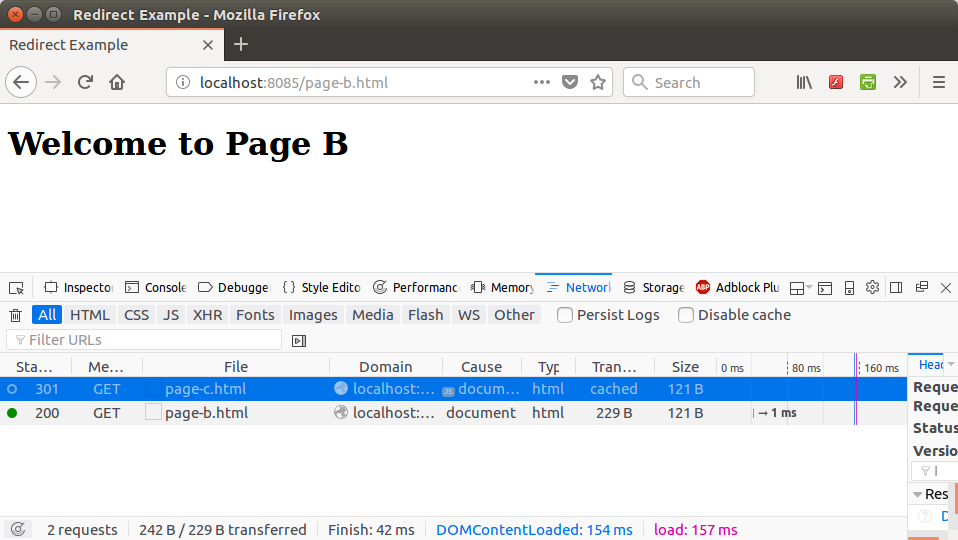
For the first request, there was a 301 response code which we have sent from our Node.js application.
Cleaner Node.js redirect with a relative Location header
The previous example builds the full URL using the request host. For an internal redirect in the same site, you can usually send a relative path in the Location header. This avoids trusting the incoming Host header and keeps the redirect easier to read.
const http = require('http');

http.createServer((req, res) => {
  if (req.url === '/old-page') {
    res.writeHead(301, {
      Location: '/new-page'
    });
    return res.end();
  }

  res.writeHead(200, { 'Content-Type': 'text/plain' });
  res.end('Current page');
}).listen(8085);
Here, a request to http://localhost:8085/old-page receives a permanent redirect to /new-page. The important part is the combination of a 3xx status code and the Location response header. The Node.js response.writeHead() documentation describes how headers are sent with the response.
Example 2 – Node.js Redirect URL – File not found error
In this example, we shall demonstrate the scenario that the requested file is not found. But you don’t want to show your web client the uninteresting 404 error page. Instead, you would like to show some other page, like page-a.html.
node-js-http-redirect-file-not-found.js
var http = require('http');
var fs = require('fs');

// create a http server
http.createServer(function (req, res) {
	var filePath = req.url.substring(1);
	fs.readFile(filePath,
		function(err, data) {
			// if there is an error reading the file, redirect it to page-b.html
			if (err){
				// redirect to page-b.html with 302 HTTP code in response
				res.writeHead(302, { "Location": "http://" + req.headers['host'] + '/page-b.html' });
				return res.end();
			}
			res.writeHead(200);
			res.write(data.toString('utf8'));
			return res.end();
	});
}).listen(8085);
Open a terminal or command prompt and run this script using node command as shown in the following.
Output
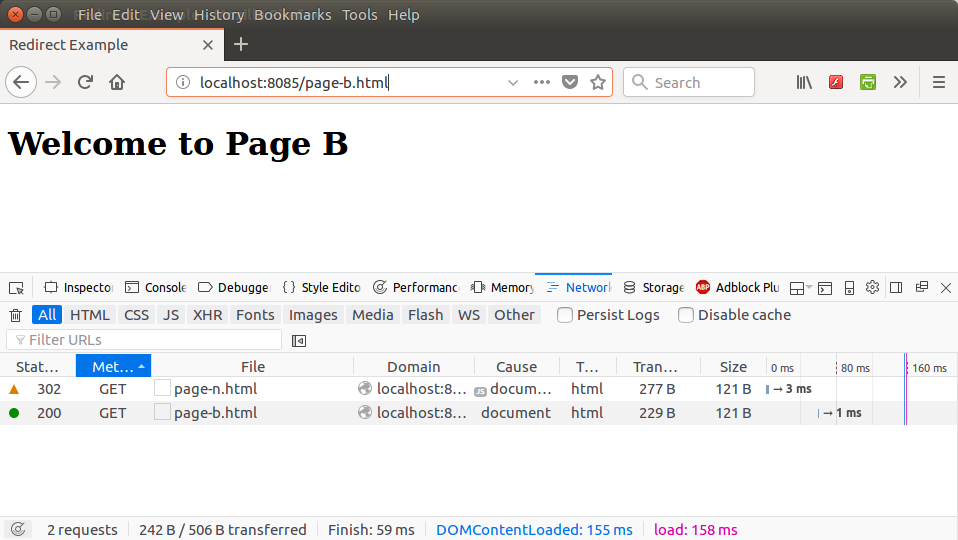
$ node node-js-http-redirect-file-not-found.jsOpen a browser, display Developer Tools, and hit the url “http://localhost:8085/page-n.html”.
In the Network section of Developer Tools, you would find that the request has been redirected to a new page, with 302(Temporarily moved) HTTP Code in the response.
Redirect a URL in Express.js with res.redirect()
Many Node.js web applications use Express. In Express, you normally do not call writeHead() directly for a redirect. Use res.redirect(), which sets the redirect status and Location header for you. The default status is 302 unless you pass another status code.
const express = require('express');

const app = express();

app.get('/old-page', (req, res) => {
  res.redirect(301, '/new-page');
});

app.get('/temporary-page', (req, res) => {
  res.redirect('/current-page');
});

app.listen(8085);
The first route sends a permanent redirect. The second route sends a temporary redirect using Express’s default behavior. See the Express res.redirect() documentation for the supported syntax.
Redirect back to the original URL after login in Node.js
A common redirect requirement is to send users back to the original protected page after they sign in. Store only a safe internal path, not a full user-controlled external URL. After authentication succeeds, redirect to that path or fall back to a known page.
app.get('/login', (req, res) => {
  const next = typeof req.query.next === 'string' ? req.query.next : '/dashboard';

  // Allow only internal absolute paths such as /dashboard or /orders/10.
  const safeNext = next.startsWith('/') && !next.startsWith('//') ? next : '/dashboard';

  res.send(`<form method="post" action="/login?next=${encodeURIComponent(safeNext)}">
    <button type="submit">Sign in</button>
  </form>`);
});

app.post('/login', (req, res) => {
  const next = typeof req.query.next === 'string' ? req.query.next : '/dashboard';
  const safeNext = next.startsWith('/') && !next.startsWith('//') ? next : '/dashboard';

  // After validating the user's credentials, redirect safely.
  res.redirect(302, safeNext);
});
This pattern is useful for login flows, but it must be validated carefully. Never redirect to a raw value copied from a query string without checking whether it points outside your application.
Avoid open redirect bugs in Node.js redirect URLs
An open redirect happens when an attacker can control the redirect destination and send users to another site. This often appears in code that accepts a query parameter such as ?next=https://example.com and redirects to it directly.
// Unsafe: do not redirect to an unchecked user-controlled URL.
app.get('/go', (req, res) => {
  res.redirect(req.query.url);
});

// Safer: allow only known internal paths.
app.get('/go-safe', (req, res) => {
  const allowedPaths = new Set(['/dashboard', '/profile', '/settings']);
  const target = typeof req.query.url === 'string' ? req.query.url : '/dashboard';

  res.redirect(allowedPaths.has(target) ? target : '/dashboard');
});
Prefer an allowlist of internal paths for redirect destinations. If your application must redirect to external domains, validate the parsed URL against a strict list of allowed hostnames.
Node.js redirect URL checklist for testing
- Check the Network tab and confirm that the response status is the intended 3xx code.
- Verify that the
Locationheader points to the expected path or URL. - Use
301or308only when the move is permanent. - Use
303after form submissions when the next request should be a GET request. - Test login redirects with safe internal paths and reject external URLs.
- Confirm that missing files do not expose stack traces or crash the Node.js server.
FAQs on Node.js redirect URL handling
How do I redirect a URL in plain Node.js without Express?
Use res.writeHead(statusCode, { Location: '/new-url' }) and then call res.end(). The status code should be a 3xx redirect code such as 301 or 302.
How do I redirect a URL in Express.js?
Use res.redirect('/new-url') for a temporary redirect, or res.redirect(301, '/new-url') for a permanent redirect.
Should I use 301 or 302 for a Node.js redirect?
Use 301 when the old URL has permanently moved. Use 302 when the redirect is temporary, such as during a login flow or short-term routing change.
Can the Location header be a relative URL in Node.js?
Yes. For redirects inside the same site, a relative path such as /page-b.html is usually enough. A full absolute URL is needed when redirecting to a different domain.
What is an open redirect in a Node.js application?
An open redirect is a redirect that lets users control the destination URL without validation. Avoid redirecting directly to query string values. Use an allowlist of safe internal paths or approved hostnames.
Conclusion
In this Node.js Tutorial, we have learnt how to redirect a URL in Node.js Server. In plain Node.js, send a 3xx status code with the Location header. In Express.js, use res.redirect(). Choose the redirect code carefully, and validate user-controlled redirect destinations to avoid open redirect issues.