 TutorialKart.com
JavaFX DatePicker
JavaFX DatePicker is a date-entry control that lets the user type a date or select one from a calendar popup. Its selected value is represented by a java.time.LocalDate object.
In this tutorial, you will learn how to create a JavaFX DatePicker, read the selected date, set an initial value, format the displayed date, clear the selection, and restrict which dates the user can choose.
Create and Display a JavaFX DatePicker
Create a DatePicker by calling its no-argument constructor. The following example adds the control to a TilePane and displays it in a JavaFX scene.
JavaFxDatePickerTutorial.java
import javafx.application.Application;
import javafx.scene.Scene;
import javafx.scene.control.DatePicker;
import javafx.scene.layout.TilePane;
import javafx.stage.Stage;

public class JavaFxDatePickerTutorial extends Application {

    public static void main(String[] args) {
        launch(args);
    }

    @Override
    public void start(Stage primaryStage) {
        try {
            // set title
            primaryStage.setTitle("JavaFX Date Picker - tutorialkart.com");

            //javafx date picker
            DatePicker datePicker = new DatePicker();

            // tile pane
            TilePane tilePane = new TilePane();

            // add date picker to the tile pane
            tilePane.getChildren().add(datePicker);

            //set up scene
            Scene scene = new Scene(tilePane, 400, 400);
            primaryStage.setScene(scene);
            primaryStage.show();
        } catch(Exception e) {
            e.printStackTrace();
        }
    }
}
Run the Java application to display the DatePicker. Click the calendar icon to open the popup calendar. Use the navigation arrows to move between months and then click a day to select it.
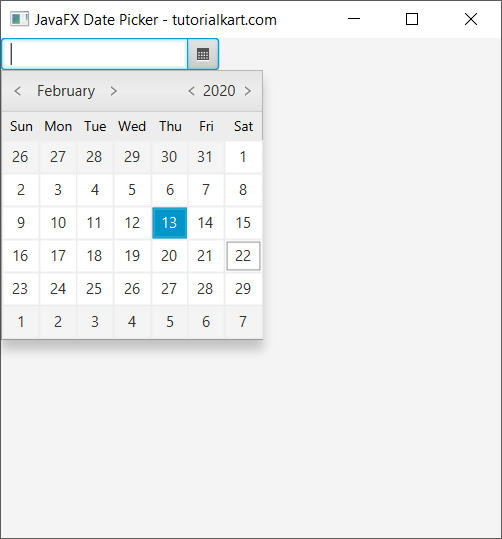
After a date is selected, the popup closes and the chosen date appears in the DatePicker editor field.
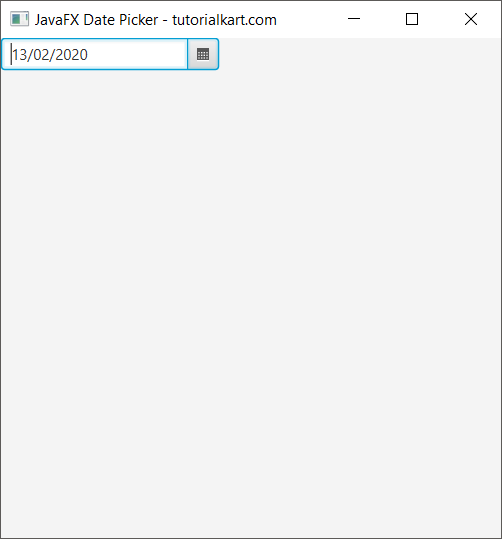
Get the Selected Date from JavaFX DatePicker
Use getValue() to read the selected date. The method returns a LocalDate, or null when the control has no selected value.
The following example registers an action handler with setOnAction(). The handler runs after the user commits a new date.
JavaFxDatePickerTutorial.java
import javafx.application.Application;
import javafx.scene.Scene;
import javafx.scene.control.DatePicker;
import javafx.scene.layout.TilePane;
import javafx.stage.Stage;

public class JavaFxDatePickerTutorial extends Application {

    public static void main(String[] args) {
        launch(args);
    }

    @Override
    public void start(Stage primaryStage) {
        try {
            // set title
            primaryStage.setTitle("JavaFX Date Picker - tutorialkart.com");

            //javafx date picker
            DatePicker datePicker = new DatePicker();

            //add action listener to the date picker
            datePicker.setOnAction(action -> {
                System.out.println("Date Picked: "+datePicker.getValue());
            });

            // tile pane
            TilePane tilePane = new TilePane();

            // add date picker to the tile pane
            tilePane.getChildren().add(datePicker);

            //set up scene
            Scene scene = new Scene(tilePane, 400, 400);
            primaryStage.setScene(scene);
            primaryStage.show();
        } catch(Exception e) {
            e.printStackTrace();
        }
    }
}
When you choose a date from the popup, the DatePicker field is updated with the selected value.
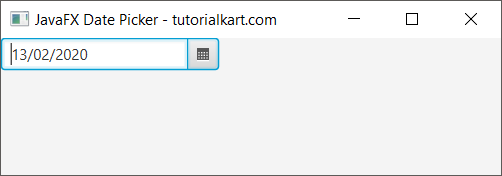
The selected LocalDate is also printed in the console.
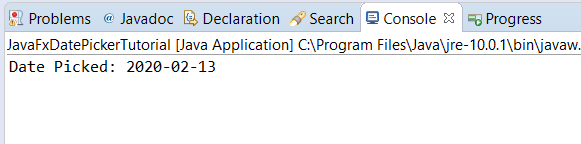
Selecting the currently stored date again may not produce a value change. When application logic must react specifically to changes in the value property, add a listener to valueProperty().
Listen for JavaFX DatePicker Value Changes
A value-property listener receives the previous and current LocalDate values. It also runs when the date is changed programmatically with setValue().
DatePicker datePicker = new DatePicker();

datePicker.valueProperty().addListener((observable, oldDate, newDate) -> {
    if (newDate == null) {
        System.out.println("Date cleared");
    } else {
        System.out.println("Previous date: " + oldDate);
        System.out.println("Current date: " + newDate);
    }
});
Check for null before using the new value because the user or application can clear the DatePicker.
Set an Initial Date in JavaFX DatePicker
Pass a LocalDate to the constructor or call setValue() to preselect a date. For example, the following statement selects the current system date.
import java.time.LocalDate;
import javafx.scene.control.DatePicker;

DatePicker datePicker = new DatePicker(LocalDate.now());
You can also assign a specific date by supplying its year, month, and day.
DatePicker datePicker = new DatePicker();
datePicker.setValue(LocalDate.of(2026, 7, 28));
Clear or Read a JavaFX DatePicker Safely
Call setValue(null) to remove the selected date. When reading the value, handle the empty state before calling methods on the returned LocalDate.
LocalDate selectedDate = datePicker.getValue();

if (selectedDate == null) {
    System.out.println("No date has been selected.");
} else {
    System.out.println("Selected year: " + selectedDate.getYear());
}

// Clear the selected date.
datePicker.setValue(null);
Format the Date Displayed by JavaFX DatePicker
A DatePicker stores a LocalDate, while its converter controls how that value is displayed and how typed text is parsed. The following converter uses the dd/MM/yyyy pattern.
import java.time.LocalDate;
import java.time.format.DateTimeFormatter;
import javafx.scene.control.DatePicker;
import javafx.util.StringConverter;

DatePicker datePicker = new DatePicker();
DateTimeFormatter formatter = DateTimeFormatter.ofPattern("dd/MM/yyyy");

datePicker.setConverter(new StringConverter<LocalDate>() {
    @Override
    public String toString(LocalDate date) {
        return date == null ? "" : formatter.format(date);
    }

    @Override
    public LocalDate fromString(String text) {
        if (text == null || text.trim().isEmpty()) {
            return null;
        }
        return LocalDate.parse(text.trim(), formatter);
    }
});

datePicker.setPromptText("dd/MM/yyyy");
The parsing pattern and the prompt text should agree so that users know which format to enter. In a production form, invalid typed input should be caught and reported instead of allowing a parsing exception to reach the user.
Disable Past or Future Dates in JavaFX DatePicker
Use a day-cell factory to disable calendar cells that should not be selectable. This is useful for appointment forms, booking forms, date-of-birth fields, and other inputs with date limits.
The following example disables all dates before today.
import java.time.LocalDate;
import javafx.scene.control.DateCell;
import javafx.scene.control.DatePicker;

DatePicker datePicker = new DatePicker();
LocalDate today = LocalDate.now();

datePicker.setDayCellFactory(picker -> new DateCell() {
    @Override
    public void updateItem(LocalDate date, boolean empty) {
        super.updateItem(date, empty);
        setDisable(empty || date.isBefore(today));
    }
});
To disable future dates instead, replace date.isBefore(today) with date.isAfter(today). The application should still validate the final value because code can assign a disabled date directly through setValue().
Make a JavaFX DatePicker Non-Editable
By default, users can type into the DatePicker editor as well as use the popup calendar. Set the control to non-editable when dates must be selected only through the calendar interface.
datePicker.setEditable(false);This setting prevents manual text entry, but it does not disable the DatePicker. Use setDisable(true) when the entire control should be unavailable.
Frequently Asked Questions about JavaFX DatePicker
What type does JavaFX DatePicker return?
DatePicker.getValue() returns a java.time.LocalDate. It returns null when no date is selected.
How do I set today’s date in a JavaFX DatePicker?
Call datePicker.setValue(LocalDate.now()), or construct the control with new DatePicker(LocalDate.now()).
How do I detect when a JavaFX DatePicker is cleared?
Add a listener to valueProperty() and check whether the new value is null. This detects both user-driven and programmatic changes.
How do I prevent users from typing a date manually?
Call datePicker.setEditable(false). The user can then select a date from the popup calendar but cannot edit the text field directly.
JavaFX DatePicker Tutorial Summary
In this JavaFX Tutorial, we created a DatePicker, retrieved its LocalDate value, listened for changes, assigned an initial date, formatted its text, handled empty values, and restricted selectable dates.