 TutorialKart.com
JavaFX PasswordField Control
JavaFX PasswordField is a text-input control designed for passwords and other sensitive text. It works like a TextField, but the characters entered by the user are visually masked.
Masking prevents nearby users from easily reading the password from the screen. It does not encrypt, hash, or securely store the password. The application must still handle the entered value carefully.
In this tutorial, you will learn how to create a JavaFX PasswordField, set prompt text, read the entered value, respond to button and Enter-key actions, validate empty input, and clear the field after use.
Create a JavaFX PasswordField
Create a password input control by instantiating the PasswordField class.
PasswordField passwordField = new PasswordField();You can display instructional text while the field is empty by setting a prompt:
PasswordField passwordField = new PasswordField();
passwordField.setPromptText("Enter password");
The prompt disappears when the user starts entering text. It is not the field value and is not returned by getText().
Example 1 – Display a JavaFX PasswordField
This example creates a PasswordField and adds it to a JavaFX scene. Characters typed into the control are displayed using the platform’s masking character.
JavaFxPasswordFieldTutorial.java
import javafx.application.Application;
import javafx.event.Event;
import javafx.event.EventHandler;
import javafx.scene.Scene;
import javafx.scene.control.Button;
import javafx.scene.control.PasswordField;
import javafx.scene.control.TextField;
import javafx.scene.layout.TilePane;
import javafx.stage.Stage;

public class JavaFxPasswordFieldTutorial extends Application {

    public static void main(String[] args) {
        launch(args);
    }

    @Override
    public void start(Stage primaryStage) {
        try {
            // set title
            primaryStage.setTitle("Password Field Tutorial - tutorialkart.com");

            //javafx password field
            PasswordField passwordField = new PasswordField();

            // tile pane
            TilePane tilePane = new TilePane();

            // add password field to the tile pane
            tilePane.getChildren().add(passwordField);

            //set up scene
            Scene scene = new Scene(tilePane, 400, 100);
            primaryStage.setScene(scene);
            primaryStage.show();
        } catch(Exception e) {
            e.printStackTrace();
        }
    }
}
Run this Java program and type into the PasswordField. The field stores the entered text but displays masked characters in the interface.
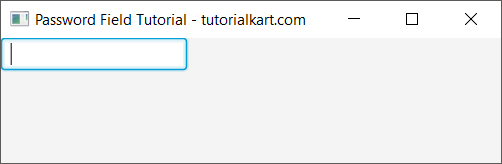
Example 2 – Get the JavaFX PasswordField Value
Use the getText() method to retrieve the text currently stored in a PasswordField. In this example, a button action reads the entered value.
JavaFxPasswordFieldTutorial2.java
import javafx.application.Application;
import javafx.scene.Scene;
import javafx.scene.control.Button;
import javafx.scene.control.PasswordField;
import javafx.scene.layout.TilePane;
import javafx.stage.Stage;

public class JavaFxPasswordFieldTutorial2 extends Application {

    public static void main(String[] args) {
        launch(args);
    }

    @Override
    public void start(Stage primaryStage) {
        try {
            // set title
            primaryStage.setTitle("Password Field Tutorial - tutorialkart.com");

            //javafx password field
            PasswordField passwordField = new PasswordField();

            Button button = new Button("Submit");
            button.setOnAction(action -> {
                System.out.println("Password entered: "+passwordField.getText());
            });

            // tile pane
            TilePane tilePane = new TilePane();

            // add password field to the tile pane
            tilePane.getChildren().add(passwordField);
            tilePane.getChildren().add(button);

            //set up scene
            Scene scene = new Scene(tilePane, 400, 100);
            primaryStage.setScene(scene);
            primaryStage.show();
        } catch(Exception e) {
            e.printStackTrace();
        }
    }
}
Run the application, enter text in the PasswordField, and click the Submit button.
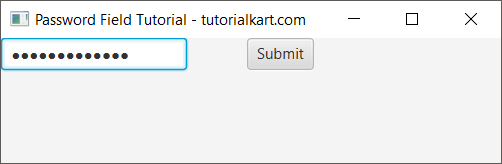
The button handler calls passwordField.getText(). The original example prints that value to the console to demonstrate retrieval.

Printing real passwords to a console, log file, error report, or analytics system is unsafe. Use the retrieved value only for the required authentication operation and avoid retaining it longer than necessary.
Handle the Enter Key in a JavaFX PasswordField
A PasswordField supports an action event. The action is normally fired when the user presses Enter while the control has focus. This lets a login form submit without requiring a mouse click.
PasswordField passwordField = new PasswordField();
passwordField.setPromptText("Enter password");

passwordField.setOnAction(event -> {
    String password = passwordField.getText();
    System.out.println("Password form submitted");
});
The example reports only that the form was submitted. It deliberately does not print the password itself.
Validate Empty JavaFX PasswordField Input
Before processing the form, check whether the user entered a value. The following example displays a status message instead of logging the password.
import javafx.application.Application;
import javafx.geometry.Insets;
import javafx.scene.Scene;
import javafx.scene.control.Button;
import javafx.scene.control.Label;
import javafx.scene.control.PasswordField;
import javafx.scene.layout.VBox;
import javafx.stage.Stage;

public class PasswordFieldValidationExample extends Application {

    @Override
    public void start(Stage stage) {
        PasswordField passwordField = new PasswordField();
        passwordField.setPromptText("Enter password");

        Label messageLabel = new Label();
        Button submitButton = new Button("Submit");

        Runnable submitForm = () -> {
            String password = passwordField.getText();

            if (password.isEmpty()) {
                messageLabel.setText("Password is required.");
                passwordField.requestFocus();
                return;
            }

            messageLabel.setText("Password received for processing.");
            passwordField.clear();
        };

        submitButton.setOnAction(event -> submitForm.run());
        passwordField.setOnAction(event -> submitForm.run());

        VBox root = new VBox(10, passwordField, submitButton, messageLabel);
        root.setPadding(new Insets(20));

        stage.setScene(new Scene(root, 360, 170));
        stage.setTitle("JavaFX PasswordField Validation");
        stage.show();
    }

    public static void main(String[] args) {
        launch(args);
    }
}
The same submission logic is used for the button and the Enter key. After the value has been accepted for processing, clear() removes it from the control.
Read, Set, and Clear JavaFX PasswordField Text
| Method | Purpose |
|---|---|
getText() | Returns the text currently stored in the PasswordField. |
setText(String) | Sets the field value programmatically. |
clear() | Removes all text from the field. |
setPromptText(String) | Displays guidance while the field is empty. |
setOnAction(EventHandler) | Handles the action commonly fired when Enter is pressed. |
setEditable(boolean) | Controls whether the user can modify the text. |
setDisable(boolean) | Enables or disables the entire control. |
requestFocus() | Moves keyboard focus to the PasswordField. |
JavaFX PasswordField and TextField Differences
| Behavior | PasswordField | TextField |
|---|---|---|
| Visible characters | Entered characters are masked. | Entered characters are shown normally. |
| Typical use | Passwords, PINs, and other concealed input. | Usernames, search terms, names, and ordinary text. |
| Read current value | getText() | getText() |
| Action on Enter | Supported through setOnAction(). | Supported through setOnAction(). |
| Data protection | Provides visual masking only. | Provides no masking. |
JavaFX PasswordField Security Practices
- Do not print passwords to standard output or application logs.
- Do not display the entered password in validation or error messages.
- Clear the field after the password has been submitted or is no longer required.
- Do not store passwords as plain text in files or databases.
- Use established password-hashing mechanisms on the system that verifies and stores credentials.
- Use an encrypted transport such as TLS when credentials are sent to a remote service.
- Keep in mind that
getText()returns a JavaString; PasswordField masking does not change how that value exists in application memory.
JavaFX PasswordField FAQs
How do I get text from a JavaFX PasswordField?
Call passwordField.getText(). The method returns the current value as a String. Avoid printing or logging that value in a real application.
How do I clear a JavaFX PasswordField?
Call passwordField.clear(). This removes all text currently stored in the control.
How do I submit a JavaFX PasswordField when Enter is pressed?
Register an action handler with passwordField.setOnAction(...). The handler is normally invoked when the user presses Enter while the PasswordField has focus.
Does JavaFX PasswordField encrypt the password?
No. PasswordField masks the on-screen characters, but it does not encrypt or hash the entered value. Secure transmission, verification, hashing, and storage must be implemented separately.
JavaFX PasswordField Tutorial Summary
In this JavaFX Tutorial, we created a PasswordField, read its value with getText(), handled button and Enter-key submission, validated empty input, cleared the control, and reviewed the difference between visual masking and secure password handling.